
Roxio Game Capture HD Pro is a versatile video capture and editing solution designed specifically for gamers seeking a seamless workflow to record, edit, and share their gameplay experiences. Developed by Corel’s Roxio brand, this all-in-one package combines hardware and software to provide a user-friendly yet powerful toolset for content creation, regardless of your experience level. Whether you’re aiming for casual gameplay recordings or professional-quality streams, Roxio Game Capture HD Pro strives to bridge the gap between ease of use and advanced functionality. This review delves into the features, performance, and overall value proposition of this popular game capture solution.
High-Quality Recording and Capture Capabilities
At the heart of Roxio Game Capture HD Pro lies its ability to capture gameplay footage in high definition. The hardware component boasts support for both HDMI and component video inputs and outputs, ensuring broad compatibility with a wide range of gaming consoles, including Xbox, PlayStation, and PCs. This flexibility eliminates the need for multiple capture devices depending on your gaming setup. The system records in crisp 1080p HD resolution at 30fps or 60i (interlaced), providing smooth and detailed video output that truly showcases the gameplay experience.
Beyond resolution and frame rate, the quality of the capture process itself is noteworthy. Roxio Game Capture HD Pro minimizes input lag, ensuring a smooth and responsive recording without compromising the timing and responsiveness of the actual gameplay. This is critical for competitive games where even a fraction of a second delay can make a significant difference. The ability to capture high-quality footage without introducing significant lag is a key advantage for many users.
The software complements the hardware by incorporating features designed for efficient capture management. The “SmartEncode” technology significantly streamlines the video rendering process. Instead of processing the entire video timeline, SmartEncode intelligently focuses only on the edited segments, dramatically reducing export times. This optimization saves valuable time, particularly for users who frequently edit their recordings. Further enhancing efficiency, the software incorporates auto-capture and pre-roll recording functions. Auto-capture automatically begins recording when a specific trigger event occurs (this can often be customized), while pre-roll recording captures a short period of gameplay before the designated start time, ensuring that crucial moments aren’t missed. These features demonstrate a thoughtful approach to usability and workflow optimization, catering to both casual and serious content creators.
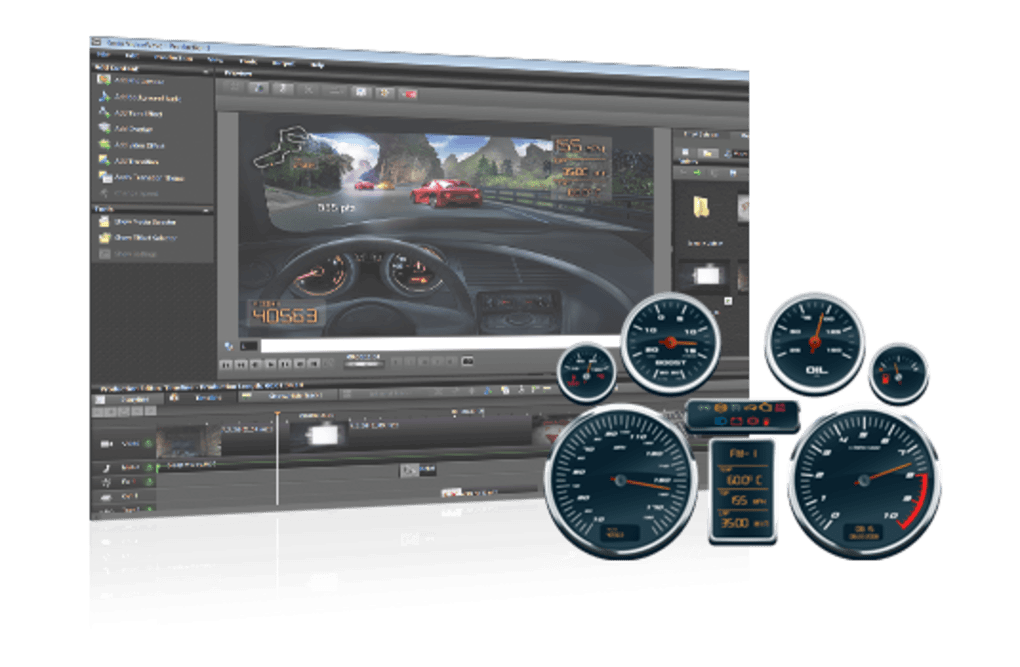
Intuitive Editing and Effects: Shaping Your Narrative
Roxio Game Capture HD Pro doesn’t just capture; it empowers you to craft a polished final product. The bundled editing software provides a surprisingly robust and intuitive interface, even for users with limited video editing experience. With over 90 transitions and video effects at your disposal, you can seamlessly enhance your gameplay recordings with a variety of visual flourishes. These effects range from simple cuts and fades to more sophisticated transitions, allowing you to add a professional touch to your videos.
Beyond transitions, the software offers a comprehensive array of editing tools. You can add custom titles and overlays, personalize your recordings with voice commentary, incorporate background music, and even utilize picture-in-picture elements to showcase your webcam feed alongside the gameplay. The inclusion of multi-track timeline editing allows for layering different audio and video elements, providing significant flexibility in creating engaging content. This detailed level of control empowers users to fully express their creativity and style, moving beyond simple recordings to curated, dynamic videos.
Furthermore, the software supports the creation of themed templates. This feature is exceptionally useful for content creators producing series or regular gameplay updates. By saving pre-designed templates with consistent branding and formatting, users can maintain a cohesive style across their video library, enhancing brand recognition and audience engagement. This feature simplifies the workflow for recurring video projects, enabling efficient and consistent content production.
Live Streaming Integration: Reaching Your Audience in Real Time
Beyond recording, Roxio Game Capture HD Pro facilitates live streaming capabilities, enabling users to share their gameplay experiences directly with online audiences in real time. The software provides built-in streaming functionality, enabling seamless integration with popular platforms such as YouTube Live and Twitch. This opens up opportunities for direct viewer interaction and community building.
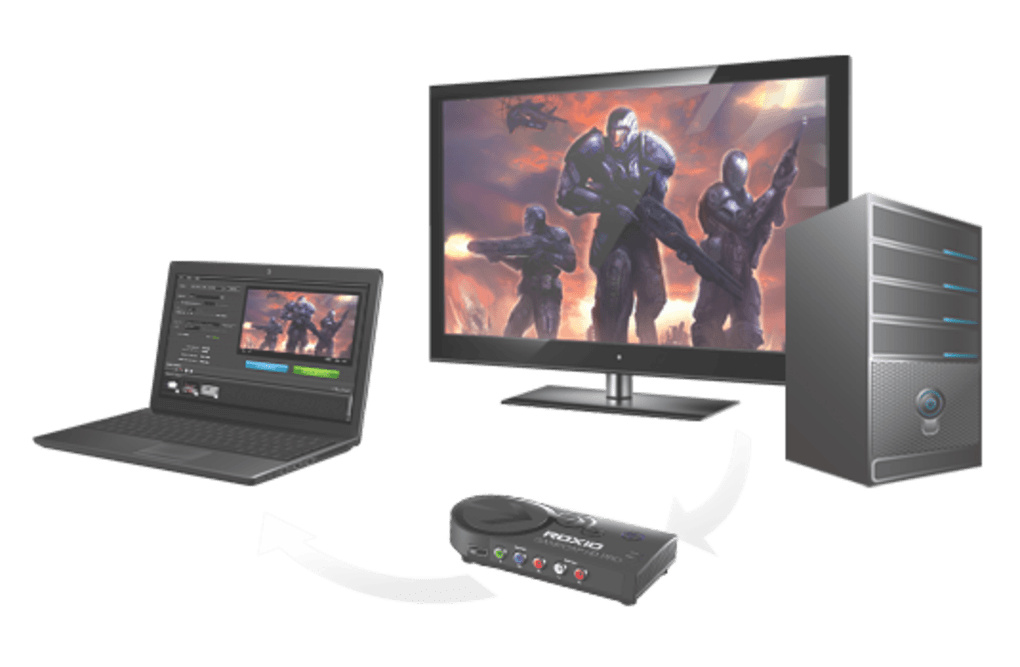
During live streams, users can enhance the viewing experience by incorporating webcam input, allowing viewers to see their reactions and commentary alongside the gameplay. The ability to add microphone commentary further enriches the streaming experience, allowing for live narration, analysis, or casual conversation with the audience. This feature effectively transforms the platform from a simple recording tool to a dynamic live broadcasting solution.
System Requirements and Compatibility: Ensuring Seamless Operation
Roxio Game Capture HD Pro is primarily designed for Windows-based PCs. While initially optimized for Windows 7 and 8, the software has proven compatible with later versions, including Windows 10 and 11, although updated drivers are recommended for optimal performance. The minimum system requirements are relatively modest, making the software accessible to a broad range of users. However, meeting or exceeding the recommended specifications will generally lead to improved performance, especially when working with high-resolution footage or complex editing projects.
The minimum requirements typically include a processor like an Intel Core 2 Duo 1.8GHz or AMD equivalent, at least 2GB of RAM, a DirectX 9.0c compatible video card, 2GB of free hard drive space (more is recommended for saving videos), a USB 2.0 port, and an internet connection for registration, updates, and live streaming. A display resolution of 1024x768 or higher is also recommended for a comfortable viewing experience during editing.
Regularly checking the Roxio website for the latest software patches and drivers is strongly recommended to ensure optimal compatibility and performance with your specific system configuration. This proactive approach helps maintain compatibility and can address any potential issues arising from operating system updates or hardware changes.
Value and Alternatives: Weighing Your Options
Roxio Game Capture HD Pro is a paid software solution, available for purchase through various online retailers and directly from the manufacturer. While there isn’t a free version, the bundled hardware and software package provides considerable value for users seeking both recording and editing capabilities within a single, integrated solution. The combination of high-quality capture, intuitive editing tools, and live streaming functionality offers a complete workflow for creating and sharing gameplay content.
However, it’s important to consider alternatives. The market offers a variety of video capture solutions, ranging from simple screen recording software to advanced professional-grade equipment. The optimal choice depends heavily on individual needs and budget. Some users may find free screen recording software sufficient for casual gameplay recordings, while others may require the advanced features and performance of higher-end professional equipment. Comparing features, pricing, and system requirements of different options is essential to make an informed decision that aligns with your specific needs and technical capabilities.
Conclusion: A Powerful Tool for Aspiring and Experienced Gamers Alike
Roxio Game Capture HD Pro presents a compelling option for Windows gamers seeking a user-friendly yet powerful solution for capturing and sharing their gameplay experiences. The combination of high-quality recording capabilities, intuitive editing tools, and integrated live streaming functionality makes it a versatile tool suitable for a broad range of users, from casual gamers creating personal archives to experienced streamers building professional-grade content. The software’s streamlined workflow, combined with the hardware’s compatibility, eliminates the complexities often associated with other video capture solutions. While it is a paid product, the comprehensive feature set and ease of use make it a strong contender in the market, offering a compelling value proposition for those seeking to elevate their gaming content creation. By combining robust performance with user-friendly design, Roxio Game Capture HD Pro effectively bridges the gap between amateur and professional-level video production in the gaming world.
File Information
- License: “Full”
- Version: “2.1”
- Latest update: “April 10, 2025”
- Platform: “Windows”
- OS: “Windows XP”
- Language: “English”
- Downloads: “3.1K”
- Size: “385.90 MB”


