
RPG Maker XP, a powerful and user-friendly game development tool, allows aspiring game designers to create their own role-playing games (RPGs) without needing extensive programming knowledge. This comprehensive guide delves into the features, capabilities, and overall experience of using RPG Maker XP to craft your own immersive RPG adventures.
Understanding RPG Maker XP’s Core Functionality
RPG Maker XP is a Windows-based software application designed to simplify the process of RPG development. Its strength lies in its intuitive drag-and-drop interface and pre-built assets, which significantly reduce the technical hurdles faced by novice developers. While it doesn’t require coding expertise for basic game creation, advanced features can be customized through scripting (using Ruby), allowing for greater flexibility and control. The core gameplay mechanics are built-in, handling the foundational elements like turn-based combat, inventory management, and character progression. This frees the developer to focus on designing the story, characters, environments, and unique elements that will define their game.
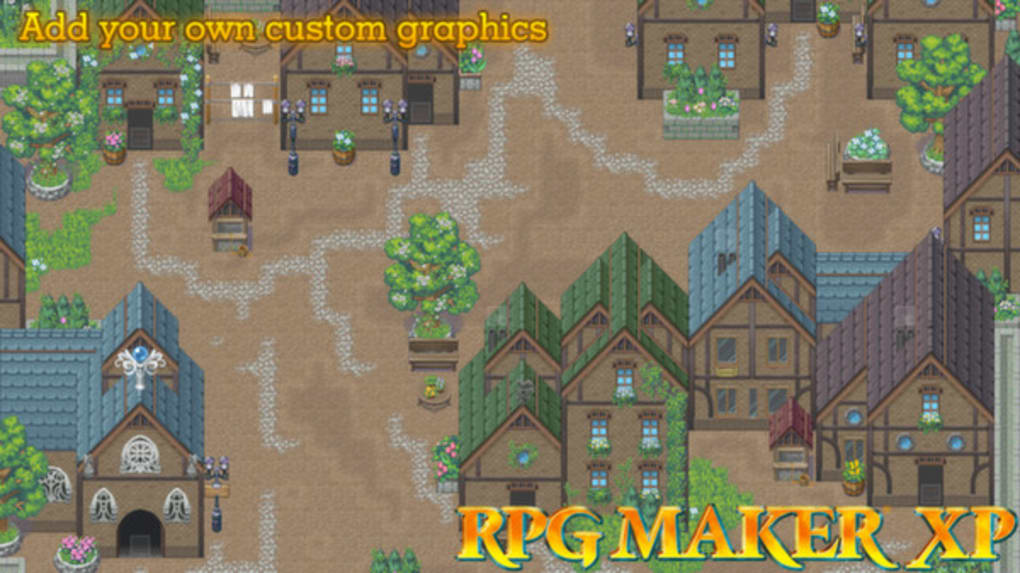
The software provides a wealth of pre-designed assets, including character sprites, tilesets, battle backgrounds, and sound effects. These ready-to-use resources significantly accelerate the development process, especially for those new to game design. However, RPG Maker XP also allows for the import of custom assets, providing a wide degree of creative freedom. Developers can personalize their games with original art, music, and sound effects, ensuring a unique identity for their projects.
Map creation is a central aspect of RPG Maker XP. The intuitive map editor allows developers to design various environments, from bustling towns to sprawling dungeons, using a tile-based system. Each tile represents a specific graphic element, allowing for the construction of detailed and varied game worlds. The system also supports different layers, enabling the creation of depth and visual complexity within the game environments. This map editor, combined with the event system, allows for the creation of interactive environments where players can interact with objects, trigger events, and advance the narrative.
The Event System: Bringing Your Game to Life
The event system within RPG Maker XP is the core mechanism through which developers inject interactivity and storyline progression into their games. Events are essentially triggers that initiate actions or sequences based on player interaction. These actions can range from simple text dialogues and item pickups to complex combat encounters and environmental puzzles.
Events are assigned to specific locations on the map and triggered by player proximity or specific actions. The event editor provides a user-friendly interface for creating and managing these events. Developers can define conditions, set triggers, and program a sequence of actions within each event. This system allows developers to create complex narratives, branching storylines, and engaging gameplay scenarios without writing a single line of code for basic functionality. However, advanced scripting offers the possibility to add more complex interactions and mechanics.
The flexibility of the event system allows for the creation of different types of gameplay experiences. The system supports various event commands, including the ability to display text, change the environment, control the game’s music, initiate battles, and manipulate game variables. Developers can use these commands to create intricate puzzles, compelling storytelling sequences, and dynamic gameplay elements. This robust system is instrumental in building an immersive and interactive world for players to explore.
Battle System and Customization: Tailoring Combat Experiences
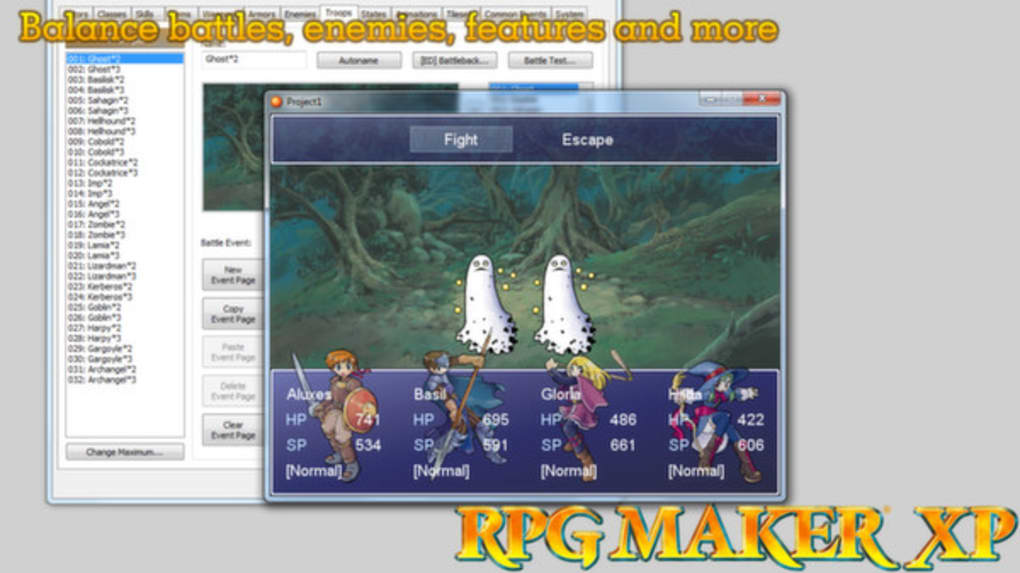
RPG Maker XP incorporates a turn-based battle system, a common element in many RPGs. This system provides a solid foundation for combat encounters, but also allows for significant customization. Developers can define enemy statistics, create unique enemy abilities, and adjust the battle mechanics to suit their desired gameplay style.
Character classes, skills, and equipment are other elements subject to customization. Developers have the flexibility to design unique character classes with diverse skill sets and abilities. They can define the effects of various items and equipment, allowing players to personalize their characters and strategically approach battles. The battle system’s flexibility allows for the creation of diverse and challenging combat encounters that keep players engaged throughout the game. Developers can adjust difficulty levels, introduce new mechanics, and create unique boss fights.
Beyond the basic battle system, advanced scripting capabilities provide even greater customization options. Experienced developers can modify the core mechanics, add new features, and implement unique battle systems that go beyond the standard turn-based format. This opens up a world of possibilities, allowing for more creative and varied combat experiences.
Asset Management and Importing: Expanding Your Creative Horizons
RPG Maker XP provides a library of default assets, but its true power lies in the ability to import custom assets, significantly enhancing the game’s visual and auditory appeal. This flexibility allows developers to create visually stunning and immersive worlds that match their vision.
Importing custom graphics involves adding new tilesets, character sprites, and battle backgrounds. This allows for greater control over the visual aspects of the game, ensuring a unique style and aesthetic. Developers can use their own artwork or acquire assets from online resources to tailor the visual elements of their game to their preferences.
Adding custom music and sound effects enhances the immersive quality. Background music can set the mood and atmosphere of each scene, while sound effects bring the game’s actions and interactions to life. Developers can use royalty-free music and sound effects, compose their own tracks, or acquire them from online marketplaces.
The process of importing assets is relatively straightforward, making it accessible to developers of all skill levels. However, careful attention to file formats and resolution is crucial to ensure seamless integration into the game. Properly sized and formatted assets will prevent issues and enhance the overall game experience.
Beyond the Basics: Advanced Techniques and Scripting
While RPG Maker XP is designed to be user-friendly for beginners, it also offers advanced features for experienced developers. The scripting capabilities, utilizing the Ruby programming language, enable significant customization and expansion of the game’s functionality. This opens a wide array of possibilities for advanced game mechanics and features.
Script modification allows developers to create custom game systems and mechanics beyond the built-in features. This includes the ability to create unique battle systems, custom item effects, and interactive elements not readily available through the standard event system.
Plugin support extends the capabilities of RPG Maker XP even further. Many community-created plugins are available online, adding new features and functionality to the software. These plugins can introduce new game mechanics, enhance existing features, or provide tools for streamlining the development process. Utilizing plugins requires some understanding of how they function and interact with the game, but can significantly reduce development time and effort.
The ability to incorporate external libraries and resources further expands the potential of RPG Maker XP. While not as accessible as plugin usage, this advanced technique permits integration of external elements, allowing for significantly more complex functionalities. However, this level of development requires advanced programming knowledge and expertise.
In conclusion, RPG Maker XP offers a comprehensive suite of tools for game development, catering to both beginners and experienced developers. Its ease of use and powerful features make it an excellent platform for creating engaging RPGs. While it simplifies the process significantly, its advanced features allow for high levels of customization and expansion, making it a versatile and enduring game development tool.
File Information
- License: “Full”
- Version: “2016”
- Latest update: “February 7, 2017”
- Platform: “Windows”
- OS: “Windows 2000”
- Language: “English”
- Downloads: “13.5K”


