
Few puzzles have captured the global imagination quite like the Rubik’s Cube. Invented in 1974 by Hungarian sculptor and architecture professor Ernő Rubik, this deceptively simple 3x3x3 colored cube has become a cultural icon, a symbol of intelligence, and a testament to the power of logical thinking. What began as a tool to teach students about 3D problems and structural design quickly evolved into the world’s best-selling puzzle toy, challenging millions across generations. Its widespread popularity has led to its adaptation across various mediums, including the digital realm, allowing enthusiasts to experience the tactile joy of solving without needing a physical cube. Among these digital interpretations is “Rubik Cube for Windows,” a free PC game that brings the classic brain-teaser to your desktop, offering a convenient and accessible way to engage with this timeless puzzle.
A Digital Dimension: Introducing Rubik Cube for Windows
In an age where digital entertainment reigns supreme, it was only a matter of time before classic physical puzzles found their way onto our screens. “Rubik Cube for Windows” by Valil is one such iteration, a dedicated PC game designed to replicate the experience of the original Rubik’s Cube. Available for free download on platforms like PhanMemFree, this game falls squarely into the “PC games” category, specifically within the “Puzzle” subcategory, and is further refined as a “3D” puzzle. This classification immediately highlights its core appeal: it’s a mental challenge presented in a three-dimensional environment, mirroring the physical object it emulates.
For many, the physical Rubik’s Cube holds an undeniable charm – the satisfying click of the turns, the visual feedback of the colors aligning, and the tangible sense of accomplishment when the final face is solved. However, a digital version offers unique advantages. It’s always available on your computer, no matter where you are, and there’s no risk of losing pieces or having it fall apart. “Rubik Cube for Windows” caters to those who appreciate a blend of traditional puzzle-solving with the convenience and modern features that a digital platform can offer. It’s particularly appealing to individuals who enjoy logical challenges that require strategic thinking and spatial reasoning, often finding common ground with fans of stealth games due to the similar need for meticulous planning and execution. The game’s straightforward approach ensures that the focus remains entirely on the puzzle itself, providing a pure Rubik’s Cube experience without unnecessary frills.
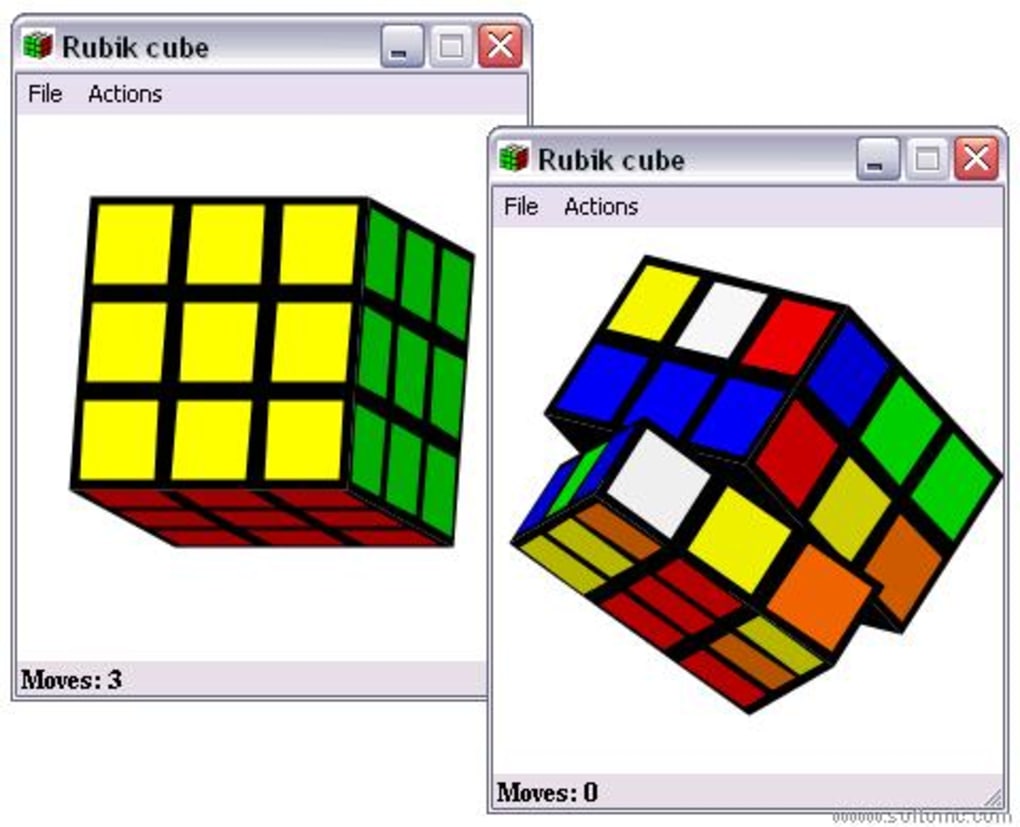
The enduring success of the Rubik’s Cube, both in its physical and digital forms, lies in its elegant simplicity and profound complexity. It’s easy to pick up but incredibly difficult to master, creating a steep but rewarding learning curve. Whether you’re a seasoned speedcuber or a novice attempting to solve it for the first time, the digital version on PC provides a consistent and accessible platform for practice and enjoyment.
Features and Accessibility: Delving into the Digital Cube Experience
While “Rubik Cube for Windows” might appear to be a simple translation of its physical counterpart, a closer look reveals how its digital nature enhances the user experience and broadens its accessibility. Released by Valil, the game offers a direct and unadulterated Rubik’s Cube experience for PC users.
The current version of the game, 1.0, initially updated on June 6, 2011, indicates its longevity and stable build. Though the last noted update on August 28, 2018, for its general information on PhanMemFree suggests continuous attention to its availability and perhaps minor backend improvements, the core gameplay remains timeless. The fact that it was originally available for users running Windows 98 and prior versions, as well as Windows ME, underscores its compatibility with older operating systems. This wide compatibility meant that a vast array of PC users could access the game even years after its initial release, demonstrating a design philosophy that prioritized broad reach over cutting-edge graphics or demanding system requirements. This commitment to accessibility is a hallmark of classic puzzle games that aim to be enjoyed by as many people as possible.
Language support is another crucial aspect of accessibility. “Rubik Cube for Windows” is available in English, which immediately opens it up to a global audience. While many puzzle games are visually driven and transcend language barriers, having instructions and interface elements in English ensures that players worldwide can comfortably navigate the game and understand any hints or features it might offer. Platforms like PhanMemFree further enhance this global reach by providing download links in multiple languages, including Arabic, German, Spanish, French, Indonesian, Italian, Japanese, Korean, Dutch, Polish, Portuguese, Russian, Swedish, Thai, Turkish, Vietnamese, and Chinese, effectively making the game discoverable to non-English speakers interested in its premise.
The game’s lightweight nature is a significant advantage. Described as “not that heavy” and not requiring “as much storage space than the average game in the section PC games,” “Rubik Cube for Windows” is designed to be efficient. With a size of just 9.93 KB (kilobytes), it’s incredibly small, meaning it downloads almost instantly and consumes negligible hard drive space. This makes it an ideal option for users with limited storage, slower internet connections, or older computers that might struggle with more graphically intensive titles. Its minimal footprint means it runs smoothly without taxing system resources, ensuring a fluid and responsive gameplay experience that is crucial for a puzzle requiring quick visual processing and manipulation. This efficiency is a testament to its focused design, prioritizing function and the core puzzle experience.
The statistics surrounding “Rubik Cube for Windows” also paint a picture of its popularity. Since its addition to the PhanMemFree catalog in 2011, it has garnered over 70,645 downloads, with a consistent trickle of activity, evidenced by 62 downloads in a single recent week. These numbers indicate a sustained interest in the game over many years. Its particular popularity in countries like India, the Philippines, and Indonesia highlights the universal appeal of the Rubik’s Cube and the demand for accessible digital versions in diverse regions. Such download figures are impressive for a niche, free puzzle game, testifying to its value proposition.
Beyond the basic emulation, a digital Rubik’s Cube game like this often incorporates features that enhance the solving experience. While the specific “Rubik Cube for Windows” game’s feature set is not extensively detailed, typical digital cube experiences might include:
- Customizable Views: The ability to rotate the cube freely in 3D space with mouse controls, ensuring optimal viewing angles for every turn.
- Undo/Redo Functionality: A lifesaver for beginners and experts alike, allowing players to backtrack mistakes or experiment with different sequences without having to physically scramble the cube again.
- Timers: For speedcubing enthusiasts, an integrated timer can record solve times, encouraging competition and self-improvement.
- Scramble Algorithms: Digital games can instantly generate perfectly randomized scrambles, ensuring fair and challenging starting positions for every game.
- Tutorials or Solvers: Some advanced digital versions might even include step-by-step guides or AI solvers to help players learn algorithms or find the optimal solution.
- Multiple Cube Sizes: While the original is 3x3, digital versions often offer 2x2, 4x4, 5x5, and even larger cubes, providing varied challenges.
These features, whether explicitly present in “Rubik Cube for Windows” or common across digital cube games, collectively contribute to making the digital version a powerful tool for learning, practicing, and enjoying the Rubik’s Cube. The user review from Tyler Brownell, stating “its amazing . its awesome on the computer and many people can use it on their device so yeah Pros: everything Cons: nothing” on October 28, 2016, encapsulates the sentiment of many. It’s a straightforward, effective, and enjoyable digital adaptation that delivers exactly what it promises – the Rubik’s Cube on your PC.
The Broader Puzzle Landscape and the Rubik’s Cube’s Place
The Rubik’s Cube, in its digital manifestation, exists within a vast and varied landscape of puzzle games. The popularity of “Rubik Cube for Windows” is not an isolated phenomenon but rather a reflection of a broader appreciation for intellectual challenges in digital form. Platforms like PhanMemFree categorize a wide array of puzzle games for Windows, from match-3 sagas like Candy Crush Saga to intricate escape room experiences, character creators, and classic board game adaptations.
The “Puzzle” genre itself is incredibly diverse, encompassing everything from spatial reasoning tests to word puzzles, logic grids, and memory challenges. What unites them is the core satisfaction derived from solving a problem, understanding a pattern, or overcoming a mental obstacle. The Rubik’s Cube, with its emphasis on permutation and combination, spatial awareness, and algorithmic thinking, stands as a cornerstone of this genre. It’s a pure logic puzzle, devoid of narrative or complex graphics, focusing solely on the intellectual engagement.
Looking at the “Top downloads Puzzle for Windows” on PhanMemFree, we see a mix of genres:
- Purble Place: Mini-games for children, highlighting family-friendly puzzle options.
- Candy Crush Saga: A popular free match-3 puzzle game, representing a more casual, pattern-recognition style of puzzle.
- Homicipher: A game focused on decoding cryptic monsters, suggesting narrative-driven puzzle elements.
- Gacha Life 2: An extensive chibi character creator, indicating puzzles can also be tied to creative expression and customization.
- AI2U: With You Till The End: An AI-powered escape room experience, emphasizing immersive storytelling and complex environmental puzzles.
- The Exit 8: A game focused on finding an exit, often involving observation and deduction.
- Untitled Goose Game: While having action elements, it involves puzzle-solving through mischievous interactions with the environment.
- Zuma’s Revenge!: An action-puzzle game involving quick reflexes and matching.
- Pico Park: A cooperative puzzle game that requires teamwork.
This diverse list demonstrates that puzzle games cater to a wide range of preferences and skill sets. “Rubik Cube for Windows” fits into this ecosystem as a foundational entry, representing the classic, pure logic puzzle. It appeals to a fundamental human desire to bring order to chaos, to understand and manipulate systems, and to achieve a clear, satisfying resolution. Its digital availability makes this fundamental challenge accessible to anyone with a PC, bridging the gap between physical and virtual puzzle enjoyment.
The “Related topics about Rubik Cube” on PhanMemFree also offer insights into how users classify and search for such games: “Puzzle Games Free For Windows,” “Pc Games,” “Stealth Games,” “Pc Puzzle Games For Windows,” “Classic Games For Android,” “Pc Games Free,” “Pc Games For Windows,” “Pc Puzzle Games,” and “Games For Pc For Windows.” The recurring themes of “PC,” “Windows,” “Free,” and “Puzzle” reinforce the core value proposition of “Rubik Cube for Windows.” The mention of “Stealth Games” is an interesting connection, perhaps highlighting the shared cognitive demand for intricate planning and foresight.
Ultimately, “Rubik Cube for Windows” serves as an excellent entry point for new puzzlers and a convenient practice tool for experienced solvers, solidifying the Rubik’s Cube’s place not just as a physical toy, but as a ubiquitous digital experience across the global puzzle community.
Exploring Alternatives and Expanding the Puzzle Horizon
While “Rubik Cube for Windows” provides a faithful digital rendition of the classic 3x3x3 puzzle, the digital realm offers a plethora of alternatives and expansions for those who crave similar or more varied challenges. The availability of multiple related applications on PhanMemFree highlights the robust demand for virtual cube-solving experiences and other engaging puzzles.
Among the direct alternatives listed are:
- Cubex (4.1/5 rating): Described as “Cubex - Rubik’s Cube Game,” this suggests another dedicated application focusing on the core Rubik’s Cube experience, potentially with its own unique interface or additional features. Its strong rating indicates a well-received alternative.
- Rubix (3.4/5 rating): This application boasts a “3D Rubik’s cube in any size,” which is a significant feature. The ability to play with cubes of different dimensions (like 2x2, 4x4, 5x5, or even larger) dramatically increases the complexity and replayability for seasoned cubers.
- Gestel Cube (3.3/5 rating): Uniquely, “Gestel Cube” is advertised as a tool to “Learn how to solve the Rubik’s cube.” This positions it not just as a game, but as an educational aid, which is invaluable for beginners who are often intimidated by the puzzle’s apparent complexity. It likely includes tutorials, solving algorithms, and perhaps even step-by-step guidance.
These alternatives demonstrate that the digital Rubik’s Cube market caters to different needs: a straight-up game, a customizable challenge, and a learning tool. Each offers a slightly different take on the same fundamental puzzle, allowing users to choose the version that best suits their skill level and preferences.
Beyond direct cube simulations, the broader category of puzzle games available on PhanMemFree offers an expansive universe of mental challenges. These include:
- Just Sudoku (3.7/5 rating): Sudoku puzzles, focusing on number logic and grid-based problem-solving, offer a different kind of intellectual engagement, appealing to those who enjoy mathematical and deductive reasoning.
- Qbeez (4.1/5 rating, Trial version): This title suggests a block-matching or pattern-recognition puzzle game, often involving clearing groups of colored blocks. It’s a more abstract puzzle compared to the Rubik’s Cube but still relies on visual logic.
- Sudoku (3.2/5 rating): Another Sudoku variant, further cementing its popularity as a digital puzzle.
- Crossword Forge (3.5/5 rating, Trial version): For those who prefer word puzzles, this application allows users to create their own crosswords, tapping into linguistic and vocabulary skills rather than spatial ones.
- Hegzis (4.4/5 rating): Described as a “Challenging puzzle game,” this indicates a more modern or complex puzzle experience that likely pushes the boundaries of traditional genres.
- Red Ronin (4.4/5 rating): An “Engaging Tactical Puzzle Experience,” suggesting a game where strategic planning and turn-based thinking are key, similar to the forward-thinking required in advanced cube-solving.
- Soccer Story (4.5/5 rating): A “Unique Puzzle Adventure,” blending sports themes with puzzle elements, showing how puzzles can be integrated into broader narratives.
- 7 Wonders: Ancient Alien Makeover (4.5/5 rating): Implies a match-3 or tile-swapping puzzle game with a theme of building ancient wonders, offering a more casual yet engaging experience.
The ecosystem of puzzle games, as exemplified by PhanMemFree’s offerings, is rich and diverse. While “Rubik Cube for Windows” provides a pure and classic puzzle experience, the array of alternatives ensures that every type of puzzle enthusiast can find a digital challenge tailored to their taste. From learning how to solve the iconic cube to mastering complex tactical puzzles or simply enjoying a relaxing match-3 game, the digital world of puzzles is continually expanding, offering endless opportunities for mental stimulation and entertainment. The classic Rubik’s Cube remains a vital cornerstone within this expansive and engaging landscape.
Conclusion: The Enduring Legacy of the Digital Rubik’s Cube
The Rubik’s Cube is more than just a toy; it is a cultural phenomenon that has transcended generations, borders, and technological advancements. Its transition from a physical puzzle to a digital game like “Rubik Cube for Windows” by Valil is a testament to its timeless appeal and adaptability. This free PC game, available through platforms like PhanMemFree, successfully captures the essence of the original puzzle while offering the unparalleled convenience and accessibility of digital play.
The game’s lightweight design, broad compatibility with older Windows operating systems, and global appeal (evidenced by its popularity in various countries and multi-language download options on PhanMemFree) make it an ideal choice for a diverse audience. Whether you are a nostalgic veteran looking to relive the challenge, a new enthusiast eager to learn, or simply someone seeking a quick and mentally stimulating break, “Rubik Cube for Windows” provides a direct and satisfying experience.
As Tyler Brownell’s simple yet powerful review highlights, the digital cube is “amazing” and “awesome” because it delivers precisely what players expect: the iconic Rubik’s Cube challenge, seamlessly integrated into their computer. In a world increasingly dominated by complex, graphically intensive games, the enduring popularity of a straightforward puzzle like the Rubik’s Cube, both in its physical form and its digital manifestations, speaks volumes about the human desire for logical challenges and the profound satisfaction derived from bringing order to apparent chaos.
PhanMemFree, in its role as a facilitator for such software, ensures that these valuable digital resources are readily available, safe, and easily discoverable. By meticulously scanning files and offering a broad catalog, PhanMemFree supports the continued engagement with classic games and utilities. The “Rubik Cube for Windows” stands as a prime example of how a simple, well-executed digital adaptation can keep a classic puzzle relevant and enjoyable for new generations of PC users, cementing the Rubik’s Cube’s legacy as an omnipresent and beloved brain-teaser.
File Information
- License: “Free”
- Version: “1.0”
- Latest update: “August 28, 2018”
- Platform: “Windows”
- OS: “Windows ME”
- Language: “English”
- Downloads: “28.7K”
- Size: “9.93 KB”


