
Losing valuable data from your Samsung phone or tablet can be incredibly frustrating. Whether it’s cherished photos, important contacts, or crucial documents, the sudden disappearance of digital assets can be devastating. Fortunately, effective data recovery solutions exist, and Tenorshare’s Samsung Data Recovery stands as a prominent contender in this field. This comprehensive guide will delve into the capabilities, ease of use, and overall effectiveness of this software, helping you understand whether it’s the right choice for your needs.
Understanding the Need for Samsung Data Recovery
Modern smartphones serve as repositories for vast amounts of personal and professional data. From high-resolution photos and videos to sensitive contact information and critical documents, these devices hold information that is often irreplaceable. However, data loss can occur for various reasons, including:
- Accidental Deletion: A simple slip of the finger can permanently delete files, especially when using features like mass selection.
- Factory Reset: Performing a factory reset, often done to troubleshoot device issues, wipes all data from the phone unless a proper backup has been created beforehand.
- ROM Flashing: Updating or installing custom ROMs (Read-Only Memory) can sometimes lead to data corruption or loss if the process is not carried out meticulously.
- Rooting: Rooting your phone to gain administrative privileges can potentially damage the system if not handled correctly, resulting in data loss.
- Hardware Failure: Internal damage to your phone’s hardware, such as a malfunctioning memory card or internal storage, can render data inaccessible.
- Malware Infection: Malicious software can corrupt files or delete entire folders, compromising your data.
- Water Damage: Exposure to water can severely damage the internal components of a smartphone, including the memory storage, leading to data loss.
- Software Crashes and Errors: Unexpected software crashes or system errors can disrupt data storage, leading to corruption or inaccessibility.
- Theft or Loss: Losing your device to theft or misplacement leads to the loss of all data stored on the device unless appropriate security measures and backups were in place.
These scenarios highlight the importance of having a reliable data recovery solution readily available. While cloud backups and regular data transfers are crucial preventative measures, they are not always foolproof. This is where specialized software like Samsung Data Recovery steps in to provide a safety net for recovering your precious digital assets.
Features and Capabilities of Samsung Data Recovery
Tenorshare Samsung Data Recovery distinguishes itself through a range of features designed for effective and efficient data recovery. These capabilities include:
-
Broad File Format Support: The software supports recovery of a wide array of file types, including contacts, text messages (SMS), call logs, photos, videos, documents (PDF, Word, Excel, etc.), and more. This comprehensive support caters to various data loss scenarios.
-
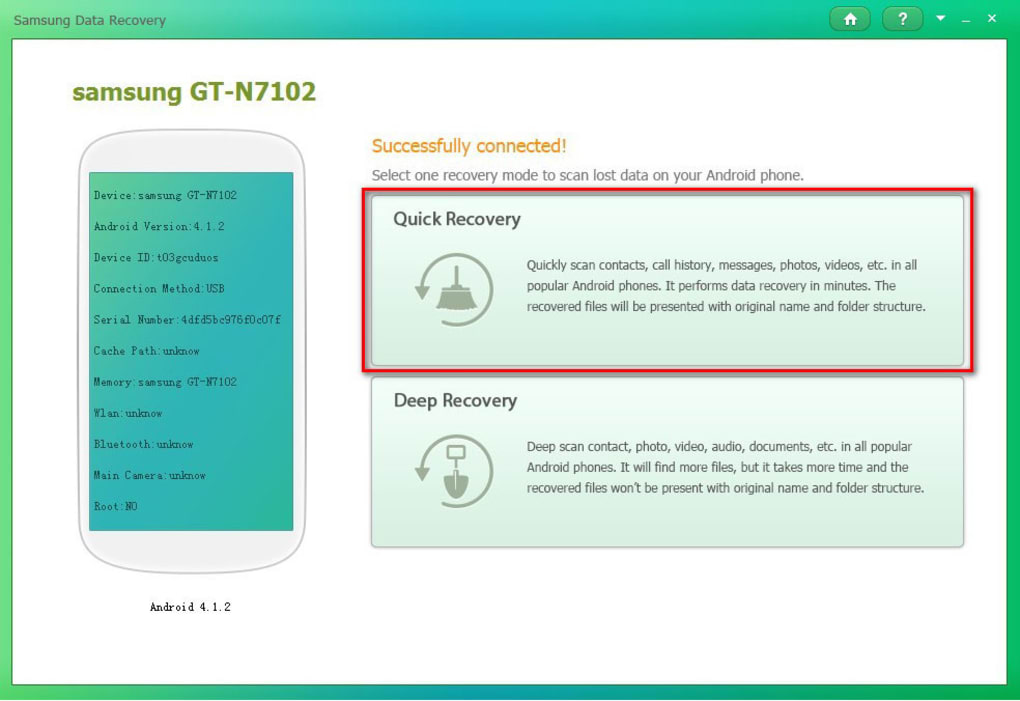
Multiple Scanning Options: Samsung Data Recovery offers both quick scan and deep scan options. A quick scan is suitable for quickly locating recently deleted files. A deep scan is a more thorough approach, which takes longer but has a higher chance of finding data that has been overwritten or is otherwise more difficult to recover.
-
Dual Connection Methods: Users can connect their Samsung device to the computer using either a USB cable or a Wi-Fi connection. The Wi-Fi option is particularly helpful if your device’s USB port is damaged or inaccessible.
-
Preview Before Recovery: Before initiating the recovery process, users can preview the recoverable data. This allows users to selectively recover only the desired files, saving time and storage space.
-
Support for Various Samsung Devices: The software is compatible with a wide range of Samsung smartphones and tablets, ensuring broad applicability across different models and generations.
-
User-Friendly Interface: Despite its powerful capabilities, Samsung Data Recovery boasts a clean and intuitive interface, making it accessible to users of all technical skill levels. The straightforward design simplifies the recovery process, avoiding technical jargon and overwhelming complexity.
-
High Success Rate: Tenorshare claims a high success rate for data recovery, although this can vary based on the specific circumstances of data loss and the condition of the device’s storage.
-
Windows Compatibility: The software is designed for Windows operating systems, ensuring compatibility with most desktop and laptop computers.
How to Use Samsung Data Recovery
The process of using Samsung Data Recovery is relatively straightforward. Here’s a step-by-step guide:
-
Download and Installation: Begin by downloading the Samsung Data Recovery software from the official Tenorshare website. Install the program on your Windows computer, following the on-screen instructions.
-
Device Connection: Connect your Samsung device to your computer. You can use a USB cable or, if supported by your device and the software version, a Wi-Fi connection.
-
Enable USB Debugging (if necessary): If using a USB cable, you may need to enable USB debugging on your Samsung device. The exact steps for enabling this setting vary slightly depending on your Android version. The software usually provides clear on-screen instructions to guide you through this process.
-
Select Scan Mode: Choose between a quick scan or a deep scan depending on the nature of your data loss. A quick scan will generally be faster but less thorough.
-
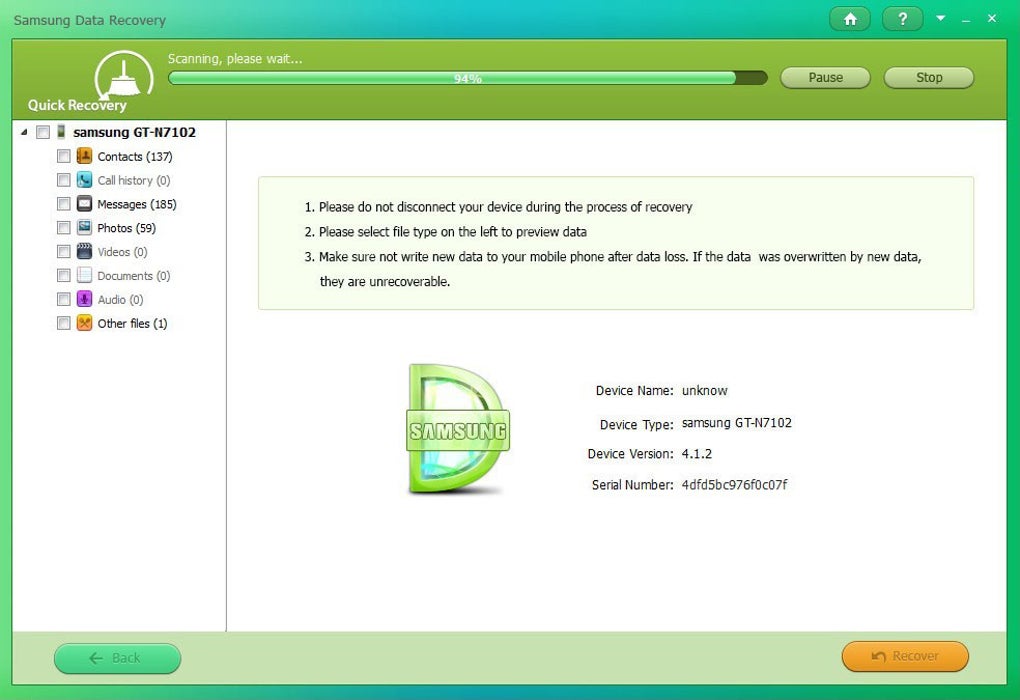
Scanning Process: Initiate the scanning process. The software will analyze your device’s memory to identify recoverable files. This process may take some time, depending on the amount of data on your device and the chosen scan mode.
-
Data Preview and Selection: Once the scan is complete, you can preview the recoverable files. This allows you to select specific files or folders for recovery.
-
Data Recovery: After selecting the files you want to recover, click the ‘Recover’ button. Choose a destination folder on your computer to save the recovered files.
-
Verification: After the recovery process is complete, verify that the recovered files are accessible and intact.
This streamlined process ensures that even users with limited technical expertise can effectively utilize Samsung Data Recovery to retrieve their lost data.
Alternatives to Samsung Data Recovery
While Samsung Data Recovery is a robust option, several alternative data recovery software solutions exist. These alternatives offer varying features, pricing models, and compatibility, allowing users to select the solution best suited to their specific needs and budget. Some popular alternatives include:
- Recuva: A free and popular data recovery tool for Windows PCs. While not specifically designed for Samsung devices, it can effectively recover data from various storage media.
-
Wondershare Dr. Fone: A comprehensive data recovery solution offering both Android and iOS support. It offers a wider range of features and often has a higher success rate, but comes at a higher cost.
-
FoneLab for Android: Another commercial option known for its ability to recover various file types from Android devices.
-
Free Android Data Recovery: A free option, although its capabilities might be more limited compared to commercial alternatives.
-
PhoneRescue: A specialized iOS and Android data recovery solution with a user-friendly interface, but at a premium cost.
Choosing the right alternative depends on individual needs and priorities. Factors to consider include cost, features, ease of use, success rate, and level of technical support.
Conclusion: Is Samsung Data Recovery the Right Choice?
Samsung Data Recovery offers a compelling solution for users seeking to recover lost data from their Samsung devices. Its user-friendly interface, support for various file types, multiple scanning options, and dual connection methods make it a highly accessible and versatile tool. While alternative solutions exist, Samsung Data Recovery’s combination of features, relative ease of use, and specific focus on Samsung devices makes it a strong contender for many users. If you need a reliable and relatively straightforward way to recover data from your Samsung device, it deserves serious consideration. However, it’s crucial to remember that data recovery is not always guaranteed, and success rates depend on several factors. Regular backups remain the best way to prevent data loss, but Samsung Data Recovery provides a valuable safety net for when things go wrong.
File Information
- License: “Trial version”
- Latest update: “May 22, 2023”
- Platform: “Windows”
- OS: “Windows XP”
- Language: “English”
- Downloads: “198.1K”
- Size: “31.00 MB”


