
SAP Crystal Reports is a robust business intelligence tool developed by SAP SE, designed to simplify the creation and distribution of professional-grade reports. This powerful software empowers users to generate comprehensive reports from diverse data sources, regardless of whether the data originates within the SAP ecosystem or from external sources. Its versatility, coupled with its user-friendly interface, makes it an invaluable asset for businesses of all sizes, from small and medium-sized enterprises (SMEs) to large corporations. This guide delves into the functionalities, benefits, and applications of SAP Crystal Reports.
Understanding the Capabilities of SAP Crystal Reports
SAP Crystal Reports stands out due to its ability to connect to a wide array of data sources, including relational databases (such as Oracle, MySQL, and SQL Server), online analytical processing (OLAP) cubes, and XML files. This connectivity is a cornerstone of its strength, allowing users to consolidate data from disparate sources into a single, cohesive report. The software’s capacity to join data from multiple sources is especially beneficial for organizations with complex data structures, streamlining the reporting process and offering a holistic view of business performance.
The reporting process itself is highly customizable. Users can design reports ranging from simple summaries to sophisticated, multi-page documents incorporating detailed visualizations. This flexibility caters to various reporting needs, from quick overviews to in-depth analyses. The precision offered allows for pixel-perfect reports, ensuring a polished and professional presentation of data.
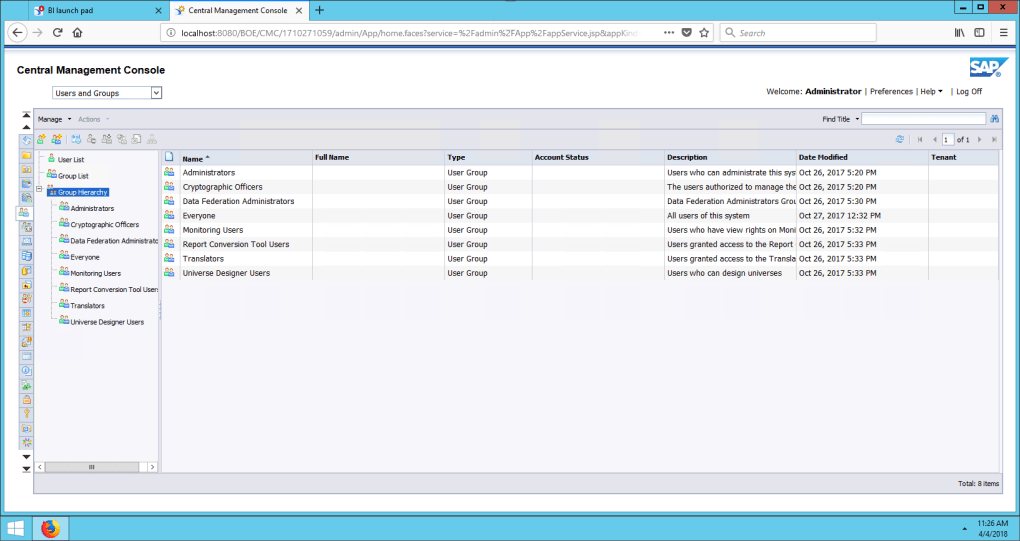
Beyond the design aspects, SAP Crystal Reports offers robust options for report delivery. Users can tailor reports to specific audiences by selecting their preferred language and format, ensuring clear and accessible communication. The software supports a wide array of languages, exceeding 24 globally, including English, French, German, Italian, Japanese, Korean, and Spanish, making it an ideal solution for multinational organizations. Furthermore, the generated reports are designed for interactive viewing on various mobile devices, ensuring accessibility across different platforms and devices.
The Advantages of Using SAP Crystal Reports for Business
For managers and business leaders, SAP Crystal Reports offers significant advantages in making data-driven decisions. The software’s ease of use simplifies the process of creating professional-looking reports, making it possible to generate insightful summaries and visualizations quickly and efficiently. The ability to visually represent complex data trends makes it easier to identify critical areas requiring attention, accelerating the decision-making process. The software’s impact extends beyond simply presenting data; it empowers informed strategic planning.
The program is particularly useful for SMEs looking to enhance their business intelligence capabilities. The ability to create comprehensive reports from various data sources, combined with the customizability options, helps small businesses understand their performance across key areas and make data-informed decisions for growth and optimization. This contrasts with many other reporting solutions that are overly complex or prohibitively expensive for SMEs. SAP Crystal Reports bridges this gap, providing high-quality reporting capabilities without the associated cost or complexity barriers.
For larger organizations with expansive data sets and complex reporting requirements, SAP Crystal Reports shines through its scalability and adaptability. Its ability to integrate seamlessly with existing SAP systems and other third-party applications enhances the value of the software. The centralization of reporting through a single platform ensures consistency and accuracy, streamlining workflows across the business.
Licensing and System Requirements
SAP Crystal Reports operates on a licensing model offering various options to meet diverse business needs. These licensing options generally include single-user licenses, named-user licenses (allowing a specific individual access), and concurrent access licenses (allowing a set number of simultaneous users). It is important to review the specifics of each license type to select the best fit for your organization’s needs and anticipated user volume.
It’s crucial to note that newer versions of SAP Crystal Reports primarily support 64-bit systems. Users with 32-bit systems might need to consider older versions, such as SAP Crystal Reports 2016, which continue to offer a strong feature set. Always check the system requirements to ensure compatibility before purchasing or installing the software.
Comparing SAP Crystal Reports to Alternative Solutions
While SAP Crystal Reports holds a strong position in the business intelligence market, it’s essential to consider alternative solutions to find the optimal fit for individual business needs and budgets. Several alternatives exist, each with its strengths and weaknesses. Some alternatives might offer superior capabilities in specific areas, such as data visualization, data mining, or integration with particular cloud-based platforms. Other options might prioritize ease of use or cost-effectiveness over extensive feature sets.
The choice ultimately depends on the specific needs of your organization. If high-level customization and integration with diverse data sources are paramount, SAP Crystal Reports remains a compelling option. However, if your requirements are less demanding, a less comprehensive solution could offer a more cost-effective approach. A thorough comparison of available options is crucial to ensure a suitable investment.
Conclusion: Empowering Data-Driven Decision Making
SAP Crystal Reports offers a comprehensive solution for businesses seeking to enhance their reporting and business intelligence capabilities. Its ability to connect to numerous data sources, create highly customizable reports, and deliver tailored reports to diverse audiences makes it a valuable asset. While understanding basic database concepts is helpful, the software’s relatively user-friendly interface makes it accessible to a wide range of users, from data analysts to business leaders.
Whether you’re an SME striving for improved decision-making or a large enterprise needing robust and scalable reporting solutions, SAP Crystal Reports stands as a powerful tool for leveraging the insights held within your data. By thoroughly evaluating your specific reporting needs and licensing options, you can effectively utilize this software to transform raw data into actionable intelligence that fuels growth and success. The software’s versatility and scalability allow businesses to adapt its use over time, evolving along with the demands of their data-driven strategy.
File Information
- License: “Full”
- Version: “2020”
- Latest update: “July 15, 2022”
- Platform: “Windows”
- OS: “Windows 10”
- Language: “English”
- Downloads: “37.2K”


