
In the vast and intricate universe of PC gaming, some titles transcend mere entertainment, evolving into platforms for boundless creativity and personalized experiences. Satisfactory, Coffee Stain Studios’ celebrated factory-building simulation, is undoubtedly one such game. From its stunning alien landscapes to its deeply satisfying production lines, Satisfactory captivates players with its unique blend of exploration, construction, and logistical challenges. However, for many dedicated pioneers, the journey doesn’t end with the vanilla game; it often begins anew with the introduction of mods. Modifications, or “mods,” can enhance gameplay, introduce quality-of-life improvements, add entirely new content, and even alter core mechanics, transforming the game into something truly bespoke. Yet, the process of finding, installing, and managing these mods can often be a daunting and cumbersome task, especially for those unfamiliar with game file directories and potential compatibility issues. This is precisely where the Satisfactory Mod Manager (SMM) steps in, serving as an indispensable utility that streamlines the entire modding experience, making it accessible, efficient, and enjoyable for every player.
Developed as a cornerstone for the Satisfactory modding community, SMM eliminates the traditional hurdles associated with game modification. No longer do players need to manually drag and drop files, risk corrupting their game installation, or painstakingly track down updates for individual mods. Instead, SMM provides a centralized, user-friendly interface that acts as a gateway to an expansive library of community-created content. It’s a dedicated application designed to simplify every aspect of mod integration, from initial discovery to active deployment. By offering one-click downloads, effortless activation management, and robust update support, SMM empowers Satisfactory enthusiasts to tailor their gameplay experience without diverting their precious time from the construction of magnificent, multi-tiered factories. For anyone looking to explore the incredible depth that the modding community has brought to Satisfactory, SMM is not just a convenience—it’s an essential tool that unlocks the full potential of this groundbreaking simulation.
The Modding Ecosystem of Satisfactory: A Foundation Built on Innovation
Satisfactory is a game that thrives on efficiency, scale, and problem-solving. Players crash-land on an alien planet with little more than a multi-tool and a dream: to build vast, automated factories, extract resources, and send them back to the Ficsit Corporation. The core loop of exploration, resource gathering, construction, and optimization is inherently rewarding. However, even with the game’s official updates and continuous development, the community’s desire for further customization and innovation is insatiable. This is where the modding ecosystem of Satisfactory truly shines, extending the game’s longevity and appealing to a diverse range of player preferences.
The types of mods available for Satisfactory are incredibly varied. Some focus on quality-of-life improvements, such as enhanced inventory management, better mapping tools, or more informative user interfaces. These mods address common frustrations or introduce conveniences that, while not essential, significantly smooth out the gameplay experience. Other mods introduce new buildings, production recipes, or even entirely new resource nodes, expanding the strategic possibilities and offering fresh challenges for seasoned pioneers. There are also aesthetic mods that allow for greater customization of factory appearance, adding new textures, colors, or decorative elements. The sheer breadth of available modifications is a testament to the dedication and creativity of the Satisfactory community.
Before the advent of dedicated mod managers like SMM, engaging with this rich modding ecosystem was often a complex affair. Players typically had to navigate various online forums, download compressed mod files, manually extract them into specific game directories, and then painstakingly ensure compatibility with their current game version and other installed mods. This manual process was not only time-consuming but also fraught with potential risks, such as accidental file corruption, game crashes, or compatibility conflicts that could render a save file unusable. For many, the barrier to entry for modding was simply too high, discouraging all but the most technically proficient or determined players from exploring these exciting additions.
The Satisfactory Mod Manager was born out of this necessity, emerging as a vital tool that democratizes access to the game’s modding scene. It serves as the official and most widely adopted solution for Satisfactory modding, effectively becoming the “cornerstone of all modding within Satisfactory,” as explicitly stated in its description. By centralizing the mod discovery, download, and management processes, SMM effectively removes the technical hurdles, allowing a broader audience of players to experience the enhanced and personalized gameplay that mods offer. Its integration into the community has fostered a more vibrant and accessible modding culture, ensuring that the incredible work of mod developers reaches the widest possible audience, ultimately enriching the Satisfactory experience for everyone.
Core Features: Seamless Mod Discovery and Installation
The primary allure of the Satisfactory Mod Manager lies in its simplicity and efficiency, particularly regarding the discovery and installation of mods. In a world where choice can often lead to paralysis, SMM organizes the vast array of available modifications into an easily navigable interface, transforming what could be a laborious hunt into an intuitive browsing experience.
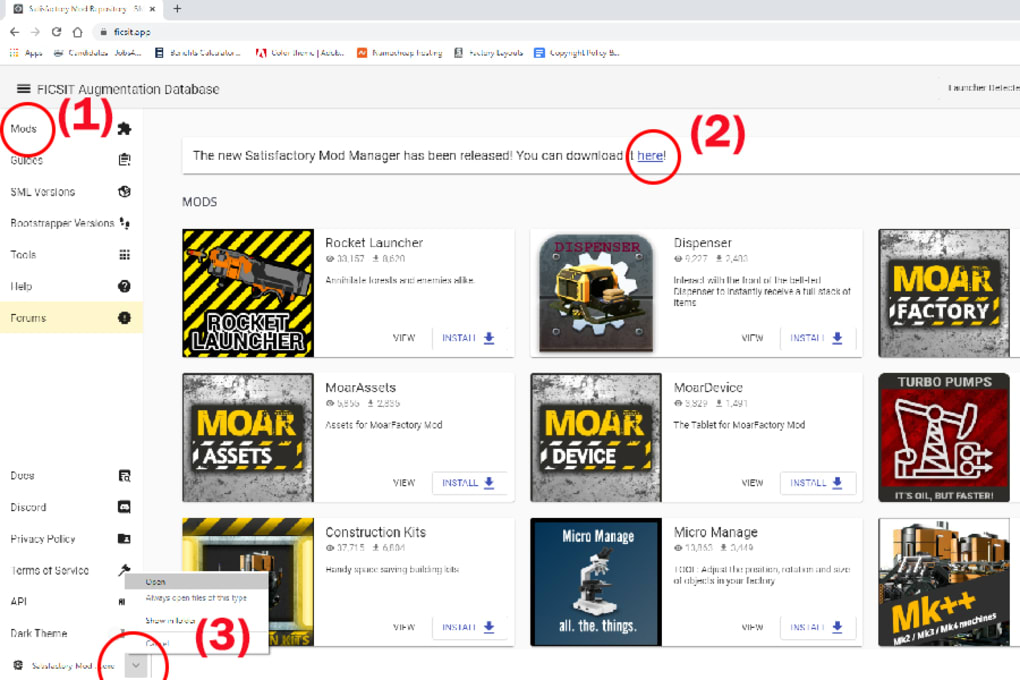
At its heart, SMM connects directly to the Satisfactory mod store, a repository of community-created content that, as of recent counts, boasts “more than 250 Satisfactory mods available.” This impressive library encompasses everything from minor tweaks to major overhauls, ensuring that virtually every aspect of the game can be customized. Upon launching the manager, users are greeted with a comprehensive list of these mods, complete with descriptions, version numbers, and often, ratings or reviews from other players. This organized display eliminates the need to scour disparate websites or forums, consolidating all necessary information in one convenient location.
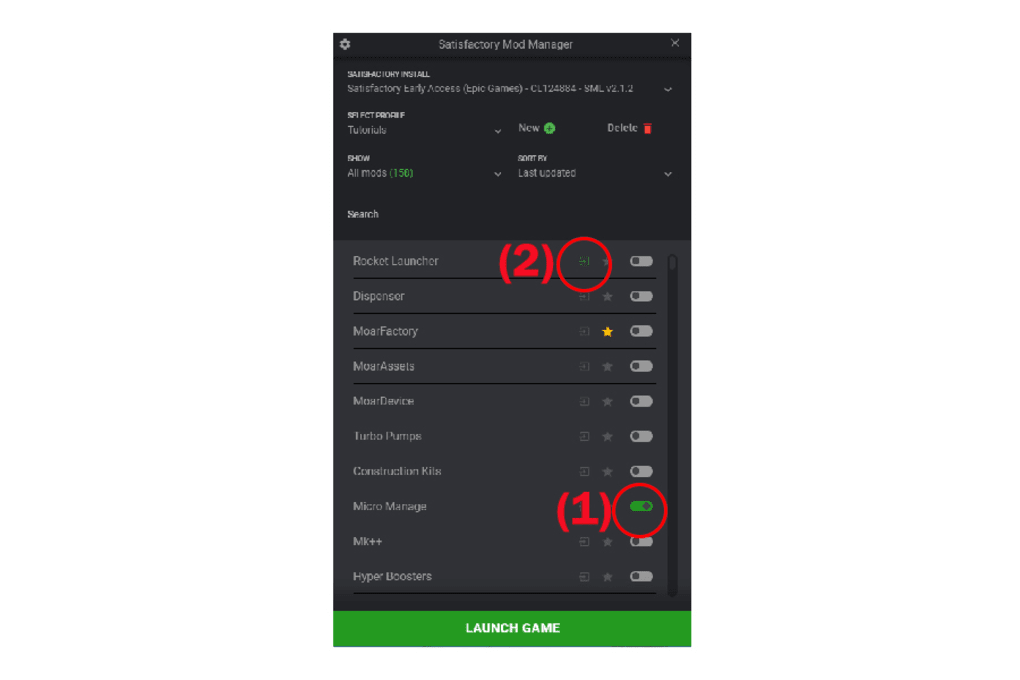
The standout feature, and perhaps the most impactful for user convenience, is the one-click download capability. Gone are the days of manually downloading zip files, navigating to the downloads folder, extracting contents, and then copying them into the correct game directories. With SMM, the process is streamlined to an unparalleled degree. A player simply identifies a mod they wish to install, clicks a single button, and the manager handles the rest. It automatically downloads the mod, places it in the correct location, and prepares it for activation within the game. This level of automation is transformative, significantly reducing the time and effort required to get new mods up and running, thereby encouraging players to experiment with a wider variety of content.
This seamless process extends beyond just the initial installation. SMM is designed to understand the intricacies of Satisfactory’s game files, ensuring that mods are installed correctly and in a way that minimizes potential conflicts. It manages file dependencies (where one mod might require another to function), tracks installed versions, and flags any potential issues before they impact gameplay. For players, this translates into a much smoother and more reliable modding experience, allowing them to focus on the creative aspects of factory building rather than troubleshooting technical problems. The “instant access to hundreds of mods” and the “easy downloading of mods” are not just buzzwords; they represent a fundamental shift in how players interact with the Satisfactory modding community, making sophisticated customization accessible to a casual player base as well as hardcore enthusiasts.
Advanced Mod Management for Effortless Gameplay
While the ease of mod discovery and installation is a significant draw, the true power of the Satisfactory Mod Manager becomes apparent in its comprehensive mod management capabilities. Beyond merely adding mods, SMM empowers users to precisely control their modded gameplay environment, offering flexibility and stability that manual methods simply cannot match.
The core of this management functionality lies in the ability to select which mods to activate before launching the game. This feature is a game-changer for players who use numerous mods or frequently switch between different mod setups. Instead of a permanent installation that requires uninstalling and reinstalling to change, SMM allows for on-the-fly toggling. Users can browse their downloaded mods within the manager and simply check or uncheck boxes to enable or disable them for their next play session. This granular control is invaluable for several reasons:
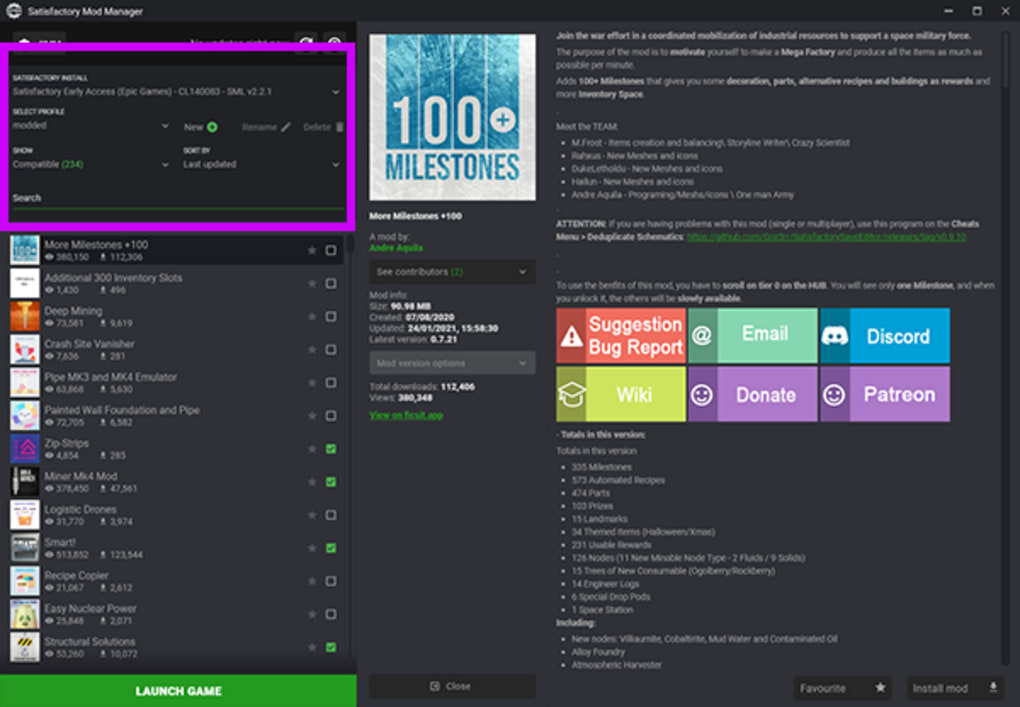
- Experimentation: Players can easily test new mods without committing to a full installation. If a mod causes issues or isn’t to their liking, they can simply deactivate it with a single click, preventing it from loading with the game.
- Stability and Troubleshooting: When issues arise, the ability to activate mods selectively is crucial for troubleshooting. By disabling mods one by one, players can quickly identify which mod is causing a conflict or bug, making resolution far less frustrating.
- Personalized Sessions: Different playstyles or save files might benefit from different mod sets. A player working on a massive automated build might require specific production or logistics mods, while another focusing on exploration might prefer mapping or quality-of-life enhancements. SMM facilitates quick switching between these customized profiles, ensuring that each game session is perfectly tailored.
- Performance Optimization: Some mods, especially those that add complex new assets or features, can impact game performance. By only activating the necessary mods for a given session, players can maintain optimal frame rates and avoid unnecessary strain on their system.
Crucially, SMM’s management system entirely bypasses the need for players to “put or remove files from the game folders.” This eliminates the risk of accidental deletion or corruption of core game files, a common pitfall in manual modding. The manager handles all file manipulations internally, creating a safe and isolated environment for mods. This not only protects the integrity of the base game but also simplifies the user experience to an unprecedented degree. Players can “skip the hassle of putting and removing files from the game folders and go straight to playing,” which is the ultimate goal of any game utility – enhancing the gaming experience without adding friction. The meticulous design of SMM ensures that even those with minimal technical expertise can confidently explore and manage a rich tapestry of modifications, making their Satisfactory journey truly their own.
Installation, Updates, and System Compatibility
Adopting a new utility, especially one that interacts directly with game files, often raises questions about its installation process, maintenance, and compatibility. The Satisfactory Mod Manager excels in these areas by adhering to standard practices and offering a reliable experience, albeit with a minor recurring task for the user.
The installation of SMM is designed to be as straightforward as possible, mirroring the process for “any other game utility.” Once the download is complete from a trusted source like PhanMemFree.org, the user simply locates and “open[s] the exe file and follow[s] the installation steps.” This typically involves a standard Windows installer wizard, guiding the user through prompts such as agreeing to terms of service, choosing an installation directory, and creating desktop shortcuts. The process is intuitive and requires no specialized knowledge, making it accessible even for novice PC users. After the installation is finalized, launching the manager will immediately present the user with the list of available mods, ready for download and activation. The client itself is a relatively compact application, with its latest version (2.5.0) weighing in at a manageable 78.23 MB, ensuring a quick download and minimal impact on disk space.
A key aspect of SMM’s functionality and a point frequently highlighted is its need for periodic updates. The description notes that “the app gets updated often, requiring you to install the latest version frequently” and that “You will need to download the latest version to enjoy these enhancements.” While some might view frequent updates as a minor inconvenience, it is, in fact, a crucial indicator of a well-maintained and actively supported utility. These updates typically bring several benefits:
- New Features and Improvements: Developers continuously refine the manager, adding new functionalities, improving user interface, or optimizing performance.
- Compatibility with Game Updates: Satisfactory itself is an actively developed game, receiving regular patches and major content updates. SMM updates are essential to maintain compatibility with these official game versions, ensuring that mods continue to function correctly and preventing game crashes.
- Mod Store Enhancements: Updates may also refine the mod store, improving mod discovery, search capabilities, or adding new categories.
- Bug Fixes and Security Patches: As with any software, bugs can appear. Regular updates address these issues, improving the manager’s stability and security.
For users, this means staying current with SMM’s versions is vital to ensure a smooth modding experience and access to the latest community content. Fortunately, the update process is usually as simple as downloading and running the new .exe file, which often automatically uninstalls the old version before installing the new one, retaining user settings and downloaded mods.
In terms of system compatibility, SMM is specifically developed for the Windows operating system. It supports “Windows 7” and later versions, making it compatible with a vast majority of PC gaming setups. The utility is available in “English,” catering to a wide global audience. PhanMemFree.org’s security assessment indicates a “Clean” status for the application (V2.5.0, last updated January 31, 2023), based on scans by “more than 50 of the world’s leading antivirus services,” assuring users of its safety and integrity. This robust support structure, coupled with transparent update policies and wide compatibility, solidifies SMM’s position as a reliable and user-friendly tool for the Satisfactory modding community.
Weighing the Pros and Cons: Is SMM Right for You?
When considering the integration of any third-party utility into your gaming setup, a balanced evaluation of its advantages and disadvantages is essential. For the Satisfactory Mod Manager, the benefits overwhelmingly outweigh the drawbacks, particularly for players who frequently engage with the game’s modding community.
The Pros: Unlocking a Superior Modding Experience
The advantages of SMM are clear and compelling, directly addressing the pain points associated with manual modding:
- Instant Access to Hundreds of Satisfactory Mods: This is arguably the most significant benefit. SMM acts as a direct portal to a vast and ever-growing library of community-created content. No more trawling through forums or unofficial websites; everything is centralized and easily discoverable within the manager. For a game like Satisfactory, where custom content can dramatically extend replayability and introduce fresh challenges, this streamlined access is invaluable.
- Easy Downloading of Mods (One-Click Installation): The one-click download feature is a game-changer for user convenience. It eliminates the manual steps of downloading, extracting, and placing files, significantly reducing the time and effort required to get mods up and running. This low barrier to entry encourages experimentation and allows players to quickly test out new mods without fear of complex installation procedures.
- Hassle-Free Mod Activation and Deactivation: The ability to “set up mods to be activated before launching the game” provides unparalleled control. Players can easily toggle mods on or off for specific play sessions, experiment with different mod combinations, or quickly troubleshoot conflicts by isolating problematic mods. This dynamic management system not only saves time but also protects the integrity of the game installation by avoiding direct manipulation of game files.
- Enhanced Game Longevity and Replayability: By making modding accessible, SMM directly contributes to the game’s lifespan. Players can continuously discover new ways to play, new challenges to overcome, and new quality-of-life features that keep the experience fresh and engaging for hundreds, if not thousands, of hours.
- Community-Driven Development: SMM is a product of the Satisfactory community’s dedication. Its continuous development reflects the needs and desires of the player base, ensuring it remains relevant and effective as the game evolves.
The Cons: Minor Inconveniences in an Otherwise Smooth Process
While the benefits are substantial, there are a couple of minor points that users might consider:
- Requires Users to Download the New Version Frequently: As noted, SMM receives frequent updates to maintain compatibility with Satisfactory game updates, introduce new features, and fix bugs. While a sign of active development, it does mean users occasionally need to download and install a new
.exefile. This isn’t a complex process, but it is a recurring manual step. However, given the alternative of manually updating dozens of individual mods, this minor inconvenience pales in comparison to the efficiency gained. - May Be Flagged by Users’ Antivirus: Software that interacts with game files or downloads content from external repositories can sometimes trigger false positives from overly aggressive antivirus programs. PhanMemFree.org addresses this directly, stating that their comprehensive scans (using over 50 leading antivirus services) indicate the program is “Clean” and that flags are “possibly false positives” due to broad detection signatures. Users might need to add an exception to their antivirus for SMM to function correctly, which is a common occurrence with many game utilities and mod managers.
Is SMM Right for You?
Ultimately, if you are a player who finds yourself saying, “If only Satisfactory had X” or “I wish I could do Y,” then Satisfactory Mod Manager is an absolute must-have. Its ability to simplify the entire modding process, from discovery to deployment, transforms a potentially frustrating endeavor into an effortless expansion of your gameplay. For dedicated pioneers eager to explore the incredible breadth of community-created content and customize their factory-building adventure to their heart’s content, SMM is not just a recommendation—it’s an essential gateway to an even richer Satisfactory experience. As PhanMemFree.org concludes, “If you are a player who uses tons of mods for Satisfactory, then downloading Satisfactory Mod Manager is a must.” It truly is “a great way to play with various mods without exerting much effort.”
Beyond SMM: Exploring the Wider Modding Landscape and Alternatives
While the Satisfactory Mod Manager stands as the definitive tool for Satisfactory-specific modding, it’s beneficial to understand its place within the broader ecosystem of game modifications and mod management. SMM caters specifically to Satisfactory, a niche it fills exceptionally well. However, the concept of a mod manager isn’t unique to this game; it’s a critical component for many titles with robust modding communities.
General-purpose mod managers, such as Mod Organizer 2 and Nexus Mods Manager (often referred to as Vortex, the successor to NMM), are widely used across a multitude of PC games, particularly those from Bethesda (like Fallout and Elder Scrolls series) or games with extensive modding scenes like Mount & Blade or Stardew Valley. These managers offer similar functionalities to SMM, including organized mod libraries, simplified installation, and conflict resolution, but they are designed to be game-agnostic or to support a wide range of titles under a single platform. For instance, the reference mentions Mod Organizer 2 (“Manage your mod collections in a hassle-free manner”) and Fallout 4 Mod Manager (“A free and minimalistic Fallout 4 mod manager”) as alternatives. These demonstrate that while the concept is shared, SMM’s strength lies in its specialized focus.
The existence of a dedicated manager like SMM for Satisfactory signifies the maturity and vibrancy of its modding community. It implies that the game’s architecture is conducive to modification and that there’s enough demand from players and developers to warrant a specialized tool. Unlike games that might only support basic manual mod installations, Satisfactory’s modding scene has evolved to a point where automated, managed solutions are not just convenient but necessary for maintaining game stability and fostering continued innovation.
The impact of such tools extends beyond individual player convenience. Mod managers facilitate easier content creation and distribution for mod developers. By providing a stable platform for users, developers can focus more on creating engaging content rather than providing extensive installation guides or troubleshooting common user errors. This symbiotic relationship between mod managers, players, and developers ensures a healthy and thriving modding ecosystem, which ultimately prolongs the life and enhances the appeal of the base game. It transforms a single-player experience into a dynamic, community-driven evolving world.
In essence, while other powerful mod managers exist for different games, the Satisfactory Mod Manager carves out its own indispensable niche. It’s tailored precisely to the technical requirements and community structure of Satisfactory, making it the optimal choice for any pioneer looking to expand their factory-building horizons. Its specialized design means better compatibility, more streamlined updates for Satisfactory-specific mods, and a user experience finely tuned to the game’s unique demands. For the dedicated Satisfactory player, SMM isn’t just an alternative to manual modding; it’s the gateway to an enriched and endlessly customizable pioneering adventure, cementing the game’s status as a community-driven masterpiece.
The Satisfactory Mod Manager represents a significant leap forward for enthusiasts of Coffee Stain Studios’ iconic factory-building game. By centralizing mod discovery, simplifying installation, and providing robust management tools, SMM transforms the often-intimidating world of game modification into an accessible and enjoyable experience. It liberates players from the complexities of manual file manipulation, allowing them to focus on the creative joy of customizing their Satisfactory journey. With its extensive library of mods, user-friendly interface, and commitment to regular updates, SMM is undeniably an essential utility for any pioneer looking to truly personalize their alien planet endeavors. Download it from PhanMemFree.org today and unlock the full, boundless potential of Satisfactory.
File Information
- License: “Free”
- Version: “2.5.0”
- Latest update: “January 31, 2023”
- Platform: “Windows”
- OS: “Windows 7”
- Language: “English”
- Downloads: “10K”
- Size: “78.23 MB”


