
Scanner is a free, lightweight utility for Windows that provides a visual representation of your hard drive’s storage usage. Developed by Steffen Gerlach, this portable application offers a unique approach to disk space analysis, prioritizing ease of use and minimal resource consumption over advanced features. While not replacing more comprehensive disk analysis tools, Scanner excels at quickly showing you where your storage space is going, making it a handy tool for anyone looking for a straightforward way to manage their files and applications.
Understanding the Need for a Visual Disk Space Analyzer
Maintaining a healthy hard drive involves regular checks on disk space usage. While Windows provides built-in tools to view file and folder sizes, these methods often lack the visual clarity needed for quick comprehension. Right-clicking a folder to view its properties reveals its size, and the “This PC” section in File Explorer gives an overview of drive usage, but these methods can be cumbersome when attempting to understand the overall distribution of files across the drive. The built-in pie chart showing “Free Space” and “Used Space” offers a rudimentary visual, but it lacks the granularity to show which specific files and folders consume the most space. This is where a dedicated disk space analyzer like Scanner steps in, providing a more intuitive and informative visual representation of your disk usage.
Scanner’s Unique Approach: The Concentric Circle Visualization
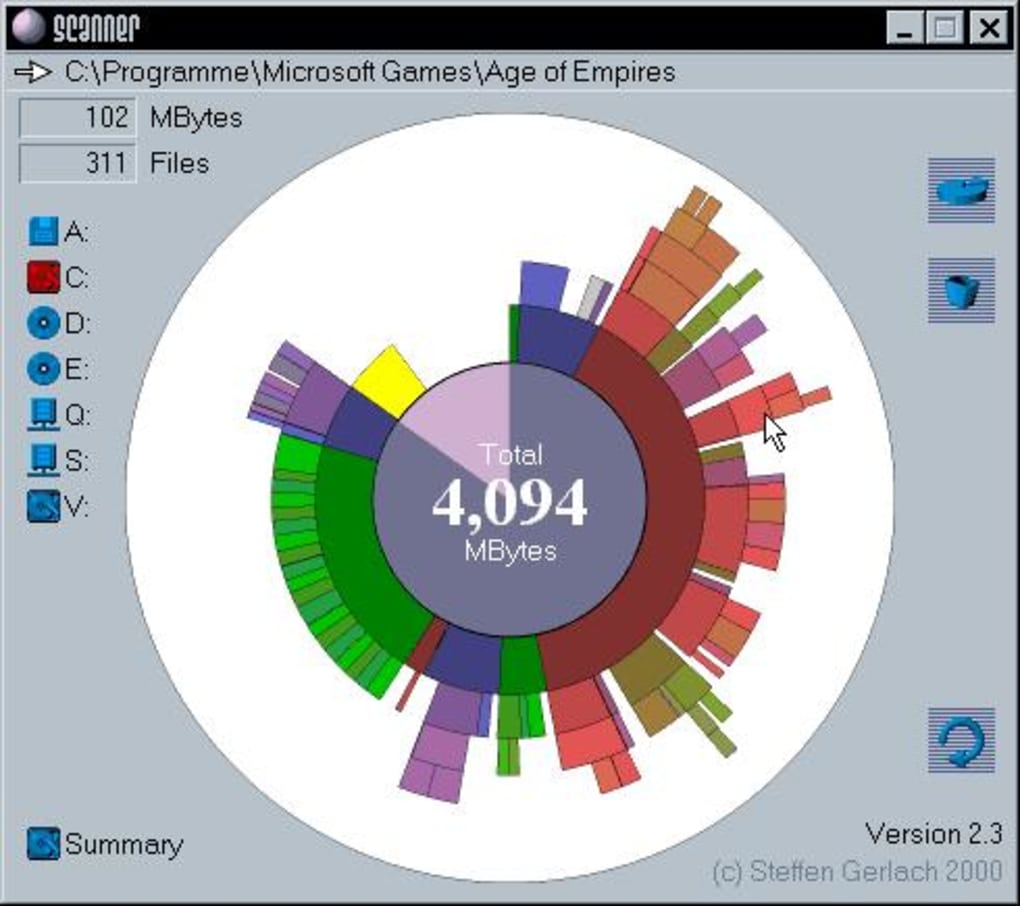
Unlike many disk analyzers that rely on traditional tree-like directory structures, Scanner uses a visually striking concentric circle (or “sunburst”) chart to depict file and folder sizes. This unique approach offers several advantages:
- Immediate Overview: At a glance, you can see the relative sizes of your largest files and folders. The largest components are represented by the outermost circles, with progressively smaller components layered inwards. This allows for rapid identification of space hogs.
- Intuitive Hierarchy: The layered circles clearly represent the hierarchical structure of your file system. Each circle represents a folder, and its size relative to other circles reflects its storage footprint.
- Detailed Information on Hover: Hovering your mouse cursor over a specific circle provides detailed information about that folder or file, including its full path, total size, and the number of files it contains. This eliminates the need to navigate through multiple menus or windows to access this information.
Features and Functionality
Scanner’s simplicity is both its strength and its limitation. While it lacks the sophisticated features of more advanced disk analysis software, its core functionality is highly effective:
- Lightweight and Portable: Scanner is remarkably lightweight and doesn’t require installation. Simply extract the contents of the downloaded ZIP file and run the executable. This portability makes it ideal for quick checks on multiple computers or for use from a USB drive.
- Automatic Scanning: Upon execution, Scanner automatically scans your selected drive(s), rapidly generating the concentric circle visualization. The speed of the scan is remarkable, even on drives with a large number of files and folders.
- Drive Selection: You can select individual drives or partitions for analysis. This prevents unnecessary scanning of drives that you are not currently interested in.
- Zoom Functionality: The sunburst chart supports zooming, allowing you to examine specific areas of the visualization in more detail.
- Direct Control Panel Access: Scanner offers a direct link to the Windows Control Panel’s “Add/Remove Programs” feature. This allows for quick access to uninstall programs that are identified as significant space consumers.
- Clear Visual Representation: The concentric circle representation is highly intuitive and immediately reveals the relative sizes of folders and files.
However, Scanner’s simplicity also means it lacks certain features found in other disk analysis tools:
- Lack of Detailed Reporting: Scanner doesn’t generate detailed reports that can be saved or printed. The visualization is primarily for on-screen examination.
- Limited Filtering Options: There’s no way to filter the results based on specific criteria, such as file type or date modified.
- No Advanced Analysis: Features such as duplicate file detection, or analysis of file types are absent.
Scanner in Comparison to Other Disk Analyzers
While Scanner shines in its simplicity and visual appeal, other tools offer more advanced features. TreeSize, for instance, provides a detailed tree-like view of the disk structure, allowing for more granular analysis and the ability to identify deeply nested folders that consume significant space. Other tools might offer reporting capabilities, duplicate file detection, or more advanced filtering options. However, none match Scanner’s ease of use and rapid visualization. Scanner serves a specific niche: providing a quick and easy way to visualize disk space usage without the complexities of more powerful, yet often more resource-intensive, alternatives.
Conclusion: A Practical Tool for Everyday Use
Scanner fills a specific need for users seeking a straightforward and visually appealing way to understand their hard drive’s storage usage. Its lightweight nature, quick scanning speed, and unique visualization make it a valuable tool for routine disk space maintenance. While lacking the advanced features of more comprehensive disk analysis software, Scanner’s simplicity is its strength. It’s a perfect choice for users who want a quick overview of their disk space without the need for complex settings or extensive analysis. If you need a tool to quickly identify large files and folders and free up disk space, Scanner offers a user-friendly and efficient solution. However, for in-depth analysis and detailed reporting, consider exploring other, more feature-rich disk analysis tools available on the market.
File Information
- License: “Free”
- Latest update: “July 12, 2023”
- Platform: “Windows”
- OS: “Windows 10”
- Language: “English”
- Downloads: “412.6K”
- Size: “168.44 KB”


