
Scanner - Quick and Easy Document Scanning is a free, powerful, and compact application designed for the Universal Windows Platform (UWP). It transforms your Windows computer into a versatile and efficient document scanning system, offering a seamless experience for digitizing paper documents. Whether you’re a student managing coursework, an office worker streamlining workflows, or simply someone needing a reliable method for converting paper to digital format, this application provides a user-friendly and feature-rich solution.
Effortless Document Scanning
The core functionality of Scanner lies in its ability to quickly and accurately scan documents using any Windows Imaging Acquisition (WIA) compatible scanner. This broad compatibility ensures that the application works with virtually all consumer-grade scanners available on the market today, eliminating the need for specialized hardware or drivers. The process is intuitive: simply connect your scanner, launch the application, and initiate a scan. The software handles the technical details, providing high-quality digital images of your documents with minimal user intervention.
Beyond basic scanning, Scanner offers granular control over the scanning process. Users can adjust settings to optimize the scan quality based on their specific needs. These customizable parameters include:
- Scanning Location: Precisely define the area to be scanned, eliminating unnecessary background elements and ensuring focus on the relevant content.
- Magnification: Control the zoom level for detailed scans, particularly useful when working with small text or intricate details. This allows for the preservation of clarity even when scanning smaller items or sections of documents.
- Color Modes: Choose between various color modes (e.g., color, grayscale, black and white) to optimize the scan based on the document type and desired file size. Scanning in grayscale or black and white can significantly reduce file size without sacrificing readability for text-based documents.
The simplicity of the user interface ensures that even users with limited technical expertise can navigate the application and produce high-quality digital scans with ease. The intuitive design minimizes the learning curve, making it accessible to a broad range of users.
Built-in Image Editing Capabilities
Scanner transcends the limitations of a basic scanning utility by incorporating a comprehensive built-in image editor. This powerful feature eliminates the need for separate image editing software, streamlining the workflow and improving efficiency. The integrated editor provides a suite of tools that allow users to refine scanned images before saving them:
- Cropping: Precisely trim images to remove extraneous borders, whitespace, or unwanted elements. This improves the overall presentation and reduces file size.
- Color Adjustments: Fine-tune the color balance, brightness, and contrast to enhance the clarity and readability of the scanned document. This ensures optimal visual quality for the final digital image.
- Highlighting: Add highlights or annotations directly to the scanned image, adding further functionality beyond simple document capture. This allows for quick notes or emphasis on specific areas.
- Other Editing Tools: The editor may include additional tools for further image manipulation, potentially including features such as image rotation, straightening, and other enhancements, enhancing the overall functionality and user experience.
These editing capabilities are crucial for optimizing scanned documents for various uses. Cropping ensures cleaner images, while color adjustments enhance readability, particularly important for documents with faded ink or low contrast. The highlighting functionality provides a quick and easy method for adding notes or emphasis, eliminating the need to use separate annotation software.
Seamless PDF Creation and Management
One of the key strengths of Scanner is its ability to directly create and manage PDF documents. Once a document has been scanned and edited, the application seamlessly converts it into a high-quality PDF file. This eliminates the need for separate conversion software, maintaining a streamlined workflow. The generated PDF documents are compatible with a wide range of PDF readers and editing software, providing universal accessibility.
The option to create PDF documents from scanned images is a particularly valuable feature. This is because PDF is a universally recognized and widely supported document format, ensuring compatibility across different devices and operating systems.

System Requirements and Compatibility
Scanner is designed for the Windows operating system, specifically supporting the UWP. This ensures broad compatibility across a wide range of Windows devices, from desktop PCs to tablets. The application requires a WIA-compatible scanner for optimal operation, ensuring that the vast majority of commonly used scanners are supported.
The specific system requirements for Scanner may vary depending on the version and features used, however, it is generally designed to operate on systems with modest specifications, making it accessible to a wide range of users, regardless of their hardware capabilities.
User-Friendly Interface and Ease of Use
The design philosophy behind Scanner emphasizes simplicity and ease of use. The user interface is clean, intuitive, and straightforward. Even users with limited technical expertise can quickly learn to use the application and achieve excellent results. The concise layout reduces complexity, ensuring a focus on core functionality without overwhelming the user with unnecessary options.
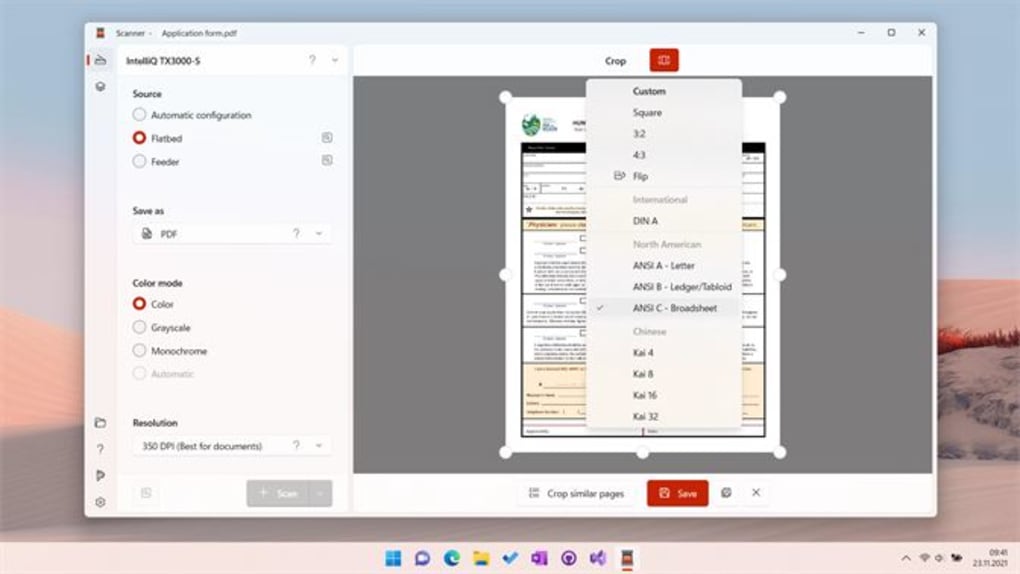
The streamlined user experience makes the application highly efficient, minimizing the time spent on the scanning process and allowing users to quickly and easily digitize their documents.
Security and Privacy Considerations
While the application itself is designed for document scanning and does not inherently handle sensitive data beyond the scanned documents, it’s important to be mindful of data security and privacy practices, especially when handling sensitive information. Ensure that your scanner and computer are protected by appropriate security measures and that scanned documents are appropriately stored and managed to prevent unauthorized access.
Regular software updates are vital for maintaining security and addressing any potential vulnerabilities that might arise. It’s essential to keep your software updated to ensure you benefit from the latest security patches and improvements.
Conclusion
Scanner - Quick and Easy Document Scanning offers a comprehensive and efficient solution for digitizing paper documents. Its combination of broad scanner compatibility, user-friendly interface, powerful editing tools, and seamless PDF creation makes it a valuable asset for students, office workers, and anyone needing a reliable method for converting paper documents to digital format. The application’s intuitive design and robust feature set ensure a seamless and productive experience, streamlining workflows and saving time. The integration of a built-in image editor further enhances its functionality, eliminating the need for external image processing tools. The free availability of this application makes it an attractive option for users seeking a cost-effective and high-quality document scanning solution for their Windows devices.
File Information
- License: “Free”
- Version: “3.0.6.0”
- Latest update: “February 7, 2024”
- Platform: “Windows”
- OS: “Windows 11”
- Language: “English”
- Downloads: “3.7K”


