
In the vast and ever-evolving landscape of software development tools, text editors and Integrated Development Environments (IDEs) form the fundamental bedrock upon which all digital creations are built. Among the myriad options available, SciTE (SCIntilla based Text Editor) stands out as a unique and enduring choice, particularly for those who appreciate efficiency, stability, and deep customizability. Far more than just a simple text editor, SciTE has evolved from its origins as a demonstration platform into a versatile and robust tool favored by experienced programmers for a variety of tasks, from routine coding to building and debugging complex applications.
At its core, SciTE is a free and open-source development tool primarily developed by Neil Hodgson. Its lineage traces back directly to the Scintilla editing component, a powerful and flexible library designed to provide advanced text editing capabilities. Initially conceived as a programming application to showcase the capabilities of this very library, SciTE quickly transcended its demonstrative purpose. It matured into a general-purpose editor, equipped with features essential for the modern development cycle, including app building, testing, and debugging. This organic growth, coupled with its open-source nature, has cultivated a vibrant, community-driven platform where users are empowered to modify and adapt the editor to precisely suit their specific needs and workflows.
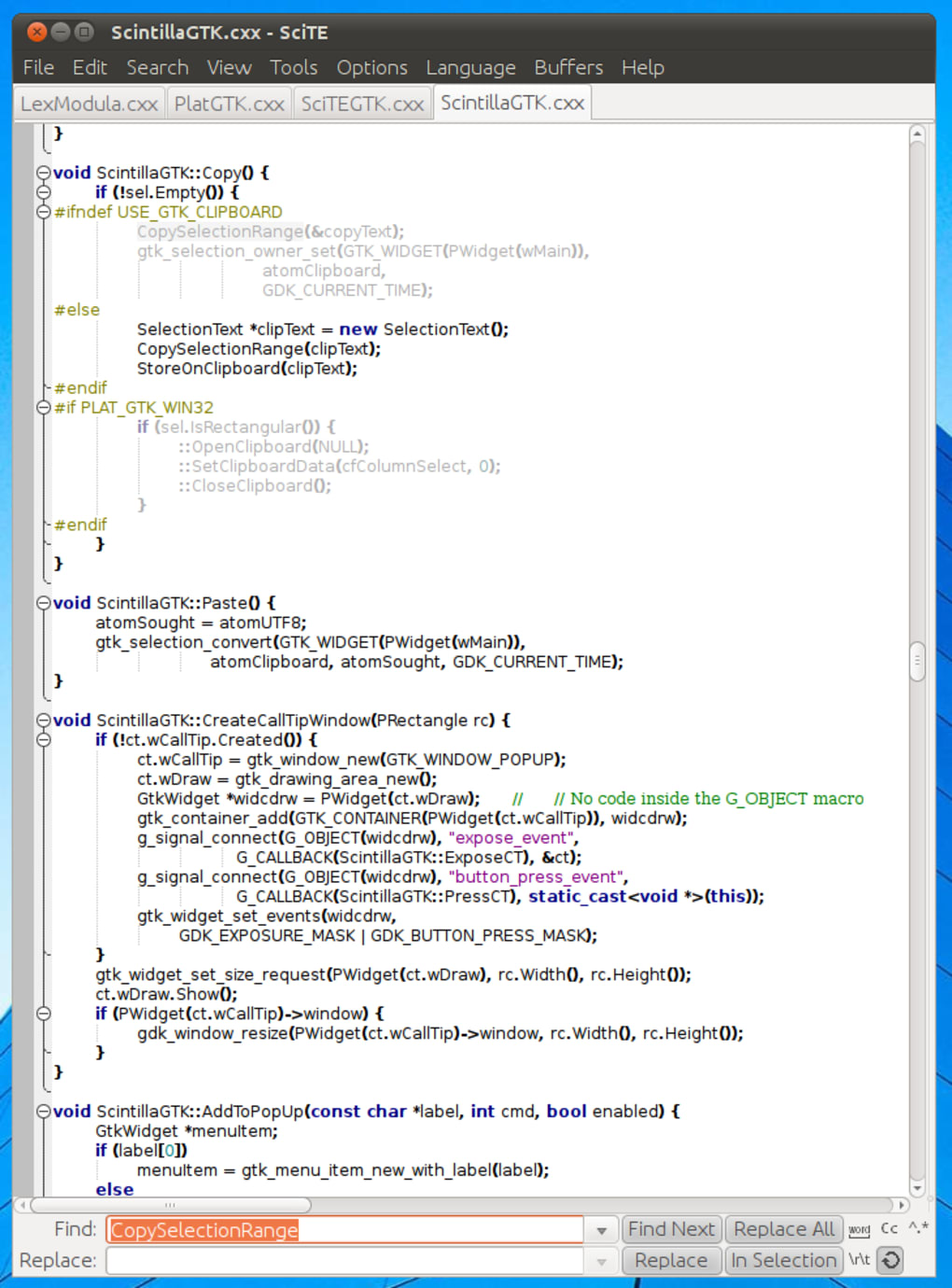
The C++ programming language forms the backbone of SciTE, a testament to its performance-oriented design. This foundation makes it an excellent alternative to other popular editors like Notepad++ or XML Notepad, particularly for developers who regularly work with languages from the same family or frequently interact with libraries built on C++. Its emphasis on directness, configurability, and a no-frills approach often appeals to those who prioritize raw functionality and performance over elaborate graphical interfaces or extensive feature bloat. SciTE’s lean architecture ensures a swift and responsive experience, a critical factor for programmers who spend countless hours interacting with their code.
The Evolution of a C++-Based Code Editor
To fully appreciate SciTE, one must understand its genesis and the philosophy that has guided its development. Its story is not one of a commercial product designed to capture a mass market, but rather a functional demonstration that grew into a robust tool through iterative improvement and community engagement.
From Scintilla Demonstration to General-Purpose Tool
The journey of SciTE began with Scintilla, a free and open-source source code editing component designed for Windows and Linux. Scintilla itself is a powerful and flexible editor control, providing features such as syntax highlighting, code folding, autocompletion, and margin indicators. Neil Hodgson, the creator of Scintilla, developed SciTE as a reference application—a living example of how to implement and leverage the Scintilla library effectively. This initial purpose meant that SciTE was built with a clear focus on showcasing Scintilla’s capabilities without unnecessary layers of abstraction.
What started as a simple demonstration quickly revealed its inherent utility. Developers began to realize that the demonstration application itself, SciTE, possessed all the fundamental qualities needed for a practical code editor. It was lightweight, fast, and, crucially, directly exposed the powerful features of Scintilla. This directness allowed for a level of control and performance that many other editors, built on more complex frameworks, couldn’t match. As demand grew and contributions flowed in from the nascent user community, SciTE gradually expanded its feature set. It integrated functionalities beyond mere text editing, incorporating capabilities for compiling and running programs, handling build processes, and even basic debugging.
This evolution cemented SciTE’s status as a general-purpose editor. While it may not boast the extensive, integrated toolchains of a full-fledged IDE like Visual Studio or IntelliJ IDEA, it provides a highly efficient environment for managing code, compiling sources, and executing simple scripts or applications. Its minimalist philosophy ensures that it remains nimble, making it ideal for tasks that require quick edits, small-to-medium project development, or as a primary editor in environments where resources are constrained, or a lightweight solution is preferred. The fact that it is self-hosting—meaning it can be used to build SciTE and Scintilla themselves—speaks volumes about its robustness and self-sufficiency.
Underlying Architecture: The Power of Scintilla
The architectural cornerstone of SciTE is undoubtedly the Scintilla text editing component. Understanding Scintilla is key to understanding SciTE’s strengths. Scintilla is not just a display engine; it’s a sophisticated framework for advanced text manipulation, specifically designed for source code. Its C++ foundation allows for highly optimized performance, direct memory access, and fine-grained control over how text is rendered and interacted with.
Key features provided by Scintilla, and consequently by SciTE, include:
- Syntax Highlighting: Scintilla supports highly customizable syntax highlighting for hundreds of programming languages, allowing different elements (keywords, comments, strings, numbers, etc.) to be displayed in distinct colors and styles, significantly improving code readability.
- Code Folding: This feature allows users to collapse and expand sections of code, such as functions, classes, or conditional blocks, providing a high-level overview of the program structure and reducing visual clutter.
- Error Indicators and Markers: Scintilla can display various types of indicators in the margin or directly within the text, useful for marking breakpoints, compiler errors, or search results.
- Line Numbers and Bookmarks: Standard features for navigation and referencing specific parts of the code.
- Autocompletion and Call Tips: While basic in SciTE’s default configuration compared to more advanced IDEs, Scintilla provides the underlying mechanism for these features, allowing for potential expansion through scripting.
- Regular Expression Search and Replace: A powerful tool for complex text manipulation, leveraging Scintilla’s efficient search algorithms.
Because SciTE directly leverages Scintilla, it benefits from the library’s efficiency and extensibility. This architecture contributes significantly to SciTE being described as “fast, stable, and powerful” by its users. Unlike editors that might layer a graphical user interface (GUI) on top of a more generic text component, SciTE’s direct integration with Scintilla means that its core text editing capabilities are highly optimized and deeply configurable at a low level. This tight coupling also allows SciTE to serve as an excellent “official demo” of Scintilla, showcasing its capabilities in a practical, real-world application, which, as some users point out, can make it more stable in its core functionality than other editors that use Scintilla but add more layers of abstraction.
Key Features and Developer-Centric Capabilities
SciTE’s enduring popularity among its user base stems from a carefully balanced set of features that prioritize developer productivity and flexibility. While its aesthetic might hark back to an earlier era of software design, its underlying capabilities are anything but dated, providing a robust environment for a wide array of programming tasks.
Extensive Language and Operating System Support
One of SciTE’s most compelling attributes is its remarkable adaptability across various programming languages and operating systems. Despite being primarily built using C++, a language often associated with system-level programming and performance-critical applications, SciTE readily supports a vast spectrum of other programming languages. This broad compatibility makes it a valuable tool for polyglot developers or teams working across different technology stacks.
The list of supported languages is extensive, covering many popular choices in software development today. While not explicitly enumerated in the provided text, common languages that SciTE and Scintilla typically support out of the box or with minimal configuration include:
- Scripting Languages: Python, Ruby, Perl, Lua, PHP, JavaScript
- Markup Languages: HTML, XML, CSS
- System and Application Languages: C, C++, C#, Java, Go, Pascal, Fortran, Ada
- Database Languages: SQL
- Configuration Files: INI, YAML, JSON
- Batch and Shell Scripts: Batch, Bash, PowerShell
This extensive support is facilitated by Scintilla’s flexible lexer system, which allows for easy integration of new language syntax definitions. For developers, this means they can use a single, familiar editor for almost all their coding tasks, reducing the cognitive load associated with switching between different tools.
Beyond language support, SciTE also boasts cross-platform compatibility, a crucial factor in today’s diverse computing landscape. It is readily available for various operating systems, most notably Windows and Linux. This multi-OS capability caters to a wide range of users, from those entrenched in Microsoft’s ecosystem to open-source advocates and server administrators working within Linux environments. The ability to maintain a consistent editing environment across different machines and operating systems simplifies workflows, especially for developers who might work on both Windows desktops and Linux servers, or for teams where members utilize different operating systems. This consistency reduces friction and promotes efficiency across development teams.
Furthermore, SciTE is designed to handle various human languages, focusing on left-to-right scripts. This includes standard English and European languages, but notably also extends to Arabic, demonstrating a commitment to wider accessibility and usability for a global developer community.
The Customizable Yet Classic Interface
SciTE’s user interface often elicits varied reactions. Described as “minimalist” yet potentially “dated” and “non-friendly for new users,” its design philosophy leans heavily towards functionality and efficiency rather than modern aesthetic trends. However, this apparent simplicity is deceptive, as it houses a powerful set of text editing capabilities.
The interface, while perhaps not visually stunning, provides commonly used features and toolbars that are easily accessible. This includes standard text editing operations like cut, copy, paste, undo, redo, and basic file management functions. Its strength lies in its ability to offer these essential tools without cluttering the screen, allowing developers to focus primarily on their code.
The true genius of SciTE’s interface, however, lies in its profound customizability. Far from being a static, immutable environment, SciTE allows users to extensively modify the editor’s appearance and behavior. This goes beyond simple theme changes; users can alter:
- Syntax Highlighting Schemes: Customizing colors, fonts, and styles for different language elements.
- Keyboard Shortcuts: Redefining key bindings to match personal preferences or integrate with existing muscle memory from other editors.
- Toolbars and Menus: Adding, removing, or rearranging items to tailor the interface to specific needs.
- Behavioral Settings: Adjusting everything from tab sizes and line endings to autocompletion triggers and saving behaviors.
- Custom Commands and Scripts: Integrating external tools or defining custom actions through scripting, effectively extending SciTE’s functionality.
This level of customization is typically achieved through plain text configuration files, which, while requiring a learning curve for beginners, offer unparalleled control for experienced users. It means that while the “base setup has been retained from the earliest versions” and might “appear dated,” a knowledgeable user can transform SciTE into a highly personalized and efficient coding environment. This versatility allows developers to mold the app precisely to their unique requirements, making it a highly personal and powerful companion.
However, the dated base interface and the learning curve associated with its configuration files present a challenge for new users. Features like “search and replace,” while functional, might not offer the advanced visual feedback or intuitive controls found in more modern editors. For those accustomed to graphical configuration tools and immediate visual feedback, SciTE’s approach can feel somewhat archaic. Nevertheless, for experienced users willing to invest the time, these limitations are often overcome by the immense power of its configurability. As one user aptly puts it, “SciTE is very configurable (if you know how to do it).”
Streamlining the Development Workflow
SciTE’s capabilities extend beyond mere text editing; it is designed to be an integral part of the software development workflow, particularly for tasks involving building, running, and testing programs. This makes it more than a simple notepad replacement; it’s a lightweight development environment.
The functionality to “build and run programs” is central to SciTE’s utility. For many compiled languages (like C, C++, Java) and interpreted languages (like Python, Lua), SciTE can be configured to execute the appropriate compiler, interpreter, or build script directly from within the editor. This means a developer can write code, save it, compile it, and run it—all without leaving the SciTE interface. This integrated approach significantly streamlines the development cycle for small to medium-sized projects or for individual file execution.
Key aspects that contribute to its role in the development workflow include:
- Output Pane: SciTE features an output pane (often at the bottom of the window) where compilation errors, program output, or script results are displayed. This immediate feedback loop is crucial for rapid iteration and debugging.
- Error Navigation: If a compiler reports errors, SciTE can often be configured to parse the error messages and allow the user to jump directly to the offending line of code, accelerating the debugging process.
- Custom Commands: Users can define custom commands that execute external programs or scripts. This allows SciTE to integrate with version control systems (like Git), code linters, formatters, or any other command-line utility. For example, a developer could define a command to commit changes to a Git repository or run a specific set of unit tests.
- Project Management (Simple): While not a full-blown IDE, SciTE can manage simple projects by organizing files and providing a quick way to switch between them. It’s particularly well-suited for jobs with “simple configurations,” such as developing test programs, demonstration utilities, or even building SciTE and Scintilla themselves.
The emphasis here is on simplicity and directness. SciTE doesn’t aim to abstract away the command line but rather to provide a convenient wrapper around it. For developers comfortable with command-line tools and build systems, SciTE acts as a powerful orchestrator, bringing these disparate tools together into a cohesive and efficient environment. This is especially valuable for experienced users who prefer to maintain control over their build processes and toolchains rather than relying on an IDE’s potentially opaque automation.
SciTE in Practice: Advantages, Limitations, and Ideal Users
While SciTE offers a compelling package for certain developers, it’s crucial to understand its practical implications, who benefits most from its design, and where its limitations might require alternative solutions. Its strengths are profound, but its dated elements can be a barrier for some.
A Powerful Alternative for Experienced Programmers
Overall, SciTE is undeniably a good programming and editing tool, but its true value shines brightest in the hands of experienced users. For seasoned developers, SciTE is not just an editor; it’s a highly customizable workstation that can be meticulously tailored to their specific programming paradigms and personal preferences.
The primary advantages that resonate with experienced programmers include:
- Efficiency and Performance: Its lean architecture, rooted in C++ and Scintilla, ensures minimal resource consumption and lightning-fast operation. In an era where many development tools can be resource hogs, SciTE offers a refreshing speed and responsiveness that directly translates to increased productivity.
- Stability: As the “official demo of Scintilla,” SciTE often exhibits a high degree of stability, particularly in its core editing functions. Users frequently commend its reliability, often noting it as more stable than other editors that also leverage the Scintilla component. This stability is critical for long coding sessions, preventing data loss and frustrating crashes.
- Deep Customizability: As discussed, the ability to extensively modify its interface and behavior through configuration files is a huge draw. Experienced users often have strong opinions about their editing environment, and SciTE empowers them to create an almost bespoke tool. This level of control allows them to integrate SciTE seamlessly into their existing workflows and toolchains, often enhancing productivity significantly.
- Multi-Language and Multi-OS Versatility: The support for a vast array of programming languages and compatibility with both Windows and Linux makes SciTE an ideal choice for developers who work across different projects, technologies, and operating systems. This versatility reduces the need to learn and adapt to multiple editors.
- Focus on Code: SciTE’s minimalist interface, while dated, ensures that the focus remains squarely on the code itself. It avoids unnecessary visual distractions, allowing developers to concentrate on logic and syntax.
These benefits combine to make SciTE a powerful choice for those who value control, performance, and adaptability over out-of-the-box aesthetic appeal or highly opinionated integrated features. For a developer who thrives on understanding and tweaking their tools, SciTE offers a deep and rewarding experience.
Navigating the Interface: Challenges and Solutions
Despite its profound strengths, SciTE’s base interface and some of its core functionalities present notable challenges, particularly for beginners or those accustomed to more modern user experiences.
The most frequently cited criticism revolves around its “dated” base interface, which is often described as “inaccessible for new and inexperienced users.” This isn’t merely an aesthetic complaint; it touches upon usability. Modern editors and IDEs often feature intuitive graphical configuration panels, drag-and-drop customization, and visually rich feedback systems. SciTE, by contrast, largely relies on text-based configuration files and a more utilitarian visual design.
Specific limitations include:
- Basic Search and Replace: While functional, its search and replace feature often doesn’t offer the advanced options, visual cues, or interactive experiences found in contemporary editors. It performs its job but lacks the polish and convenience that many users now expect.
- Lack of Symbol Browser/Navigation: A common complaint from experienced users is the “lack of a symbol browser (classes, functions, ecc).” This feature, prevalent in modern IDEs, allows developers to quickly navigate through a codebase by listing and jumping to definitions of classes, functions, and variables. For large projects, the absence of such a feature can significantly impede navigation and understanding.
- Steep Learning Curve for Customization: While highly customizable, the process of customization through editing configuration files (like
SciTEGlobal.propertiesorSciTEUser.properties) requires users to read documentation, understand parameters, and manually edit text files. This can be intimidating for newcomers who prefer point-and-click options.
For experienced users, these limitations are often mitigated or overcome. They might:
- Leverage External Tools: For advanced symbol browsing or debugging, experienced users might pair SciTE with external command-line tools, scripting languages, or simpler, dedicated debuggers.
- Create Custom Scripts: The ability to define custom commands and scripts allows users to implement workarounds or add missing functionalities themselves. For example, a Python script could be invoked to parse code and generate a rudimentary symbol list.
- Prioritize Performance: Many experienced users are willing to overlook aesthetic shortcomings or minor feature gaps in favor of SciTE’s unparalleled speed and stability. For them, raw performance and stability trump bells and whistles.
Ultimately, while the dated interface is a genuine hurdle for adoption by new users, it’s also a hallmark of its design philosophy: robust functionality without unnecessary abstraction or visual overhead. For those who can look past the veneer and embrace its configurability, SciTE transforms from a simple editor into a powerful, personalized development powerhouse.
Community Contributions and Open-Source Philosophy
SciTE’s success and longevity are inextricably linked to its open-source nature and the vibrant community that has grown around it. Being open source means that its source code is freely available for anyone to view, modify, and distribute. This philosophy brings several significant benefits:
- Transparency and Trust: Users can inspect the code, ensuring there are no hidden malicious functionalities and understanding exactly how the editor operates. This builds trust, especially for a tool used to write critical software.
- Community-Driven Development: While Neil Hodgson remains the primary developer, the open-source model allows for contributions from a global community of developers. This collaborative environment leads to bug fixes, feature enhancements, and support for new languages or platforms that might not be prioritized by a single developer or a commercial entity. Users are empowered to “modify it to suit their particular needs,” fostering innovation and ensuring the tool remains relevant.
- Extensibility and Customization: The open-source model directly supports SciTE’s deep customizability. Developers can not only configure it through property files but also fork the project, modify the source code, and add entirely new features or integrate it more deeply into their specific ecosystems.
- Long-Term Viability: Unlike proprietary software that can be abandoned by its creators, an open-source project with an active community has a higher chance of being maintained and evolving over time, ensuring its continued utility for years to come.
The community around SciTE actively shares configuration files, scripts, and tips, helping new users overcome the initial learning curve and empowering experienced users to discover new ways to leverage the editor. This collaborative spirit is a cornerstone of SciTE’s enduring legacy and a testament to the power of open development. The positive user reviews, often highlighting its configurability and stability even after decades of use, underscore the strength of this model.
Conclusion: SciTE’s Enduring Legacy in the Development Landscape
SciTE, the SCIntilla based Text Editor, occupies a distinct and respected position within the pantheon of development tools. It is a testament to the power of focused design, core functionality, and community-driven evolution. From its humble beginnings as a demonstration of the Scintilla editing component, it has matured into a highly capable and versatile code editor, beloved by a segment of the programming community for its unique blend of speed, stability, and unparalleled configurability.
For experienced developers, particularly those comfortable with C++ and allied languages, or those who frequently operate in command-line-centric environments, SciTE is more than just a free alternative to tools like Notepad++ or XML Notepad; it is often a superior choice. Its direct integration with the high-performance Scintilla library ensures a responsive editing experience, while its cross-platform compatibility across Windows and Linux allows for consistent workflows regardless of the operating system. The extensive support for a multitude of programming languages further solidifies its position as a flexible companion for diverse development projects.
While its minimalist interface may strike new users as “dated” or “inaccessible,” this perceived simplicity belies a profound depth of customization. Users willing to delve into its configuration files can transform SciTE into an exquisitely tailored coding environment, aligning every aspect from syntax highlighting to keyboard shortcuts and custom build commands with their precise preferences. This level of control, though requiring an initial investment of time and effort, ultimately empowers developers to optimize their productivity to an extent rarely seen in more opinionated IDEs.
The criticisms, such as the basic “search and replace” and the absence of an integrated “symbol browser,” are valid but often mitigated by SciTE’s target audience. Experienced users frequently leverage external tools or script their own solutions, demonstrating their preference for a lightweight editor that integrates well with a broader ecosystem of specialized utilities. Its open-source nature and active community ensure ongoing maintenance, collaborative improvement, and a transparent development process that fosters trust and extensibility.
In an age dominated by feature-rich, often resource-intensive IDEs, SciTE stands as a powerful counter-narrative. It champions efficiency, stability, and user empowerment through deep customization. It’s a tool for those who understand the underlying mechanics of their code and their environment, preferring to build their ideal workstation piece by piece rather than accepting an off-the-shelf solution. For these discerning programmers, SciTE is not just an editor; it is a reliable, fast, and endlessly adaptable partner that has faithfully served their coding needs for decades and promises to continue doing so into the future. It remains a prime example of how a well-engineered, focused, and community-supported open-source project can carve out an enduring and vital niche in the dynamic world of software development.
File Information
- License: “Free”
- Latest update: “April 3, 2025”
- Platform: “Windows”
- OS: “Windows NT”
- Language: “English”
- Downloads: “148.9K”
- Size: “5.58 MB”


