
In the vast digital landscape where computing demands grow exponentially, maintaining a clean and optimized system is paramount for peak performance and longevity. Enter SCleaner, a refreshingly straightforward and incredibly efficient solution designed to keep your Windows operating system running smoothly. Developed by TheShrewdGamer (under the developer name ShrewdSquad), SCleaner stands out as a lightweight, portable, and open-source utility that empowers users to declutter their systems with a single click.
Unlike many complex system optimization tools that overwhelm users with intricate settings and advanced features, SCleaner embraces simplicity without sacrificing effectiveness. It’s a free, user-friendly alternative to traditional built-in Windows utilities like Disk Cleanup, offering a more intuitive experience while delivering tangible improvements to your PC’s responsiveness and overall health. Its compact size and portable nature mean no installation is required, leaving no digital footprints on your system – a significant advantage for users conscious about system integrity and privacy.
The philosophy behind SCleaner is clear: provide a hassle-free method for all types of users, regardless of technical expertise, to perform essential system maintenance. From novices looking for an easy way to speed up their computers to more experienced users seeking a quick, no-frills cleaning tool, SCleaner offers a compelling package. It intelligently identifies and removes unnecessary files that accumulate over time, preventing system slowdowns, reclaiming valuable disk space, and contributing to a more stable computing environment. This article delves deep into SCleaner’s functionalities, its benefits, its place in the broader software ecosystem, and how it empowers users to take control of their system’s performance.
A Closer Look at SCleaner’s Intuitive Design and Functionality
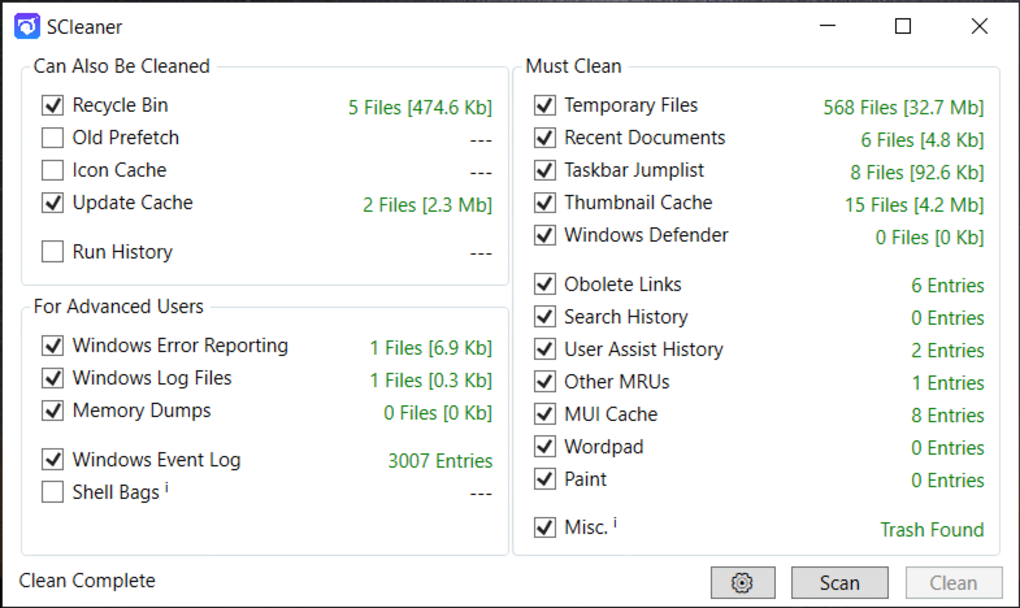
Upon launching SCleaner, users are immediately greeted by its hallmark feature: an exceptionally straightforward graphical user interface (GUI). This design choice is deliberate, aiming to make system cleaning accessible to everyone. The interface relies heavily on visual cues, guiding users through the entire operation without requiring extensive technical knowledge or navigating through obscure menus. This approach significantly reduces the learning curve, allowing users to initiate a cleaning process within moments of downloading the application.
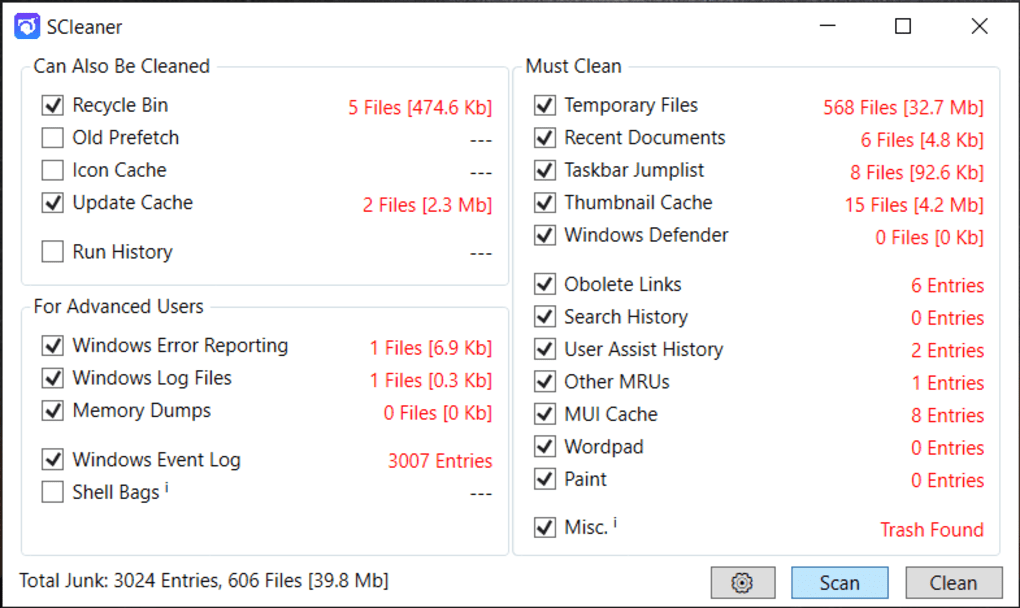
The main window of SCleaner is logically divided into two primary sections, making the selection process clear and concise: “Must Clean” and “Can Also be Cleaned.” This distinction helps users understand the criticality of different file types and allows them to make informed decisions about what to remove.
The ‘Must Clean’ tab contains categories of files that are almost universally safe to delete and often contribute significantly to system clutter and potential performance degradation. These essential categories typically include:
- Obsolete Links and Shortcuts: Over time, installations and uninstallations can leave behind defunct shortcuts that point to non-existent applications or files. SCleaner identifies and removes these digital relics, tidying up your Start Menu, desktop, and other shortcut locations.
- Icon and Thumbnail Cache: Windows maintains caches for icons and image thumbnails to speed up their display. However, these caches can sometimes become corrupted or grow excessively large, contributing to disk space consumption and potentially causing display issues. Cleaning them forces Windows to rebuild fresh, optimized caches.
- Temporary Files: A common culprit for system clutter, temporary files are created by applications and Windows itself during various operations. While intended to be transient, they often linger long after their purpose has been served. These can include installer remnants, log files, and various intermediate data, all of which can accumulate into gigabytes of wasted space.
- Windows Error Reporting: When applications or the operating system encounter errors, Windows collects data for reporting purposes. While useful for diagnostics, these error reports can pile up, consuming disk space. SCleaner offers to remove these records once they are no longer needed.
On the other hand, the ‘Can Also be Cleaned’ tab presents optional categories. These files are generally safe to remove but might hold some minor utility or historical data that a user might prefer to retain. This section includes:
- Recycle Bin: While users can manually empty their Recycle Bin, SCleaner provides an integrated option to ensure that permanently deleted files are truly gone from your system, reclaiming the space they occupy.
- Old Prefetch: Prefetch files are created by Windows to speed up application launch times by storing data about frequently used programs. Over time, these can become outdated or refer to uninstalled applications. Cleaning old prefetch data can help Windows rebuild a more relevant and efficient prefetch cache.
- Taskbar Jumplist: Jumplists provide quick access to recently opened files or tasks within an application from the taskbar. Clearing this can be a privacy measure, as it removes the history of accessed documents.
- Run History: The ‘Run’ dialog box in Windows keeps a history of commands and applications launched through it. Clearing this history is another privacy-focused option, preventing others from seeing what programs or commands have been executed.
Once users have selected their desired categories from both tabs, SCleaner performs a remarkably swift scan. The results are presented clearly, with the number of detected files highlighted in red next to each chosen category, indicating the potential amount of data to be erased. This transparency allows users to understand the impact of the cleaning process before it even begins. To initiate the cleanup, a simple click on the ‘Clean’ button, conveniently located at the bottom left of the interface, sets the process in motion. After completion, the summary of deleted files is presented in green, providing immediate confirmation of the operation’s success and the amount of clutter removed. This entire process is designed to be effortless, requiring minimal user interaction while delivering maximum impact.
Utilities & Tools: Enhancing System Performance
SCleaner firmly resides within the essential category of “Utilities & Tools,” a broad software segment dedicated to maintaining, optimizing, and enhancing the functionality of a computer system. Within this landscape, system cleaners like SCleaner play a crucial role, often acting as the first line of defense against the inevitable accumulation of digital debris that can plague any operating system.
The importance of system maintenance utilities cannot be overstated. A clean system isn’t just about aesthetics or reclaiming a few megabytes of disk space; it directly translates to tangible improvements in performance. Imagine your computer’s storage as a physical filing cabinet. Over time, it gets filled with old documents, duplicates, and papers that are no longer needed. Locating new or important documents becomes slower, and the cabinet itself becomes inefficient. The digital equivalent occurs within your Windows system. Temporary files, cached data, obsolete shortcuts, and error reports are like those unnecessary papers. They don’t actively harm your system, but their sheer volume can bog it down.
SCleaner combats this by systematically clearing out such non-essential data. The benefits are multifaceted:
- Faster Boot Times: A cleaner system means fewer files for the operating system to index and manage during startup, leading to quicker boot sequences.
- Quicker Application Launches: Applications might have less data to sift through or rely on cleaner caches, resulting in more responsive loading times.
- Smoother Multitasking: With less background clutter, your system’s resources (CPU, RAM, disk I/O) are freed up to handle active applications more efficiently, leading to smoother multitasking.
- Improved Responsiveness: Overall, the system feels snappier, with reduced lag and quicker reactions to user input.
- Disk Space Reclamation: Perhaps the most immediate and visible benefit, especially for users with smaller SSDs, is the recovery of valuable storage space. Removing gigabytes of old temporary files can make a significant difference.
- Enhanced System Stability: While not a direct repair tool, a system free of excessive clutter can sometimes be more stable, as there are fewer opportunities for conflicting or corrupted temporary files to cause issues.
These benefits collectively contribute to a more enjoyable and efficient computing experience. SCleaner, with its focus on simplicity and effectiveness, ensures that even the most casual user can achieve these improvements without diving into complex system diagnostics. It complements other types of utilities, such as disk defragmenters (though less critical for SSDs), resource monitors, and application uninstallers, all working in concert to keep the digital engine of your PC finely tuned. Its role as a reliable, one-click cleaner makes it an indispensable addition to any user’s digital toolkit, ensuring the optimal performance that allows users to focus on what matters most.
Security & Privacy: Beyond Basic Cleanup
While SCleaner is not marketed as a dedicated security or privacy suite, its core function of system cleanup inherently contributes to both aspects in subtle yet significant ways. In an age where digital footprints are constantly scrutinized and personal data is a valuable commodity, minimizing one’s online and offline traces is a growing concern. SCleaner, through its efficient removal of various system files, plays a role in enhancing a user’s digital privacy and, by extension, contributes to a more secure computing environment.
Consider the types of files SCleaner targets: temporary internet files, run history, and various caches. These seemingly innocuous files can often contain sensitive information. For instance:
- Temporary Internet Files and Browser Caches: While SCleaner focuses on system-level temporary files rather than specific browser caches, the principle is similar. Any temporary data generated by web browsers, if not cleaned, can reveal browsing habits, downloaded content, and accessed websites. Removing system-wide temporary files minimizes the leftover data that might hint at user activity.
- Run History: The ‘Run’ dialog box in Windows conveniently logs every command or application launched through it. For those sharing a computer or concerned about someone else viewing their activity, clearing this history is a vital privacy measure. SCleaner offers this capability, ensuring that a user’s direct execution commands remain private.
- Thumbnail Cache and Icon Cache: While not directly privacy-related in terms of data, a clean cache can prevent residual images or icons from pointing to previously accessed or deleted content.
From a security standpoint, while SCleaner doesn’t scan for malware or provide firewall protection, a cleaner system is generally a more secure system. Reducing the sheer volume of miscellaneous files can make it easier to identify genuinely suspicious files. Less clutter means a smaller ‘attack surface’ – fewer obscure locations where malicious code could potentially hide or persist unnoticed. While this is an indirect benefit, it’s a valuable one in the broader context of system hygiene.
Moreover, in scenarios where a user needs to ensure sensitive information is not easily recoverable (e.g., before disposing of an old drive or if a computer is accessed by unauthorized individuals), basic cleaning tools like SCleaner act as a preliminary step. While not a data shredder, removing temporary files and history reduces the likelihood of casual recovery of traces. It’s an integral part of a multi-layered security strategy, working in conjunction with antivirus software, firewalls, and robust password management tools. By ensuring that system junk is regularly purged, SCleaner helps users maintain a more private digital existence and contributes to the overall integrity of their computing environment. It’s a reminder that good digital hygiene isn’t just about performance, but also about protecting one’s personal space in the digital realm.
Productivity: A Direct Impact on Your Workflow
In today’s fast-paced world, where efficiency is key, a sluggish computer can be a significant impediment to productivity. Whether you’re a student working on an assignment, a professional managing critical projects, or a casual user simply trying to browse the web, a slow, unresponsive PC directly translates to frustration, wasted time, and ultimately, reduced output. SCleaner emerges as a crucial utility in this context, directly impacting and enhancing user productivity by maintaining a fluid and responsive computing environment.
The connection between system performance and productivity is undeniable. Imagine you’re in the middle of a complex task, perhaps editing a high-resolution image, compiling code, or preparing a detailed report. If your applications are constantly freezing, opening slowly, or if your system takes an age to respond to commands, your concentration breaks, your workflow is interrupted, and the time taken to complete the task inflates dramatically. This isn’t just an inconvenience; it’s a drain on your mental resources and a tangible hit to your efficiency.
SCleaner addresses the root causes of many common system slowdowns: accumulated digital clutter. By removing obsolete links, temporary files, old caches, and error reports, it ensures that your operating system and applications have a cleaner, more efficient foundation to operate from. The benefits translate directly to your daily workflow:
- Reduced Waiting Times: Faster application launches and smoother transitions between tasks mean less time spent staring at loading screens or unresponsive windows. This allows you to maintain your focus and momentum.
- Seamless Multitasking: A decluttered system can allocate resources more effectively. You can switch between multiple applications, browser tabs, and documents without experiencing debilitating lag, making multitasking a genuinely productive activity rather than a frustrating juggle.
- Enhanced System Stability: Fewer temporary files and system anomalies can lead to fewer application crashes or system freezes. A stable system is predictable, allowing you to work continuously without fear of losing progress.
- Improved Focus: When your computer responds instantly to your commands, you remain immersed in your work. The cognitive load associated with managing a slow machine is eliminated, freeing up your mental energy for the task at hand.
Consider specific scenarios: a graphic designer needing quick access to files and smooth software operation; a programmer requiring fast compile times and responsive IDEs; a writer needing to open multiple research documents without delay. In each case, a system kept lean and efficient by tools like SCleaner allows these individuals to perform their tasks more effectively and with greater satisfaction.
While SCleaner doesn’t offer advanced features like project management or document creation, its fundamental contribution to productivity lies in creating the optimal digital environment for all other productivity tools to thrive. It’s the behind-the-scenes hero that ensures your digital workspace remains tidy, responsive, and conducive to efficient work, making it an indispensable part of any user’s strategy for sustained productivity.
SCleaner in the Open-Source Ecosystem and Future Prospects
SCleaner’s identity as an open-source project is a cornerstone of its appeal and positions it uniquely within the broader software development landscape. Developed by TheShrewdGamer, operating as ShrewdSquad, the open-source nature means that its source code is freely available for anyone to inspect, modify, and distribute. This transparency is a significant advantage, fostering trust and enabling community involvement in ways that proprietary software cannot.
The benefits of being an open-source application are manifold for both developers and users:
- Transparency and Trust: Users can verify that the software does exactly what it claims to do, with no hidden functionalities, malware, or data harvesting. This is a critical factor for system utilities that delve deep into the operating system.
- Community-Driven Development: While developed by ShrewdSquad, the open-source model allows for contributions from a global community of developers. This can lead to faster bug fixes, security enhancements, and even the introduction of new features based on collective input and expertise.
- Longevity and Adaptability: Open-source projects often have a longer lifespan as they are not tied to the commercial interests of a single company. Even if the original developer moves on, the community can fork the project and continue its development, ensuring its continued relevance and functionality.
- Educational Value: For aspiring developers, studying SCleaner’s code can be an excellent learning experience, providing insights into system-level programming and optimization techniques for Windows.
Currently, SCleaner is noted for its simplicity and efficiency, lacking the “advanced features” found in some more complex, often paid, system optimizers. These advanced features might include:
- Registry Cleaner: Tools that scan and fix issues in the Windows Registry.
- Startup Manager: For controlling which programs launch with Windows.
- Application Uninstaller: More thorough removal of software, including leftover files and registry entries.
- Duplicate File Finder: To locate and delete redundant files.
- Privacy Cleaner: More extensive cleaning of browser histories, cookies, and specific application data.
- System Information Tools: Providing detailed hardware and software diagnostics.
While SCleaner’s current design intentionally omits these to maintain its user-friendly and lightweight profile, the open-source nature means such features could potentially be integrated in future iterations, either by the original developer or through community contributions. The mention of “SCleaner for Android” on PhanMemFree.org also indicates a potential cross-platform future, suggesting that the core cleaning philosophy could be adapted to other operating systems, expanding its utility beyond Windows.
The development team, ShrewdSquad, has kept the project active, as indicated by the “Latest update July 11, 2023” for version 1.5.2. This ongoing support, combined with the power of the open-source model, bodes well for SCleaner’s future. As operating systems evolve and new forms of digital clutter emerge, SCleaner, supported by its community, has the potential to adapt and continue serving as a vital tool for system maintenance and optimization for years to come. It exemplifies how thoughtful, community-driven software can provide powerful solutions that are both free and deeply valuable to the end-user.
Exploring Alternatives and the Broader Software Landscape
In the diverse world of system utilities, SCleaner exists within a crowded marketplace, alongside numerous other tools designed for cleaning and optimization. While SCleaner carves out its niche through simplicity, portability, and its open-source nature, it’s always beneficial for users to understand the broader landscape and how SCleaner compares to its peers, both built-in and third-party. This understanding helps users choose the “Best Products” for their specific needs, a category often highlighted on platforms like PhanMemFree.org.
Windows’ Built-in Disk Cleanup: SCleaner’s most direct comparison is Windows’ own Disk Cleanup utility. Both aim to remove temporary files, system logs, and other non-essential data. SCleaner distinguishes itself by offering a more streamlined, visually guided interface, which many users find more accessible. Its portability is another key advantage; it can be run from a USB drive without installation, something the built-in tool cannot do. For users seeking a slightly more intuitive and portable experience than the native offering, SCleaner is an excellent alternative.
Other Free System Cleaners: Many free alternatives exist, such as CCleaner (the free version), BleachBit, and various other utilities available on platforms like PhanMemFree.org. These often offer a wider array of cleaning options, including browser cache management, registry cleaning, and startup program control. While these advanced features can be powerful, they also introduce complexity, which SCleaner deliberately avoids. For users who prioritize simplicity and a focused cleaning approach without venturing into potentially risky areas like registry modification, SCleaner remains a superior choice. For those seeking more granular control and a broader set of tools, exploring the “Best Free To Play Games” or “Best PC Games” categories on PhanMemFree.org is less relevant than exploring “Best Antivirus” or “Best VPN” if looking for other system utilities. However, SCleaner offers a simpler, more direct approach for core system cleaning tasks, avoiding the feature bloat found in some competitors.
Paid System Optimizers: The market also includes numerous premium system optimization suites that bundle a vast array of features, from advanced diagnostic tools to real-time performance monitors, duplicate file finders, and uninstaller programs. Examples include IObit Advanced SystemCare, AVG TuneUp, and Ashampoo WinOptimizer. These tools often come with a subscription cost and cater to users who demand comprehensive system management. SCleaner, as a free, open-source tool, doesn’t aim to compete in this high-end, feature-rich segment. Instead, it offers a focused, cost-effective solution for essential cleaning tasks, proving that effective system maintenance doesn’t always require a hefty price tag.
SCleaner on Different Platforms: While this article focuses on “SCleaner for Windows,” the reference to “SCleaner for Android” on PhanMemFree.org hints at the utility’s potential expansion. The principles of decluttering and optimizing are universal across operating systems. A mobile version would likely target app caches, residual files, and other storage hogs common on Android devices, offering similar benefits of speed and reclaimed space. This multi-platform ambition showcases the core utility’s versatility and the developer’s vision.
Ultimately, choosing the right system cleaner depends on individual needs and technical comfort levels. For users who value simplicity, portability, open-source transparency, and a focused approach to cleaning essential system junk, SCleaner stands out as an exemplary tool. It doesn’t promise to be an all-in-one suite, but what it does, it does exceptionally well, making it a valuable utility in any PC user’s toolkit for maintaining optimal performance without unnecessary complexity.
Conclusion
SCleaner represents a refreshing approach to system maintenance, prioritizing simplicity and effectiveness in a world often saturated with overly complex software. Developed by TheShrewdGamer (ShrewdSquad), this lightweight, portable, and open-source utility for Windows provides an effortless way to keep your PC running smoothly. Its one-click operation, intuitive user interface, and clear distinction between “Must Clean” and “Can Also be Cleaned” categories make it incredibly accessible, even for those with minimal technical knowledge.
By efficiently targeting and removing obsolete links, temporary files, icon caches, and other digital debris, SCleaner directly contributes to improved system performance, faster boot times, quicker application launches, and enhanced system stability. Moreover, its cleaning capabilities indirectly bolster privacy by removing traces of user activity and contribute to a more secure computing environment by reducing system clutter. From a productivity standpoint, a fast and responsive PC ensures an uninterrupted workflow, allowing users to focus on tasks rather than system lag.
While SCleaner intentionally foregoes advanced features like registry cleaning or comprehensive startup management, its strengths lie precisely in this focused simplicity. It’s a free, transparent, and community-supported alternative to Windows’ built-in Disk Cleanup, offering a more user-friendly and portable experience. For anyone seeking a reliable, straightforward, and no-cost solution to optimize their Windows system and prevent file clutter from slowing down their computer, SCleaner is an outstanding choice. It proves that powerful utility doesn’t always need to be complicated, making essential system hygiene achievable for everyone.
File Information
- License: “Free”
- Latest update: “July 11, 2023”
- Platform: “Windows”
- OS: “Windows 10”
- Language: “English”
- Downloads: “4.6K”
- Size: “397.38 KB”


