
Scrble Ink, formerly known as Scrble, is a premium multimedia application designed to empower users with a versatile platform for creative expression through writing and drawing. This comprehensive application seamlessly blends functionality and ease of use, offering an immersive experience for both seasoned artists and casual hobbyists. Serving as a compelling alternative to applications such as MS Paint and Whiteboard, Scrble Ink provides a dynamic, free-form digital canvas that encourages creative spontaneity without the constraints of rigid templates or predefined structures. The application’s intuitive interface and robust feature set unlock a wealth of creative possibilities, fostering both productivity and a sense of connection with one’s creative process.
Unleashing Creativity: Tools and Features
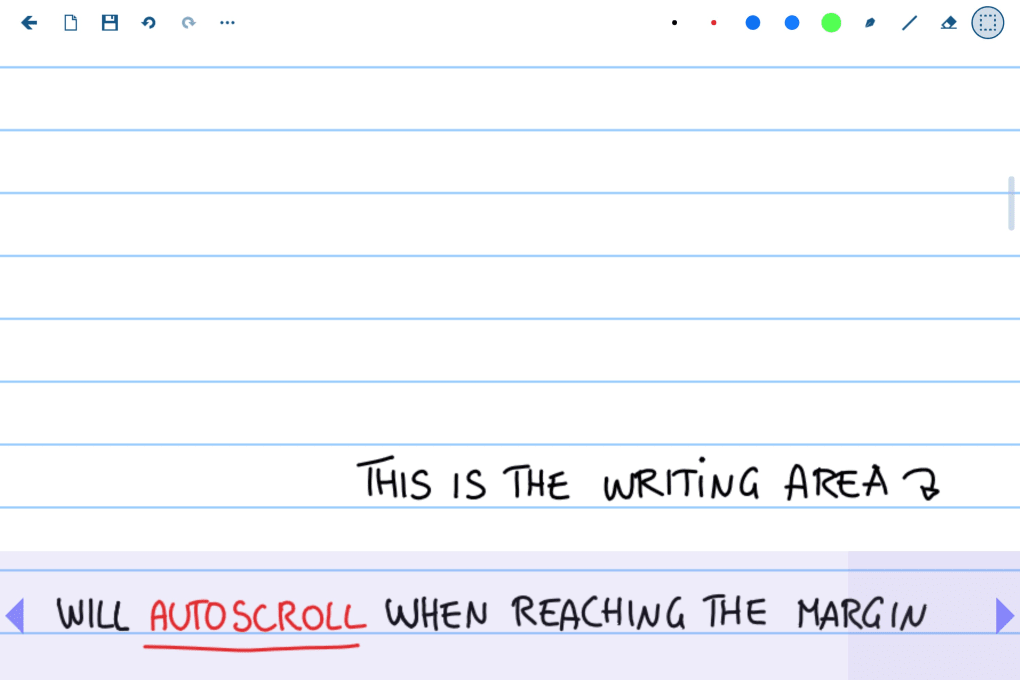
Scrble Ink offers a rich toolkit meticulously designed to cater to diverse creative needs. The expansive range of customizable pen styles, colors, and brush sizes allows for precise and nuanced artistic expression. Users can effortlessly translate their ideas into vibrant digital artwork with remarkable detail and control. Beyond its drawing capabilities, Scrble Ink provides extensive text formatting options, granting users complete control over font styles, sizes, and colors. This versatility ensures that written content seamlessly integrates with visual elements, creating cohesive and impactful projects.
The application’s fluidity extends to its input methods. Whether users prefer the precision of a stylus, the convenience of their fingers, or a combination of both, Scrble Ink seamlessly adapts to their preferred workflow. This adaptability enhances the user experience, fostering a natural and intuitive creative process that prioritizes comfort and efficiency. The seamless integration of various input methods demonstrates a commitment to user-centric design, maximizing accessibility and ensuring a smooth and enjoyable user journey.
Beyond its core drawing and writing functionalities, Scrble Ink boasts robust support for diverse file formats, simplifying the process of sharing and exporting completed projects across different platforms and devices. This broad compatibility facilitates collaboration and ensures that creative work can be easily disseminated to a wider audience. The application’s commitment to interoperability enhances its versatility, making it an ideal choice for users who value seamless integration with their existing workflows and collaborative projects.
Enhancing Productivity and Connectivity: Cloud Integration and Organization
Scrble Ink’s integration with cloud services elevates the user experience by enabling seamless synchronization and access across multiple devices. Users can effortlessly resume their work from where they left off, regardless of the device they are using. This cross-platform compatibility is invaluable for users who frequently switch between devices, ensuring a consistent and uninterrupted creative flow. The cloud synchronization feature empowers users to work efficiently across various environments, effectively eliminating the barriers often associated with device switching.
Beyond connectivity, Scrble Ink prioritizes efficient project management. The intuitive organizational features and robust search functionality empower users to effortlessly navigate and manage even extensive collections of projects. Users can quickly locate specific projects, eliminating the time-consuming search often associated with managing large digital archives. The ease with which users can locate and access their projects enhances productivity, ensuring a streamlined and efficient creative workflow. The application’s commitment to simplifying organization demonstrates an understanding of the need for efficient project management in a creative environment.
Addressing User Needs: Strengths and Limitations
Scrble Ink presents a compelling proposition for both professional creatives and casual hobbyists. Its extensive toolkit empowers users to bring their visions to life, regardless of their artistic skill level. The intuitive interface and flexible workflow cater to diverse user preferences, ensuring a personalized and engaging experience for everyone. The application’s potential for fostering self-expression and boosting productivity makes it a valuable asset for those seeking to enhance their creative endeavors.
While Scrble Ink offers a wealth of advantages, some users have reported occasional technical issues. These hiccups, although infrequent, highlight the importance of ongoing development and improvement to ensure a consistently seamless user experience. The developers’ responsiveness to user feedback and commitment to addressing reported issues indicate a dedication to providing a high-quality and reliable application. These minor drawbacks, however, do not detract significantly from the application’s overall utility and value. The positive aspects of Scrble Ink, including its intuitive design, robust features, and cloud synchronization, significantly outweigh the occasional technical challenges.
Scrble Ink: A Comparative Perspective
Compared to other digital drawing and note-taking applications, Scrble Ink stands out due to its unique combination of features and ease of use. While alternatives such as Nebo focus primarily on handwriting recognition and text conversion, Scrble Ink offers a broader range of artistic tools and features, appealing to a wider spectrum of users. Applications like Inkodo, while offering a playful and intuitive interface, may lack the advanced features and robust functionality provided by Scrble Ink. Similarly, while other note-taking applications like MetaMoJi Note offer comprehensive organization tools, they might not offer the same level of artistic freedom and precision available in Scrble Ink. Therefore, Scrble Ink occupies a unique space in the market, effectively bridging the gap between simple drawing applications and more complex note-taking software. Its versatility makes it a suitable choice for a diverse range of creative projects.
Conclusion: A Valuable Tool for Creative Expression
In conclusion, Scrble Ink presents a powerful and user-friendly application for individuals seeking to express their creativity through writing and drawing. Its comprehensive feature set, support for various input methods, and practical capabilities make it an invaluable tool for artists, writers, and anyone wishing to explore their creative potential. While minor technical glitches may occasionally occur, the application’s overall performance and numerous benefits significantly outweigh these minor drawbacks. The potential for fostering both self-expression and productivity makes Scrble Ink a worthwhile addition to any creative toolkit, offering a dynamic and intuitive platform for transforming ideas into tangible reality. The application’s enduring appeal lies in its ability to seamlessly blend functionality with an intuitive user experience, catering to both novice and experienced users alike. The commitment to user-centric design, coupled with its rich feature set, positions Scrble Ink as a leading contender in the ever-evolving landscape of digital creativity tools.
File Information
- License: “Full”
- Version: “2016.1109.106.0”
- Latest update: “January 17, 2024”
- Platform: “Windows”
- OS: “Windows 10”
- Language: “English”
- Downloads: “11.1K”


