
Screencastify is a free screen recording extension for the Google Chrome web browser, developed by Screencastify. This versatile utility allows users to record, edit, and share videos online with ease. Whether you need to capture your entire desktop, a specific browser window, or just a single tab, Screencastify offers a streamlined workflow for creating and sharing video content. This review delves into its functionalities, pros, cons, and provides a comparison with alternative options.
Core Functionalities: Record, Edit, and Share
Screencastify’s design centers around three core functionalities: recording, editing, and sharing. Its intuitive interface makes it accessible to both novice and experienced users.
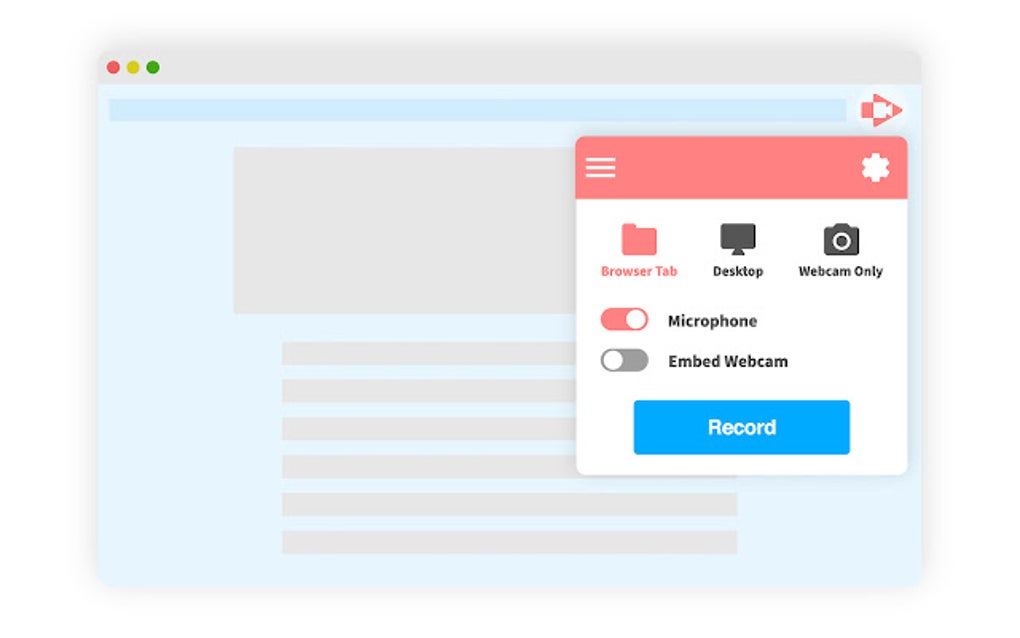
Recording: The recording process is straightforward. Users can select to capture their entire screen, a specific browser tab, or incorporate their webcam for a more personal touch. All recordings are captured in Full High Definition (FHD) resolution, ensuring a high-quality visual experience for viewers. A noteworthy feature is the ability to add real-time annotations, making it simple to highlight key points or provide visual cues during the recording. While the recordings are saved directly to Google Drive for convenient access and management, users also have the option to save the videos locally in MP4 or GIF format.
Editing: Beyond its recording capabilities, Screencastify offers a robust set of online editing tools. This is a significant advantage, as many free screen recorders lack integrated editing features. The editing functionality is not limited to Screencastify recordings; it supports external videos as well, making it a versatile tool for various video editing tasks. While the specifics of the editing tools aren’t extensively detailed in the provided information, the capability to edit recordings directly within the platform streamlines the workflow and eliminates the need for separate video editing software.
Sharing: Once a video is recorded and edited, Screencastify provides multiple options for sharing. The direct integration with Google Drive allows for effortless sharing via links. This is especially useful for collaborating on projects or quickly disseminating information. Alternatively, users can choose to upload their recordings directly to YouTube, expanding the reach of their video content to a broader audience. The seamless integration with popular platforms like Google Drive and YouTube significantly simplifies the video-sharing process.
Advantages of Using Screencastify
Screencastify’s appeal lies in its user-friendly interface, powerful features, and seamless integration with popular online platforms. Several key advantages contribute to its popularity:
-
Ease of Use: The intuitive interface and straightforward recording process make Screencastify accessible to users of all technical skill levels. The absence of complex settings or confusing options simplifies the overall experience.
-
Free and Accessible: As a free extension available on the Google Chrome Web Store, Screencastify eliminates the financial barrier often associated with screen recording software. The direct integration with Chrome eliminates the need for separate installations or third-party programs, simplifying the setup process.
-
Extensive Online Editing Tools: The built-in online video editor is a significant advantage. This feature allows for quick and easy edits without requiring users to download or learn another piece of software. The ability to edit both Screencastify recordings and external videos enhances the tool’s versatility.
-
Direct Google Drive Integration: Saving recordings directly to Google Drive provides a centralized location for easy access and management. The cloud storage integration eliminates the need for managing local files and simplifies the process of sharing videos with others.
- Multiple Sharing Options: The ability to share via links or upload directly to YouTube offers flexibility in how users distribute their video content. This versatility accommodates various sharing preferences and target audiences.
Limitations of Screencastify
Despite its numerous advantages, Screencastify has certain limitations that users should be aware of:
-
Recording Length: The most significant limitation is the 5-minute recording time limit per capture. This restriction may hinder users who need to record longer videos. For extended recordings, users would need to create multiple shorter videos and combine them using external editing software, adding complexity to the workflow.
-
Limited File Output Formats: The availability of only MP4 and animated GIF formats limits the flexibility of file output. While MP4 is a widely compatible format, users might require other formats depending on their specific needs or platform requirements. The lack of options restricts the customization of the final video product.
-
System Resource Intensive: The software’s performance is highly dependent on system resources. Users with less powerful hardware may experience performance issues, such as lagging or dropped frames, during recording. This limitation restricts the accessibility of the tool for users with older or less powerful computers.
Screencastify vs. Alternative Screen Recorders
While Screencastify offers a compelling combination of features and ease of use, it’s essential to consider alternative options available. Many other screen recorders exist, each with its own strengths and weaknesses. A comprehensive comparison requires considering various factors, such as functionality, cost, and system requirements. The specific needs of the user will dictate the optimal choice. The provided information mentions Nimbus Screenshot & Screen Video Recorder and Overwolf as alternatives, but lacks detailed comparisons to allow for a comprehensive evaluation.
Conclusion
Screencastify provides a user-friendly and accessible way to record, edit, and share screen videos. Its seamless integration with Google Chrome and Google Drive, along with its built-in editing tools, makes it a convenient option for many users. However, the 5-minute recording limit and limited file output formats might be significant drawbacks for users requiring longer videos or different file types. Ultimately, the suitability of Screencastify depends on individual needs and priorities. Users requiring longer recordings or specific file formats should explore alternative options to determine the best fit for their workflow. The software’s resource intensity should also be considered, particularly for users with less powerful hardware. While the ease of use and integration make it an attractive option for many, careful consideration of these limitations is crucial before making a choice.
File Information
- License: “Free”
- Version: “2.74.0.4549”
- Latest update: “July 11, 2023”
- Platform: “Windows”
- OS: “Windows 11”
- Language: “English”
- Downloads: “19K”


