
ScreenGrab is a lightweight and user-friendly screen capture utility designed for Windows operating systems. Its straightforward approach makes it ideal for both frequent screenshot users and those who only occasionally need to capture images from their screen. This review will delve into its features, pros and cons, and compare it to alternative screen capture software.
Functionality and Ease of Use
ScreenGrab’s primary strength lies in its simplicity. The software operates almost entirely through user-defined hotkeys, eliminating the need for cumbersome mouse clicks or navigating menus during the capture process. This streamlined approach makes it incredibly efficient for users who need to quickly grab screenshots without disrupting their workflow. Once the hotkey is pressed, the program instantly captures the image, leaving the user to choose how to proceed. This process is largely automated, significantly reducing the time and effort involved in screen capture.
The program offers a selection of popular image formats for saving captured images, providing flexibility in terms of file size and compatibility. However, the range of capture modes is limited. While users can capture their entire screen or only the active window, more advanced options, such as capturing specific regions or scrolling windows, are absent. This limitation might hinder users requiring more precise control over their screen captures.
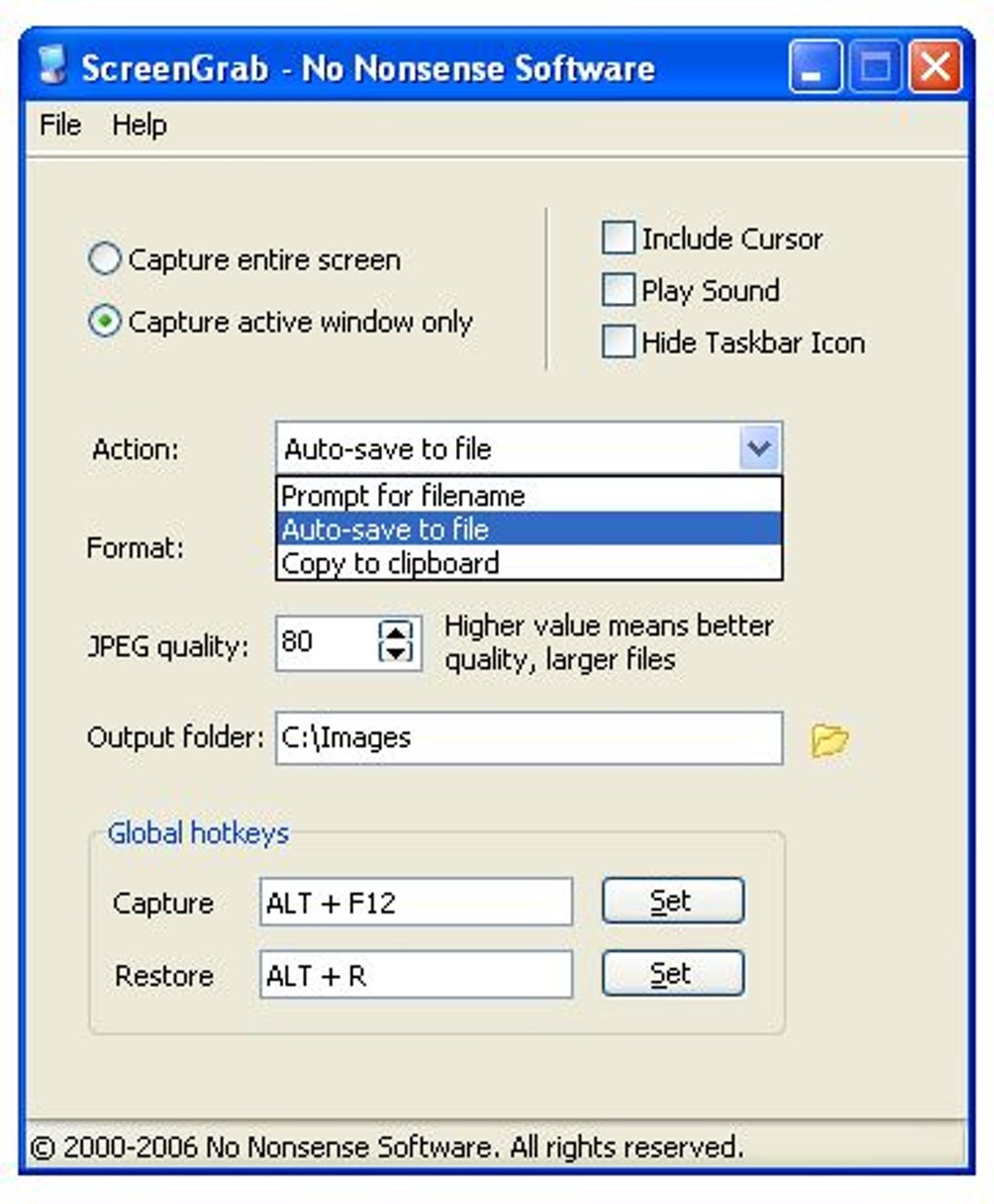
The auto-save feature is a standout advantage. This functionality ensures that screenshots are automatically saved, further accelerating the capture process and minimizing manual intervention. For users who routinely take many screenshots, this feature is incredibly time-saving and helps to maintain a streamlined workflow.
Features and Specifications
ScreenGrab provides a core set of features focused on quick and easy screen capture. The key features include:
- Hotkey-driven capture: Users can define their preferred keyboard shortcuts to initiate screenshots.
- Multiple image formats: Captured images can be saved in several common formats, allowing users to select the most appropriate option based on their needs.
- Auto-save functionality: Screenshots are automatically saved, streamlining the capture process.
- Two capture modes: Users can capture either the full screen or the currently active window.
The software is lightweight, with a small installation footprint, making it suitable for systems with limited resources. Its relatively low system requirements ensure that it runs smoothly on a wide range of Windows machines. The software’s minimalistic interface enhances its user-friendliness, eliminating unnecessary complexity and providing a clean and intuitive user experience. The program’s straightforward approach is aimed at users prioritizing speed and efficiency over extensive features.
Comparison with Alternative Screen Capture Software
While ScreenGrab excels in its simplicity and speed, several alternative screen capture tools offer more comprehensive feature sets. These alternatives may be more suitable for users needing advanced functionalities beyond basic screen capture. Let’s consider some prominent alternatives and compare them to ScreenGrab:
-
Snagit: Snagit is a highly-regarded and feature-rich screen capture tool that offers a wider range of capture modes, including region selection, scrolling window capture, and even video recording capabilities. Snagit also provides powerful editing tools for annotating and enhancing screenshots. While more comprehensive than ScreenGrab, Snagit comes with a price tag and a steeper learning curve due to its vast feature set.
-
LightShot: LightShot provides a simple and efficient screen capture experience, with the ability to capture specific regions and perform basic edits. It offers easy sharing options, integrating directly with various online platforms. However, it might lack the advanced features and automation capabilities found in more professional tools.
-
FastStone Capture: FastStone Capture offers a balance between functionality and ease of use. It provides various capture modes, image editing tools, and options for saving images in multiple formats. Similar to Snagit, FastStone Capture offers more extensive capabilities than ScreenGrab but may also be more complex to learn.
-
Greenshot: Greenshot is a free and open-source screen capture tool known for its simplicity and portability. It provides basic screen capture modes and the option to quickly upload captures to image hosting services. However, it lacks the advanced features and automation found in other alternatives.
ScreenGrab differentiates itself from these alternatives by its singular focus on speed and automation. While other programs offer a wide array of features, ScreenGrab prioritizes quick and efficient capture, which makes it an ideal choice for users who value simplicity and speed above all else.
Pros and Cons of ScreenGrab
Pros:
- Simplicity and ease of use: The software’s intuitive interface and hotkey-driven functionality make it incredibly user-friendly.
- Speed and efficiency: The auto-save feature and streamlined workflow drastically reduce the time required for screen capture.
- Lightweight and resource-efficient: Its small size and low system requirements make it suitable for various systems.
- Free of charge: ScreenGrab is available at no cost.
Cons:
- Limited capture modes: The lack of region selection and scrolling window capture can limit its functionality for some users.
- Basic features: It lacks advanced editing tools and sharing options.
- Older version: The last update was in 2007, which raises concerns about compatibility and security updates for modern operating systems.
Conclusion
ScreenGrab is a valuable tool for users prioritizing speed and ease of use in screen capture. Its simple interface and hotkey-driven functionality make it incredibly efficient for those who frequently need to grab screenshots quickly. However, its limited features and lack of recent updates might make it unsuitable for users requiring more advanced functionalities or those concerned about compatibility and security. Users needing more robust features, advanced editing options, or more modern software should consider the alternatives discussed above. The choice between ScreenGrab and other screen capture tools ultimately depends on individual needs and priorities. If simplicity, speed, and ease of use are paramount, ScreenGrab remains a compelling choice. However, for users requiring more comprehensive features, a more feature-rich option might prove more suitable.
File Information
- License: “Free”
- Version: “1.1”
- Latest update: “July 26, 2007”
- Platform: “Windows”
- OS: “Windows XP”
- Language: “English”
- Downloads: “47.6K”
- Size: “622.87 KB”


