
ScreenShooter is a free, lightweight application designed for capturing and sharing screenshots on Windows operating systems. While it lacks the advanced features found in some professional-grade screen capture tools, its ease of use and straightforward functionality make it a convenient choice for users who need a quick and simple way to grab images of their desktop. This review will delve into the strengths and weaknesses of ScreenShooter, exploring its functionality, ease of use, and limitations.
Ease of Use and Interface
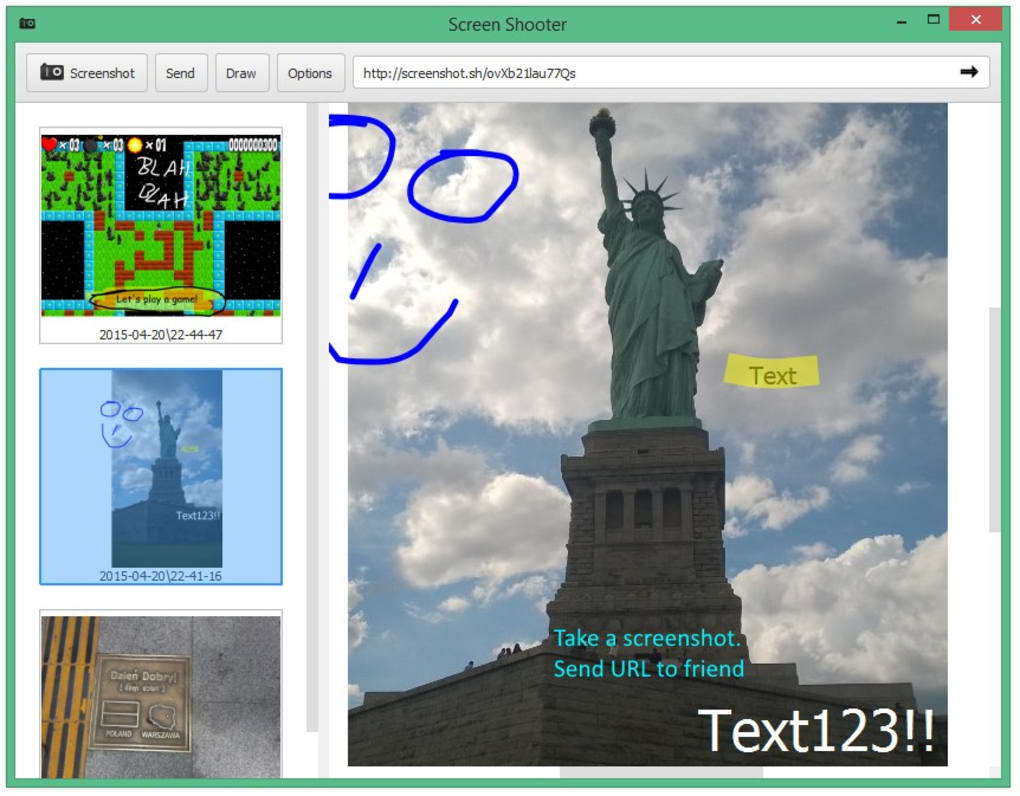
ScreenShooter boasts a remarkably intuitive and user-friendly interface. Its minimalist design minimizes clutter, focusing on core functionalities. The primary window presents a clearly labelled “Screenshot” button (or the F9 hotkey alternative), making initiating a capture effortless. The process is straightforward: a single click activates the capture function, allowing the user to select the desired screen area using the mouse. No complex menus or confusing settings hinder the workflow, making it instantly accessible, even for users with no prior experience with screen capture software. The simplicity is particularly beneficial for casual users who only need a basic screenshot tool without navigating intricate options.
This ease of use extends beyond the capture process itself. The application’s small size and minimal resource consumption ensure it runs smoothly without impacting system performance. This is a significant advantage over resource-intensive programs, especially on older or less powerful machines. The quick launch and immediate availability of the screenshot function ensure that capturing an image is a seamless process.
Core Functionality: Capturing and Sharing
ScreenShooter’s core function is, as its name suggests, taking screenshots. It offers a single capture style, allowing users to select a rectangular region of the screen. This method is sufficient for capturing specific areas of interest, such as a particular website element or a section of a document. However, the lack of additional capture modes, such as full-screen capture or window-specific capture, is a notable limitation. The absence of scrolling capture is another significant drawback, restricting its usefulness for capturing long web pages or documents that extend beyond the visible screen area.
While ScreenShooter excels in its straightforward capture method, its true innovation lies in its integrated sharing capabilities. Upon capturing a screenshot, the application generates a unique URL that can be instantly copied to the clipboard. This URL provides direct access to the captured image, eliminating the need to save the image locally and then transfer it via email or other methods. This instant sharing feature is incredibly convenient for quickly communicating visual information with others. The generated link grants recipients immediate access to the screenshot, regardless of their location or device, as long as they have internet access.
The instant upload functionality is further enhanced by its potential integration with cloud storage services. Users can move the ScreenShooter screenshots directory into their preferred cloud storage folder, automatically syncing their captures to the cloud. This feature eliminates the need for manual uploads, streamlining the workflow for users who regularly rely on cloud storage for file management.
Built-in Editing Tools and Limitations
While ScreenShooter is primarily a capture and sharing tool, it also provides some basic editing functionalities. Users can add simple annotations to their captured images using a pen tool, highlighter, and a selection of shapes. The inclusion of a color picker is particularly helpful for web developers, allowing them to easily identify and select specific colors on a website.
However, the built-in editing capabilities are quite rudimentary and lack the sophistication found in dedicated image editing programs. The editing tools are minimal, offering only the most basic of annotations. Users seeking more advanced editing features, such as cropping, resizing, or more extensive annotation options, will need to use a separate image editing application. The limited editing functionality restricts ScreenShooter’s appeal to users who require substantial post-capture image manipulation.

Comparison with Alternative Screenshot Tools
ScreenShooter occupies a specific niche within the market of screen capture software. While its simplicity is an advantage for some users, others may find its limited functionality insufficient. Compared to more comprehensive tools like Snagit or Lightshot, ScreenShooter lacks advanced features such as scrolling capture, varied capture modes, and advanced editing tools. Snagit, for example, offers extensive annotation features, along with options for screen recording and detailed editing. Lightshot provides a broader range of capture modes and allows for easy image uploads to various image-hosting services.
Other alternatives, such as ShareX, provide a free and open-source option with extensive features, surpassing ScreenShooter’s functionality in numerous aspects. While ScreenShooter’s immediate sharing capability is unique, these alternative programs often offer integration with popular cloud storage services or direct upload capabilities, rendering ScreenShooter’s unique selling point less critical.
The choice between ScreenShooter and these alternatives largely depends on the user’s individual needs and technical proficiency. Users who prioritize simplicity and quick sharing over advanced features might find ScreenShooter ideal. However, those who require more extensive capabilities will find more comprehensive screen capture solutions to be more suitable.
Strengths and Weaknesses of ScreenShooter
Strengths:
- Ease of Use: The incredibly simple interface and straightforward workflow make it extremely easy to use for users of all technical skill levels.
- Instant Sharing: The unique URL-based sharing mechanism provides a remarkably quick and convenient method for disseminating captured images.
- Lightweight: The application is lightweight and requires minimal system resources, ensuring efficient performance.
- Free to Use: ScreenShooter is available free of charge, making it an accessible option for budget-conscious users.
- Basic Editing: The basic editing tools, while limited, are sufficient for simple annotations and color selection.
- Cloud Integration Potential: The ability to integrate with cloud storage further streamlines the workflow.
Weaknesses:
- Limited Capture Modes: The application only allows for rectangular selection capture, lacking support for full-screen capture, window capture, and scrolling capture.
- Rudimentary Editing: The editing features are extremely basic and lack advanced options found in other screen capture tools.
- Lack of Customization: The application offers little to no customization options.
- No Screen Recording: ScreenShooter is solely focused on image capture, lacking the ability to record screen activity.
- Infrequent Updates: The last update was several years ago, raising concerns about future maintenance and feature additions.
Conclusion
ScreenShooter serves as a functional and user-friendly solution for capturing and sharing screenshots, particularly for those prioritizing simplicity and speed. Its unique instant sharing capability is a significant advantage, streamlining the process of disseminating images. However, the limited capture modes and rudimentary editing capabilities restrict its appeal to users who require more advanced functionality. Users who need a simple, quick, and free tool for basic screenshot capture and sharing will find ScreenShooter a satisfactory choice. Those seeking a more comprehensive solution with advanced features and more extensive editing options should consider exploring alternative screen capture applications offering a broader range of functionalities.
File Information
- License: “Free”
- Version: “5.21”
- Latest update: “August 9, 2019”
- Platform: “Windows”
- OS: “Windows XP”
- Language: “English”
- Downloads: “16.6K”
- Size: “163.84 KB”


