
ScreenToGif is a versatile and user-friendly application designed for capturing screen recordings and effortlessly converting them into animated GIFs or video files. This free, portable tool offers a streamlined workflow, combining screen recording capabilities with an integrated editor, making it an ideal choice for users of all skill levels, from casual GIF creators to professional video editors. This comprehensive guide delves into the features, functionalities, and advantages of ScreenToGif, along with comparisons to alternative software options.
Key Features and Functionalities of ScreenToGif
ScreenToGif’s strength lies in its simplicity and efficiency. Its core functionality centers around three primary recording methods: screen recording, webcam recording, and a unique sketchpad feature. This multi-faceted approach caters to a wide range of needs, whether you’re capturing gameplay, creating short tutorial videos, or adding a personal touch with hand-drawn animations.
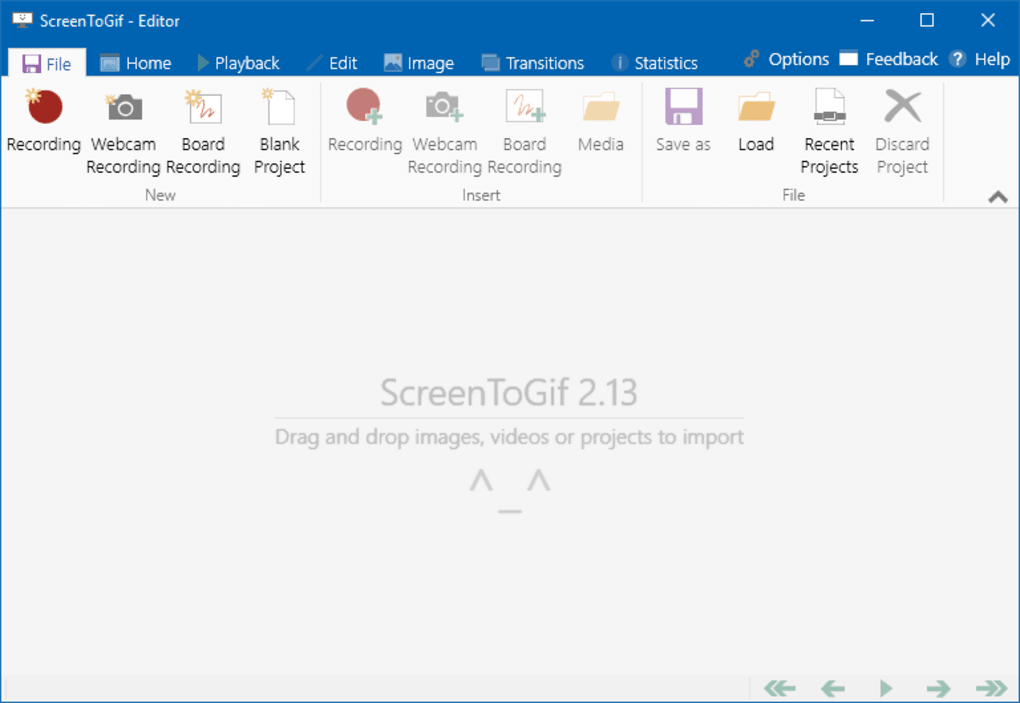
1. Screen Recording: This is the most commonly used function, allowing users to select a specific region of their screen for recording. The customizable recording area lets you focus on the relevant content, avoiding unnecessary elements. ScreenToGif provides granular control over recording parameters, including the duration and frame rate, enabling users to optimize the recording for different purposes. High frame rates result in smoother animations, ideal for action-packed content, while lower frame rates reduce file size, beneficial for sharing online.
2. Webcam Recording: For those needing to incorporate themselves into the recording, the webcam recording option allows the integration of live video footage. This feature is particularly useful for creating personalized tutorials or adding a personal touch to presentations. Similar to screen recording, users can adjust the recording area and settings to suit their preferences.

3. Sketchpad Recording: This innovative feature allows users to create animations directly within the application using a built-in sketchpad. This adds a unique element to ScreenToGif, enabling users to overlay hand-drawn elements onto their recordings or even create standalone animated drawings. This tool can be incredibly useful for adding explanatory annotations to tutorials or creating simple animated illustrations.
4. Integrated GIF Editor: Once a recording is complete, ScreenToGif’s built-in editor provides a range of tools to enhance and refine the final output. Users can easily crop, resize, and adjust the speed of their animations. The editor allows for adding text overlays and basic drawing elements, further personalizing the GIF. The editing features, though not as extensive as dedicated professional-grade software, are more than sufficient for most users’ needs, offering a user-friendly interface for quick adjustments.
5. Export Options: The final GIF or video can be exported in various formats, with the ability to adjust the quality and file size. This flexibility allows users to optimize their creations for different platforms and sharing methods. High-quality settings offer detailed visuals, suitable for high-resolution displays, while lower quality settings reduce file size for smoother online sharing.
Advantages of Using ScreenToGif
The appeal of ScreenToGif extends beyond its core features. Several key advantages contribute to its popularity amongst users:
-
Free and Open-Source: ScreenToGif is entirely free to use, avoiding the costs associated with commercial screen recording software. Its open-source nature also allows for community contributions and continuous improvements.
-
Portability: The application is portable, meaning it doesn’t require installation. This simplifies deployment and allows users to easily run it from a USB drive or other external storage.
-
Ease of Use: The intuitive interface makes ScreenToGif extremely user-friendly, even for beginners. The clear layout and simple controls eliminate the need for extensive tutorials or prior experience with similar software.
-
Lightweight: ScreenToGif boasts a small file size, consuming minimal system resources. This is particularly advantageous for users with older or less powerful computers.
-
Regular Updates: Active development ensures continuous improvements, bug fixes, and new features, keeping ScreenToGif relevant and up-to-date.
Comparison with Alternative Screen Recording and GIF Creation Software
While ScreenToGif offers a compelling set of features, several alternative applications cater to similar needs. A comparison highlights the strengths and weaknesses of ScreenToGif relative to its competitors:
-
GifCam: A lightweight and simple GIF creator, GifCam focuses primarily on capturing screen recordings and converting them to GIFs. While straightforward, it lacks the advanced editing features and multiple recording methods of ScreenToGif. It’s a good option for basic GIF creation but lacks the versatility.
-
LICEcap: Another straightforward option, LICEcap is renowned for its simplicity. However, it suffers from limitations in terms of editing capabilities and lacks the advanced recording options offered by ScreenToGif. It’s suitable for quick and simple screen captures but lacks sophistication.
-
ShareX: A more comprehensive screenshot and screen recording tool, ShareX provides a wider array of features beyond GIF creation. However, its interface can be somewhat overwhelming for beginners, unlike ScreenToGif’s intuitive design. ShareX is a powerful choice for advanced users but may be too complex for casual users.
-
Other Commercial Options: Several commercial screen recording and video editing suites offer more extensive features, but come with a price tag. These applications often include advanced editing tools, effects, and export options, but may be overkill for users primarily focused on creating simple GIFs or short screen recordings.
Limitations and Potential Drawbacks of ScreenToGif
Despite its numerous advantages, ScreenToGif has some limitations:
-
Occasional Crashes: Reports indicate that ScreenToGif can occasionally crash, particularly on older versions of Windows. This is a relatively infrequent issue, but it’s worth noting as a potential drawback.
-
Basic Editing Features: While the built-in editor is user-friendly, it lacks the advanced editing capabilities of professional-grade software. Users seeking sophisticated editing tools might need to use a dedicated video editor after exporting their recordings.
-
Interface Simplicity: The simplified interface, while beneficial for ease of use, might feel overly basic to some users who prefer more customization options.
-
Start Menu Issues: Some users have reported difficulties with ScreenToGif appearing in the Start Menu or apps list, requiring manual navigation to the application’s location.
Conclusion
ScreenToGif emerges as a compelling and versatile tool for creating GIFs and short screen recordings. Its user-friendly interface, combined with a multi-faceted approach to recording and a practical built-in editor, makes it accessible to both novice and experienced users. While it may lack some of the advanced features found in commercial software, its simplicity, free availability, and portability make it an exceptional choice for a wide range of tasks, from creating quick tutorial videos to producing engaging animated content for social media. The occasional stability issues are outweighed by its overall functionality and user-friendliness, establishing ScreenToGif as a valuable addition to any digital creator’s toolkit.
File Information
- License: “Free”
- Latest update: “November 30, 2023”
- Platform: “Windows”
- OS: “Windows 8.1”
- Language: “English”
- Downloads: “4.3K”
- Size: “79.85 MB”


