
In an increasingly interconnected world, the ability to remotely access and monitor computer screens has become a valuable tool for a variety of purposes, ranging from parental supervision to corporate oversight. Among the early contenders in this specialized software category was ScreenViewer, a program that offered a straightforward and efficient way to capture and view remote computer screens. Originally designed for Windows operating systems, ScreenViewer established itself as a functional solution within the networking software landscape, specifically under the subcategory of analysis and monitoring tools. This article delves into the intricacies of ScreenViewer, exploring its core functionalities, diverse applications, technical specifications, and its position within the broader ecosystem of remote monitoring solutions, all from the perspective of PhanMemFree.
Unveiling ScreenViewer: Core Functionality and Architecture
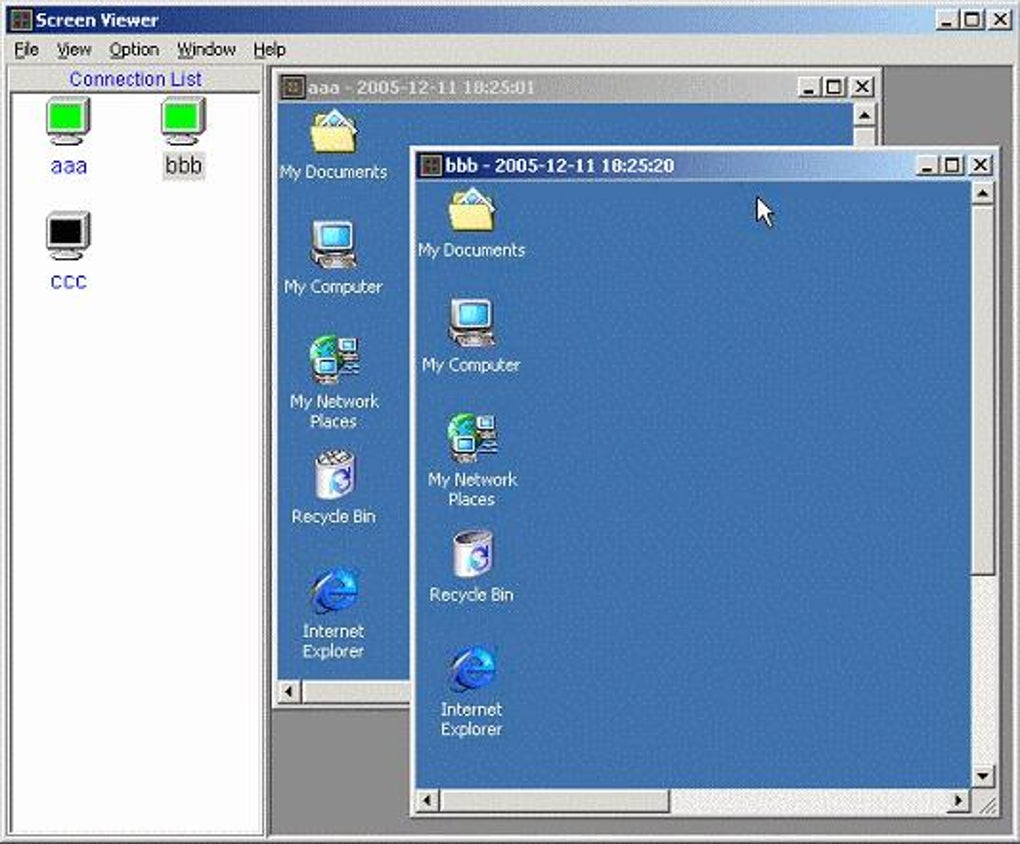
ScreenViewer’s primary purpose is succinctly defined: remote computer screen monitoring. Its fundamental design revolves around capturing a remote screenshot whenever a user desires to observe another machine’s display. This simple yet powerful capability allows for immediate visual feedback of activity on a distant computer, a feature that laid the groundwork for many subsequent monitoring applications. The software doesn’t merely display a live feed; it focuses on snapshot-based monitoring, offering the user control over when a visual update is required. Furthermore, it incorporates a practical option to save these captured screenshots as JPEG files, facilitating record-keeping, evidence collection, or later analysis.
The architecture of ScreenViewer is built upon a classic client-server model, a common and effective paradigm for remote interaction. This bipartite structure is crucial to its operation:
The Client-Server Paradigm
- The Server Component: This part of the software is installed on the remote computer – the machine whose screen is to be monitored. A key design choice, and one that highlights its monitoring intent, is the server’s invisibility. Once installed, it operates discreetly in the background, generally without any visual indication to the user of the remote machine that their screen is being observed. This stealthy operation is often a prerequisite for effective monitoring in scenarios like parental control or employee supervision, where overt notification might defeat the purpose of observation. The server’s role is to capture the screen data and transmit it upon request.
- The Client Component: The client is the interface through which the monitoring user interacts with the system. It is installed on the user’s local computer, serving as the control panel for viewing remote screens. The client software is designed for efficiency and scalability, supporting the connection to multiple server instances simultaneously. This multi-server capability means a single client workstation can monitor several remote computers at once, displaying their screens side-by-side or toggling between them. This feature is particularly beneficial for scenarios requiring oversight of numerous machines, such as in a classroom setting, an internet café, or a small business environment.
The interaction between the client and server is typically initiated by the client sending a request for a screen capture. The server responds by taking a snapshot of its current display and sending it back to the client, which then renders it for the monitoring user. The ability to save these images as JPEGs adds an archival dimension to its functionality, transforming ephemeral screen activity into permanent records. This dual-component approach ensures a clear division of labor and streamlined communication for remote visual access.
Diverse Applications and Ethical Considerations
The utility of ScreenViewer extends across various domains, addressing specific needs for supervision, security, and productivity. However, like any powerful monitoring tool, its application also brings forth important ethical considerations that users must navigate responsibly.
Personal Remote Monitoring
For individual users, ScreenViewer offers a simple solution for keeping an eye on their own computers from a distance. Imagine a scenario where you’ve left your home computer downloading a large file or running an automated task. With ScreenViewer, you could theoretically monitor its progress from your office or another location, simply by installing the server on your home PC and the client on your remote device. This application is primarily about convenience and peace of mind, allowing users to verify operations or check for unexpected activity without needing full remote control. While the primary stated use case often leans towards monitoring others, its fundamental capability to ‘monitor your computer from a remote location’ offers a legitimate personal utility.
Parental Supervision and Child Safety
One of the most frequently cited applications for ScreenViewer is parental monitoring. In an age where children have unprecedented access to the internet and digital devices, parents often seek tools to ensure their safety and responsible online behavior. ScreenViewer allows parents to:
- Observe online activities: Parents can see which websites their children are visiting, what applications they are using, and the nature of their digital interactions.
- Identify potential risks: By viewing screen captures, parents might detect exposure to inappropriate content, cyberbullying, or interactions with unknown individuals.
- Promote responsible usage: Knowledge of being monitored can encourage children to make safer and more appropriate choices online, fostering a sense of accountability.
However, the ethical implications here are significant. While child safety is paramount, excessive or clandestine monitoring can erode trust between parents and children. Open communication about the use of such tools, establishing clear rules, and focusing on education rather than just surveillance are crucial for a healthy parent-child relationship.
Employee Monitoring and Workplace Productivity
Another prominent use case for ScreenViewer is within a professional environment, where employers can utilize it to monitor their employees’ computer activities. The motivations behind this are varied:
- Productivity assessment: Employers can track how time is spent during working hours, ensuring employees are focused on work-related tasks and identifying potential productivity drains.
- Data security: Monitoring can help prevent unauthorized access to sensitive company data, intellectual property theft, or the leakage of confidential information.
- Compliance and policy enforcement: It allows employers to verify that employees are adhering to company policies regarding internet usage, software installation, and general computer conduct.
- Resource optimization: Understanding software usage patterns can help optimize license allocation and hardware resources.
The ethical landscape of employee monitoring is even more complex, often involving legal considerations regarding privacy, consent, and employee rights. Transparency is generally advised, with clear policies communicated to employees about the extent and purpose of monitoring. Laws regarding employee monitoring vary significantly by region, and businesses must ensure full compliance. The balance lies in protecting company assets and ensuring productivity without infringing on employee privacy rights or creating a hostile work environment.
In all these applications, the invisible server component and the ability to capture and save screenshots underscore ScreenViewer’s design as a tool for discrete observation and record-keeping, making the discussion of its ethical deployment paramount.
Technical Footprint, Historical Context, and Availability
Understanding the technical specifications and historical context of ScreenViewer provides insight into its design philosophy and target audience. Despite its relatively simple functionality, certain aspects of its technical profile contributed to its niche popularity.
System Requirements and Historical Relevance
ScreenViewer was explicitly developed for users running Windows 2000 and prior versions. This detail is crucial, as it places the software firmly in an earlier era of computing. Windows 2000, released in February 2000, was a professional operating system primarily targeting businesses and power users. Its support for “prior versions” would likely include Windows 98, Windows NT, and possibly Windows 95, indicating a broad compatibility with late 20th and early 21st-century Windows environments. This specific requirement highlights that the software, in its primary documented form (version 1.9.1), predates more modern operating systems like Windows XP, Vista, 7, 8, 10, or 11. While PhanMemFree lists newer versions (2.1.0, 2.9(20)) and a “Latest update January 15, 2024,” the initial descriptive information about version 1.9.1 and its 2008 update suggests that the core offering might be quite dated or has seen minimal functional changes across versions, despite updated compatibility efforts for newer OS by PhanMemFree’s cataloging. This historical context is important for users considering the software today, as modern operating systems have evolved significantly in terms of security architecture, network protocols, and graphical interfaces.
Versioning and Update History
The reference content mentions two distinct version numbers:
- Version 1.9.1: This is noted as the software version, with an update date of June 20, 2008. This suggests that the core capabilities and architecture discussed were largely solidified around this period. For a software focused on network communication and screen capture, an update from 2008 implies a reliance on older protocols and security practices, which might be a concern in contemporary network environments.
- Version 2.1.0 and 2.9(20): These are listed as the current trial versions, with an update date of January 15, 2024, and compatibility with Windows Vista (and presumably newer, though not explicitly stated for all). This indicates that the software has likely undergone further development or at least packaging updates to function on more recent Windows iterations, even if the underlying core features remain similar to the 2008 version. The coexistence of these version numbers suggests either significant gaps in development or a rebranding/repackaging effort over time. PhanMemFree’s catalog aims to present the latest available version that works on contemporary platforms, hence the newer date and version number.
Lightweight Footprint and Download Statistics
One notable characteristic of ScreenViewer, even in its latest version (1.73 MB size), is its remarkably small file size. The original description states it “needs less free space than many software in the section Networking software.” This lightweight nature is a significant advantage, particularly for older systems or environments with limited storage capacity and bandwidth. A smaller footprint means faster downloads, less strain on system resources during operation, and minimal impact on the performance of the monitored computer.
The download statistics provided by PhanMemFree offer an interesting geographical insight: since its addition to the catalog in 2005, it accumulated 10,712 installations, with 83 downloads in a single week. More specifically, it was “mostly downloaded in India, Peru, and Mexico.” This geographical distribution might be attributed to several factors:
- Emerging markets: Countries with rapidly expanding internet access and a growing demand for basic remote monitoring tools.
- Economic factors: As a trial version, it might appeal to users in regions where budget-friendly or freely accessible solutions are prioritized.
- Specific cultural or business needs: Parental or employee monitoring might have higher perceived value or less stringent regulatory frameworks in these regions, or there might be specific local demands for straightforward, no-frills monitoring.
The download numbers and regional popularity underscore its consistent, albeit niche, appeal over time, suggesting that its core functionality continues to meet specific user requirements.
Licensing and Availability
ScreenViewer is available as a “Trial version.” This means users can download and test the software for a limited period or with restricted features before committing to a purchase. This model allows potential users to evaluate its suitability for their needs without upfront investment. It is exclusively available in English, which might limit its reach in non-English speaking markets unless users are comfortable with English interfaces. PhanMemFree, true to its mission, provides direct download links for the Windows platform, making it accessible to a wide audience.
Installation, Management, and Performance
The practical aspects of deploying and utilizing ScreenViewer are directly tied to its client-server architecture, emphasizing ease of setup and discrete operation.
The Installation Process: A Two-Part System
Installing ScreenViewer involves a straightforward, albeit critical, two-step process that aligns with its client-server model:
- Server Installation (on the target machine): The server component must be installed on the computer(s) that you intend to monitor. This is the “remote computer” mentioned in the description. The installation process for the server is designed to be minimal and, crucially, to run invisibly. This means that once installed, the server component will typically not appear in the taskbar, system tray, or in the list of active applications in a way that is easily discoverable by the remote user. This stealth functionality is a core requirement for many monitoring scenarios, particularly for parental or employee supervision, where overt signs of monitoring could be counterproductive. Its invisibility helps ensure that the monitoring remains effective without causing undue alarm or enabling circumvention.
- Client Installation (on the monitoring machine): The client software is installed on your personal computer, the machine from which you will observe the remote screens. This is your “control center.” The client provides the user interface for connecting to the server(s), requesting screenshots, viewing the captured images, and saving them as JPEG files.
The simplicity of this dual installation contributes to ScreenViewer’s user-friendliness, especially for those who might not be deeply technically inclined. The focus is on getting the monitoring setup quickly and efficiently.
Management: Multi-Server and Multi-Screen Support
One of ScreenViewer’s standout features is its robust support for managing multiple remote connections from a single client. The description explicitly states that “The client supports multi-servers and you can watch multi-screens at the same time!” This capability is highly advantageous for environments where oversight of several computers is necessary:
- Centralized Monitoring: Instead of needing to switch between different applications or establish separate connections for each machine, a single client instance can display visuals from several remote servers simultaneously. This could be achieved through a tiled view, a tabbed interface, or quick switching options, enhancing efficiency for the monitoring user.
- Scalability: This feature makes ScreenViewer suitable for small offices, internet cafes, or even households with multiple family computers. It streamlines the management process, allowing a supervisor or parent to quickly scan activity across various devices without extensive manual effort.
- Real-time Overview (snapshot-based): While not truly real-time video streaming, the ability to rapidly request and display snapshots from multiple screens gives the impression of an aggregated view of ongoing activities, providing a comprehensive overview at a glance.
This centralized management capability distinguishes ScreenViewer from simpler, one-to-one remote desktop tools, positioning it firmly as a monitoring solution.
Performance and Resource Usage
Given its small file size (1.73 MB) and compatibility with older operating systems like Windows 2000, ScreenViewer is inherently designed to be lightweight and resource-efficient.
- Low Disk Space Requirement: As highlighted, it “needs less free space than many software in the section Networking software.” This minimizes its impact on the storage of both the client and server machines.
- Minimal System Load: For the server component, running invisibly means it should consume minimal CPU and RAM to avoid detection and ensure the monitored machine remains responsive. Excessive resource usage would be a significant drawback for a stealth monitoring tool. The snapshot-based approach, as opposed to continuous video streaming, also contributes to lower CPU and network bandwidth consumption, as data is only transmitted when explicitly requested.
- Network Considerations: While lightweight, the frequency of screen capture requests and the size of the JPEG images will impact network bandwidth. However, for typical monitoring scenarios, this is generally manageable, especially on modern broadband connections. For older or slower networks, users might adjust the frequency of captures to optimize performance.
In essence, ScreenViewer prioritizes a discreet, efficient, and scalable approach to remote screen monitoring, making it a pragmatic choice for its intended applications within its specified technical constraints.
PhanMemFree’s Verdict and Alternatives
PhanMemFree, as a prominent platform for software downloads and reviews, categorizes and presents ScreenViewer within the context of other networking tools. Their overview, combined with an understanding of its historical relevance, helps place ScreenViewer in its proper context for potential users.
PhanMemFree’s Editorial Perspective
PhanMemFree describes ScreenViewer as a “nice, trial version Windows program,” emphasizing its straightforward utility. Its classification under “Networking software” with a subcategory of “Analysis (more specifically Monitoring)” clearly defines its niche. The statistics provided by PhanMemFree – its consistent download figures (10,712 installations since 2005, with 83 downloads in a recent week) and its popularity in certain regions – attest to its enduring, if specialized, appeal. Despite being an older program with its primary development seemingly rooted in the Windows 2000 era, the fact that PhanMemFree continues to list updated versions and download figures indicates its ongoing relevance for a segment of users, perhaps those with legacy systems or specific, simple monitoring needs. The fact that PhanMemFree keeps it in its catalog with recent update dates (Jan 2024 for the listed version) also suggests that the software has received some level of maintenance or repackaging to ensure compatibility on more contemporary Windows systems, even if its core features remain consistent with its original design.
PhanMemFree’s role is not just to host downloads but also to provide context, and by highlighting its lightweight nature and specific use cases, they guide users towards understanding if ScreenViewer is the right fit for their requirements.
Comparison with Alternative Solutions
The world of networking and remote control software is vast, and ScreenViewer exists alongside numerous alternatives. PhanMemFree lists several related applications, offering a glimpse into the broader landscape:
- FOCA (Free Security Testing Application): While also a networking tool, FOCA is focused on security analysis and penetration testing, quite distinct from ScreenViewer’s direct monitoring. It’s for security professionals analyzing metadata, not for viewing live screens.
- NetProxy (Efficiently provide simultaneous Internet access to multiple network users): This is a proxy server solution, facilitating shared internet connections. Again, a networking tool, but with a different purpose – network resource management rather than visual monitoring.
- Artisteer (The easiest way to create professional website templates): This is a website design tool, completely unrelated to networking or monitoring. Its inclusion suggests a general listing of other “trial version” software by the same developer or merely related by listing category within the broader PhanMemFree site.
- mRemoteNG (Manage all your remote connections at once): This is a multi-protocol remote connection manager, allowing users to consolidate connections to various remote desktops (RDP, VNC, SSH, etc.). While it involves remote access, its focus is on managing active interactive sessions, often with the full knowledge and consent of the remote user, rather than discreet screen monitoring.
- Remote Desktop Connection (Microsoft RDP): This is Windows’ built-in solution for full remote control. It provides a live, interactive session, but typically takes over the remote screen and is not designed for invisible monitoring.
- VNC (Virtual Network Computing): Similar to RDP, VNC provides full graphical remote control. While some VNC servers can be configured for stealth, the primary use case is interactive remote administration or support.
ScreenViewer differentiates itself from these by its specific emphasis on snapshot-based, often invisible, multi-screen monitoring primarily for supervisory roles, rather than full interactive remote control or network management. Its lightweight design and simplicity also set it apart from more complex remote desktop or security analysis suites. For users prioritizing unobtrusive visual oversight without needing full interactive control, ScreenViewer offers a focused solution that was particularly relevant in its time and continues to serve a niche.
In conclusion, ScreenViewer stands as a testament to early solutions in remote monitoring. Its client-server architecture, invisible server component, and multi-screen support made it a practical choice for parents and employers seeking basic visual oversight. While its historical roots are evident in its system requirements, its continued presence on platforms like PhanMemFree, updated for modern OS, indicates its lasting utility for users who value simplicity, discretion, and efficiency in remote screen observation. However, prospective users are always advised to consider the ethical and legal implications of employing such monitoring tools, ensuring responsible and compliant usage.
File Information
- License: “Trial version”
- Latest update: “January 15, 2024”
- Platform: “Windows”
- OS: “Windows Vista”
- Language: “English”
- Downloads: “25.4K”
- Size: “1.73 MB”


