
ScriptMaker is a free Windows-based software application designed to streamline the process of screenwriting and formatting screenplays. While no longer actively developed, its legacy as a user-friendly and effective tool for scriptwriters remains. This review will explore its functionalities, strengths, and limitations, providing a comprehensive overview for prospective users.
Core Functionalities and Features
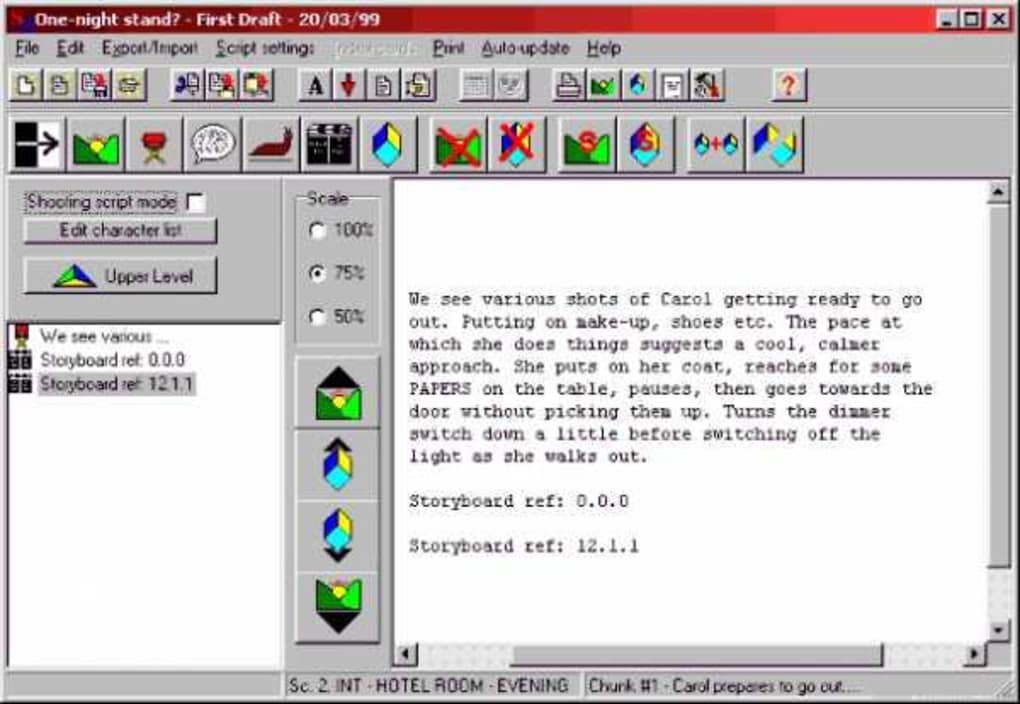
At its core, ScriptMaker functions as an automated formatting tool for screenplays. It takes the user’s script input and automatically formats it according to industry-standard conventions. This eliminates the tedious manual formatting process, allowing writers to focus on the creative aspects of their work. The software boasts a level of output comparable to commercial screenwriting applications that cost significantly more.
One of ScriptMaker’s standout features is its character name management system. The software maintains a list of character names used throughout the screenplay. It even incorporates a predictive feature, attempting to guess which character name the writer intends to use next, thus speeding up the writing process and minimizing errors. This intelligent functionality anticipates the writer’s needs, enhancing efficiency and reducing repetitive typing.
Beyond basic formatting, ScriptMaker offers advanced capabilities for organizing and managing screenwriting projects. It provides storage for elements beyond the screenplay itself, including synopsis, treatment information, and the ability to link this supplementary data to relevant portions of the script. This allows writers to maintain a comprehensive repository of information related to their project within a single application. This integrated approach to project management ensures that all crucial elements are easily accessible and well-organized.
The software also allows for the export of screenplays or sections thereof into XML format. This functionality promotes collaboration with other ScriptMaker users, enabling the sharing and editing of scripts in a structured and compatible format. Furthermore, the XML export option opens possibilities for converting screenplays into web pages, allowing for online dissemination or presentation of work. This versatility extends the reach of the software beyond simple document creation.
ScriptMaker’s scene management capabilities further contribute to its organizational prowess. The software allows users to save and load individual scenes, fostering a modular approach to writing. This function promotes flexibility and allows writers to work on specific scenes independently before integrating them into the larger project. This granular control over project management offers a valuable tool for streamlining the writing and revision process.
The software’s capacity to generate RTF (Rich Text Format) files is another significant asset. This allows users to generate professional-looking documents containing a synopsis, treatment, and the screenplay itself, all compiled into a single, well-organized file. This feature significantly enhances the presentation of a screenplay for potential producers, directors, or collaborators.
System Requirements and Compatibility
ScriptMaker’s compatibility is somewhat limited. It is explicitly designed for Windows 95 and earlier versions. This significant limitation restricts its usability to users with older operating systems and makes it incompatible with the majority of contemporary Windows versions. User reviews highlight installation issues on newer Windows versions, indicating compatibility issues with 64-bit systems. This severely restricts its accessibility to a modern user base. The last update to the software was in 2006, further highlighting the lack of current development and support.
Strengths and Weaknesses
ScriptMaker’s greatest strengths lie in its automated formatting, character name management, and project organization tools. Its ability to automatically format scripts to professional standards, reducing manual effort, is invaluable to writers. The integrated system for managing character names and linking supplementary documentation to specific screenplay sections simplifies the overall writing process. The XML export and RTF generation capabilities extend its utility beyond basic script creation, allowing for collaboration and professional presentation.
However, ScriptMaker’s age and lack of recent updates are significant weaknesses. Its incompatibility with modern Windows systems drastically limits its potential user base. The absence of recent updates means the software lacks the latest features and bug fixes found in contemporary screenwriting tools. The lack of a spell-checker and thesaurus in the free version also represents a limitation compared to modern alternatives. Although a paid version with these features exists, it’s unclear how readily it is available given the age of the software and lack of current developer presence.
Comparison with Modern Alternatives
Compared to modern screenwriting software, ScriptMaker’s functionalities are comparatively basic. While it effectively handles automated formatting and character name management, modern alternatives often include features like scene breakdown, script analysis tools, collaboration features, and cloud-based storage. These features, absent in ScriptMaker, significantly enhance productivity and workflow for contemporary screenwriters. Moreover, modern software packages typically offer cross-platform compatibility, supporting various operating systems, unlike ScriptMaker’s Windows 95 limitation.
Despite the advantages of modern alternatives, ScriptMaker’s simplicity could appeal to users who prefer a straightforward, no-frills approach to screenwriting. For users with older systems who prioritize fundamental formatting over advanced features, ScriptMaker could provide a sufficient solution. However, for most contemporary users, the lack of features and compatibility makes it less appealing compared to the plethora of advanced and supported options available.
In conclusion, ScriptMaker represents a legacy piece of screenwriting software. While its automated formatting and organizational features remain valuable, its significant compatibility limitations and lack of updates render it less practical for most modern users. While simple and potentially functional for specific niche cases, users should weigh the considerable limitations against its strengths before considering its use. The availability of numerous modern alternatives with enhanced functionality and broader compatibility makes ScriptMaker a less compelling choice in the current screenwriting software landscape.
File Information
- License: “Free”
- Version: “1.18”
- Latest update: “September 24, 2021”
- Platform: “Windows”
- OS: “Windows 2000”
- Language: “English”
- Downloads: “9.8K”
- Size: “1.07 MB”


