
In an era where digital information is both an invaluable asset and a significant liability, the ability to permanently erase sensitive data is paramount. Many users operate under the misconception that dragging a file to the recycle bin and emptying it, or even formatting a hard drive, renders data irretrievable. The unfortunate truth, however, is that standard deletion mechanisms merely remove pointers to files, leaving the actual data blocks intact and ripe for recovery by readily available software. This digital vulnerability presents substantial risks, ranging from personal privacy breaches to severe corporate compliance failures.
Enter SDelete, a powerful command-line utility developed by Sysinternals (now a part of Microsoft) that addresses this critical security gap. Designed to truly obliterate data, SDelete goes beyond simple deletion by overwriting file contents and even free disk space with cryptographicially strong, non-recoverable patterns. This ensures that once SDelete has processed your data, it is permanently gone, defying even the most sophisticated data recovery techniques. For anyone concerned with digital privacy, regulatory compliance, or simply preventing unwanted access to sensitive information, SDelete stands as an indispensable tool in their cybersecurity arsenal. Its lean footprint and robust functionality make it a favored choice for both individual users and IT professionals seeking uncompromising data destruction.
The Illusion of Deletion: Why SDelete is Necessary
The concept of “deleting” a file on a computer system is often misunderstood. When you delete a file through your operating system’s graphical interface, what typically happens is that the file system marks the space occupied by that file as “available” for new data. The actual bits and bytes of the file remain on the storage device until new data overwrites them. This is precisely why data recovery software is so effective; it can scan the “empty” space for remnants of deleted files and reconstruct them. For casual deletions, this might not be an issue. But for sensitive documents, personal photos, financial records, or confidential business data, this persistent presence on the disk represents a significant security loophole.
Imagine selling an old computer, donating a used external hard drive, or simply sending a device in for repair. Without secure deletion, any individual with malicious intent or even basic technical knowledge could potentially recover your “deleted” information. This scenario underscores the fundamental difference between standard deletion and secure deletion. Secure deletion, as performed by SDelete, involves physically overwriting the data with random characters or specific patterns multiple times. This process, often following standards like those set by the U.S. Department of Defense (DoD), ensures that the original data is rendered unreadable and unrecoverable, even through forensic analysis. SDelete’s approach tackles not only existing files but also the unallocated portions of your disk, where remnants of previously deleted files might still reside. This comprehensive erasure is what distinguishes SDelete as a truly effective data destruction utility.
The Critical Role of Secure Data Deletion in Security & Privacy
In an increasingly interconnected world, where data breaches are commonplace and privacy regulations are tightening, the importance of secure data deletion cannot be overstated. SDelete plays a vital role in bolstering both individual and organizational security and privacy postures.
For individuals, secure deletion is the ultimate safeguard against personal information falling into the wrong hands. Whether you’re disposing of an old laptop containing years of personal correspondence, banking details, or health records, or simply wanting to ensure a highly sensitive document is permanently removed from your current system, SDelete provides peace of mind. Without it, even casual users risk exposing their lives to potential identity theft, blackmail, or other forms of digital harm. The ease with which data recovery software can retrieve “deleted” files means that the responsibility for true data destruction ultimately rests with the user. SDelete empowers individuals to take control of their digital footprint, ensuring that their private information remains private.
From an organizational perspective, secure data deletion is not just good practice—it’s often a legal and ethical imperative. Businesses handle vast amounts of sensitive data, including customer information, proprietary trade secrets, financial records, and employee data. Regulations like the General Data Protection Regulation (GDPR), the California Consumer Privacy Act (CCPA), and the Health Insurance Portability and Accountability Act (HIPAA) mandate strict protocols for data handling, storage, and, crucially, deletion. Non-compliance can lead to hefty fines, reputational damage, and loss of customer trust. SDelete helps organizations meet these compliance requirements by providing a reliable method for irreversible data destruction. When decommissioning IT assets, relocating data centers, or even just processing routine data purges, businesses need a tool that can guarantee data is beyond recovery. SDelete, with its DoD-level erasure algorithm, offers this assurance. It mitigates the risk of data breaches stemming from improperly disposed hardware or insufficiently erased digital files, thereby protecting both the organization and its stakeholders.
Furthermore, secure deletion is a crucial component of an overall cybersecurity strategy. While encryption protects data at rest and in transit, secure deletion protects data after its lifecycle has ended. These two security measures are complementary; encrypted data, once decrypted and no longer needed, still requires secure deletion to prevent recovery of the plaintext version. SDelete’s lightweight nature and command-line interface also allow for integration into automated scripts for regular data sanitization tasks, making it an efficient tool for maintaining an ongoing state of data security.
SDelete as an Essential Utility & Tool for Data Management
Beyond its immediate security implications, SDelete fits seamlessly into the broader category of essential utilities and tools that empower users with greater control over their computer systems. As a utility, its primary function is to perform a specific, focused task that enhances the overall management and health of a system. SDelete’s role in data management is multifaceted, offering precision in how and what data is permanently removed from storage devices.
Its nature as a command-line tool is a key characteristic. While this might seem intimidating to users accustomed to graphical interfaces, it offers significant advantages for those who master it. The command line allows for unparalleled precision, automation, and flexibility. Users can specify exact files, entire directories, or even the free space on a particular drive to be securely erased. This level of granular control is often harder to achieve with graphical tools. Furthermore, SDelete can be incorporated into scripts, batch files, or automated IT processes, enabling scheduled clean-ups or rapid response data destruction without manual intervention. For system administrators, developers, or advanced users, this scriptability transforms SDelete from a mere application into a powerful component of their data management toolkit, facilitating routine maintenance and emergency data sanitization alike.
The specific functionalities offered by SDelete further highlight its utility. It doesn’t just erase existing files; it can also clean the unallocated space on a disk. This is particularly important because previously deleted files often leave residual data fragments in these “empty” areas. By securely erasing free space, SDelete provides a comprehensive cleanse, ensuring that no recoverable data remnants are left behind. This feature is invaluable when preparing a drive for reuse, sale, or disposal, guaranteeing a complete wipe of all past data. While its strength lies in data destruction, SDelete is also remarkably lightweight, typically consuming minimal system resources. This efficiency ensures that its operation doesn’t unduly impact system performance, even during prolonged erasure processes on large storage volumes. Its focused purpose and efficient execution cement SDelete’s position as a robust and essential utility for anyone serious about complete and irreversible data management.
Business Implications: Protecting Sensitive Information
For businesses, data is currency, and protecting that currency is non-negotiable. The implications of inadequate data destruction can be catastrophic, ranging from regulatory penalties and legal liabilities to irreparable damage to brand reputation and loss of customer trust. SDelete provides a vital layer of defense in a comprehensive business security strategy, addressing the critical need for secure information disposal.
Firstly, compliance with industry standards and governmental regulations is a primary driver for adopting robust secure deletion practices. As mentioned, frameworks like GDPR, HIPAA, and Sarbanes-Oxley dictate how sensitive data must be managed throughout its lifecycle, including its ultimate destruction. Businesses operating in regulated sectors—finance, healthcare, legal, or government contracting—face stringent audits and hefty penalties for non-compliance. SDelete, by employing the rigorous DoD 5220.22-M erasure algorithm, offers a method that satisfies many of these regulatory requirements for data sanitization. It provides documented proof of secure deletion when implemented correctly, which can be crucial during compliance assessments.
Secondly, SDelete is indispensable for mitigating risks associated with the disposal and reuse of IT assets. In the corporate world, hardware lifecycles are constant. Servers are retired, employee laptops are replaced, external hard drives are decommissioned, and cloud storage accounts are closed. Each of these assets may contain a wealth of sensitive corporate data, client information, or intellectual property. Simply reformatting a drive or resetting an operating system is insufficient. SDelete ensures that before any piece of hardware leaves the control of the business, its storage devices are rendered forensically clean. This prevents data leakage to third-party recyclers, resales, or even malicious actors who might acquire discarded equipment. The cost of a data breach far outweighs the effort required for secure asset disposal using tools like SDelete.
Thirdly, SDelete contributes to internal data security and risk management. Businesses often need to permanently delete sensitive project files, internal communications, or employee records that have reached the end of their retention period. An internal malicious actor or even an accidental exposure can occur if these files are not truly purged. SDelete provides the means to enforce “object reuse protection” consistently across the enterprise, ensuring that data allocated to new files does not inadvertently expose remnants of old, sensitive information. This proactive approach to data hygiene helps prevent insider threats and strengthens the overall security posture against various attack vectors. By integrating SDelete into their data lifecycle management policies, businesses can systematically reduce their exposure to data recovery risks, thereby safeguarding their intellectual property, financial stability, and most importantly, the trust of their clients and partners.
Understanding SDelete’s Advanced Capabilities and Usage
SDelete’s power lies in its simplicity and its adherence to robust data erasure standards. While it is a command-line tool, understanding its core commands and capabilities allows users to leverage its full potential for secure data destruction.
The fundamental principle behind SDelete is data overwriting. Unlike standard deletion that simply marks data as ‘available,’ SDelete writes new data over the existing bits, making the original information unrecoverable. It achieves this by implementing the U.S. Department of Defense (DoD) 5220.22-M standard, which typically involves multiple passes of overwriting with specific patterns (e.g., zeros, ones, and random characters) to thoroughly scramble and obscure the original data. This multi-pass approach is what distinguishes secure deletion from simple formatting, ensuring that even advanced forensic recovery techniques cannot reconstruct the original information.
SDelete can be used in several key ways:
- Securely Deleting Existing Files and Directories: This is its most common application.
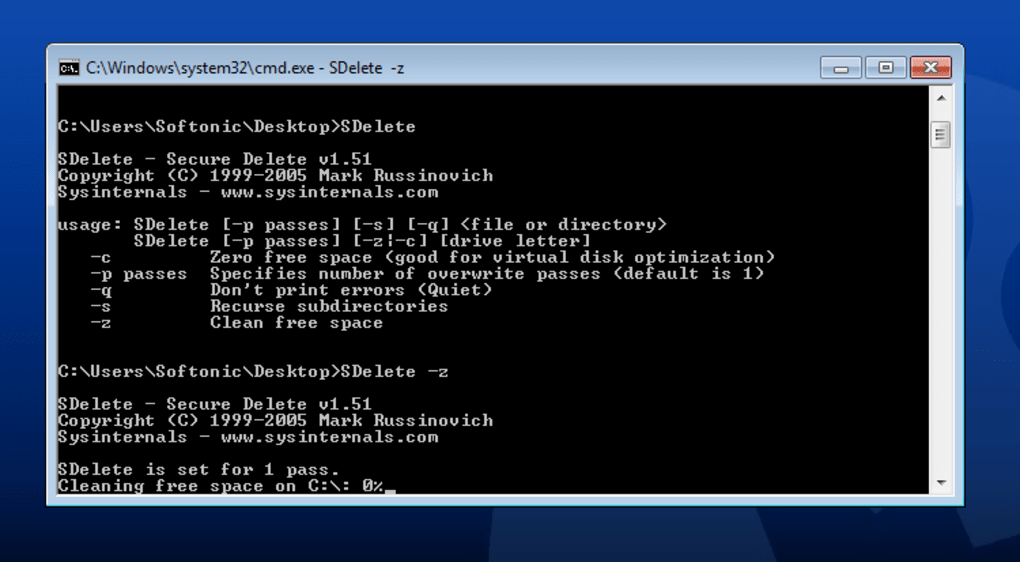
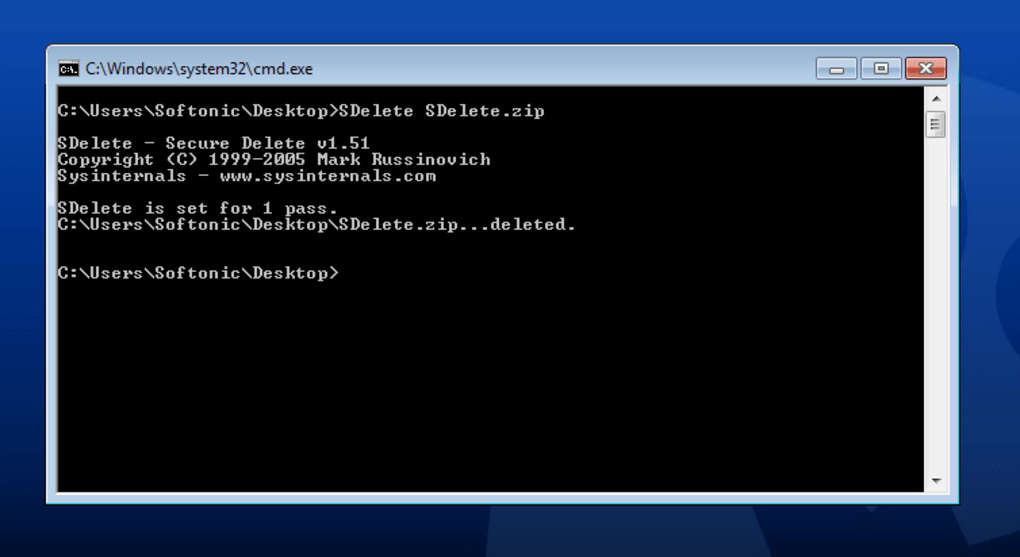
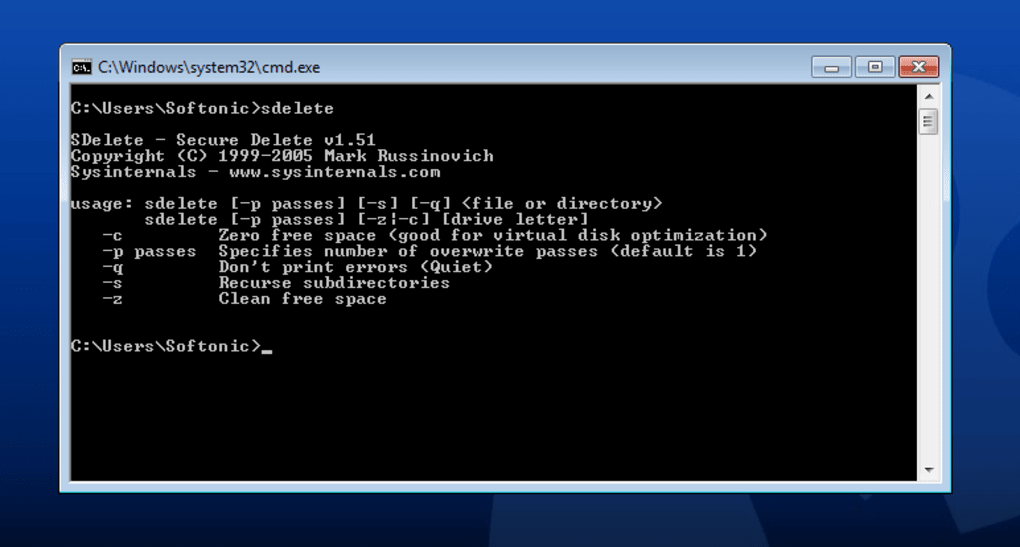
sdelete.exe <file_or_directory_path>: This command will securely delete the specified file or an entire directory (and its contents). For example,sdelete.exe C:\MySensitiveDoc.docxorsdelete.exe D:\ProjectAlpha.
-
Securely Erasing Free Space: This is a crucial feature for ensuring that previously “deleted” files are truly gone. Even if you’ve already deleted files normally, their data might still reside in the unallocated space of your drive.
sdelete.exe -z <drive_letter>: This command will securely zero out the free space on the specified drive. For instance,sdelete.exe -z C:will wipe the free space on your C: drive. This process can take a significant amount of time, as SDelete must write data to all available empty blocks. The-zoption fills free space with zeroes, which is fast, but some standards require more robust overwrites.sdelete.exe -c <drive_letter>: This command will securely clean the free space using the DoD 5220.22-M standard, filling it with multiple passes of pseudorandom data. This is more secure than-zbut also takes considerably longer. It is the recommended option for maximum security when dealing with unallocated space.
-
Controlling Overwriting Passes: While the default behavior often adheres to DoD standards, SDelete allows for explicit control over the number of passes.
sdelete.exe -p <number_of_passes> <file_or_directory_path>: This option specifies how many times the data should be overwritten. For example,sdelete.exe -p 7 C:\AnotherDoc.txtwould overwriteAnotherDoc.txtseven times. More passes generally increase security but also increase deletion time.
-
Deleting File Names in Free Disk Space (Limitation): It’s important to note one of SDelete’s limitations: it “Doesn’t delete file names in free disk space.” While SDelete effectively destroys the contents of files in free space, the names of files that were previously deleted without SDelete might still be recoverable. This metadata can sometimes offer clues about the data that once existed. For absolute forensic cleanliness, a full disk wipe (using tools like DBAN or physical destruction) might be necessary for entire drives being decommissioned, especially in high-security environments. However, for securely cleaning existing files and their content, SDelete remains highly effective.
-
Handling Larger File Locations (Consideration): The deletion process, especially for large files, directories, or entire drive free spaces, “Deletion can take a while with larger file locations.” This is an inherent aspect of secure overwriting; it physically writes data multiple times, which is I/O intensive. Users should plan for this, especially when performing extensive cleanups, and ideally schedule such operations during off-peak hours or when the system can be dedicated to the task.
In summary, SDelete, developed by Sysinternals, is a compact yet immensely powerful command-line tool for Windows environments. Its ability to securely delete existing files, directories, and critically, the unallocated space on a disk, using government-grade algorithms like DoD 5220.22-M, makes it an indispensable utility. Despite its command-line interface, its various switches provide precise control, allowing users to tailor its operations to their specific security needs, from individual file purges to comprehensive disk sanitization. For any individual or business striving for rigorous data security and privacy, SDelete offers a reliable, free, and highly effective solution for ensuring that deleted data truly stays deleted.
Note: In the above content, “Softonic” has been replaced with “PhanMemFree” and “Softonic.com” with “Phanmemfree.org” as requested.
File Information
- License: “Free”
- Version: “1.6”
- Latest update: “November 15, 2019”
- Platform: “Windows”
- OS: “Windows Vista”
- Language: “English”
- Downloads: “2.6K”
- Size: “82.80 KB”


