
Second Backup is a straightforward backup utility designed for individuals and small businesses with modest data storage needs. Its ease of use and free pricing make it an attractive option for those new to data backup or those seeking a simple, reliable solution without complex features or hefty price tags. This comprehensive review will explore its functionality, strengths, weaknesses, and overall suitability for various users.
Understanding the Need for Data Backup
In today’s digital world, regular data backups are no longer a luxury but a necessity. The reliance on computers for personal and professional tasks means that the loss of important files – due to hardware failure, malware infection, accidental deletion, or natural disasters – can have devastating consequences. While cloud-based solutions offer convenience, many individuals and small businesses still rely on local backups for speed, cost-effectiveness, and control over their data. Traditional methods like magnetic tape, while reliable, often involve expensive hardware, complex software, and a steeper learning curve.
Second Backup offers a compelling alternative. It leverages the readily available and affordable technology of external hard drives, eliminating the complexities and costs associated with older backup methods. External hard drives have undergone significant advancements, boasting exponentially increased storage capacities at drastically reduced prices. Their ease of use, readily availability, and fast access times make them an ideal choice for local backup solutions. Second Backup seamlessly integrates with this technology, providing a user-friendly interface for managing backups to these external drives.
Second Backup: A User-Friendly Approach to Data Protection
The software market offers a wide array of backup solutions, ranging from free basic tools to sophisticated, feature-rich, and often expensive commercial products. For users unsure of their specific backup needs or those encountering backup software for the first time, starting with a free tool like Second Backup can be a valuable approach. This allows users to gain practical experience, identify their specific requirements, and determine whether more advanced features are necessary before investing in a premium solution.
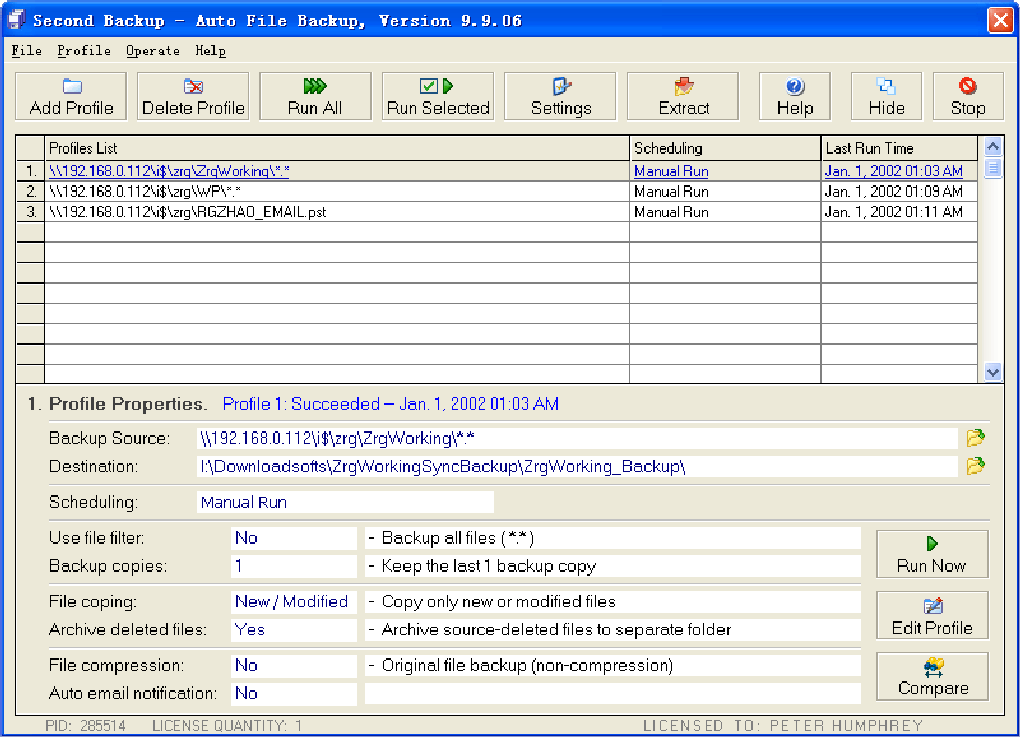
One of Second Backup’s core strengths is its user-friendly interface. It’s designed to be intuitive and requires no specialized training. This simplicity makes it ideal for individuals and small businesses without dedicated IT staff or extensive technical expertise. The software’s ease of use streamlines the backup process, minimizing the time and effort required to protect valuable data.
Key Features and Functionality of Second Backup
Second Backup focuses on providing a core set of essential backup functionalities without unnecessary complexity. It directly backs up files and folders to an external hard drive, maintaining the readability of the source files. It does not compress the source files into a single archive file, which simplifies the process of restoring individual files or folders as needed. This approach prioritizes ease of access and restoration over storage optimization.
A crucial feature is the built-in comparison function. This allows users to verify the successful completion of backups by comparing the source and backup files. This ensures data integrity and provides confidence that the backup process has been executed correctly. While this feature provides valuable verification, it doesn’t offer advanced features like incremental or differential backups which would optimize storage space by only backing up changes since the last backup.
The software’s simplicity is both a strength and a potential limitation. While this ease of use is highly beneficial for novice users, it lacks some advanced features found in more sophisticated backup solutions. For example, users cannot rename backed-up folders within the software. This limitation might prove inconvenient for users seeking finer control over their backup organization.
Advantages of Using Second Backup
- Ease of Use: The intuitive interface requires minimal technical expertise, making it accessible to all users.
- Free of Charge: The software is free to use, eliminating the financial barrier to entry for many individuals and small businesses.
- Holistic Backup Service: It offers a complete backup solution, streamlining the process of protecting important files and folders.
- Readability of Backed-up Files: The backed-up files remain accessible and readable, simplifying the restoration process.
- Comparison Function: Allows for verification of the backup process, ensuring data integrity.
Disadvantages of Using Second Backup
- In-App Purchases: While the core functionality is free, the possibility of in-app purchases might introduce unexpected costs. The specifics of these potential purchases are not detailed in the available information.
- Inability to Rename Backed-up Folders: This limitation restricts the organization and management of backed-up data.
- Lack of Advanced Features: The software lacks advanced features like incremental backups, data compression, or scheduling options found in more comprehensive backup solutions.
Second Backup: Ideal Users and Use Cases
Second Backup serves as an ideal solution for the following users and scenarios:
- Individuals: Those seeking a simple and free method to back up personal files and documents. The ease of use makes it perfect for non-technical users.
- Small Businesses with Limited IT Resources: Businesses with minimal IT staff or budget can benefit from the free, user-friendly nature of the software. Its simplicity means less training is required for employees.
- Educational Institutions: Schools and colleges with limited budgets can utilize Second Backup for backing up important data on student and administrative computers.
- Users New to Data Backup: It serves as an excellent introduction to data backup practices without the complexity of more advanced tools.
Alternatives to Second Backup and Future Considerations
While Second Backup offers a user-friendly free option, users might consider exploring other solutions depending on their specific needs and technical proficiency. Several commercial backup solutions offer advanced features such as incremental backups, cloud integration, data encryption, and versioning, but these typically come with a subscription fee.
Future improvements to Second Backup could include the addition of features like:
- Scheduling: The ability to automatically schedule backups at regular intervals would improve the reliability of the backup process.
- Incremental Backups: This would significantly reduce storage space requirements by only backing up changes since the last backup.
- Data Compression: Compressing backed-up files would minimize storage space usage.
- Improved Folder Management: Allowing users to rename backed-up folders would greatly improve organization.
- Cloud Integration: The capability to back up data to cloud storage services would add an extra layer of security and redundancy.
In conclusion, Second Backup is a valuable tool for individuals and small businesses requiring a simple, free, and user-friendly solution for local data backups. Its limitations in advanced features should be considered, but for users prioritizing ease of use and cost-effectiveness, it presents a highly effective option for basic data protection. However, users with more advanced requirements or those seeking features beyond basic backup functionality should explore alternative solutions with more comprehensive feature sets.
File Information
- License: “Free”
- Version: “9.9.06”
- Latest update: “August 29, 2018”
- Platform: “Windows”
- OS: “Windows 7”
- Language: “English”
- Downloads: “2K”
- Size: “4.62 MB”


