
Secunia Personal Software Inspector (PSI) was a free software application designed to identify and address security vulnerabilities on personal computers. While no longer actively developed or supported, its functionality and impact on the landscape of personal computer security warrant a thorough examination. This review delves into the features, strengths, weaknesses, and overall legacy of Secunia PSI.
Secunia PSI: Functionality and Features
Secunia PSI functioned as a vulnerability scanner, systematically analyzing a computer’s installed software to detect outdated programs, missing security patches, and other potential weaknesses that could be exploited by malicious actors. Its primary function was to identify software that was either end-of-life (no longer receiving security updates from the vendor) or had known vulnerabilities for which patches were available.
The software offered two distinct scanning modes: Simple and Advanced. The Simple mode presented a streamlined interface, primarily focusing on easily patched vulnerabilities. This mode automated the process of downloading and installing necessary updates, making it user-friendly for those less technically proficient. The Advanced mode, however, provided a more comprehensive view of the system’s security posture. It offered detailed information about identified vulnerabilities, including severity levels and specific recommendations for remediation. Advanced mode also provided insights into end-of-life software and the security status of web browsers, offering a more granular understanding of potential risks.
Beyond vulnerability detection, Secunia PSI actively facilitated the patching process. In the Simple mode, the software automatically downloaded and installed updates where possible, minimizing user intervention. The Advanced mode gave users greater control, allowing for more informed decision-making regarding which updates to apply. This functionality greatly simplified the often complex task of keeping software up-to-date, a critical aspect of maintaining computer security.
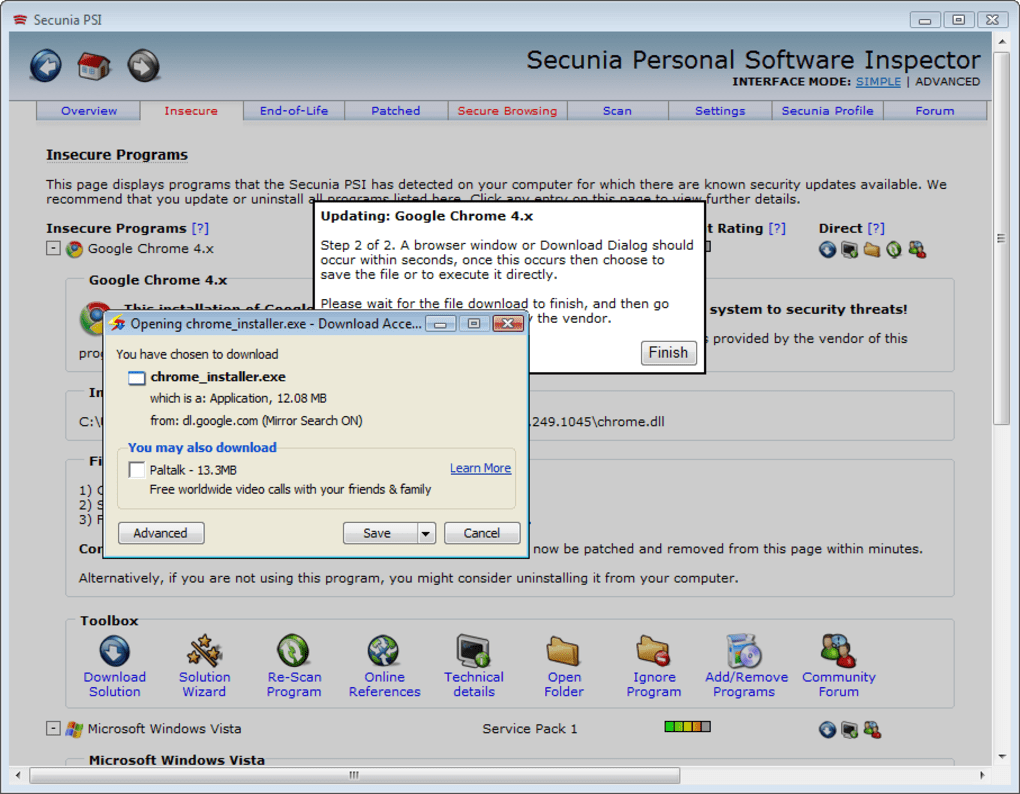
The application’s interface, though described as plain by some users, was designed for usability. The separation into Simple and Advanced modes catered to users with varying levels of technical expertise. The “Show only ‘Easy-To-Patch’ programs” option further simplified the process for beginners, although the developers cautioned against relying solely on this setting.
Strengths and Advantages of Secunia PSI
Secunia PSI offered several significant advantages, contributing to its popularity during its operational lifespan:
- Ease of Use: The software’s simple mode made it accessible to users with limited technical skills. The automated update process streamlined the task of patching vulnerabilities.
- Comprehensive Scanning: Secunia PSI’s scanning capabilities were robust, identifying a wide range of vulnerabilities, including outdated software and missing patches.
- Automated Patching: The automated update functionality in the Simple mode significantly reduced the effort required to maintain software security.
- Free for Personal Use: The software was free for personal use, making it accessible to a broad audience. This affordability was a significant factor in its adoption.
- Multilingual Support: The software supported a wide range of languages, expanding its global reach and making it accessible to a diverse user base.
Weaknesses and Limitations of Secunia PSI
Despite its strengths, Secunia PSI had certain limitations:
- Occasional Freezing and Slow Scanning: Some users reported instances of the software freezing or exhibiting slow scanning times. These performance issues could be frustrating and disruptive.
- Inaccurate Readings: Several user reviews highlighted instances where the software incorrectly identified installed software versions, leading to inaccurate vulnerability reports. This could potentially lead to unnecessary actions or a false sense of security.
- Not for Commercial Use: The free version was explicitly for personal use, limiting its applicability in professional or business settings.
- End-of-Life: The most significant limitation is that Secunia PSI is no longer supported or updated. This means that the vulnerability database is outdated, and the software may no longer accurately identify current threats. Furthermore, it will not receive any security patches or updates of its own, leaving it potentially vulnerable to exploitation.
- Potential for Paranoia: The software’s meticulous scanning might lead some users to excessive concern about security threats, even when the risks are minimal.
Secunia PSI: A Legacy of Influence
Secunia PSI played a significant role in raising awareness of software vulnerabilities and the importance of keeping software up-to-date. Its ease of use and free availability made it accessible to a large number of users, promoting a more proactive approach to personal computer security. While the software is no longer supported, its influence is still felt in the continuing emphasis on software updates and the development of alternative security tools.
Many modern antivirus and security suites incorporate similar vulnerability scanning capabilities, directly building upon the foundation laid by Secunia PSI. The software’s success highlighted the demand for user-friendly tools that simplify the complexities of software security management. This legacy continues to drive innovation in the field, leading to the development of more sophisticated and integrated security solutions.
Alternatives to Secunia PSI
Given that Secunia PSI is no longer supported, users seeking similar functionality should explore alternative software solutions. Several options exist, including:
- Comprehensive Antivirus Suites: Many reputable antivirus programs now include automatic vulnerability scanning as part of their broader security features. These suites often provide more comprehensive protection, including real-time malware detection and other security tools.
- Dedicated Vulnerability Scanners: Some specialized software applications are designed specifically for vulnerability scanning. These tools often offer more advanced features and detailed reporting than consumer-grade antivirus suites.
- Operating System Updates: Keeping the operating system itself up-to-date is crucial, as these updates frequently include security patches for core system components. Regular updates are a fundamental aspect of maintaining a secure system.
Choosing a suitable alternative depends on individual needs and technical expertise. Users with limited technical knowledge might prefer a comprehensive antivirus suite, while those with more advanced skills could consider dedicated vulnerability scanners offering greater customization and control.
Conclusion
Secunia Personal Software Inspector, while no longer available, holds a significant place in the history of personal computer security. Its user-friendly design and free availability democratized vulnerability scanning, making it accessible to a wide audience. While it had limitations, Secunia PSI’s influence is undeniable, paving the way for the more sophisticated and integrated security solutions available today. Users seeking similar functionality should explore modern alternatives that offer comparable features and ongoing support to maintain a secure computing environment. The legacy of Secunia PSI serves as a reminder of the ongoing importance of proactive software updates and the ever-evolving landscape of cybersecurity.
File Information
- License: “Free”
- Latest update: “December 14, 2023”
- Platform: “Windows”
- OS: “Windows XP”
- Language: “English”
- Downloads: “12.9K”
- Size: “5.33 MB”


