
Secure Eraser is a freeware utility designed for the secure and permanent deletion of files on Windows systems. Unlike simply moving files to the Recycle Bin, which leaves them recoverable, Secure Eraser employs various data deletion standards to overwrite file data, making recovery virtually impossible. This detailed review will explore its features, functionality, security implications, and comparison to alternative solutions.
Understanding Secure Data Deletion: Why You Need Secure Eraser
In today’s digital world, data security is paramount. Simply deleting a file doesn’t guarantee its complete removal. Deleted files often remain on the hard drive, residing in unallocated space until overwritten by new data. Sophisticated data recovery tools can easily retrieve this information, potentially exposing sensitive personal or business data to unauthorized access. This is where Secure Eraser steps in. By implementing multiple data deletion algorithms, it ensures that deleted files are irrecoverable, protecting your privacy and sensitive information.
The need for a secure file deletion tool is not limited to individuals. Businesses handling sensitive client data, financial records, or intellectual property must ensure rigorous data security measures are in place to comply with regulations and prevent data breaches. Secure Eraser offers a straightforward solution for both personal and professional use.
Key Features and Functionality of Secure Eraser
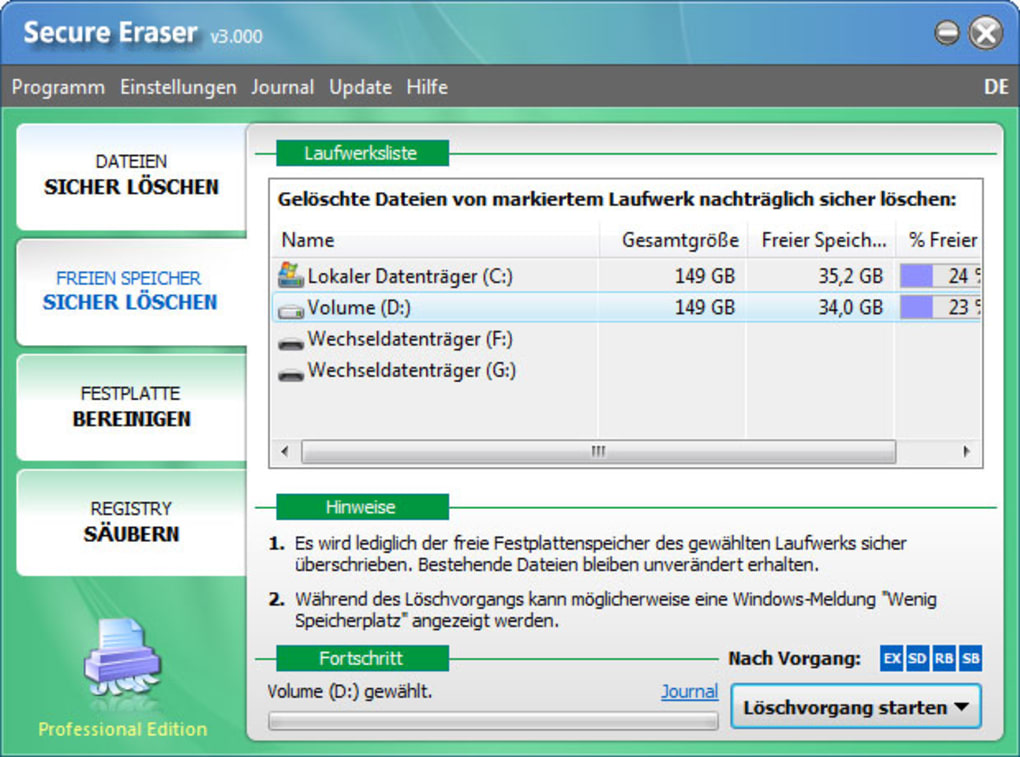
Secure Eraser’s strength lies in its simplicity and effectiveness. The program offers a clean and intuitive interface, making it user-friendly for both novice and experienced computer users. Here’s a breakdown of its key features:
- Multiple Deletion Standards: Unlike basic file deletion methods, Secure Eraser offers several recognized data deletion standards, each with varying levels of overwrite passes. These standards include:
- US DoD 5220.22-M ECE: This standard, employed by the US Department of Defense, is known for its rigorous data sanitization methods. It typically involves multiple passes of overwriting with random data.
- German Standard: This standard defines a specific method for securely erasing data, ensuring its unrecoverability.
- Peter Gutmann Standard: A more comprehensive method known for its extensive overwrite cycles, designed to thwart even the most advanced data recovery techniques.
- Secure Deletion of Existing and Deleted Files: Secure Eraser can securely delete files that are currently on your hard drive as well as those already sent to the Recycle Bin. This feature ensures complete data sanitization, eliminating the possibility of recovery from either location.
- System and Registry Cleaning: In addition to file deletion, Secure Eraser provides options for cleaning system files and the Windows Registry, removing temporary files and other data that might contain sensitive information. This feature enhances overall system security and performance.
- Easy-to-Use Interface: The user interface is designed for simplicity. Users can easily select files or folders for deletion and choose their preferred deletion standard with minimal effort.
Secure Eraser Compared to Alternative Solutions
While Secure Eraser is a robust option, several other secure file deletion tools are available. Comparing features and functionality helps determine the best choice for individual needs:
- Eraser: A popular open-source alternative, Eraser also employs multiple data deletion standards and offers scheduling capabilities. However, its interface might be slightly less intuitive than Secure Eraser’s.
- Freeraser: Another free, open-source alternative that provides a more streamlined interface, though it might not offer the same range of deletion standards as Secure Eraser.
- Soft4Boost Secure Eraser: A commercial alternative, offering a wider range of features, including the ability to securely wipe entire hard drives. However, it comes with a price tag.
The choice between Secure Eraser and these alternatives depends on individual preferences and requirements. Secure Eraser offers a good balance of features, ease of use, and security for most users.
Security Implications and Best Practices
Secure Eraser significantly reduces the risk of data recovery, but it’s crucial to remember that no method guarantees 100% unrecoverability in all circumstances. Advanced techniques, physical damage to the hard drive, or specialized laboratory equipment could potentially recover data even after using Secure Eraser.
To maximize data security, follow these best practices alongside using Secure Eraser:
- Regular Backups: Maintain regular backups of important data to mitigate the risk of data loss in case of hardware failure or accidental deletion.
- Strong Passwords: Protect your system with a strong and unique password to prevent unauthorized access.
- Antivirus Software: Keep your system protected with up-to-date antivirus software to prevent malware from compromising your data.
- Software Updates: Ensure that your operating system and other software are regularly updated to patch security vulnerabilities.
- Physical Security: Protect your computer and hard drives from physical theft or damage.
Secure Eraser: A Practical and Reliable Solution
Secure Eraser provides a user-friendly and effective solution for securely deleting files on Windows systems. Its simple interface and multiple deletion standards make it suitable for both individual users and businesses concerned about data security. While alternative solutions exist, Secure Eraser stands out for its balance of functionality, ease of use, and reliability, making it a valuable tool in any digital security arsenal. Remember to combine Secure Eraser with other best practices to achieve comprehensive data protection and mitigate the risks of data breaches and unauthorized access.
The information provided here is for general informational purposes only and does not constitute professional advice. Always consult with a qualified security expert for advice tailored to your specific needs and circumstances. The effectiveness of any secure file deletion tool depends on various factors, including the type of hard drive, the data deletion standard employed, and the sophistication of potential recovery attempts. While Secure Eraser significantly reduces the risk of data recovery, it does not provide an absolute guarantee of unrecoverability.
File Information
- License: “Free”
- Latest update: “February 19, 2016”
- Platform: “Windows”
- OS: “Windows XP”
- Language: “English”
- Downloads: “45.6K”
- Size: “4.93 MB”


