
Sekiro: Shadows Die Twice, FromSoftware’s critically acclaimed action-adventure title, captivated players with its challenging combat and rich lore. However, the desire to enhance the game experience beyond its core content led to a thriving modding community. While modifying Sekiro can be a daunting task for the average player, the Sekiro Mod Engine emerged as a game-changer, significantly simplifying the process and opening up the game to a broader range of customization options. This article delves into the functionalities, benefits, and limitations of the Sekiro Mod Engine, providing a comprehensive overview for both seasoned modders and newcomers alike.
Understanding the Sekiro Modding Landscape Before the Engine
Before the advent of the Sekiro Mod Engine, modding Sekiro: Shadows Die Twice was a complex and potentially risky endeavor. It required a deep understanding of the game’s file structure, extensive technical knowledge, and meticulous care to avoid corrupting the game files. The process generally involved:
-
Extracting Game Files: Modders had to extract the game’s assets, including textures, models, animations, and scripts, from the game’s installation directory. This often involved using specialized tools and navigating a complex hierarchy of folders and files. Incorrectly extracting or modifying files could lead to game instability or even complete game breakage.
-
Manual Editing: Once the files were extracted, modifications had to be made directly to the game assets. This required specialized software and a thorough understanding of the file formats used by Sekiro. Even minor mistakes could render the modified files unusable, necessitating a complete re-extraction and editing process.
-
Re-integration: After making the desired modifications, the altered files had to be carefully re-integrated into the game’s file structure, replacing the original files. This process, like extraction, was fraught with potential for error, potentially causing game crashes or data corruption.
This intricate and error-prone process acted as a significant barrier to entry for aspiring Sekiro modders. The learning curve was steep, and the risk of permanently damaging the game installation was substantial. This limited the modding community’s reach, preventing many players from experiencing the potential enhancements offered by user-created modifications.
The Sekiro Mod Engine: A Game-Changer for Modding
The Sekiro Mod Engine dramatically simplified the modding process by providing a user-friendly framework for installing and managing modifications. Instead of directly manipulating the game’s files, modders could utilize the engine as an intermediary. This streamlined approach involved:
-
Simplified Installation: The engine is designed for easy installation. It’s typically a single DLL file that needs to be placed in a specific location within the game’s directory. No complex configuration or registry edits are required, making it accessible to even less technically proficient users.
-
Mod Management: The engine features a central repository for mods. Modders can simply download mods from community platforms like Nexus Mods and place them into the designated folder specified by the engine. The engine automatically detects and integrates the mods, eliminating the need for manual file extraction, editing, and re-integration.
-
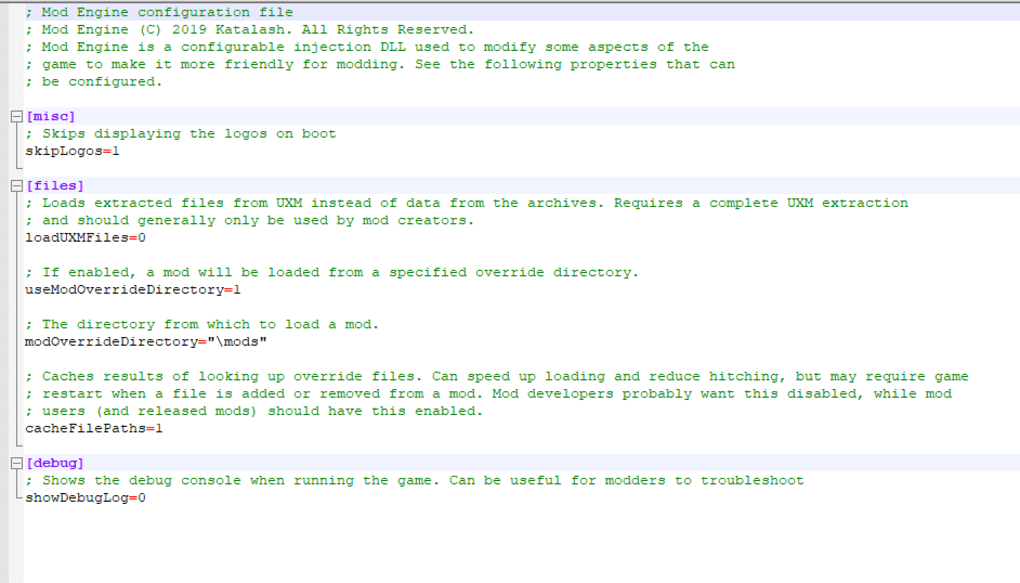
INI File Configuration: The engine primarily uses an INI file (Initialization file) for configuration. This file allows users to customize various aspects of the engine’s behavior and manage mod loading. The user-friendly nature of INI files makes them accessible even to users without extensive programming knowledge.
-
Automated File Handling: The engine handles the complexities of unpacking mod files, ensuring compatibility with the game’s file structure, and properly integrating the modified assets. This automated process drastically reduces the likelihood of errors during the installation process, protecting the game’s integrity.
-
Enhanced User Experience: Beyond streamlined modding, the Sekiro Mod Engine often provides extra benefits, such as bypassing the initial game logo screens, enabling quicker access to gameplay.
Supported Mod Types and Compatibility
The Sekiro Mod Engine is designed to be compatible with a broad range of mod types, including:
-
Asset Replacement Mods: These mods replace existing game assets, such as textures, models, and sounds, with modified versions. For example, a mod might replace the default character models with higher-resolution versions or alter the game’s soundtrack.
-
Map Modifications: Some mods modify existing game maps or introduce entirely new areas to explore. These mods might add new challenges, secrets, or even entirely new storylines.
-
Gameplay Tweaks: Mods can alter various aspects of gameplay, such as enemy health, damage output, or item availability. These mods can tailor the game’s difficulty to the player’s preference or introduce new challenges.
-
Script Mods: These advanced modifications use scripting languages to alter the game’s underlying mechanics. They can introduce new features, alter existing systems, or even create entirely new game mechanics.
While the Sekiro Mod Engine strives for broad compatibility, it’s crucial to note that not all mods will function flawlessly. Some mods may be designed for older versions of the game or may conflict with other mods, causing instability. Additionally, the engine primarily supports the Steam version of the game; it typically doesn’t support cracked or modified versions. It’s also important to regularly check for updates to the engine itself to ensure compatibility with the latest game patches and mods.
Benefits and Limitations of Using the Sekiro Mod Engine
The Sekiro Mod Engine offers numerous advantages over manual modding:
-
Ease of Use: The engine drastically simplifies the modding process, making it accessible to a far wider range of players. No prior technical expertise is required to utilize the engine’s features.
-
Safety: The engine minimizes the risk of damaging the game files. Its automated file handling and mod management features reduce the chances of errors during installation or modification.
-
Increased Mod Availability: The simplified modding process encourages a more vibrant modding community, resulting in a wider variety of mods available to players.
-
Faster Installation: Installing mods is significantly faster compared to manual methods. The engine automates the entire process, saving users considerable time and effort.
However, the Sekiro Mod Engine also presents some limitations:
-
Infrequent Updates: While the engine receives updates, the frequency might be less consistent compared to actively developed modding tools for other games. This can lead to compatibility issues with newly released mods or game patches.
-
Steam Version Only: The engine typically only supports the legitimate Steam version of Sekiro: Shadows Die Twice, excluding those using cracked or modified copies.
-
Potential for Conflicts: While the engine strives for compatibility, conflicts between different mods can still occur. Careful mod selection and attention to mod compatibility information are essential.
-
Dependence on the Engine: The engine itself acts as a requirement for using mods. Any modifications to the game’s files are mediated through the engine, introducing an additional layer of potential points of failure.
Conclusion: Empowering Sekiro Modders and Players
The Sekiro Mod Engine has significantly altered the Sekiro modding landscape, making modding more accessible and safer for a broader audience. While it possesses some limitations, such as infrequent updates and Steam-version-only support, its benefits in terms of ease of use, safety, and expanded mod availability far outweigh the drawbacks. The engine empowers both seasoned modders and newcomers to customize their Sekiro experiences, unlocking new possibilities and enhancing the game’s longevity. For players seeking a more streamlined and less risky approach to modding Sekiro: Shadows Die Twice, the Sekiro Mod Engine presents a valuable and indispensable tool.
File Information
- License: “Free”
- Version: “0.1.16”
- Latest update: “September 22, 2021”
- Platform: “Windows”
- OS: “Windows 10”
- Language: “English”
- Downloads: “1.7K”
- Size: “308.81 KB”


