
Send Anywhere is a versatile and user-friendly application designed for efficient file transfer across various platforms. This comprehensive guide explores its functionalities, benefits, and applications across different operating systems and devices. Whether you’re a casual user or a business professional, Send Anywhere offers a streamlined solution for sharing files of any size, quickly and securely.
Send Anywhere for Business: Streamlining Workflow and Collaboration
In today’s interconnected business environment, efficient file sharing is paramount. Send Anywhere offers businesses a robust solution to overcome the limitations of traditional file transfer methods. Its key advantages for businesses include:
-
Enhanced Productivity: Send Anywhere eliminates the bottlenecks associated with email attachments, cloud storage limitations, and complex FTP protocols. Employees can swiftly transfer large files, collaborate on projects, and share crucial data without delays. This increased efficiency translates directly into improved productivity and reduced operational costs.
-
Improved Collaboration: Send Anywhere facilitates seamless collaboration between teams, regardless of their geographical location. The platform’s cross-platform compatibility ensures that everyone can access and share files, regardless of their device or operating system. This fosters a more collaborative and efficient work environment.
-
Enhanced Security: Data security is a critical concern for businesses. Send Anywhere employs robust encryption protocols to protect sensitive information during transmission. The platform’s secure file sharing capabilities alleviate concerns about data breaches and unauthorized access, ensuring compliance with data protection regulations.
-
Cost-Effectiveness: Unlike some file transfer solutions that involve costly subscriptions or infrastructure investments, Send Anywhere offers a free plan with generous limits, making it an accessible option for businesses of all sizes. The freemium model allows businesses to start using the platform immediately, scaling to paid plans as their needs evolve.
-
Scalability and Flexibility: Send Anywhere adapts to the evolving needs of businesses. Its scalable infrastructure can handle increasing file transfer volumes, accommodating growth and expansion without compromising performance. The platform’s flexibility allows businesses to integrate it into existing workflows and customize it to their specific requirements.
-
Ease of Use: Send Anywhere’s intuitive interface makes it easy for employees to learn and use, reducing the need for extensive training and support. This ensures rapid adoption and efficient file transfer across the organization.
Send Anywhere: A Deep Dive into its Features and Functionality
Send Anywhere’s simplicity belies its powerful features, making it a robust solution for various file transfer needs. Key functionalities include:
-
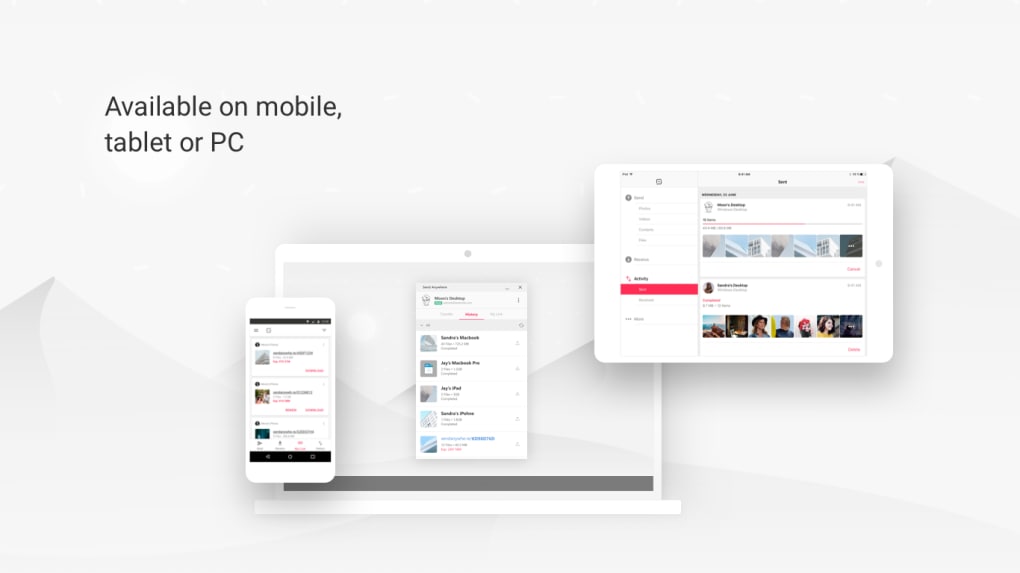
Cross-Platform Compatibility: Send Anywhere is available on a wide range of platforms, including Windows, macOS, Android, iOS, and web browsers. This ensures seamless file sharing between different operating systems and devices, eliminating compatibility issues and fostering smooth collaboration.
-
Large File Transfer Capability: Unlike email, which often has limitations on file size, Send Anywhere readily handles large files, facilitating the transfer of high-resolution images, videos, and other large data sets without compression or quality loss. This is crucial for businesses dealing with large media files or complex project data.
-
Secure File Transfer: Security is prioritized through end-to-end encryption, protecting sensitive data during transmission. This ensures that files remain confidential and inaccessible to unauthorized individuals, safeguarding business data from potential breaches.
-
Link Sharing: Users can generate unique links to share files, offering a flexible alternative to direct file transfer. These links can be shared via email, messaging apps, or any other communication channel, simplifying the file sharing process. Links can be customized with expiration dates and passwords for added security.
-
Multiple Transfer Options: Send Anywhere offers various transfer methods, including direct device-to-device transfer and cloud-based transfers. Users can select the most efficient method based on their network conditions and preferences. This versatility makes it adaptable to different situations and network environments.
-
Offline Access: Certain features, such as file sending via link sharing, may be available offline, enabling users to prepare files for transfer even without an active internet connection. This increases efficiency and facilitates file sharing in areas with limited network availability.
-
File Versioning (Paid Plans): For users who subscribe to a paid plan, features like file versioning are sometimes offered. This enables users to track changes to files over time and revert to earlier versions if necessary. This is valuable for collaborative projects where several individuals contribute to the same file.
Send Anywhere App: User-Friendly Interface and Seamless Experience
The Send Anywhere application boasts an intuitive and user-friendly interface, simplifying the file transfer process. Navigating the app is straightforward, even for those unfamiliar with file transfer applications. The clean design focuses on ease of use, making file transfers quick and efficient. Key aspects of the app’s user experience include:
-
Intuitive Design: The application’s minimalist design focuses on core functions, prioritizing a clutter-free experience. Users can easily locate and select files for transfer without navigating complex menus or options.
-
Drag-and-Drop Functionality: Many versions of the Send Anywhere app support drag-and-drop functionality, enabling users to simply drag files from their file explorer into the Send Anywhere app to initiate the transfer process. This simplifies the file selection process, saving time and effort.
-
Progress Tracking: The app provides real-time progress tracking, allowing users to monitor the transfer status and estimated completion time. This transparency keeps users informed and reduces anxiety associated with lengthy file transfers.
-
Notification System: Users receive notifications on the completion of file transfers, ensuring they’re aware when the transfer is finished. This avoids users having to continually check the app’s status.
-
Mobile Optimization: The mobile versions of the Send Anywhere app are designed for optimal functionality on smartphones and tablets, offering a touch-friendly interface and intuitive controls.
-
Cross-Device Synchronization: (Depending on the plan) Some advanced features in paid plans may offer synchronization across devices, ensuring consistency across all user devices.
Send Anywhere: A Comparison with Alternative File Transfer Methods
Send Anywhere stands out among alternative file transfer methods due to its combination of speed, security, and ease of use. Let’s compare it to other common methods:
-
Email Attachments: Email is limited by file size restrictions and poses security risks when sending sensitive data. Send Anywhere overcomes these limitations, handling large files and employing robust encryption.
-
Cloud Storage Services: Cloud storage services like Dropbox or Google Drive require both sender and receiver to have accounts and can be slower for larger files. Send Anywhere offers a faster, more direct transfer without requiring accounts from the recipient.
-
FTP Clients: FTP clients are complex and require technical expertise. Send Anywhere provides a simple, user-friendly alternative, accessible to users of all technical skill levels.
-
Peer-to-Peer File Sharing: Peer-to-peer file sharing can be unreliable and insecure. Send Anywhere offers a more secure and reliable transfer mechanism with built-in encryption.
Conclusion: Send Anywhere – Your Versatile Solution for File Transfer
Send Anywhere’s versatility and user-friendly interface make it a compelling solution for both personal and professional file transfer needs. Its ability to handle large files securely and efficiently across various platforms makes it a highly valuable tool in today’s digital landscape. Whether you’re a business seeking to streamline workflows or an individual needing a reliable file transfer method, Send Anywhere deserves consideration. Its free plan offers ample functionality, while paid plans cater to users with more advanced needs and higher transfer volumes. Its ease of use and robust security features make it a strong contender in the competitive world of file transfer applications.
File Information
- License: “Free”
- Version: “varies-with-device”
- Latest update: “February 13, 2019”
- Platform: “Windows”
- OS: “Windows Vista”
- Language: “English”
- Downloads: “12.6K”
- Size: “49.32 MB”


