
SereneScreen Marine Aquarium offers a captivating virtual underwater world, transforming your computer screen into a vibrant, living aquarium. This screensaver provides a highly realistic experience, complete with a diverse array of fish, detailed coral formations, and the subtle movement of air bubbles, creating an immersive and visually stunning experience. Whether you’re a marine life enthusiast or simply seeking a calming and beautiful screensaver, SereneScreen Marine Aquarium delivers a remarkably detailed and engaging underwater spectacle.
A Realistic Underwater Escape
The remarkable realism of SereneScreen Marine Aquarium sets it apart from other screensavers. The 3D modeling of the fish is exceptional, capturing the intricate details of their scales, fins, and movements with impressive accuracy. Each fish species is rendered with lifelike animations, mimicking their natural swimming patterns and behaviors. The interaction between the fish and their environment is seamless, creating a convincing underwater ecosystem right on your desktop. The inclusion of meticulously crafted coral reefs, complete with varied textures and colors, further enhances the overall realism, providing a backdrop that is both aesthetically pleasing and biologically accurate. The addition of air bubbles subtly rising through the water adds a touch of dynamism and realism, completing the immersive underwater scene. This attention to detail elevates SereneScreen Marine Aquarium beyond a simple screensaver, transforming it into a captivating virtual aquarium experience.
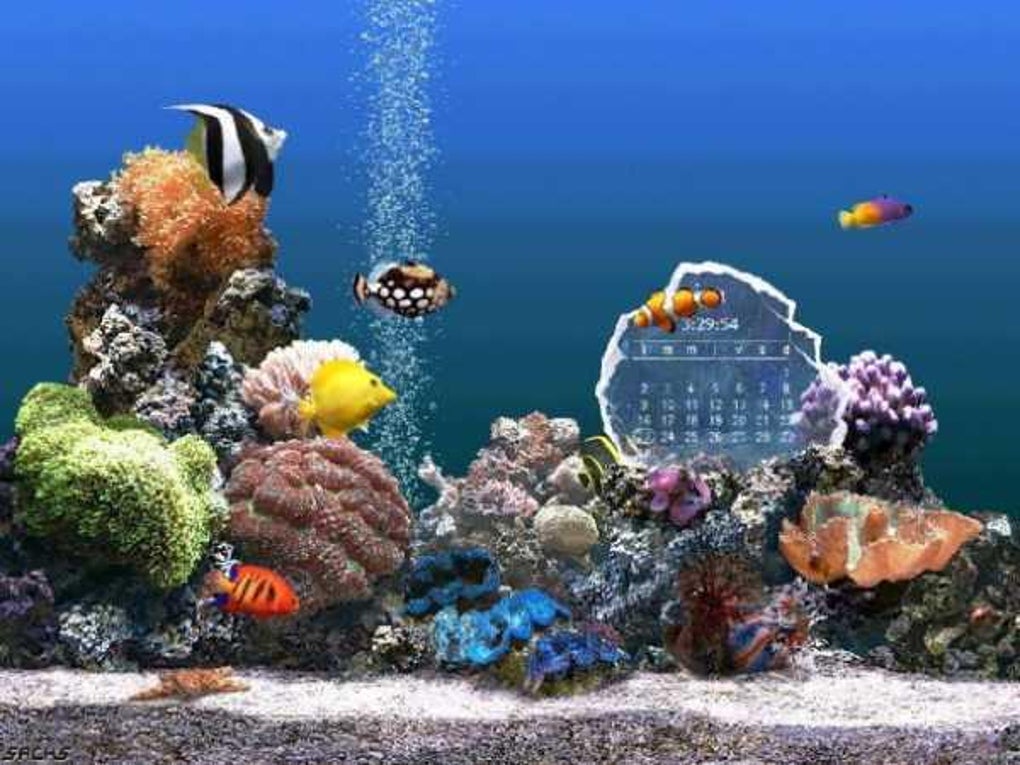
The developers have consistently expanded the aquatic life featured within the screensaver. The addition of species like the Clearfin Lionfish and Achilles Tang exemplifies this commitment to ongoing improvement, bringing the total number of species to a remarkable 28. This ongoing expansion keeps the visual experience fresh and prevents the screensaver from becoming stale over time. The sheer variety of marine life on display guarantees that each viewing session offers something new to discover, rewarding users with an ever-changing underwater spectacle.
Customization and Display Options
SereneScreen Marine Aquarium caters to diverse user preferences with its customization options. The ability to toggle the on-screen clock on or off provides flexibility depending on your needs. Whether you desire a purely aesthetic experience or a blend of beauty and functionality, this feature ensures SereneScreen Marine Aquarium aligns with individual preferences.
The screensaver is designed to maximize its visual impact across various display setups. Its compatibility with multiple monitors and widescreen displays allows users to fully immerse themselves in the underwater environment. The seamless transition of the aquatic scene across multiple screens creates a panoramic view of the aquarium, expanding the visual scope and enhancing the overall sense of immersion. This adaptability ensures that regardless of your display configuration, you can experience the full beauty and detail of the SereneScreen Marine Aquarium. This scalability is a significant advantage, making the screensaver compatible with a wide array of modern computer systems and configurations.
System Requirements and Performance
While SereneScreen Marine Aquarium delivers an exceptional visual experience, it is worth noting that the high level of realism comes at a slight computational cost. The 3D rendering employed to achieve such detailed visuals requires more processing power than many other screensavers. As a result, users with older or less powerful systems may experience a slightly higher CPU utilization while the screensaver is active. However, this minor trade-off is likely well worth it for the stunning visuals the screensaver provides.
For users concerned about system performance, it is recommended to monitor their CPU usage while the screensaver is running. Adjusting other applications or background processes can help mitigate potential performance issues. It’s important to weigh the trade-off between visual fidelity and system performance to determine if the screensaver is suitable for your specific computer setup. For those with newer, high-performance systems, the increased CPU usage is negligible, making it a worthwhile addition to their desktop environment.
User Experience and Alternatives
Despite the high level of realism and the wide variety of marine life, some users might find the repetitive nature of the screensaver’s animation to be monotonous over extended periods. The constant swimming of fish, while beautiful, may lack the dynamic interaction or variety to keep all users completely engaged indefinitely. This is a common feedback point for screensavers of this type. The beauty lies in its calming, relaxing effect, but the lack of significant changes in the scene over long periods could lead to some users finding it less stimulating than other screensaver options.
Several alternative aquarium screensavers are available, each with its own strengths and weaknesses. Some alternatives offer simpler visuals with lower system requirements, while others might incorporate interactive elements or a wider range of customization options. Choosing the ideal screensaver ultimately depends on personal preferences, system capabilities, and the desired level of realism and interaction. Consider exploring other options if the continuous swimming animation doesn’t fully align with your personal preferences. However, for those seeking an exceptionally realistic and visually engaging underwater experience, SereneScreen Marine Aquarium remains a strong contender.
The positive user reviews highlight the visual appeal and realism of SereneScreen Marine Aquarium. Many users praise the beauty and detail of the fish and coral, describing the screensaver as “beautiful” and “stunning.” However, some negative feedback points out the screensaver’s tendency to turn off too quickly, causing interruptions. This suggests a potential area for improvement regarding the screensaver’s settings and behavior. Addressing user concerns about the automatic shut-off functionality would enhance the overall user experience and address a significant drawback identified by some users. Ultimately, balancing the visual appeal with functional usability is key to creating a truly exceptional screensaver experience. The ongoing development and updates suggest the developers are committed to improving the user experience based on user feedback.
In conclusion, SereneScreen Marine Aquarium provides a visually stunning and highly realistic underwater experience for your computer screen. Its detailed 3D models, wide array of fish species, and compatibility with various display configurations make it a captivating screensaver choice for those seeking a beautiful and calming digital escape. While some users might find the repetitive nature of the animations to be a slight drawback, the overall realism and visual impact of the screensaver compensate for this limitation for many users. The ongoing addition of new fish species and the opportunity for user feedback suggest a continued effort to enhance the screensaver experience and address any potential concerns. Therefore, if you are looking for a high-quality, visually impressive aquarium screensaver, SereneScreen Marine Aquarium is certainly worth considering.
File Information
- License: “Trial version”
- Latest update: “July 11, 2023”
- Platform: “Windows”
- OS: “Windows 2000”
- Language: “English”
- Downloads: “70.4K”
- Size: “4.86 MB”


