
Shadowsocks, initially developed in 2012 by a Chinese programmer known as clowwindy, is a free and open-source proxy tool that has gained significant popularity, particularly in mainland China and among users prioritizing online privacy and security. This detailed exploration will delve into its functionality, strengths, weaknesses, and broader implications within the context of internet censorship and digital freedom.
Understanding Shadowsocks: Functionality and Mechanisms
At its core, Shadowsocks acts as a SOCKS5 proxy, routing internet traffic through a third-party server. This intermediary server masks the user’s IP address and encrypts their data, making it difficult for network observers (such as internet service providers or government agencies) to monitor online activity or track the user’s location. This functionality is similar to an SSH tunnel but offers significant advantages due to its ability to proxy UDP traffic, offering broader application compatibility.
The software leverages sophisticated encryption algorithms, providing a robust layer of security for user data. Shadowsocks’s design employs asynchronous I/O and event-driven programming, leading to remarkably fast connection speeds despite the added security layer. Its open-source nature allows for community contributions, ensuring continuous improvement and the patching of vulnerabilities, contributing to its enduring relevance and reliability.
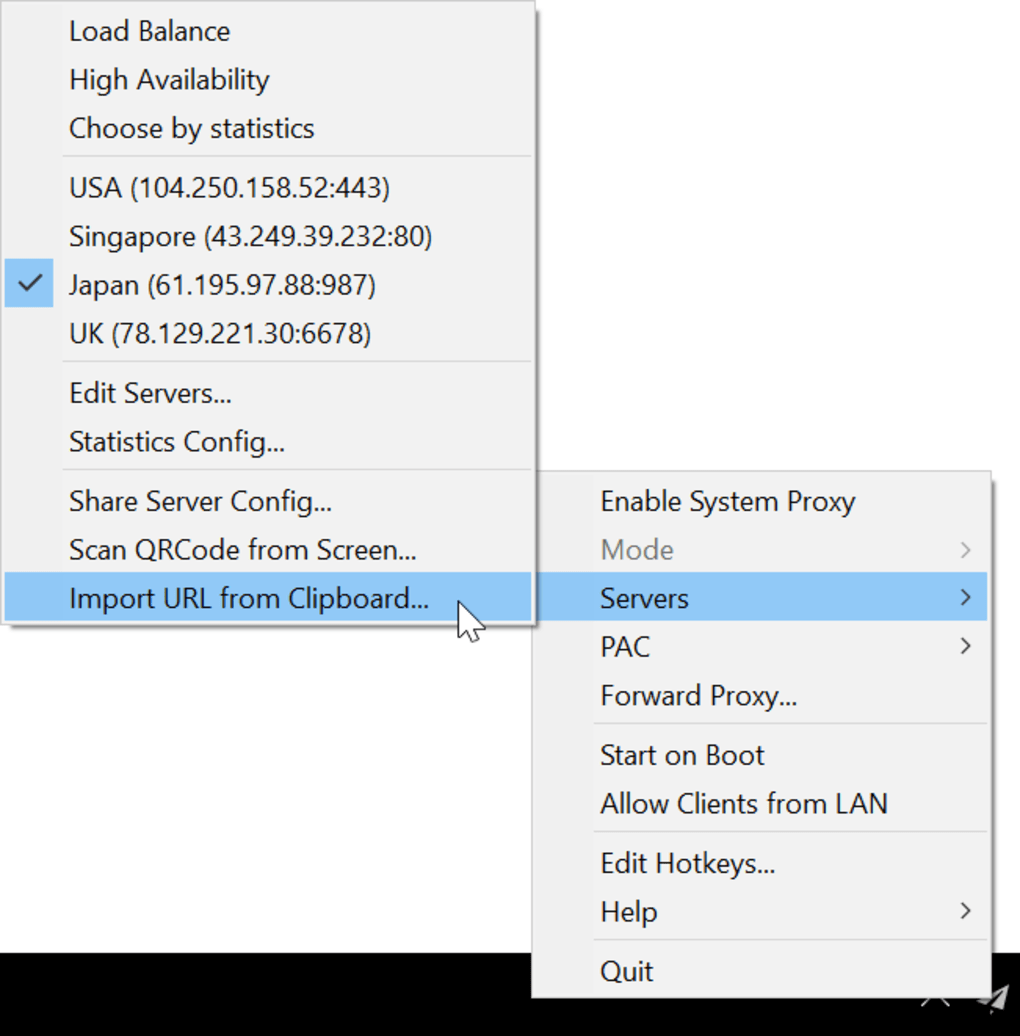
Shadowsocks’s flexibility extends to its support for various features:
- Custom Encryption Algorithms: While employing default secure encryption, the system allows users to specify custom algorithms, offering enhanced control and adaptability to evolving security landscapes. This is a crucial feature for advanced users who may require specific cryptographic suites for their unique security needs.
- HTTP Proxy Support: In addition to SOCKS5, the tool supports HTTP proxies, expanding compatibility with applications that may not inherently support SOCKS5. This enhances the range of applications and services that can benefit from Shadowsocks’s anonymizing capabilities.
- UDP Relay: Unlike many traditional proxies, Shadowsocks efficiently handles UDP traffic. This is particularly important as many online games, streaming services, and VoIP applications rely on UDP for real-time communication. The inclusion of UDP support significantly expands Shadowsocks’s practical applicability.
- Server Auto-Switching: Users can configure the software to automatically switch between multiple proxy servers based on predefined criteria. This includes:
- Load Balancing: Servers are selected randomly to distribute the load, preventing any single server from becoming overloaded.
- High Availability: The system prioritizes servers with the best performance metrics, ensuring consistently reliable connections.
- Package Loss Selection: By enabling ‘Availability Statistics’, Shadowsocks can prioritize servers with the lowest packet loss, minimizing connection disruptions and optimizing performance.
- Plugins: Shadowsocks supports plugins, enabling users to extend its functionality with custom features and integrations. This allows for further customization and specialized applications, enhancing its versatility and adaptability to unique user needs. However, users must exercise caution when using third-party plugins to ensure their authenticity and security.
Installation and System Requirements
While the precise installation method varies based on the operating system, Shadowsocks’s open-source nature ensures its availability across various platforms. Common package managers like pip (for Python environments), AUR (Arch User Repository), and others often provide convenient installation methods. The Windows version typically requires Microsoft .NET Framework 4.7.2 or a higher version, along with Microsoft Visual C++ 2015 Redistributable to ensure optimal functionality. Users should always refer to the official documentation or community resources for the most up-to-date and accurate installation instructions for their specific platform.
For UDP proxy functionality with certain applications that may not inherently support Shadowsocks’s SOCKS5 capabilities, users might need to employ additional tools such as SocksCap or ProxyCap. These tools act as intermediaries, forcing specific applications to route their traffic through the Shadowsocks proxy, extending its anonymizing capabilities to a wider range of software. The same applies to the use of plugins; configuring the correct plugin path (either relative or absolute) within the Shadowsocks settings is crucial for successful integration.
Security and Privacy Implications
Shadowsocks’s primary function is to protect users’ internet traffic from unwanted observation. The encryption employed offers a strong defense against traffic analysis, preventing others from identifying the visited websites or the nature of the data being transmitted. This is especially crucial in regions with restrictive internet policies or where user privacy is under threat.
However, it’s vital to acknowledge Shadowsocks’s limitations. While it effectively obscures the user’s internet traffic, it doesn’t inherently conceal the user’s online identity. Users should still exercise caution and employ additional measures, such as using a VPN in conjunction with Shadowsocks or selecting reputable proxy servers. Moreover, the security of the system depends largely on the security of the chosen proxy servers. Users should diligently research and select trusted servers from well-established providers.
Shadowsocks in the Context of Censorship Circumvention
Shadowsocks’s popularity is intrinsically linked to its ability to bypass internet censorship. In countries with strict online restrictions, this software becomes a crucial tool for accessing information and maintaining freedom of expression. This is especially relevant in regions where governments actively censor online content and monitor citizen’s internet activity. By routing traffic through uncensored servers, Shadowsocks provides a pathway to unrestricted access to information. However, the use of such tools can have legal implications, depending on the local laws and regulations.
Shadowsocks vs. Alternative Solutions
Shadowsocks is not the only tool available for achieving similar goals. Several alternative solutions exist, each with its own set of advantages and disadvantages. Popular alternatives include:
- V2Ray: A more modern and versatile tool that offers a similar level of functionality but with improved performance and a wider array of protocols. V2Ray also offers a variety of transport methods, offering more sophisticated obfuscation techniques.
- VPN (Virtual Private Network): VPNs provide a broader range of security features and often offer simpler user interfaces, making them more accessible to less technically proficient users. However, they often come at a cost and may be subject to stricter regulation.
The choice of a specific solution depends on individual needs and priorities. Users should carefully consider factors like performance requirements, desired security levels, ease of use, and legal implications before making a decision.
Conclusion: A Powerful Tool with Limitations
Shadowsocks represents a significant contribution to the realm of online privacy and security, especially for users operating under restrictive internet conditions. Its open-source nature, flexibility, and speed make it a powerful tool for circumventing censorship and protecting user data. However, it’s crucial to acknowledge its limitations, especially concerning identity concealment, and to utilize it responsibly, in compliance with local laws, and in conjunction with other security measures where appropriate. The ongoing evolution of censorship technologies necessitates ongoing vigilance and the adoption of multi-layered security approaches to maintain digital freedom and online privacy.
File Information
- License: “Free”
- Latest update: “June 12, 2025”
- Platform: “Windows”
- OS: “Windows 7”
- Language: “English”
- Downloads: “4.2K”
- Size: “4.42 MB”


