Shelter is a free utility application developed by the Paper Airplane Dev Team, designed to create isolated virtual spaces for Android apps. This innovative tool allows users to install or clone applications within a contained environment, separate from the main operating system. This separation offers significant advantages in terms of security, privacy, and app management, making it a powerful tool for both average users and developers.
Creating Isolated App Environments
Shelter operates similarly to virtual machines like VirtualBox, but with significantly reduced hardware demands. Instead of creating a full virtual operating system, Shelter leverages Android’s Work Profile feature to isolate apps. This means you can run applications in a sandboxed environment, preventing them from accessing sensitive data or interfering with other apps on your device. This isolation provides several key benefits:
-
Enhanced Security: By containing apps within their own virtual spaces, Shelter limits the potential damage from malware or compromised apps. If an app within a Shelter instance becomes infected, the damage is contained within that specific environment, protecting the rest of your phone.
-
Increased Privacy: Shelter allows you to manage app permissions granularly. You can restrict access to features like mobile data, contacts, location services, and more on a per-app basis within the Shelter environment. This gives you finer control over what data each app can access, bolstering your overall privacy.
-
Multi-Account Management: Many online services don’t allow multiple accounts on a single device. Shelter circumvents this limitation by allowing you to clone apps. This creates separate instances of the same application, enabling you to log in with different accounts simultaneously, such as having two separate WhatsApp or Facebook accounts.
-
App Testing for Developers: For developers, Shelter provides a safe and controlled environment for testing apps. They can install and run applications in isolation, evaluating functionality without risking their main system. This is invaluable for identifying and resolving bugs before releasing the app to the public.
- Managing Misbehaving Apps: If an app is causing performance issues or consuming excessive resources, Shelter allows you to freeze it without uninstalling it. This pauses the app’s activity, freeing up system resources and improving overall performance. You can later unfreeze the app when needed.
User Interface and Functionality
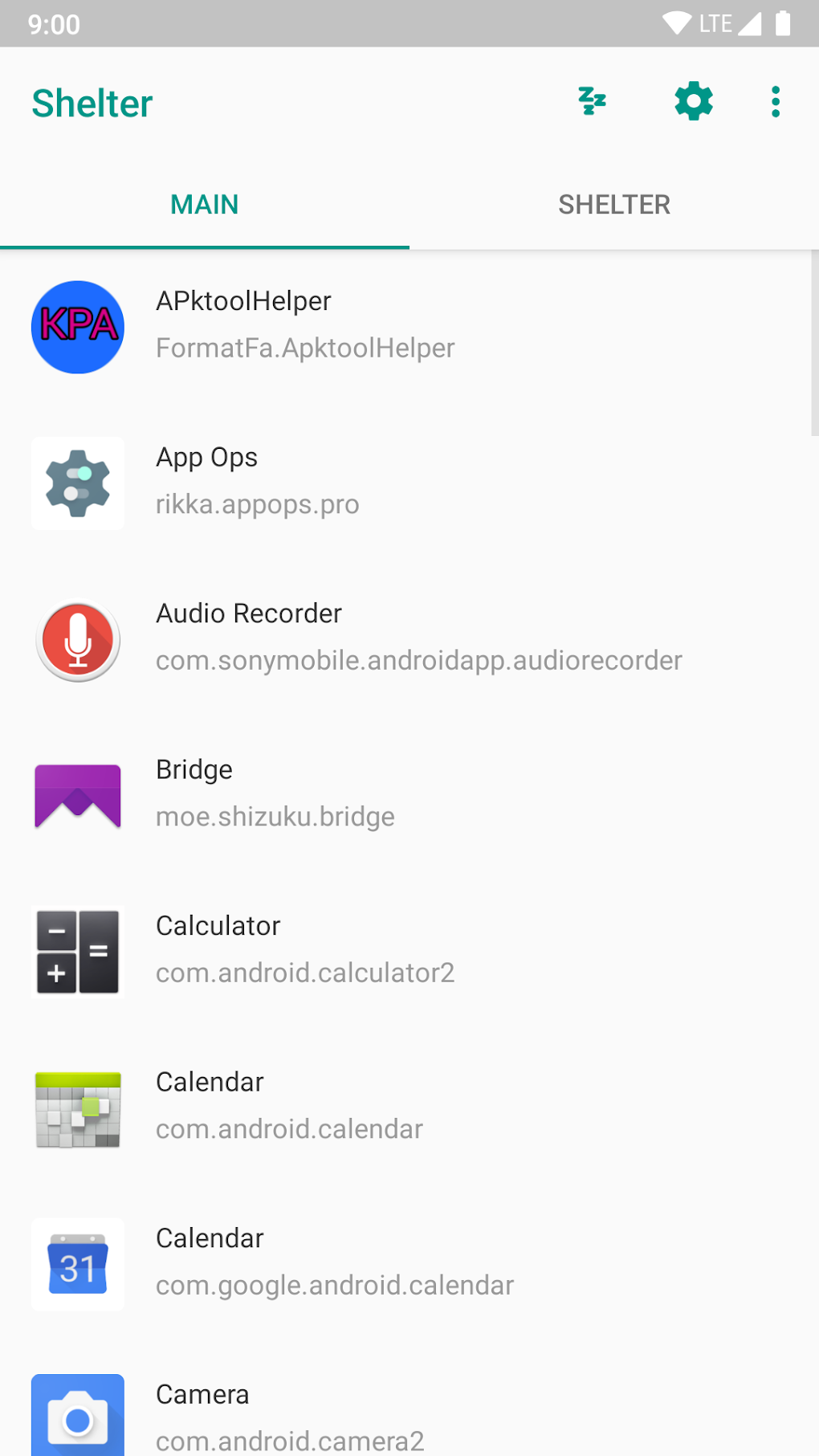
Shelter boasts a user-friendly interface, employing a simple two-tab system. The main window displays a list of all installed apps. Users can select an app from this list and then move to the second tab—the “Shelter” tab—to manage the selected application. Here, several options are available:
-
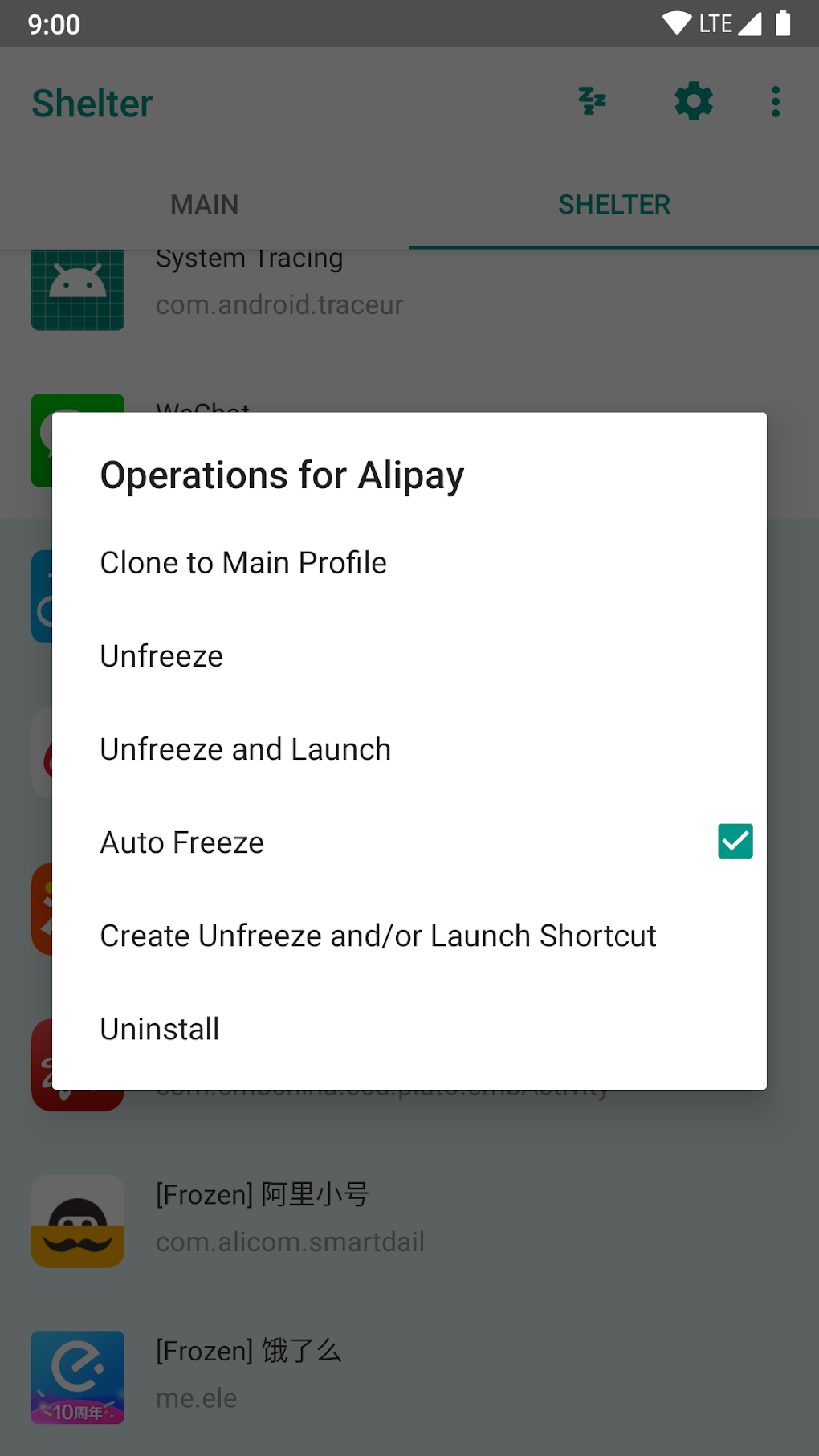
Launching Apps: Select an app in the Shelter environment to launch it within its isolated space.
-
Freezing Apps: This suspends the selected app’s activity, preventing it from running and consuming system resources. This is particularly useful for apps that drain battery life or consume excessive data.
-
Cloning Apps: Create a separate instance of an app to use multiple accounts. This enables seamless multi-account management without the hassle of switching between accounts.
-
Auto-Freeze: This feature allows you to automatically freeze specific apps even when you’re not actively using Shelter. This enhances control and resource management, even if you’re multitasking.
System Requirements and Limitations
Shelter relies on Android’s Work Profiles to function, meaning your device must support this feature. It’s important to note that you’ll need to grant Shelter Device Administrator access for full functionality. While this is a necessary step for the app to operate correctly, it’s crucial to be aware of the security implications of granting such permissions.
It is also essential to understand that while Shelter enhances security, it doesn’t guarantee complete protection from security breaches. Malicious actors could still potentially exploit vulnerabilities within individual apps. While less likely due to the isolation, responsible internet usage and regular security updates for your apps remain crucial.
Comparison to Traditional Virtual Machines
Traditional virtual machines (VMs) offer complete operating system virtualization, allowing you to run entire operating systems within a separate environment. However, VMs are resource-intensive, requiring significant RAM and processing power. They are unsuitable for most mobile devices due to their demanding system requirements.
Shelter provides a compelling alternative by leveraging Android’s built-in Work Profiles, avoiding the need to emulate a full operating system. This approach drastically reduces the resource burden, making it feasible for use on a wide range of Android devices. While Shelter doesn’t offer the same level of comprehensive isolation as a full VM, it provides a practical and efficient solution for isolating and managing apps on mobile devices.
Installation and Usage
Installing Shelter is straightforward. Simply download the APK from a trusted source like PhanMemFree.org (or a similar reputable app store), and follow the on-screen instructions. Once installed, you’ll need to grant the app Device Administrator access. This is essential for Shelter to function correctly.
The app’s interface is intuitive and easy to navigate. The two-tab design simplifies app selection and management. The options for freezing, cloning, and managing app permissions are clearly presented, making it easy for even novice users to utilize the full range of Shelter’s features.
Conclusion: A Powerful Tool for Enhanced App Control
Shelter provides a unique and effective approach to Android app management, offering significant benefits in terms of security, privacy, and resource optimization. Its lightweight design, coupled with its intuitive interface, makes it accessible to a broad spectrum of users, from casual smartphone owners to more technically proficient individuals. While not a replacement for a full-blown virtual machine, it serves as an excellent alternative for mobile users seeking enhanced control and security over their installed applications. Its ability to create isolated app environments, manage permissions, and even allow for multi-account use, solidifies its position as a valuable tool in the Android ecosystem. While it’s essential to remain aware of inherent security limitations and use responsible internet practices, Shelter’s advantages significantly outweigh its constraints. The ease of use and the increased control it provides over individual applications make Shelter a recommended app for anyone looking to enhance their Android experience.
File Information
- License: “Free”
- Latest update: “September 20, 2024”
- Platform: “Android”
- OS: “Android 13.0”
- Downloads: “159.3K”
- Size: “2.68 MB”
- Download Options: “APK, Google Play”
- Filename: “net-typeblog-shelter-445-68790267-1575b1933f2ad1395089bb0bdf596139.apk”