
O&O ShutUp10 is a free utility designed to help Windows 10 users regain control over their privacy settings. In an era of increasing data collection and surveillance, this tool offers a straightforward way to disable various features that transmit personal information to Microsoft and third-party applications. Its simple interface and ease of use make it an accessible option for users of all technical skill levels, allowing them to customize their privacy settings without needing extensive technical knowledge. This detailed exploration delves into the functionality, benefits, and implications of using O&O ShutUp10.
Understanding the Need for Privacy Control in Windows 10
Windows 10, while a powerful and versatile operating system, has faced criticism regarding its data collection practices. Many built-in features, designed for personalization and improvement of the user experience, inadvertently transmit user data to Microsoft servers. This data can include browsing history, app usage patterns, location information, and even diagnostic reports. While Microsoft argues that this data is anonymized and used for improving services, concerns persist among users who value their online privacy.
The default settings in Windows 10 often prioritize convenience and functionality over privacy. Many features are enabled by default, sending a significant amount of information without explicit user consent. This raises privacy concerns, particularly for users who are uncomfortable with the extent of data collection by default. O&O ShutUp10 directly addresses this issue by providing users with granular control over these features, empowering them to disable those that they deem intrusive or unnecessary.
O&O ShutUp10: Features and Functionality
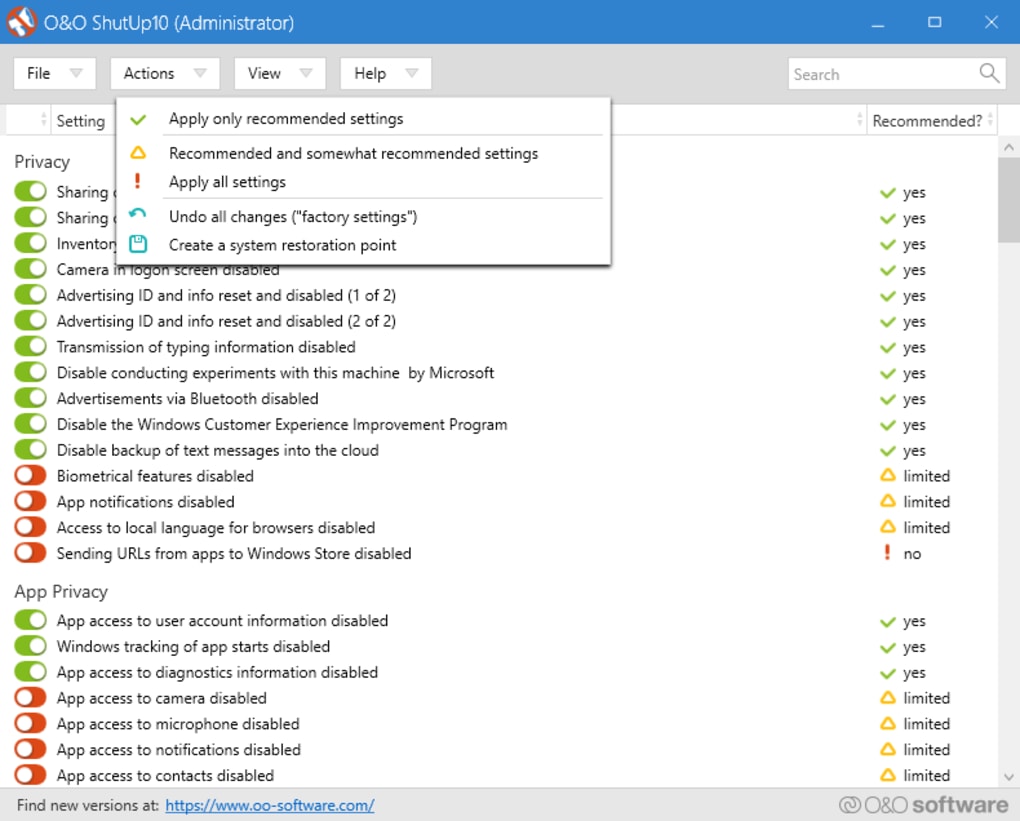
O&O ShutUp10’s strength lies in its simplicity. The program presents a single-page interface clearly displaying all the configurable privacy settings. This eliminates the need to navigate complex system settings menus, making it easy for even novice users to adjust their privacy preferences.
The tool categorizes the settings logically, enabling users to quickly identify and modify specific aspects of data collection. These settings generally fall under the following broad categories:
- Control Location Services: Windows 10 extensively uses location services for various features, including map applications, weather updates, and location-based advertisements. O&O ShutUp10 allows users to disable these services completely or selectively disable them for specific apps. This offers a fine-grained level of control over which applications have access to location data.
-
Control Windows Updates: While essential for security, Windows updates often automatically download and install in the background. O&O ShutUp10 provides options for managing these updates, allowing users to schedule updates, control restart behavior, and limit the amount of data collected during the update process. This helps users balance security with their preferences regarding when and how updates are installed.
-
Prevent Telemetry and Diagnostics: Windows 10 collects telemetry and diagnostic data to improve its performance and functionality. While this information is reportedly anonymized, O&O ShutUp10 offers the possibility to substantially reduce or completely eliminate the transmission of this data. This option is particularly attractive to users who prioritize maintaining their data privacy above the potential benefits of contributing to system improvements.
-
Manage User Data and Diagnostics: The program allows users to finely tune the level of diagnostic data sent to Microsoft. Users can choose between various options, from sending minimal data to opting out entirely. This control allows users to balance the need for system improvements with their concerns about data privacy.
-
Control Advertising ID: This unique identifier is used by Windows to personalize advertising. Disabling it helps limit targeted advertising based on your usage patterns.
-
Manage Advertising and Personalization: O&O ShutUp10 provides options to restrict various forms of advertising and personalization features. This includes disabling personalized recommendations, suggestions, and other targeted advertising efforts.
-
Control Connected Services: The program allows users to disable various connected services and features that may collect user data, such as Cortana (if applicable), and other background processes. This enhances control over data that is shared with external parties.
The program’s intuitive interface allows users to easily toggle settings on or off with a simple click. This straightforward approach makes it accessible to a wide range of users, regardless of their technical expertise. Furthermore, the lack of installation requirements means it can be run directly from a portable drive, offering convenience and flexibility.
Advantages of Using O&O ShutUp10
The primary advantage of O&O ShutUp10 is its ability to empower users with direct control over their privacy settings. The program’s user-friendly interface and ease of use allow even less technically inclined users to modify their Windows 10 privacy settings effectively. It streamlines a process that would otherwise require navigating multiple system menus and making potentially confusing choices.
O&O ShutUp10’s portability is another significant advantage. It doesn’t require installation, allowing users to run it from a USB drive or other portable storage. This is beneficial for users who want to temporarily adjust privacy settings on multiple computers without installing software on each machine.
The software is completely free, which eliminates any financial barriers to access. This makes it a valuable tool for users who are concerned about data privacy but lack the resources to invest in paid software.
Potential Drawbacks and Considerations
While O&O ShutUp10 offers considerable benefits, it’s important to understand potential drawbacks:
- Potential for Functionality Loss: Disabling certain features might impact the functionality of some Windows 10 services. Some features, such as location-based services or personalized recommendations, might stop working correctly. Users should carefully consider the implications of disabling each setting, ensuring they are comfortable with any potential loss of functionality.
-
Risk of Instability: Overly aggressive modification of settings can sometimes lead to system instability or unexpected behavior. It is crucial to understand what each setting does before disabling it and to have a backup or restore point in case issues arise. Always exercise caution when modifying system settings.
-
Maintenance and Updates: As Windows 10 updates frequently, some settings might need to be reconfigured after each update. While O&O ShutUp10 is updated periodically, changes to the operating system may necessitate manual adjustments.
-
Security Concerns: While generally reputable, it’s always advisable to download software from trusted sources. Ensure you download the program from the official O&O Software website to avoid potentially malicious files.
Conclusion: A Powerful Tool for Privacy-Conscious Users
O&O ShutUp10 offers a simple and effective method for Windows 10 users to regain control over their privacy settings. Its intuitive interface, ease of use, and free availability make it a valuable tool for those concerned about the amount of data collected by the operating system. While understanding the potential drawbacks and proceeding with caution is essential, O&O ShutUp10 provides a significant advantage for users who want to personalize their privacy configurations and enhance their control over their digital footprint. However, remember that maintaining a balance between privacy and functionality is crucial. Users should carefully weigh the benefits of disabling features against any potential loss of functionality before making changes. Regularly reviewing and adjusting settings is also recommended, as operating system updates may necessitate reconfiguration.
File Information
- License: “Free”
- Latest update: “July 11, 2023”
- Platform: “Windows”
- OS: “Windows 8”
- Language: “English”
- Downloads: “2.8K”
- Size: “1.11 MB”


