
SideQuest is a free, third-party utility software designed to enhance the capabilities of your Oculus Quest and Oculus Quest 2 virtual reality (VR) headsets. It acts as a gateway to a vast library of VR experiences unavailable on the official Oculus Store, offering users a richer and more diverse VR ecosystem. This article will delve into the functionality, benefits, risks, and overall value proposition of SideQuest, providing a comprehensive guide for users considering exploring this powerful tool.
SideQuest: Beyond the Official Oculus Store
The official Oculus Store boasts a substantial collection of VR games and experiences. However, its curated nature means that certain types of content—pre-release builds from developers, experimental projects, community-created modifications (mods), and other user-generated content—are often excluded. This is where SideQuest shines. It facilitates the “sideloading” of VR content, enabling users to install applications and games not officially approved by Meta (formerly Facebook), the creators of the Oculus platform. Sideloading, essentially the installation of applications from external sources, expands the potential of your VR headset dramatically. It allows you to access a wealth of unique content, often created by independent developers and enthusiasts, that may not meet the strict criteria for inclusion in the official store. This opens up opportunities for early access to games, exploration of niche VR genres, and access to unique modifications that enhance existing titles.

Understanding Sideloading and its Implications
Sideloading, while offering significant advantages, comes with inherent risks. The process involves bypassing the official Oculus Store’s security protocols, meaning that the content you download is not subjected to the same rigorous vetting process for security and stability. This lack of oversight introduces the possibility of installing malware, compromising your headset’s performance, or even exposing your personal data to malicious actors. Therefore, it’s crucial to exercise caution and adopt responsible sideloading practices.
How to Use SideQuest: A Step-by-Step Guide
Before utilizing SideQuest, users must understand the necessary steps and precautions. The process typically involves the following:
-
Download and Installation: Download the SideQuest application to your computer. The specific installation process may vary depending on your operating system (Windows, macOS). Note that some operating systems may require additional software packages or drivers.
-
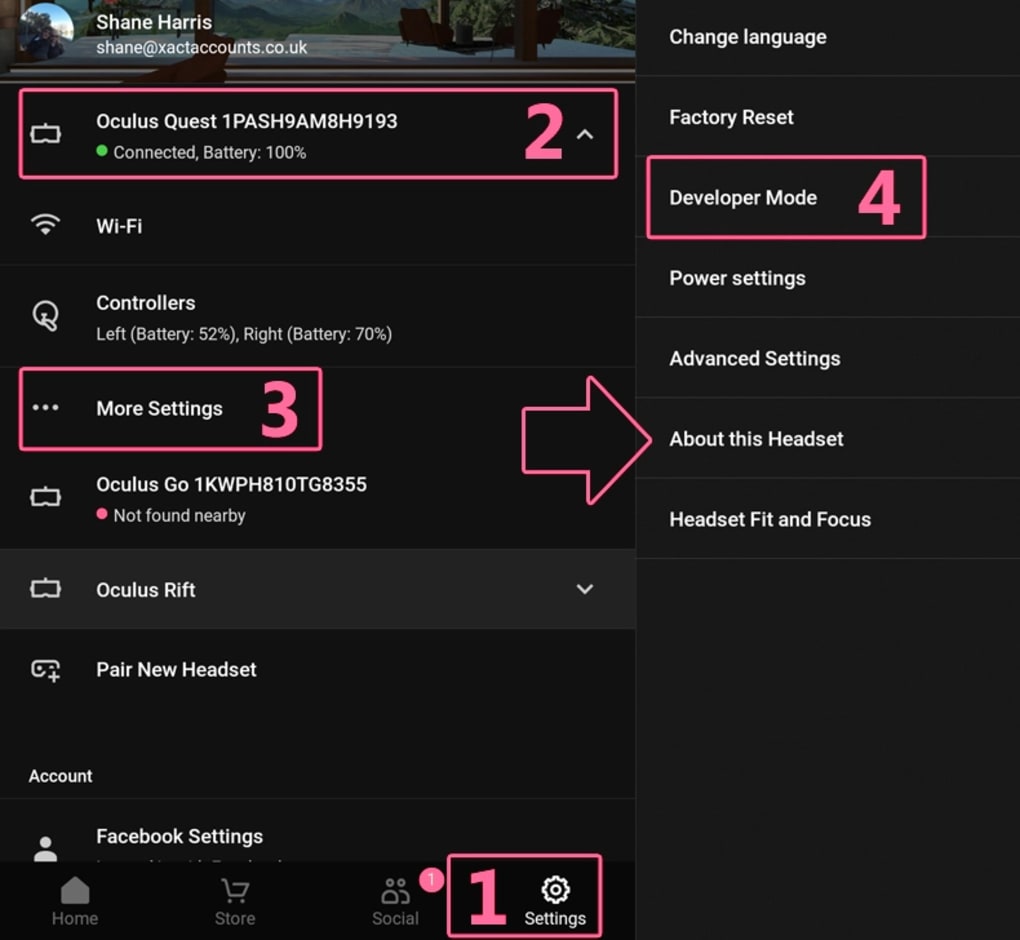
Enabling Developer Mode: This crucial step allows your Oculus headset to accept sideloaded content. You must enable Developer Mode on your Oculus account through the Oculus website or mobile app. This usually involves creating a developer account (often free) and following the provided instructions.
-
Driver Installation and Headset Connection: Install the necessary drivers for your Oculus Quest or Quest 2 headset. Once this is complete, connect your headset to your computer using a USB-C cable (recommended). This is the most reliable connection method.
-
USB Debugging and Permissions: When prompted, allow USB debugging on your headset. Selecting “Always allow from this computer” simplifies future connections. It’s also prudent to disable any lock screen pattern or PIN for easier access during the process.
-
Sideloading Content: Once your headset is recognized by SideQuest (indicated by a green dot and your headset’s name), you can browse the available content and select applications or games to install. SideQuest provides a user-friendly interface to facilitate this process.
-
Post-Installation: After sideloading an application, it will appear in your headset’s library, much like any other officially installed application.
Navigating the Risks of Sideloading
While SideQuest opens up exciting possibilities, it’s crucial to acknowledge and mitigate potential risks.
-
Malware: The most significant risk is the potential for malicious software. Downloads from untrusted sources may contain viruses or malware that can damage your headset or steal your data. Always download from reputable developers and sources. Check reviews and user comments before installing anything.
-
Performance Issues: Sideloaded apps may not be as optimized as those found in the Oculus Store. They may contain bugs or be incompatible with your headset, leading to performance issues, crashes, or even bricking (rendering the device unusable).
-
Security Vulnerabilities: Sideloaded applications may contain security vulnerabilities that could be exploited by hackers. Only download applications from trusted sources that have a proven track record of security and reliability.
-
Account Compromise: In rare cases, poorly designed or malicious applications could compromise your Oculus account credentials, giving unauthorized access to your personal information.
Mitigating Risks and Practicing Safe Sideloading
To minimize the risks associated with sideloading, follow these best practices:
-
Download from Reputable Sources: Only download applications from well-known developers or trusted community forums with strong reputations for security.
-
Verify Developer Credentials: Before downloading, check the developer’s credentials to ensure they are legitimate. Look for reviews, testimonials, and other evidence of their trustworthiness.
-
Read Reviews and User Comments: Scrutinize reviews and comments from other users to gauge the safety and reliability of the application.
-
Check Permissions: Carefully review the permissions requested by the application before installing it. If the application requests excessive or suspicious permissions, avoid installing it.
-
Keep Your Antivirus Software Updated: Ensure your antivirus software is up-to-date and running before, during, and after the sideloading process.
-
Regularly Update Your Headset Software: Keep your Oculus Quest or Quest 2 headset’s software up-to-date with the latest patches and security updates from Meta. This helps to protect against known vulnerabilities.
SideQuest’s Additional Features and Benefits
Beyond sideloading, SideQuest offers additional features that enhance the user experience. These include:
-
Screencasting and Streaming: Many users find the ability to stream their VR gameplay to a television or monitor valuable. SideQuest supports screencasting and streaming capabilities, expanding the enjoyment and sharing of VR experiences.
-
Community Support: SideQuest fosters a vibrant community of developers and users. This provides a platform for collaboration, support, and the sharing of knowledge.
-
Intuitive Interface: SideQuest’s user-friendly interface makes navigating the process of sideloading and managing VR content significantly easier, even for those new to the technology.
-
Regular Updates: The developers of SideQuest regularly release updates with new features, bug fixes, and improvements to the user experience, showing a commitment to maintaining and enhancing the application.
Conclusion: Weighing the Pros and Cons of SideQuest
SideQuest is a powerful tool that significantly expands the functionality and potential of the Oculus Quest and Quest 2 headsets. Its ability to sideload content provides access to a vast array of experiences unavailable through official channels. However, it’s crucial to understand and mitigate the associated risks of sideloading. By exercising caution, downloading only from reputable sources, and practicing safe computing habits, users can harness the power of SideQuest to unlock the full potential of their virtual reality experience. The benefits of expanded content and community interaction often outweigh the risks, but responsible use is paramount. Ultimately, SideQuest represents a significant enhancement to the VR ecosystem, empowering users to explore beyond the boundaries of the official Oculus Store.
File Information
- License: “Free”
- Latest update: “July 8, 2025”
- Platform: “Windows”
- OS: “Windows 8.1”
- Language: “English”
- Downloads: “30.8K”
- Size: “105.33 MB”


