
In an era defined by the sheer volume of digital content, particularly images, the challenge of managing personal and professional photo libraries has never been more pronounced. From casual snapshots captured on smartphones to professional photographic archives, our hard drives and cloud storage accounts are overflowing. This proliferation of visual data inevitably leads to a common yet frustrating problem: duplicate images. These redundant files consume valuable disk space, clutter our digital workspaces, and complicate the process of finding the right photo when we need it most. Enter SimilarImages, a dedicated application designed to address this very issue, offering a straightforward and efficient solution for identifying and managing identical or nearly identical images on your Windows PC.
Developed by Nils Maier, SimilarImages presents itself as a simple-to-use application that quickly scans your computer to unearth these hidden duplicates. Its core functionality revolves around a comparative analysis, presenting users with potential matches in a clear, side-by-side view, empowering them to decide which versions to keep and which to discard. For anyone grappling with a burgeoning image collection, SimilarImages offers a vital tool to reclaim storage, enhance organization, and streamline their digital life.
The Digital Deluge: Why Duplicate Images Accumulate
Before delving deeper into SimilarImages’ capabilities, it’s crucial to understand why duplicate images become such a prevalent problem. The reasons are multifaceted, often stemming from everyday digital habits:
- Multiple Backups and Transfers: Users frequently back up their photos to different locations or transfer them between devices. In this process, original files can be copied multiple times, leading to exact duplicates or slightly altered versions (e.g., resizing for a specific platform).
- Photo Editing and Exports: When editing photos, users often save multiple iterations or export the same image in different formats, resolutions, or compression levels. While these aren’t always exact duplicates, they are “similar images” that serve the same visual purpose but occupy unnecessary space.
- Accidental Downloads and Screenshots: Images downloaded from the internet, attached to emails, or captured as screenshots can easily be saved multiple times without conscious intent, especially if file names are generic.
- Cloud Synchronization Issues: Sometimes, synchronization services can create duplicate files, particularly if there are conflicts or interruptions during the sync process.
- Social Media Practices: Uploading images to social media platforms and then downloading them again for other uses can result in duplicates, often with altered metadata or slight compression.
- Camera Roll Management: Many smartphones automatically back up photos, and if a user also manually transfers them, duplicates can arise between the phone’s storage, a computer, and cloud services.
The accumulation of these redundant files can be more than just an aesthetic annoyance. They consume significant disk space, slowing down system performance, extending backup times, and making it harder to locate specific photos within a disorganized gallery. For professionals, designers, or photographers, this digital clutter can directly impact workflow efficiency and project delivery.
SimilarImages: A Simple Solution to a Complex Problem
SimilarImages was designed with the singular goal of simplifying the process of duplicate image detection. Its strength lies in its straightforward approach and user-centric design, which prioritizes ease of use and effective results.
The application’s workflow is intuitive: upon launching, it initiates a scan of specified directories or entire drives. Unlike simple file name or size comparisons, SimilarImages employs more sophisticated algorithms to identify actual image similarity. This means it can detect not only exact byte-for-byte duplicates but also images that are visually almost identical, such as the same photo saved in different resolutions, file formats, or with minor cropping. This capability is highly valued, as highlighted by a user review on Phanmemfree.org, noting its impressiveness in finding “pictures that are duplicates, but more impressive it finds pictures that nearly the same. That could be the same picture in a smaller size.”
Once the scan is complete, SimilarImages presents its findings in a dedicated “compare window.” This interface is critical, as it allows users to view the identified similar images side-by-side. This visual comparison is paramount because automated deletion can be risky. Users can meticulously examine each pair or group of similar images, ensuring they only remove unwanted files. This level of user control is a significant “pro” for the application, empowering informed decisions rather than relying on an automated, potentially error-prone process.
Furthermore, the application is lauded for its quick scanning process and its relatively modest resource consumption during operation. In a world where many utility applications can be heavy on system resources, SimilarImages strives to remain efficient, allowing users to perform other tasks while the scan is underway. Its simple user interface further contributes to its accessibility, ensuring that even users with minimal technical expertise can navigate and utilize its features effectively.
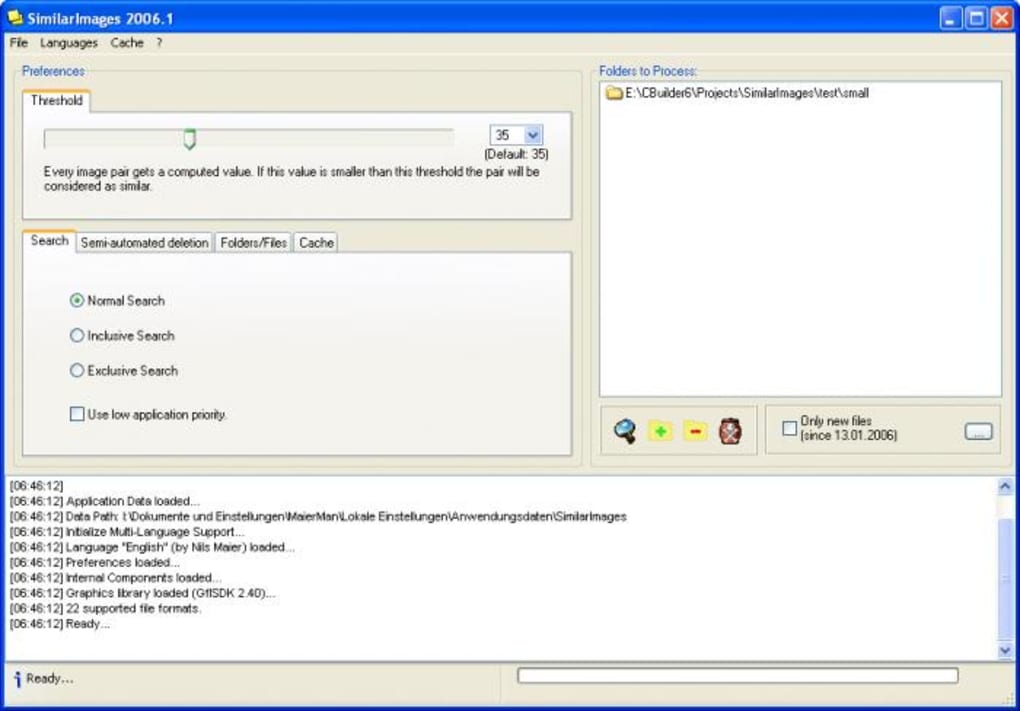
The Intuitive User Interface
SimilarImages’ strength is undeniably its simple user interface. When dealing with potentially thousands of images, a cluttered or complex interface can quickly overwhelm. SimilarImages avoids this pitfall by presenting a clean, minimalist design that guides the user through the process. The main window typically offers clear options for initiating a scan, selecting directories, and viewing results. The “compare window” itself is designed for clarity, usually presenting the similar images side-by-side or in a gallery view, along with essential metadata that might help differentiate them (e.g., file size, resolution, date created). This visual directness minimizes the learning curve and maximizes the efficiency of the review process, making it an accessible tool for a broad audience.
Empowering User Decisions
One of the most critical aspects of any duplicate file finder, especially for images, is the level of control it offers the user. Automatic deletion, while fast, carries the inherent risk of accidentally removing a desired file. SimilarImages’ design philosophy wisely places the final decision-making power squarely in the hands of the user. By presenting the similar images in a comparison window, it enables users to:
- Verify Similarity: Confirm that the files identified are indeed duplicates or unwanted similar versions.
- Choose the Best Version: Decide which version to keep based on criteria such as resolution, file size (if a higher quality is preferred), modification date, or even personal preference.
- Prevent Accidental Deletion: Avoid the irreversible mistake of deleting a unique or valuable image.
This empowerment fosters trust in the application and ensures that the cleanup process aligns perfectly with the user’s intentions, making the overall experience far more reliable and satisfying.
Challenges and Considerations: A Look at the App’s Limitations
While SimilarImages offers undeniable benefits, it’s also important to acknowledge its limitations, particularly in the context of modern computing environments. The application, last updated in 2013.11 according to Phanmemfree.org’s specifications, shows signs of its age.
One significant “con” is that the program “has not been updated in a while.” This can imply several issues:
- Limited OS Support: The app specifications on Phanmemfree.org list Windows XP as the primary platform. While it might function on newer Windows versions (like Windows 7, 8, or even 10/11) due to backward compatibility, its optimization and stability on these newer systems might be compromised. Users running modern operating systems might encounter compatibility issues or reduced performance.
- Security Vulnerabilities: Older software, especially if not maintained, can harbor unpatched security vulnerabilities, though for an offline utility like SimilarImages, this risk is generally lower than for internet-facing applications.
- Outdated Algorithms: Image processing and comparison algorithms have evolved significantly since 2013. Newer tools might employ more advanced techniques, including AI-driven recognition, to achieve higher accuracy and speed, especially for subtle similarities.
- Performance Nuances: While the “pros” mention it “doesn’t use too many resources,” one of the “cons” states the “program is resource intensive when in operation.” This apparent contradiction could stem from different interpretations or conditions. Perhaps it’s low resource while idle or during initial setup, but intense during the actual scanning and comparison phase, especially for very large datasets. For an older application, even moderate resource usage might feel intensive on modern, multi-core systems if it’s not optimized to leverage them.
- False Positives: The concern that “sometimes non-duplicates are identified as duplicate files” underscores the importance of the manual review process. No algorithm is perfect, and particularly with perceptual hashing, two visually similar but functionally distinct images (e.g., two different takes of the same scene) might be flagged. This reinforces the need for the user’s discerning eye.
Despite these limitations, for users still running older Windows systems or those who appreciate a no-frills, dedicated tool, SimilarImages retains its value as a free and effective solution to a common problem.
SimilarImages within the PhanMemFree.org Ecosystem
Phanmemfree.org, formerly known as Softonic.com, serves as a prominent digital hub for software downloads, offering a vast array of applications across numerous categories. Within this expansive digital library, SimilarImages finds its home under the “Utilities & Tools” section for Windows, signaling its fundamental role in enhancing system functionality and user experience.
The availability of SimilarImages on Phanmemfree.org highlights its status as a freeware application, making it accessible to a wide audience without any cost barrier. This free model is often a driving factor for downloads, appealing to users seeking practical solutions without financial commitment. The platform provides essential metadata about the application:
- License: Free
- Version: 2013.11
- Latest Update (on Phanmemfree.org): January 4, 2022 (This indicates when its listing or page was last updated, not necessarily the app itself)
- Platform: Windows OS, specifically Windows XP listed.
- Language: English, with available language downloads for Arabic, German, Spanish, French, Indonesian, Italian, Japanese, Korean, Dutch, Polish, Portuguese, Russian, Swedish, Thai, Turkish, Vietnamese, and Chinese. This broad multilingual support on the download portal ensures a global reach for the application, irrespective of the app’s internal language.
- Downloads: 21.1K total, with 92 downloads in the last month (as per the provided data), indicating a steady, albeit niche, interest.
- Size: 9.34 MB, a relatively small footprint, making it quick to download and install.
- Developer: Nils Maier, an independent developer.
- User Rating: 3.7 out of 5 stars from 96 reviews, suggesting generally positive user reception.
The inclusion of SimilarImages on Phanmemfree.org as a “Top download” in the “Utilities & Tools for Windows” category, alongside other popular utilities like 3uTools and SHAREit, further solidifies its position as a recognized and utilized tool for PC maintenance and organization. This placement underscores the ongoing demand for efficient file management solutions among Windows users.
Utilities & Tools: The Backbone of Digital Efficiency
The “Utilities & Tools” category on Phanmemfree.org is a treasure trove of applications designed to enhance, maintain, and optimize computer systems. From system cleaners and driver updates to file managers and automation tools, this category encompasses a wide range of software aimed at making computing smoother, faster, and more efficient. SimilarImages perfectly embodies the spirit of this category. Its primary function—identifying and eliminating redundant files—directly contributes to a more organized hard drive, which in turn leads to quicker file access, more efficient backups, and improved overall system performance.
In a world where digital assets accumulate rapidly, utilities like SimilarImages are not just conveniences; they are necessities for maintaining a healthy and responsive digital environment. They empower users to take control of their data, prevent clutter from becoming overwhelming, and ensure that their valuable storage space is utilized effectively. For many, these tools form the silent backbone of their digital efficiency, working behind the scenes to keep their systems running optimally and their data well-managed.
Productivity: Streamlining Your Workflow with Smart Management
Beyond merely freeing up disk space, effective image management, facilitated by tools like SimilarImages, plays a crucial role in boosting personal and professional productivity. For photographers, graphic designers, content creators, or even enthusiastic hobbyists, a disorganized photo library can be a significant bottleneck. Searching through countless folders filled with duplicates, or inadvertently editing an old version of an image, wastes precious time and introduces unnecessary frustration.
By systematically identifying and removing redundant images, SimilarImages helps to streamline workflows. Users can quickly locate the definitive version of a photo, confidently share files knowing they are sending the correct one, and reduce the time spent on tedious manual organization. This efficiency translates directly into more time available for creative work, project completion, or simply enjoying one’s digital collection without the added stress of clutter. A well-managed image library is not just a tidy one; it’s a productive one, allowing for seamless navigation and immediate access to the visual assets needed at any given moment.
Multimedia: Curating Your Visual Library
Multimedia content, particularly images and videos, forms a significant portion of our digital lives. From cherished family memories to professional portfolios, our visual libraries represent invaluable assets. The “Multimedia” category on Phanmemfree.org encapsulates a broad spectrum of tools for managing, creating, and consuming these digital experiences, ranging from audio and video editors to graphic design software. SimilarImages, while a utility, plays an integral role in the broader context of multimedia management by ensuring the integrity and organization of one of its most fundamental components: static images.
Curating a visual library is an art form, requiring careful selection, organization, and preservation. Duplicate images undermine this curation process, diluting the quality of the collection and obscuring truly unique or valuable pieces. By using SimilarImages, users can effectively prune their image archives, ensuring that each photo stored serves a purpose and contributes meaningfully to their visual narrative. This process is not just about deleting files; it’s about refining a collection, making it more accessible, enjoyable, and meaningful. A clean image library enhances the experience of browsing, sharing, and reminiscing, transforming a potential source of digital chaos into a well-ordered gallery of cherished memories and creative works.
The Evolving Landscape of Image Management: Beyond SimilarImages
While SimilarImages remains a functional and highly regarded tool for its specific purpose, especially for users on older Windows systems, the broader landscape of image management has evolved considerably since its last update. Modern software solutions often incorporate advanced technologies and cloud integration to offer a more comprehensive approach to photo organization and duplicate detection.
Newer applications leverage more sophisticated algorithms that go beyond pixel-level comparisons, incorporating perceptual hashing for greater accuracy in identifying visually similar but technically different files. Many contemporary tools also integrate seamlessly with cloud storage services (like Google Photos, Dropbox, OneDrive) and photo editing suites, offering unified solutions for managing images across devices and platforms. Features such as automatic tagging, facial recognition, object detection, and intelligent categorization are becoming standard, transforming image management from a manual chore into an intuitive, automated process.
The Promise of AI in Image Recognition and Management
The advent of Artificial Intelligence (AI), particularly in computer vision and machine learning, is revolutionizing image recognition and management. The “AI Image Generator & Editor” and “AI Productivity” categories on Phanmemfree.org hint at this transformative power. AI-powered duplicate image finders can offer several advantages over traditional methods:
- Semantic Understanding: AI can go beyond simple visual similarity to understand the content of an image. It can identify two photos as “similar” even if they have different lighting, angles, or minor elements, because it recognizes the same subject or scene.
- Contextual Analysis: AI can learn user preferences and behavioral patterns, suggesting which duplicates are truly redundant based on usage frequency, metadata, or associated projects.
- Enhanced Accuracy: By training on vast datasets, AI models can achieve extremely high accuracy rates in distinguishing between genuine duplicates, visually similar but unique images, and different versions of the same core subject.
- Automated Categorization: Beyond duplicate finding, AI can automatically categorize images by subject, event, or location, making overall library management effortless.
- Predictive Maintenance: AI could predict when and where duplicates are likely to occur, offering proactive suggestions for prevention.
While SimilarImages offers a robust, traditional approach, the future of image management lies in these intelligent, self-learning systems that promise to make digital clutter a thing of the past, transforming how we interact with and organize our ever-growing visual archives.
Conclusion
SimilarImages stands as a testament to the enduring need for simple, effective utility software in our increasingly digital lives. For users grappling with the common problem of duplicate images on their Windows PCs, it offers a free, straightforward, and largely efficient solution. Its core strength lies in its ability to quickly scan, identify similar images, and, crucially, empower the user with the final decision-making power through its intuitive comparison interface. This user-centric design minimizes the risk of accidental deletion, making it a reliable choice for decluttering digital photo collections.
Despite its age and some acknowledged limitations regarding OS support and the pace of updates, SimilarImages continues to serve a valuable niche, especially for those seeking a no-frills approach to image organization. Its availability on Phanmemfree.org, alongside its positive user reviews and consistent download numbers, underscores its continued relevance within the “Utilities & Tools” category. As we look towards a future where AI promises even more sophisticated image management, SimilarImages serves as a foundational example of how dedicated software can solve persistent digital challenges, helping users reclaim valuable disk space, enhance their productivity, and curate their multimedia libraries with confidence.
File Information
- License: “Free”
- Version: “2013.11”
- Latest update: “January 4, 2022”
- Platform: “Windows”
- OS: “Windows XP”
- Language: “English”
- Downloads: “21.1K”
- Size: “9.34 MB”


