
Simple Allow Copy is a free Google Chrome extension designed to overcome website restrictions that prevent text copying or disable right-click menus. This straightforward browser tool provides quick access to copy-blocked content, proving particularly useful for research and referencing purposes. Its ease of use and single-click activation make it a convenient option for many users. However, it’s important to be aware of potential limitations before using it.
Easy Activation and Core Functionality
Simple Allow Copy’s primary strength lies in its simplicity. Once installed, the extension adds an icon to your Chrome toolbar. A single click toggles the copy mode on or off. When enabled, the extension essentially overrides the website’s copy protection measures, allowing users to select and copy text as they normally would. This functionality makes it a valuable tool for anyone who frequently encounters websites that restrict text selection, a common occurrence on sites aiming to protect their content from unauthorized reproduction. The immediate and intuitive nature of the on/off switch ensures that users can effortlessly enable the extension when needed and disable it just as easily when it’s no longer required, mitigating any potential conflicts.
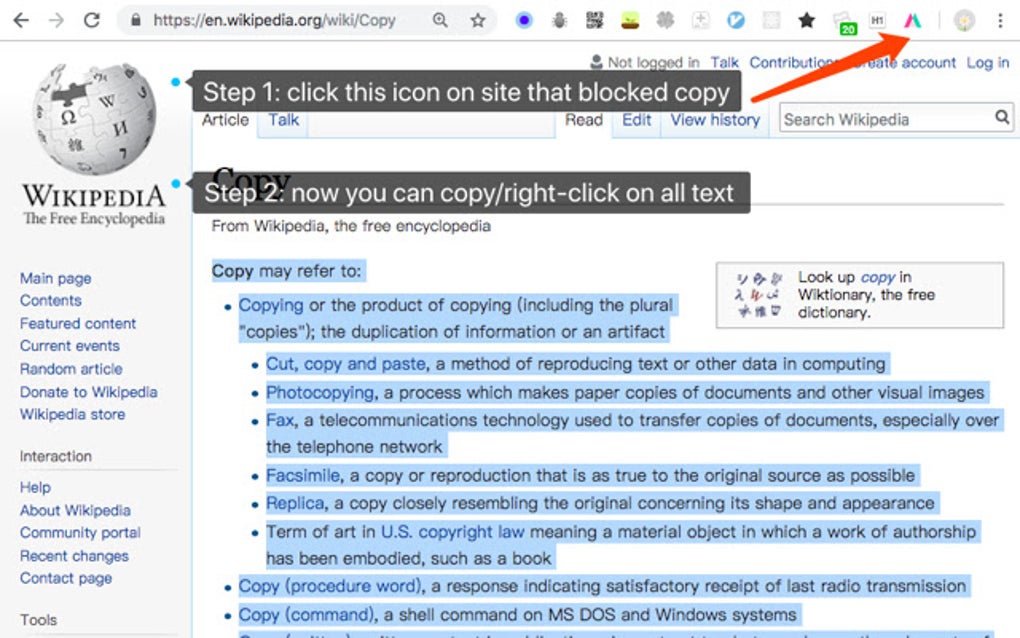
The effectiveness of Simple Allow Copy lies in its ability to seamlessly integrate into the user’s browsing experience. Unlike some more complex extensions, it doesn’t require complicated configurations or settings adjustments. Its straightforward nature contributes to a user-friendly experience, making it an appealing choice for both technically proficient and less tech-savvy users. The extension’s simple, yet efficient design addresses a common problem with minimal fuss.
Limitations and Potential Drawbacks
While Simple Allow Copy efficiently bypasses copy restrictions on most websites, it isn’t without its drawbacks. The most significant limitation revolves around its potential incompatibility with certain Google applications. Users have reported that enabling Simple Allow Copy can cause malfunctions in Google services, disrupting their normal functionality. This issue, while not universal, is a critical consideration for users heavily reliant on Google’s ecosystem. The unexpected disruption of Google services presents a significant usability challenge and can lead to frustration. The conflict highlights the potential for interference between browser extensions and web applications, reminding users to carefully consider the impact of such tools on their overall browsing environment.
The incompatibility with Google apps underscores the complexities involved in developing browser extensions. Websites and applications often employ various techniques to protect their content, and extensions like Simple Allow Copy must devise strategies to counteract these measures. In some instances, this interaction might inadvertently trigger conflicts, impacting the performance of unrelated software. Therefore, users should exercise caution and understand the potential risks associated with using such tools.
Furthermore, the precise nature and scope of these Google app malfunctions aren’t consistently documented. The issue might manifest differently depending on the specific Google service being used, the version of Chrome, or even the website where the extension is activated. This lack of detailed information can make troubleshooting challenging for users encountering problems. A clearer explanation of the potential conflict and possible solutions would enhance the overall user experience and mitigate potential frustrations. The developers should prioritize addressing this incompatibility, either through coding improvements or more explicit warnings within the extension’s documentation.
User Experience and Ease of Use
The positive aspects of Simple Allow Copy heavily focus on user experience. The one-click activation significantly enhances usability. This simple mechanism allows users to instantly enable or disable the extension as needed, adapting to various browsing situations. This straightforward approach minimizes the learning curve and reduces potential frustration, making the extension particularly user-friendly. The ease of use further extends to the absence of complex settings or configuration options. This straightforward design caters to a wider audience, including users who may not be particularly tech-savvy.
The clean and intuitive interface aligns with the extension’s overall design philosophy. Simplicity is prioritized, ensuring that the user interaction is both efficient and straightforward. This design choice prevents the extension from becoming overwhelming for users, contributing to its user-friendly nature. This uncluttered approach also ensures that the core functionality isn’t overshadowed by unnecessary features or complex configurations.
Comparison with Alternative Solutions
Several alternative extensions offer similar functionality to Simple Allow Copy. Some provide more granular control, allowing users to customize the extension’s behavior on a per-website basis. Others might incorporate additional features, such as the ability to automatically bypass copy restrictions on specific domains or integrate with other browser extensions. However, these alternative solutions often come with a steeper learning curve and a more complex interface.
The choice between Simple Allow Copy and its alternatives depends on individual needs and preferences. Users who value simplicity and ease of use might prefer Simple Allow Copy’s straightforward design. Conversely, users who require more fine-grained control or additional features might opt for a more comprehensive extension. This decision highlights the trade-off between simplicity and customization, a common challenge in choosing software tools. Understanding these trade-offs and aligning the choice with personal requirements is crucial for maximizing user satisfaction.
Furthermore, the potential incompatibility with Google applications should be considered when comparing Simple Allow Copy to alternative solutions. If users rely heavily on Google services, they might find it worthwhile to explore alternatives that exhibit better compatibility. This consideration reinforces the importance of evaluating not only the core functionality but also the potential side effects of different extensions.
Conclusion: A Useful Tool with Caveats
Simple Allow Copy provides a quick and effective method for bypassing copy restrictions on websites. Its ease of use and one-click activation make it a convenient tool for many everyday browsing tasks. However, the potential for conflicts with Google apps is a significant drawback that users should carefully consider. The ultimate decision of whether or not to use this extension depends on individual priorities and tolerance for potential risks. If the risk of disrupting Google services is acceptable, then its simple and efficient functionality can be extremely beneficial. However, if seamless integration with Google’s ecosystem is paramount, exploring alternative solutions might be advisable. Thorough consideration of both benefits and potential drawbacks is essential before installing and using any browser extension.
File Information
- License: “Free”
- Version: “0.8.8”
- Latest update: “October 23, 2024”
- Platform: “chrome”
- Downloads: “11.8K”


