
Simple Calculator is a minimalist extension for Google Chrome designed for users who prioritize efficiency and simplicity in their everyday computing. This lightweight, no-frills calculator provides essential calculation capabilities directly within your browser, eliminating the need to switch between applications or utilize cumbersome online tools. Its clean interface and straightforward functionality make it perfect for quick calculations, both personal and professional. This review will delve into the features, benefits, and overall user experience of this handy Chrome extension.
Functionality and User Interface
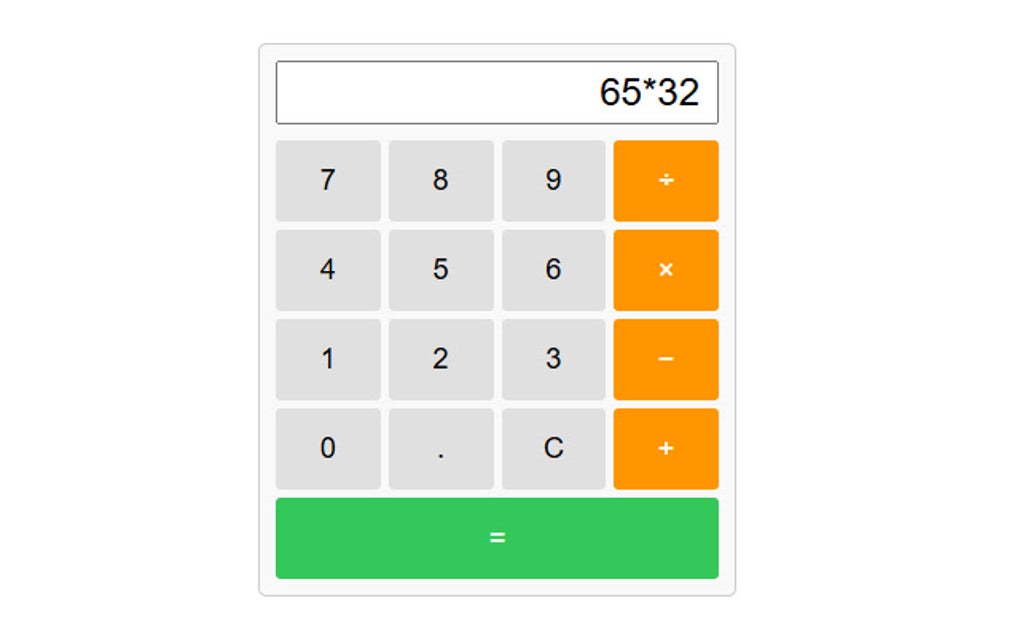
Simple Calculator lives up to its name. It’s a straightforward calculator with a clean, uncluttered interface. There are no unnecessary bells and whistles; just the essential numerical keys, arithmetic operators (+, -, *, /), an equals sign, and a clear button. The design prioritizes ease of use and intuitive navigation, ensuring a quick and efficient calculation process. The absence of complex features or distracting elements helps maintain focus and prevents any interruptions during calculations. Users seeking a powerful, multi-functional calculator with advanced features may find this simplicity limiting. However, for users prioritizing speed and simplicity, this straightforward design is highly advantageous.
The extension’s compact size ensures it doesn’t overwhelm the browser’s toolbar. Its unobtrusive presence minimizes screen clutter and enhances the overall user experience. The focus on core functionality is a key strength, making it a highly efficient tool for performing basic mathematical operations. Its speed and responsiveness are also notable; calculations are processed instantly, contributing to an overall efficient workflow.
Keyboard Compatibility and Efficiency
Simple Calculator is designed for maximum efficiency, incorporating comprehensive keyboard compatibility. Users can input numbers and arithmetic operators directly from their keyboard, eliminating the need for mouse clicks. This feature significantly speeds up the calculation process, particularly for users who frequently perform multiple calculations. The keyboard shortcuts are intuitive and easy to remember, seamlessly integrating with standard keyboard usage patterns. This seamless integration ensures a smooth and natural workflow, enhancing overall productivity.
This keyboard-centric approach makes the extension ideal for those who prefer a fast and efficient method of calculation. The elimination of mouse clicks reduces potential interruptions and allows users to maintain their flow, leading to a more streamlined calculation experience. For users who frequently perform calculations as part of their daily workflow, this efficiency gain can be significant. The ability to quickly input calculations without relying on the mouse significantly improves productivity and streamlines the overall user experience.
System Resources and Performance
One of the key advantages of Simple Calculator is its minimal impact on system resources. Its lightweight design ensures that it doesn’t consume excessive memory or processing power, even during prolonged use. This is crucial for users with lower-end systems or those running multiple applications simultaneously. The extension’s low resource consumption contributes to a smoother and more responsive browsing experience, preventing any noticeable slowdowns or performance issues. The lightweight nature of Simple Calculator is a key element in its overall design philosophy, ensuring that it remains a consistently efficient and reliable tool. The focus on efficiency extends to every aspect of its design, from the interface to its codebase.
The fast processing speed ensures that calculations are performed almost instantaneously, without any noticeable delays. This responsiveness is a crucial aspect of user experience, enabling efficient workflow and preventing interruptions during tasks. The combination of lightweight design and fast processing speed makes Simple Calculator an ideal tool for users who need a quick and efficient way to perform calculations without compromising system performance.
Comparison with Other Chrome Extensions and Applications
Compared to other Chrome extensions and standalone calculator applications, Simple Calculator distinguishes itself through its unparalleled simplicity and efficiency. Many alternative calculators offer a plethora of features, including scientific functions, unit conversions, and advanced mathematical operations. While these features can be beneficial for certain users, they often come at the cost of increased complexity and resource consumption. Simple Calculator eschews these extra features, focusing solely on core calculation capabilities. This targeted approach results in a streamlined and efficient tool perfect for users who value speed and ease of use above all else.
For users who need only basic arithmetic operations, Simple Calculator presents a superior alternative to more feature-rich options. Its minimalist design and low resource consumption make it ideal for users who prefer a fast, lightweight tool without unnecessary complexities. While other calculators may offer more advanced functions, Simple Calculator excels in its core competency: quick and efficient basic calculations. The choice between Simple Calculator and other options ultimately depends on the individual user’s needs and priorities.
Use Cases and Target Audience
Simple Calculator is versatile and can be used in a multitude of contexts. Students can use it for quick calculations during homework or exams, eliminating the need for a separate calculator device. Professionals can utilize it for rapid calculations related to their work, integrating effortlessly into their daily workflow. Even casual users can benefit from its simple and efficient design, using it to quickly perform everyday calculations. Its ease of use and minimal system impact make it suitable for a broad range of users, regardless of their technical expertise.
The target audience is individuals who value simplicity, efficiency, and ease of use in a calculator. This includes students, professionals, and casual users alike, anyone who needs a quick and straightforward way to perform basic calculations without the need for complex functionalities or resource-intensive applications. The simplicity of Simple Calculator is its greatest strength, catering to users who prefer a no-frills approach to calculation. For those who prioritize efficiency and a clean, uncluttered user experience, Simple Calculator provides a highly effective and user-friendly solution. The extension’s lightweight nature and fast processing speed also make it ideal for users with lower-end systems or those who prefer to minimize their digital footprint.
Conclusion
Simple Calculator is a well-designed and efficient Chrome extension that fulfills its purpose admirably. Its minimalist interface, keyboard compatibility, lightweight design, and fast processing speed make it an excellent choice for users seeking a simple and efficient solution for everyday calculations. While it lacks the advanced features of more complex calculators, its simplicity and efficiency are its greatest strengths, making it a valuable tool for a wide range of users. If you’re looking for a fast, lightweight, and user-friendly calculator extension for your Chrome browser, Simple Calculator is a strong contender worth considering. Its focus on core functionality and optimized performance makes it a highly effective tool for users who value efficiency and simplicity. The extension seamlessly integrates into the workflow, providing quick and easy access to basic calculation capabilities without compromising system performance or user experience.
File Information
- License: “Free”
- Version: “1.1.0”
- Latest update: “December 17, 2024”
- Platform: “chrome”
- Downloads: “1”


