
Simple Sudoku is a free-to-play Sudoku game for Windows, developed by Angusj and available in multiple languages. Initially released in 2007, it has garnered significant popularity, boasting over 90,000 downloads in the last month alone. This review will delve into its features, user experience, and compare it to other available Sudoku applications.
Gameplay and Features
Simple Sudoku’s core strength lies in its straightforward yet effective design. The game presents classic Sudoku puzzles, requiring players to fill a 9x9 grid with digits from 1 to 9, ensuring each row, column, and 3x3 subgrid contains all digits without repetition. What sets Simple Sudoku apart is its focus on accessibility and assistance without compromising the challenge.
The interface is clean and uncluttered, facilitating easy navigation and gameplay. The game allows users to select difficulty levels, ranging from “Easy” to “Extreme,” catering to players of all skill levels. This graded difficulty ensures a progressive and engaging experience, allowing newcomers to learn the mechanics smoothly while providing experienced players with a robust challenge. Each puzzle is generated randomly, promising near-limitless variety and replayability.
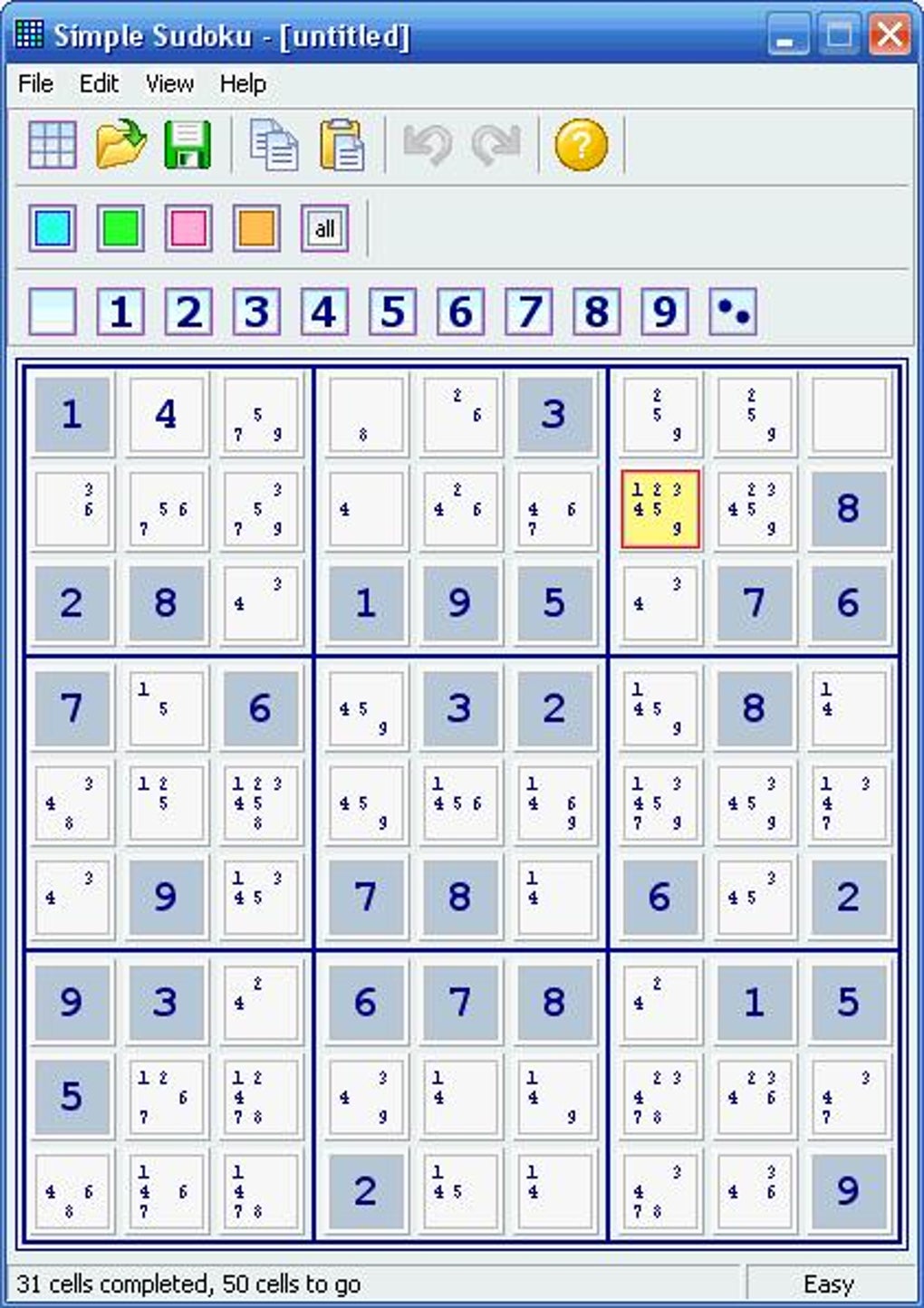
Beyond the standard Sudoku experience, Simple Sudoku offers a suite of helpful tools that enhance gameplay without removing the core puzzle-solving element. These tools are crucial for assisting players during particularly challenging sections. One of these features is the ability to highlight all cells containing a particular number. This is particularly useful when trying to ascertain where a specific number can or cannot be placed, allowing for faster solving times. Another notable feature is the display of candidate numbers – possible values for each empty cell. This candidate highlighting significantly reduces the time spent manually calculating and tracking possibilities.
The application also provides color markers and filters, enabling players to visually organize their progress and deductions. These tools allow for flexible strategizing, making the game manageable for both new and experienced Sudoku enthusiasts. The developer has gone to great lengths to make the experience both engaging and less time-consuming without simply handing over the answers.
For players who encounter particularly stubborn puzzles, Simple Sudoku offers a discrete hint system. The hints are cleverly designed, providing just enough assistance to overcome a specific obstacle without revealing the solution outright. This subtle support feature keeps the game engaging for players of all skill levels without trivializing the core challenge.
Puzzle Generation and Difficulty
A key aspect of any Sudoku game is the quality of its puzzles. Simple Sudoku excels in this regard, generating high-quality puzzles that meet stringent criteria. Each puzzle is carefully crafted to be symmetrical, ensuring visual appeal and balanced challenge. Crucially, each puzzle boasts a unique solution, eliminating the frustrating possibility of encountering multiple valid solutions. The developer’s commitment to puzzle quality ensures a fair and enjoyable experience, free from the vagaries of poorly-designed puzzles that could contain inconsistencies or multiple solutions.
The five difficulty levels ensure a progressive learning curve. Beginners can hone their skills on easier puzzles, gradually working their way towards the more complex challenges offered at the higher difficulty settings. This scalability ensures the game appeals to a wide audience, from novice puzzle-solvers to seasoned veterans. The dynamic difficulty settings mean that Simple Sudoku can accompany the player on their Sudoku journey, providing a continuously engaging challenge as their skills improve.
User Interface and Experience
Simple Sudoku’s user interface (UI) stands out for its clean, intuitive design. The grid is large enough to be easily readable, even on smaller screens. The use of clear, uncluttered fonts and simple iconography further enhances usability, prioritizing functionality and making the game accessible to all users.
Navigation is straightforward and intuitive. The game’s menus are clear and concise, allowing quick access to features such as new game, hint, and settings. The game does not overwhelm the user with excessive options, maintaining focus on the core Sudoku experience. This design choice prevents a cluttered interface that may detract from the simplicity of the game and potentially confuse players.
Comparison with Other Sudoku Games
Simple Sudoku distinguishes itself from many competitors through its balance of challenge and assistance. Some Sudoku games offer an overwhelming number of features, which can be overly complex for casual players. Conversely, some games prioritize simplicity to the point of neglecting helpful tools. Simple Sudoku successfully navigates this delicate balance, offering a selection of helpful tools without sacrificing the core challenge.
While other Sudoku games may boast advanced features or more extensive puzzle packs, Simple Sudoku offers a focused and refined experience. Its intuitive interface, helpful tools, and well-designed puzzles make it an excellent choice for players of all skill levels. The game’s focus on accessibility means that players can fully enjoy the game without being overwhelmed with too many options. The carefully designed difficulty progression ensures that players are challenged without being frustrated.
System Requirements and Technical Aspects
Simple Sudoku is notably lightweight, requiring minimal system resources. This low system footprint ensures compatibility across a broad range of Windows systems, including older machines. This makes Simple Sudoku accessible to a wider audience than games with more demanding system requirements. The ease of installation and compatibility mean players can enjoy this game without worrying about technical complications.
The game’s small size, typically under 1 MB, ensures quick installation and minimal impact on storage space. This characteristic is especially beneficial for users with limited hard drive capacity or those who prefer to keep their computer systems lean and efficient. Given the game’s limited size, updates are quick and require minimal download time, ensuring players can get back to playing quickly.
User Reviews and Community Feedback
User reviews consistently praise Simple Sudoku for its intuitive interface, helpful tools, and well-designed puzzles. Many users appreciate the balance between challenge and assistance, highlighting the game’s accessibility for both beginners and experienced Sudoku players. The consistent positive feedback indicates that the game has successfully catered to its target demographic.
While there are some minor criticisms about the lack of certain advanced features found in other Sudoku games, the majority of user reviews reflect a positive experience. The developers have consistently acknowledged user feedback and have implemented improvements over the years, showcasing responsiveness to the player community.
Conclusion
Simple Sudoku is a well-crafted Sudoku game that stands out for its balance between challenge and accessibility. Its intuitive interface, helpful tools, and well-designed puzzles make it a great choice for players of all skill levels. While it may lack some of the advanced features of other Sudoku games, its focus on a clean and efficient experience makes it an excellent addition to any Windows user’s game collection. The game’s consistent updates and user feedback responsiveness showcase the developer’s commitment to providing a high-quality and enjoyable experience. Whether you’re a Sudoku novice or a seasoned pro, Simple Sudoku offers a rewarding and enjoyable puzzle-solving experience.
File Information
- License: “Free”
- Latest update: “May 23, 2023”
- Platform: “Windows”
- OS: “Windows 98”
- Language: “English”
- Downloads: “90.9K”
- Size: “798.25 KB”


