
Sizer is a freeware utility for Windows operating systems that simplifies the process of resizing windows to precise dimensions. Its straightforward functionality makes it a valuable tool for a wide range of users, from web developers ensuring consistent webpage views to document creators maintaining uniform screenshots. This article delves into the features, functionality, and benefits of Sizer, along with comparisons to alternative applications.
Understanding Sizer’s Core Functionality
At its heart, Sizer’s purpose is simple yet powerful: to allow users to quickly and precisely resize any window to a predetermined size. This seemingly basic function has significant implications for various tasks. For instance, web developers frequently utilize Sizer to test the responsiveness of their designs across different screen resolutions. By setting Sizer to simulate various window sizes, developers can readily identify and correct layout issues that may only appear at specific dimensions. This ensures consistent user experience regardless of the screen size employed.
The utility extends its usefulness to tasks involving screen capture. When compiling a series of screenshots for documentation or tutorials, maintaining uniform window sizes is crucial for clarity and visual appeal. Manually resizing windows for each screenshot can be time-consuming and prone to inconsistencies. Sizer eliminates this hassle by allowing users to set a standard size, ensuring all screenshots are consistent and easily comparable. This feature significantly streamlines the documentation process, leading to more professional and readily understandable results.
Beyond web development and documentation, Sizer finds application in various other scenarios. Users who frequently work with multiple applications might find it beneficial to configure specific window sizes for optimal workflow. For example, a programmer might set a preferred size for their code editor and another for their debugging console. This approach enhances screen organization and reduces the mental overhead of managing multiple window sizes.
Sizer’s Ease of Use and User Interface
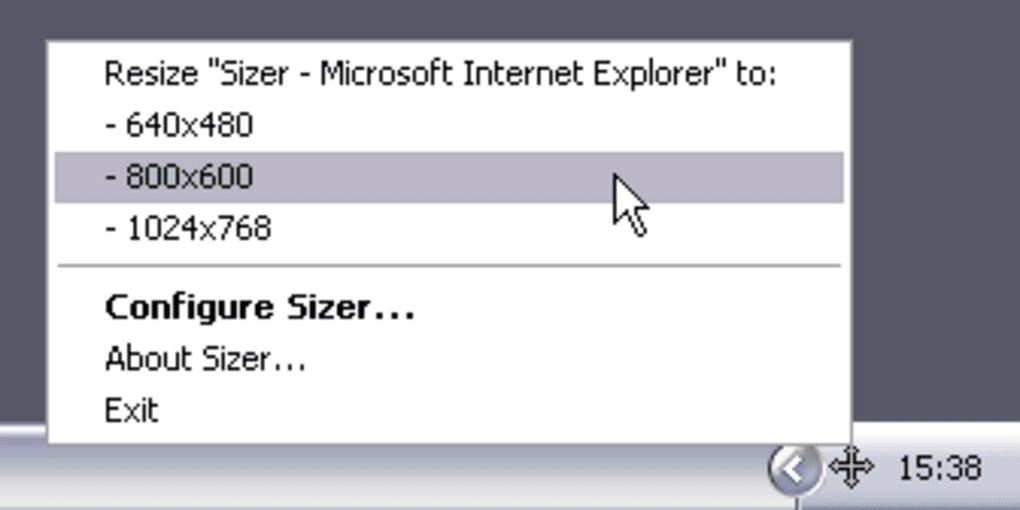
One of Sizer’s greatest strengths lies in its simplicity. The user interface is intentionally minimalistic, focusing on core functionality without unnecessary complexities. This straightforward design makes Sizer incredibly user-friendly, even for those with minimal technical experience. Users can easily set preferred window sizes and initiate resizing with minimal clicks. The absence of intricate settings or configuration options contributes to its intuitive nature, allowing users to focus on their task rather than navigating a cluttered interface.
The simplicity of Sizer’s design doesn’t compromise its effectiveness. The core resizing function is executed efficiently and accurately, providing users with the precise control they need. The program seamlessly integrates with the Windows operating system, making it a natural extension of the existing window management capabilities.
Advanced Features and Customization Options
While Sizer’s core functionality is relatively straightforward, it offers a degree of customization to cater to specific user preferences. While not as extensive as some more feature-rich window management tools, the options available are sufficient for most users. This measured approach to features ensures Sizer remains lightweight and responsive, avoiding the performance overhead that can accompany more complex software.
The absence of extensive customization options is a deliberate design choice, emphasizing the program’s ease of use and efficiency. By focusing on core functionality, Sizer avoids becoming overly complicated, thereby maintaining its accessibility for a broad range of users. The streamlined approach ensures that users can quickly achieve their desired window sizes without getting bogged down in intricate settings.
Sizer Compared to Alternative Window Management Tools
The market offers several alternative tools for window management, each with its own strengths and weaknesses. Some, like WinSplit Revolution, offer more advanced features, including the ability to arrange windows into predefined layouts. Others, such as AutoSizer, focus on automatically adjusting window sizes based on predefined rules or screen resolution. GridMove provides another approach, organizing windows into easily manageable blocks.
While these alternatives provide additional functionality, they often come with increased complexity and resource consumption. Sizer’s strength lies in its simplicity and focused functionality. Users who require sophisticated window management features might find the advanced alternatives more suitable. However, for users who primarily need precise window resizing, Sizer provides a more efficient and user-friendly solution. The choice between Sizer and alternative tools depends on the individual user’s needs and technical expertise. If precise resizing is the primary requirement, Sizer remains a highly efficient and lightweight choice.
System Requirements, Availability, and Updates
Sizer is compatible with a wide range of Windows operating systems, ensuring broad accessibility. Its minimal system requirements make it suitable for older machines as well as newer systems. The program’s lightweight nature contributes to its efficient resource utilization, preventing it from slowing down the host system. This feature is particularly important for users who operate with limited system resources.
The availability of Sizer is readily accessible, with easy downloads available through various online platforms. Regular updates, although infrequent in recent years, aim to address any bugs or compatibility issues, further enhancing the stability and reliability of the software. While the frequency of updates might not match some more actively developed applications, the core functionality remains reliable and robust. The infrequent updates highlight the mature and stable nature of the software.
Conclusion: Sizer’s Niche and Lasting Appeal
Sizer may not be the most feature-rich window management tool available, but it excels in its specific niche: precise and effortless window resizing. Its straightforward interface, lightweight design, and reliable functionality make it a valuable tool for a broad range of users. Whether you’re a web developer fine-tuning website layouts, a document creator maintaining consistent screenshots, or simply someone looking for an easy way to manage window sizes, Sizer offers a streamlined and efficient solution. Its enduring appeal stems from its focus on simplicity and effectiveness, fulfilling a specific need without unnecessary complexities. In a landscape of increasingly complex software, Sizer’s straightforward approach continues to resonate with users seeking a simple, reliable solution for precise window resizing. The program’s continued availability and user base demonstrate its enduring usefulness and enduring appeal.
File Information
- License: “Free”
- Latest update: “June 13, 2025”
- Platform: “Windows”
- OS: “Windows 11”
- Downloads: “12.1K”
- Size: “335.87 KB”


