
SkinFiner is a photo editing software designed to enhance portraits by seamlessly smoothing skin and removing imperfections. Developed by Chengzhu Li, this tool offers both professional-grade retouching capabilities and user-friendly functionality, making it accessible to both experienced photo editors and casual users alike. This review delves into the software’s features, performance, pros, and cons, comparing it to alternative options available in the market.
Effortless Skin Enhancement: Features and Functionality
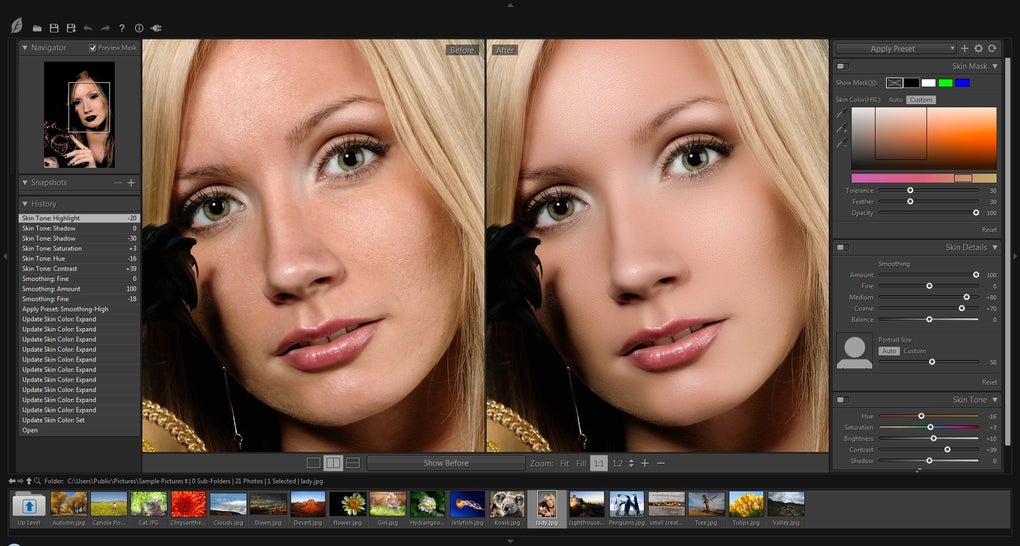
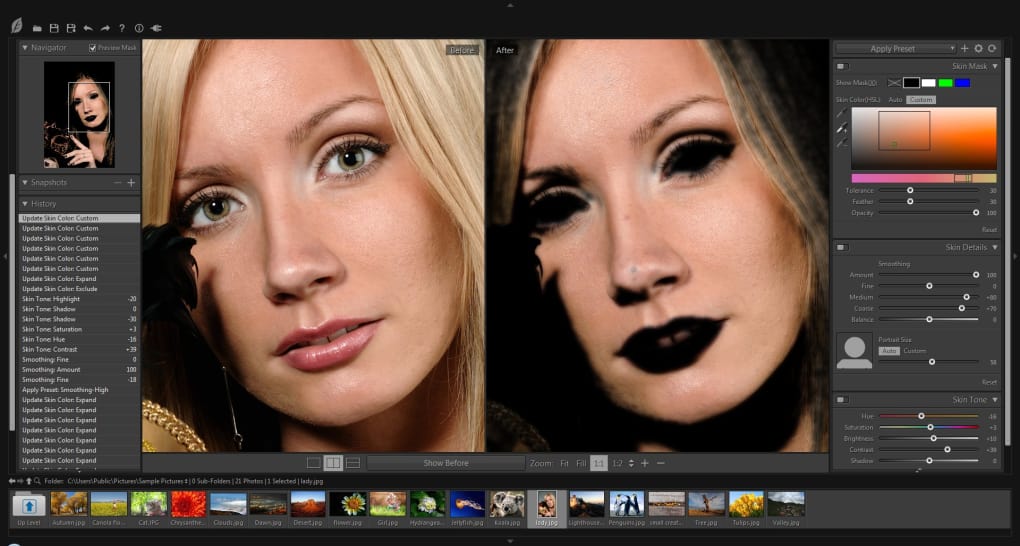
SkinFiner distinguishes itself through its intelligent approach to skin retouching. The core functionality revolves around its ability to intelligently identify and enhance skin tones while preserving natural texture and detail. This is primarily achieved through its unique Auto-Skin-Mask feature. This automated tool analyzes the image, accurately identifying facial areas requiring retouching, minimizing the need for manual selection and significantly speeding up the editing process. Users, however, retain full control, allowing for manual fine-tuning and adjustments to the mask for precise control over the retouching process. This balance between automation and manual control caters to a wide range of user skill levels, from beginners seeking quick enhancements to professionals requiring precise adjustments.
Beyond the Auto-Skin-Mask, SkinFiner boasts a comprehensive suite of tools dedicated to skin tone refinement. The “Natural Skin Tone Enhancing” feature offers granular control over various aspects of skin appearance. Users can adjust skin color, subtly altering the hue to achieve their desired complexion. The software also allows for precise adjustments to skin lighting, managing shadows and highlights to create a more balanced and flattering look. Brightness and contrast adjustments further refine the overall appearance, ensuring the final result looks natural and radiant rather than artificial. These adjustments work in tandem to create a healthy and vibrant skin tone, effectively mitigating imperfections and creating a more polished appearance.
The software’s commitment to preserving natural texture is a crucial element of its effectiveness. Unlike some retouching tools that can result in an overly smooth or artificial appearance, SkinFiner retains the subtle texture of the skin, ensuring the final image remains realistic and natural-looking. This subtle detail is key to avoiding the “uncanny valley” effect, a phenomenon where digitally enhanced images appear almost real, yet unsettling due to minute imperfections. SkinFiner avoids this by maintaining a balance between smoothing out imperfections and retaining natural skin texture. This nuanced approach is one of its greatest strengths.
Furthermore, SkinFiner supports 16-bit per channel color depth and full-color management. This advanced processing architecture ensures accurate color representation throughout the editing process, preventing color distortions or inaccuracies that can occur with lower bit-depth processing. This feature is particularly beneficial for users working with high-resolution images or those requiring precise color fidelity in their final output. The ability to handle various color spaces and profiles ensures compatibility with different workflows and output requirements.
Batch processing is another notable feature. This allows users to apply the same settings and retouching techniques to multiple images simultaneously, significantly accelerating the workflow for large-scale projects. This feature is invaluable for photographers or individuals needing to edit a large number of photographs, saving considerable time and effort. The ability to process multiple images in a single operation significantly streamlines the process.
Integration and Usability: A Plugin and Standalone Solution
SkinFiner’s versatility is enhanced by its dual functionality as both a standalone application and a plugin for Adobe Photoshop and Lightroom. This flexibility caters to diverse user preferences and workflows. Those who primarily utilize Adobe’s Creative Suite can seamlessly integrate SkinFiner into their existing workflow, benefiting from its advanced retouching capabilities within a familiar environment. However, those who prefer a dedicated standalone application can use SkinFiner independently, without the need for additional software. This dual functionality maximizes the software’s accessibility and utility for a broader audience.
The user interface is designed for ease of use. While offering sophisticated features, the software avoids unnecessary complexity, presenting users with a clean and intuitive interface. The layout is straightforward, enabling quick navigation and access to essential tools. This simplicity is especially beneficial for beginners who may be unfamiliar with professional photo editing software. The intuitive design makes the software accessible even to individuals without prior experience in image editing.
Addressing Imperfections: Removing Blemishes and Enhancing Portraits
SkinFiner excels at addressing common skin imperfections. Blemishes, pores, blackheads, and uneven skin tones are effectively minimized or removed, resulting in a more polished and even complexion. The software offers both automatic and manual controls over the correction process. Automatic correction streamlines the workflow for quick edits, while manual controls allow for precise adjustments based on individual needs and preferences. This versatility allows users to tailor the level of retouching to their specific requirements, balancing speed and precision.
The software targets various skin imperfections with varying degrees of intensity. Minor blemishes can be addressed with minimal intervention, preserving a natural look. More significant imperfections can be corrected more aggressively, achieving more pronounced results. This adaptive approach allows for a comprehensive range of correction options.
Beyond spot correction, SkinFiner aims to enhance overall skin quality. The software addresses issues such as redness and yellowing, utilizing color sliders to subtly refine skin tone and create a more harmonious appearance. These subtle color adjustments contribute significantly to the final image quality, bringing about a healthier and more radiant complexion. The color management system ensures that these adjustments are accurately applied, avoiding unnatural or discolored results.
SkinFiner: Pros and Cons
Pros:
- Intelligent Auto-Skin-Mask: Automatically detects and selects skin areas for retouching, significantly accelerating the workflow.
- Natural Skin Tone Enhancing: Offers fine-grained control over skin color, lighting, shadows, and highlights, achieving a natural and radiant look.
- Texture Preservation: Maintains natural skin texture, avoiding the artificial or overly smooth appearance seen in some retouching software.
- Dual Functionality: Works as both a standalone application and a plugin for Adobe Photoshop and Lightroom.
- 16-bit Processing and Full Color Management: Ensures accurate color representation and compatibility with various workflows.
- Batch Processing: Enables simultaneous editing of multiple images.
- User-Friendly Interface: Intuitive design simplifies the editing process for both beginners and experienced users.
- Effective Imperfection Removal: Smooths skin, removes blemishes, and corrects uneven tones.
Cons:
- Dependence on Adobe Software (for plugin functionality): Full functionality as a plugin requires Adobe Photoshop or Lightroom.
- Not universally effective: The software’s ability to produce natural-looking results can vary depending on the image quality and the subject’s characteristics. In some cases, over-processing might lead to an unnatural or artificial appearance.
Alternatives and Conclusion
Several alternative photo editing applications offer similar skin retouching capabilities. These include FaceFilter, Portraiture, Face Smoother, CleanSkinFX, Adobe Photoshop Lightroom, Neat Image, and Portrait Professional. Each of these tools has its strengths and weaknesses, offering different approaches to skin retouching and varying degrees of sophistication. The choice of which application to use depends heavily on individual needs, budget, and technical skill level.
SkinFiner stands out due to its intelligent automation and the careful balance it achieves between removing imperfections and maintaining a natural appearance. Its dual functionality as a standalone application and a plugin, along with its user-friendly interface, makes it an attractive option for a wide range of users. While not a perfect solution for every situation, SkinFiner offers a compelling combination of features and usability, making it a strong contender in the field of portrait retouching software. The choice ultimately hinges on individual preferences and priorities in terms of workflow, budget, and desired level of control.
File Information
- License: “Trial version”
- Latest update: “November 29, 2024”
- Platform: “Windows”
- OS: “Windows 10”
- Language: “English”
- Downloads: “143.3K”
- Size: “133.33 MB”


