
SlimBrowser, a tabbed, multi-site web browser, presents itself as a lightweight alternative to more established options. It boasts a range of features designed to enhance browsing efficiency and security, including a built-in popup blocker, customizable window frames, form filling capabilities, site grouping, quick search functionality, auto-login, hidden site management, built-in commands and scripting, online translation, script error suppression, and blacklist/whitelist filtering. While promising a streamlined and feature-rich experience, SlimBrowser’s legacy and current user feedback paint a more nuanced picture of its strengths and weaknesses. This review will explore the browser’s capabilities, evaluate user experiences, and assess its place in the competitive landscape of modern web browsers.
Feature Set and Functionality
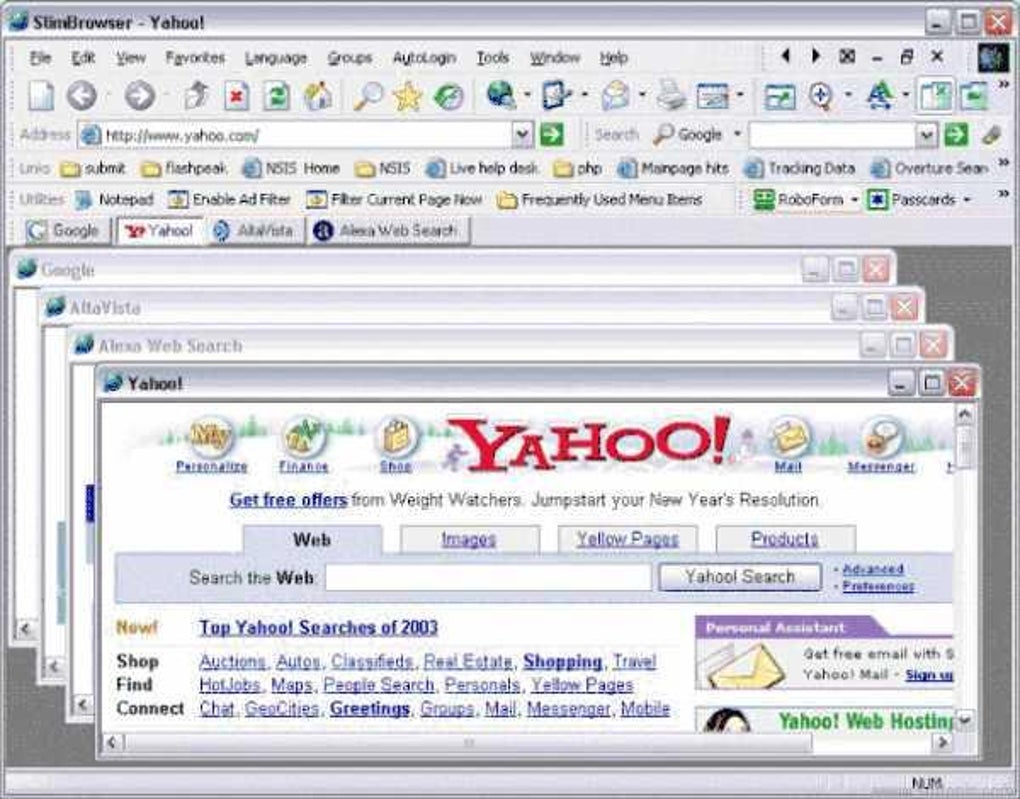
SlimBrowser’s core functionality centers around its tabbed interface, allowing users to manage multiple websites simultaneously. This is a standard feature in most modern browsers, but SlimBrowser aims to differentiate itself through additional functionalities. Its built-in popup blocker aims to mitigate intrusive advertisements and pop-up windows, a common annoyance for many internet users. The customizable window frames allow for a degree of personalization, enabling users to tailor the browser’s appearance to their preference.
Form filling is a time-saving feature that automatically completes online forms based on previously saved information. This can be particularly useful for frequently visited websites requiring repetitive data entry. Site grouping allows users to organize frequently visited sites into categories, improving navigation and organization. Quick search offers a fast way to initiate searches using various search engines, directly from the browser’s interface. Auto-login functionality streamlines the process of accessing accounts on different platforms.
The inclusion of hidden sites allows for greater privacy by keeping certain browsing sessions concealed. This functionality is important for maintaining a degree of online anonymity and safeguarding sensitive information. Built-in commands and scripting provide advanced users with a degree of control over the browser’s behavior. This feature opens up possibilities for customization and automation, albeit requiring a degree of technical expertise.
Online translation is a valuable feature in today’s increasingly globalized internet. SlimBrowser’s inclusion of this function simplifies the process of navigating websites in foreign languages. Script error suppression is designed to improve stability by preventing scripts from crashing the browser, increasing overall reliability. Blacklist and whitelist filtering allow for granular control over website access, enhancing security and protecting against potentially harmful or unwanted content. URL aliasing allows users to create shortcuts for frequently visited websites, further streamlining the browsing experience.
User Experience and Reviews
User reviews regarding SlimBrowser are mixed, ranging from overwhelmingly positive to severely negative. Some users praise its speed, lightweight nature, and the array of customization options. They highlight its usefulness for older systems and its ability to handle tasks efficiently, even on less powerful hardware. The positive reviews often emphasize the browser’s responsiveness and the effectiveness of its built-in features, such as the popup blocker and form filler.
However, a significant portion of user feedback expresses dissatisfaction, citing issues with stability, crashes, and difficulties in uninstalling the software. Several users report that SlimBrowser caused system crashes on both older and newer operating systems, suggesting potential compatibility problems. The difficulty in uninstalling the program also raises concerns, indicating potential issues with the software’s installation and removal processes. These reports highlight a significant drawback, as a stable and easily removable browser is crucial for a positive user experience.
The discrepancy in user reviews may reflect a combination of factors. The age of the software and the potential lack of consistent updates might contribute to incompatibility issues and instability on modern systems. Moreover, the feature set, while extensive, may overwhelm some users, while others may find the interface less intuitive than that of more mainstream browsers.
Comparison with Other Browsers
Compared to major browsers like Google Chrome, Mozilla Firefox, and Microsoft Edge, SlimBrowser lacks the extensive ecosystem of extensions and add-ons. While its built-in features are comprehensive, they cannot match the vast library of extensions available for more popular browsers, which cater to a much wider range of user needs and preferences. The lack of a large community support network also limits the availability of troubleshooting resources and community-driven solutions.
In terms of security, SlimBrowser’s built-in features offer some level of protection, but it might not be as robust as the security measures implemented in browsers from larger corporations that invest heavily in security research and development. Regular security updates are crucial for protecting against emerging online threats, and the frequency and comprehensiveness of these updates for SlimBrowser are not as widely publicized as those for other major browsers.
SlimBrowser’s advantage lies in its purported lightweight nature and potentially faster performance on older or less powerful hardware. However, the reliability issues reported by many users negate this advantage in many cases. For users with powerful machines and a need for a broad range of extensions and a thriving community support system, SlimBrowser might not be the most suitable option.
Potential Strengths and Weaknesses
SlimBrowser’s potential strengths lie in its unique feature set, which caters to users who prefer a highly customizable and efficient browsing experience. Its built-in features, such as the popup blocker, form filler, and site grouping, can significantly enhance productivity and personalize the online experience. The potential for faster performance on older systems is another potential benefit, though user reports contradict this claim in many instances.
However, significant weaknesses exist in terms of user experience and stability. The reported crashes, difficulty in uninstallation, and lack of a robust update schedule raise serious concerns regarding its reliability and overall user satisfaction. The lack of a large and active community, coupled with limited extension support, may further hinder its appeal to a broader audience.
Conclusion
SlimBrowser, while aiming for a niche of users seeking a lightweight browser with extensive built-in functionality, struggles to overcome substantial stability and usability issues. While its features are comprehensive, the negative user experiences regarding crashes and uninstallation difficulties significantly outweigh the benefits. In a landscape dominated by well-established browsers with massive user bases and active development communities, SlimBrowser’s shortcomings hamper its competitiveness. Unless these fundamental issues are addressed through substantial updates and improved stability, it’s unlikely to gain significant traction in the broader market. For many users, the potential advantages of SlimBrowser’s feature set are overshadowed by the risks of instability and negative user experiences reported by a considerable number of users. Therefore, potential users should carefully weigh the pros and cons before considering SlimBrowser as their primary web browser.
File Information
- License: “Free”
- Latest update: “April 2, 2024”
- Platform: “Windows”
- OS: “Windows 95”
- Language: “English”
- Downloads: “35.5K”
- Size: “57.73 MB”


