
Smart IPTV is a free Android application developed by needz, designed to provide users with a seamless and customizable IPTV streaming experience directly on their Android TV devices. Unlike many pre-packaged IPTV solutions, Smart IPTV doesn’t come with a pre-loaded channel list. Instead, it empowers users with complete control over their viewing experience, allowing them to add and manage their own IPTV streams. This unique approach ensures users only access the channels and content they desire, fostering a truly personalized entertainment landscape. The application’s user-friendly interface makes navigating and managing your customized channel list straightforward, even for those less tech-savvy.
This detailed guide will explore the features, functionality, and benefits of Smart IPTV, providing a comprehensive understanding of this popular Android application. We will delve into its core functionality, discuss its availability and licensing, and examine the user experience it provides. We will also explore alternative applications and consider its position within the broader Android multimedia landscape.
Smart IPTV: Core Functionality and Features
At its heart, Smart IPTV acts as a powerful media player specifically optimized for IPTV streams. It takes the raw IPTV data provided by a user and transforms it into a smooth, navigable viewing experience on their Android TV. The absence of pre-loaded channels is a key differentiator; it’s a blank canvas onto which users paint their personalized entertainment preferences. This control is a significant advantage, allowing users to select precisely the channels and content they wish to view, without being burdened by unwanted or irrelevant programming.
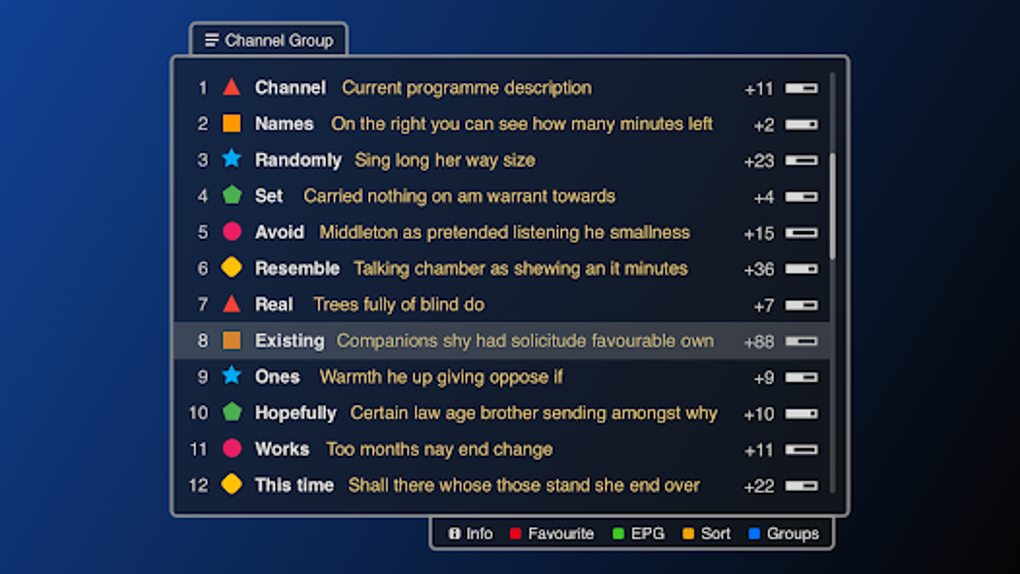
The application’s simplicity is a major strength. The user interface is intuitively designed, making it easy to add, organize, and manage IPTV streams. Users can group channels into categories, create custom playlists, and arrange their content in a manner that best suits their viewing habits. This level of customization elevates Smart IPTV beyond a simple media player; it becomes a personalized entertainment hub curated entirely by the user.
One of the most significant benefits of Smart IPTV is its compatibility with various IPTV providers and stream formats. While the application doesn’t directly provide channels, it supports a wide range of protocols and formats, ensuring compatibility with numerous IPTV services. This flexibility allows users to seamlessly integrate their preferred IPTV provider into the Smart IPTV interface. This versatility makes it a highly adaptable solution for various users and their unique streaming needs.
The current version (1.8.6 as of January 26, 2025) is available for free download on the Google Play Store, allowing users to experience the app’s full functionality before committing to any paid subscriptions or upgrades. This free trial period gives users an opportunity to explore the app’s interface, test its compatibility with their IPTV provider, and ascertain its suitability for their individual needs.
Apps, Games, and News Integration (or Lack Thereof)
It’s crucial to understand that Smart IPTV is solely focused on IPTV streaming. Unlike other Android TV applications, it does not offer integrated apps, games, or news feeds. Its functionality is strictly limited to playing IPTV streams provided by the user. This focused approach streamlines the user experience and avoids cluttering the interface with unnecessary features.
The application’s deliberate exclusion of apps, games, and news ensures a clean, uncluttered interface dedicated solely to IPTV streaming. This design choice enhances the app’s primary functionality and avoids distracting users from their core purpose: watching their chosen IPTV channels. This targeted functionality makes Smart IPTV a remarkably efficient and effective solution for IPTV users. However, users seeking integrated app stores or news feeds will need to utilize separate applications alongside Smart IPTV.
Smart IPTV for Business: Potential Applications
While Smart IPTV is primarily aimed at individual consumers, its core functionality could potentially find applications in business settings. Businesses operating in hospitality, healthcare, or other sectors might utilize Smart IPTV to provide customized television programming to their clients or patients. This could include delivering targeted advertising, localized news, or specific entertainment content based on the audience’s needs.
For example, a hotel could use Smart IPTV to provide its guests with access to a curated selection of channels and content, potentially including local information or hotel-specific services. A healthcare provider might use it to offer patients calming visuals or educational programming. The flexibility and customization options of Smart IPTV make it potentially useful in many diverse business environments, though specialized business-oriented IPTV solutions might offer more tailored functionalities and reporting features.
Smart IPTV for Android: User Experience and Technical Aspects
Smart IPTV’s strength lies in its ease of use. The Android application is intuitive and straightforward, even for individuals unfamiliar with IPTV technology. Adding IPTV streams is a relatively simple process, often involving entering a URL or XML file provided by the user’s IPTV service provider. The interface is visually uncluttered, making navigation easy and efficient.
The application is designed to be compatible with a wide range of Android TV devices and Android versions, though compatibility is always subject to change and updates. Users should consult the application’s description and reviews before downloading to ensure compatibility with their specific device and operating system version. The application’s developers actively update the application to address bugs, improve performance, and add new features, contributing to a continuously enhanced user experience.
Smart IPTV leverages the processing power of the Android TV device to deliver smooth playback, even for high-definition streams. This optimized performance ensures a high-quality viewing experience without significant lag or buffering. The application’s light footprint also contributes to efficient resource management, leaving ample processing power available for other applications.
Multimedia Capabilities and Alternatives
As a multimedia application, Smart IPTV excels in its ability to handle IPTV streams. However, it doesn’t offer the extensive multimedia features found in other all-in-one entertainment applications. While it plays IPTV streams flawlessly, it lacks the advanced editing, creation, or organizational capabilities seen in some alternative Android applications.
The market offers numerous alternative IPTV applications and general-purpose media players. These alternatives may offer additional features, such as integrated download managers, video editors, or enhanced organizational tools. However, Smart IPTV’s focused approach ensures a streamlined and efficient user experience specifically tailored to IPTV streaming, which may be preferable for users prioritizing a clean, simple interface. Choosing the best application depends on individual user needs and priorities. Some users might prefer a more comprehensive multimedia solution, while others prioritize a streamlined IPTV experience.
Free Access and Future Considerations
The current free access model of Smart IPTV allows users to explore its functionality without any financial commitment. This trial period is invaluable for users to assess the application’s compatibility with their chosen IPTV provider and determine if it aligns with their preferences before potentially investing in a paid subscription (if such a model is ever implemented). This accessibility is a major advantage for consumers, minimizing risk and fostering a transparent user experience.
While currently free, the developers retain the right to adjust the licensing model in the future. This means the free access period may be temporary or that the application might eventually transition to a paid subscription model. However, the current free access period demonstrates the developer’s commitment to ensuring widespread accessibility and allowing users to experience the application’s core functionalities before any potential cost implications. Staying updated on the application’s status through official channels is crucial to avoid any surprises regarding licensing and pricing.
Conclusion
Smart IPTV provides a compelling solution for Android TV users seeking a streamlined and customizable IPTV viewing experience. Its simplicity, focus on core functionality, and free access contribute to a user-friendly and accessible application. While it lacks some of the extensive multimedia features found in other Android applications, its dedication to providing a seamless IPTV experience remains its greatest strength. The application’s clean interface, robust performance, and customizable features make it a worthy consideration for anyone seeking a personalized IPTV experience on their Android TV. Ultimately, the application’s success lies in its ability to efficiently and effectively deliver the core function of IPTV streaming in a straightforward, user-friendly package.
File Information
- License: “Free”
- Version: “1.8.6”
- Latest update: “January 26, 2025”
- Platform: “Android”
- OS: “Android 13.0”
- Language: “English”
- Downloads: “1.8K”
- Download Options: “Google Play”


