
SMART Notebook is a powerful educational software application designed to enhance teaching and learning experiences. Developed by SMART Technologies, this software provides educators with a comprehensive suite of tools for creating and delivering engaging, interactive lessons. While it requires a SMART Board interactive display for its full functionality, SMART Notebook’s versatility extends beyond the classroom, making it a valuable tool for various educational settings and even professional presentations. This guide explores its features, benefits, and alternatives to help you determine if SMART Notebook is the right solution for your needs.
Understanding SMART Notebook’s Functionality
At its core, SMART Notebook is a desktop application that empowers educators to create interactive lessons and presentations. It transcends traditional lecture-based teaching methods by seamlessly integrating multimedia elements, interactive activities, and collaborative features. This software facilitates the transition from static lesson plans to dynamic, engaging learning experiences that cater to diverse learning styles.
The software’s robust feature set allows educators to develop interactive content that includes:
-
Multimedia Integration: Easily embed videos, audio clips, and images into lessons, transforming static presentations into dynamic learning experiences. This encourages student engagement and provides multiple avenues for comprehension. The software supports various media formats, simplifying the integration process.
-
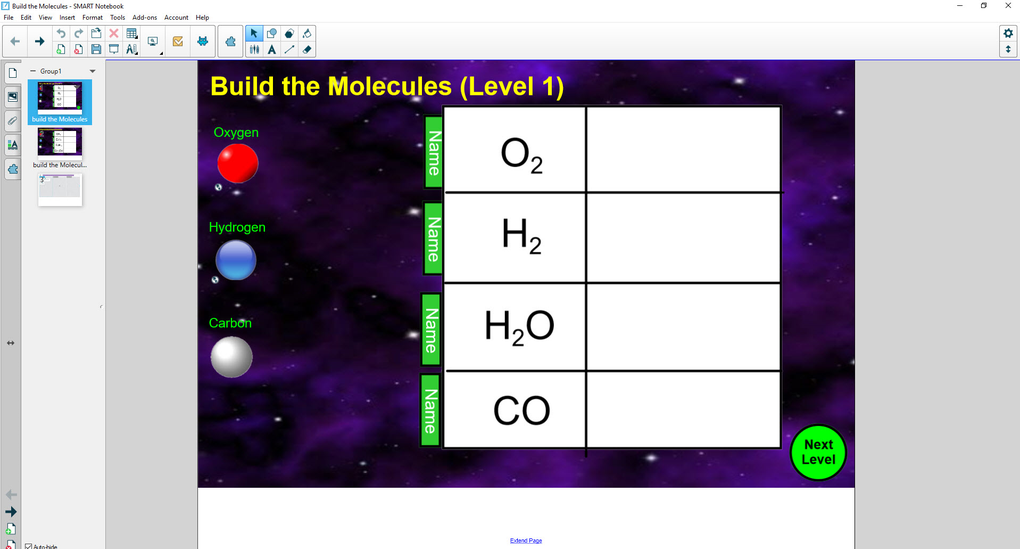
Interactive Activities: Design interactive games, quizzes, and exercises to reinforce learning concepts and assess student understanding. These activities can be tailored to specific learning objectives, fostering active participation and knowledge retention. The flexibility allows for activities that cater to individual learning paces and preferences.
-
Collaborative Tools: SMART Notebook enables collaboration during lessons, encouraging student participation and peer learning. Features like shared annotation and real-time feedback promote active involvement and deeper understanding of the subject matter. This interactive nature makes learning a more engaging and communal experience.
-
Import and Export Capabilities: Seamlessly import existing materials, such as PDF files and Microsoft PowerPoint presentations, into the SMART Notebook environment. This streamlines the lesson preparation process by leveraging existing resources and minimizing the need to recreate content from scratch. Furthermore, finished lessons can be easily exported for sharing or archiving.
-
Drawing and Annotation Tools: The software provides a range of drawing and annotation tools, mirroring the functionality of digital art software. Educators can draw, add shapes, create tables, and type text directly onto the interactive whiteboard, providing immediate visual aids and explanations during lessons. This real-time annotation feature enhances the dynamic nature of the lesson.
-
Advanced Features: Advanced features such as object manipulation, layering, and animation capabilities provide educators with powerful tools to enhance visual appeal and convey complex information in an engaging manner. This level of customization ensures that the learning materials are visually stimulating and effective for diverse audiences.
Lesson Delivery and Presentation with SMART Notebook
SMART Notebook’s strengths are fully realized when paired with a SMART Board interactive display. This integration enables a seamless connection between the lesson plan and the classroom environment. However, the software’s file compatibility extends beyond the SMART Board, allowing lesson plans to be presented using other display technologies, although interactive capabilities will be limited in these alternative scenarios. Here’s a breakdown of the process:
-
Connection and Access: Connect your computer to a SMART Board or other display device. Alternatively, access your lesson plans from a USB drive or cloud storage (Google Drive, OneDrive). If you have a subscription, the File Sync feature streamlines access.
-
Teaching Aids: SMART Notebook offers built-in teaching aids to enhance the learning experience. A Magnifier tool helps students focus on specific details, while the Spotlight tool draws attention to key elements on the screen. These features are designed to enhance accessibility and clarity.
-
Screen Capture and Recording: Record your entire lesson session for later review by students or for self-reflection on teaching methods. This feature provides a valuable resource for both students and instructors, facilitating a more comprehensive learning experience.
- Real-time Interaction: The interactive nature of SMART Notebook allows for spontaneous adjustments to the lesson based on student engagement and comprehension. This adaptability ensures that the learning experience is responsive to student needs and enhances the effectiveness of the teaching process.
Alternatives to SMART Notebook
While SMART Notebook offers a comprehensive solution for interactive teaching, other options exist depending on your specific needs. Some notable alternatives include:
-
OpenBoard: OpenBoard is an open-source interactive whiteboard software. It offers a similar range of functionalities to SMART Notebook, including annotation tools, multimedia integration, and collaborative features. Its open-source nature allows for customization and community-driven development, potentially attracting users who prefer customizable options. However, it might lack some of the advanced features and polish of commercial solutions.
-
Microsoft Whiteboard: Microsoft Whiteboard is tightly integrated with the Microsoft ecosystem. This integration simplifies collaboration for users already invested in Microsoft products. The seamless integration with other Microsoft applications improves workflow and data management. However, its focus on collaboration within the Microsoft ecosystem might make it less suitable for users outside of this environment.
The choice between SMART Notebook and these alternatives depends on factors such as budget, existing infrastructure, and the specific requirements of your teaching environment. SMART Notebook excels in its comprehensive features and ease of use, particularly when integrated with a SMART Board, while the open-source nature of OpenBoard and the Microsoft ecosystem integration of Microsoft Whiteboard are attractive to specific user groups.
SMART Notebook Pricing and Versions
SMART Notebook is available in two primary versions:
-
SMART Notebook Basic Version: This free version provides access to a wide array of tools for creating interactive lessons. It also offers access to free classroom resources and interactive lessons through the SMART Exchange website. While this free version offers extensive functionality, it limits editing capabilities for downloaded materials and does not allow the creation of new activities.
-
SMART Learning Suite: This paid subscription provides expanded functionality and features, including complete control over content creation and customization. Users gain the ability to create and edit their own activities, catering to specific student needs. Additionally, the subscription enables compatibility with Lumio, another SMART Technologies product that facilitates classroom device connectivity.
The free basic version offers an excellent entry point, allowing educators to explore the capabilities of the software without a financial commitment. However, the paid subscription unlocks additional functionality and customization options that are essential for maximizing the software’s potential in a dynamic classroom environment. The choice depends on the specific needs and budget of the educational institution or individual user.
Conclusion: Is SMART Notebook Right for You?
SMART Notebook is a highly versatile and powerful educational software application. Its ease of use, coupled with its extensive feature set, makes it an appealing option for educators looking to enhance their teaching methods. While the requirement of a SMART Board for full functionality represents a potential barrier to entry, the potential benefits of interactive lessons often outweigh the cost. The software’s compatibility with Windows 11 further ensures its relevance and longevity in the evolving educational technology landscape. If you’re searching for a comprehensive interactive whiteboard solution designed to engage students and streamline the lesson planning process, SMART Notebook is certainly worth considering. Its two versions cater to diverse budgets and needs, making it accessible to a wide range of users and educational institutions. However, it’s crucial to carefully weigh the cost and feature set against the alternatives available to ensure it aligns with your specific requirements.
File Information
- License: “Demo”
- Latest update: “November 18, 2024”
- Platform: “Windows”
- OS: “Windows 10”
- Language: “English”
- Downloads: “88.6K”
- Size: “18.16 MB”


