
Smart YouTube TV is a free and open-source application developed by Yuriy Lyskov, offering a customized YouTube experience optimized for larger screens. Unlike the official YouTube app, Smart YouTube TV provides enhanced functionality and avoids reliance on Google Services, making it a compelling alternative for users seeking a more tailored viewing experience on their Android TV devices. This article delves into the features, installation process, advantages, and limitations of Smart YouTube TV, providing a comprehensive overview for potential users.
Installation and Setup: A User-Friendly Approach
Installing Smart YouTube TV requires enabling the “Install apps from unknown sources” option within your smart TV’s security settings. This allows the installation of applications from sources other than the official app store. Once enabled, download the Smart YouTube TV APK file and transfer it to a USB flash drive. Connect the USB drive to your smart TV and initiate the installation process, similar to installing apps on a smartphone.
Upon launching the application for the first time, users are presented with a selection of four device/resolution options: 1080 Main, 1080 Alt, 4K Main, and 4K Alt. Choosing the appropriate option ensures optimal video quality based on your TV’s capabilities. A “remember” checkbox allows the selected settings to persist for future use, streamlining the process for subsequent launches.
A key advantage of Smart YouTube TV is its ability to function independently of Google Services. This means users can log into their YouTube accounts without needing a Google account or any associated services. This aspect enhances privacy and bypasses potential limitations imposed by Google’s ecosystem. Furthermore, the application supports remote controllers, making navigation intuitive and user-friendly. Root permissions are not required, simplifying the installation and usage process.
Features and Functionality: Beyond the Standard YouTube Experience
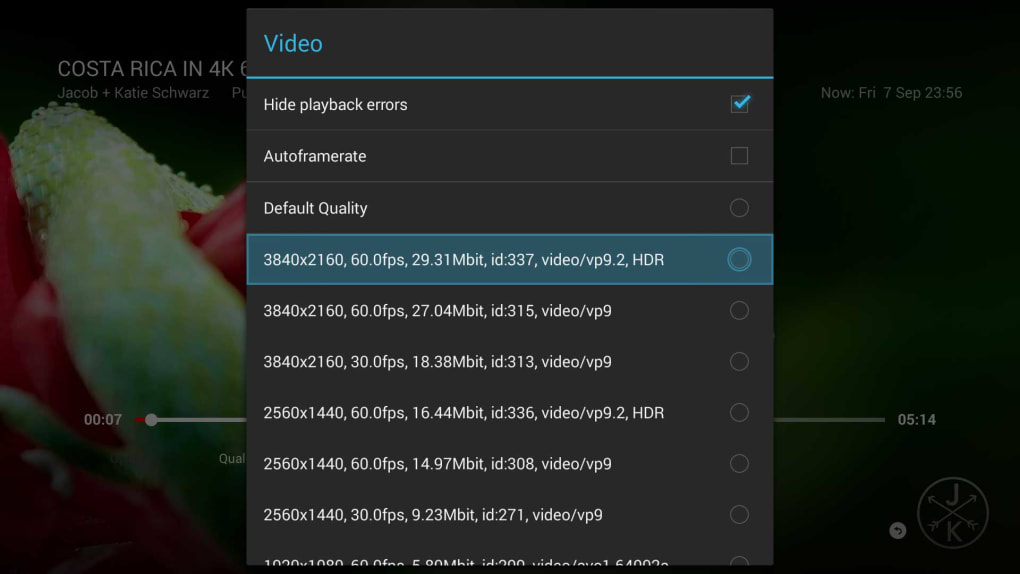
Smart YouTube TV emulates many functions of the standard YouTube app but with enhancements tailored for smart TVs. Users can access their subscriptions, search for videos, create playlists, and manage their viewing history, mirroring the functionality of the official app. However, Smart YouTube TV distinguishes itself through several key features:
- Optimized for Larger Screens: The user interface is meticulously designed for larger screens, enhancing readability and providing a more immersive viewing experience. Navigation is intuitive, making it easy to browse videos and manage settings.
-
Support for High Resolutions: The app supports up to 4K resolution, ensuring that users can enjoy the highest quality video available based on their TV’s capabilities. This allows for sharp, detailed visuals, enhancing the overall viewing enjoyment.
-
Independence from Google Services: This is a crucial differentiating factor. Smart YouTube TV operates without relying on Google Services, offering a degree of independence and potentially enhancing user privacy. This contrasts with the official YouTube app, which is tightly integrated with the Google ecosystem.
-
Remote Control Compatibility: Seamless integration with remote controllers ensures ease of use, mirroring the experience of navigating native smart TV applications. This is essential for comfortable and convenient usage on larger screens.
Advantages and Disadvantages: Weighing the Pros and Cons
Smart YouTube TV presents several advantages compared to the official YouTube app and other third-party alternatives. However, it’s essential to consider its limitations before deciding whether it’s the right option for your needs.
Advantages:
- Free and Open-Source: The application is entirely free to use, eliminating subscription fees or hidden costs often associated with other streaming applications. Its open-source nature promotes transparency and community involvement.
-
High Resolution Support: The support for up to 4K resolution ensures viewers can enjoy videos at their highest quality, making it an ideal choice for users with 4K TVs.
-
No Root Permission Required: The application doesn’t require root access, eliminating the need for potentially risky modifications to the smart TV’s operating system. This simplifies the installation process and enhances security.
-
Google Services Independence: This is a significant advantage for users concerned about privacy or who prefer not to be tied to the Google ecosystem. It provides an alternative for users wanting more control over their data.
Disadvantages:
-
No Official Support: The app is not officially supported by YouTube or Google, meaning there’s no guarantee of ongoing updates or technical assistance. This also means that any bugs or issues might not be addressed by the developers.
-
No Longer Actively Maintained: The application is no longer under active development. This means that new features or bug fixes are unlikely, potentially limiting its longevity and functionality over time.
-
Potential Compatibility Issues: While generally compatible with Android TV devices, there might be compatibility issues with certain models. Thorough research is recommended before installing the application.
Alternatives and Comparisons: Exploring Other Options
While Smart YouTube TV provides a compelling alternative, it’s beneficial to explore other options to find the best YouTube client for your smart TV. Several alternatives exist, each with its own strengths and weaknesses:
-
Official YouTube App: The official YouTube app provides a consistent experience, regular updates, and official support. However, it’s reliant on Google Services and may lack some customization options.
-
Other Third-Party YouTube Clients: Various third-party clients offer different features and functionalities. However, it’s crucial to carefully research these options to ensure they are reputable and safe before installation.
Smart YouTube TV offers a unique balance of features, customization, and independence from Google Services. While its lack of active development and official support are limitations, it’s a viable option for users prioritizing these aspects. Potential users should carefully weigh the advantages and disadvantages before installing the application, considering their technical proficiency and personal preferences. The decision depends on the user’s priorities and comfort level with using applications outside the official app store. If the need for regular updates and official support is paramount, the official YouTube app might be a more suitable choice. However, for users seeking a more customized, privacy-focused experience, Smart YouTube TV remains a compelling contender.
File Information
- License: “Free”
- Version: “6.17.730”
- Latest update: “January 3, 2023”
- Platform: “Android”
- OS: “Android 9.0”
- Language: “English”
- Downloads: “251.5K”
- Size: “9.08 MB”
- Download Options: “APK, Google Play”
- Filename: “smart_youtube_tv_v6.17.730.apk”


