
Smartmockups is a powerful application designed to streamline the process of creating marketing mockup images. Mockups are crucial for businesses and individuals alike, providing clients and stakeholders with a clear visual representation of how a website, app, or design will appear on various devices and in different contexts. Traditionally, creating these mockups has been a time-consuming and often complex task, requiring significant design skills and software proficiency. Smartmockups addresses this challenge by offering a user-friendly interface and a comprehensive library of pre-designed templates, enabling users to generate professional-looking mockups quickly and efficiently. This review delves into the features, benefits, and limitations of the Smartmockups application, exploring its potential for both professional marketers and casual users.
Streamlining Marketing Mockup Creation
The core functionality of the Smartmockups app revolves around simplifying the creation of marketing materials. Instead of starting from scratch with complex design software, users can leverage the app’s extensive library of pre-designed templates. These templates showcase a wide variety of devices, including smartphones (both Android and iOS), tablets, laptops, desktop computers, and even televisions. Furthermore, the app caters to print media, offering templates for brochures, flyers, and other printed materials. This broad range of options allows users to visualize their designs across a multitude of platforms and formats, providing a comprehensive view of their project’s potential impact.
The process itself is remarkably straightforward. Users simply upload their design or image (be it a website screenshot, app interface, or any other relevant visual) and the Smartmockups app seamlessly integrates it into the chosen template. The app handles the complexities of proper scaling, alignment, and perspective, ensuring that the final mockup maintains a professional and realistic appearance. This eliminates the need for manual adjustments and fine-tuning, significantly reducing the time and effort required for mockup creation.
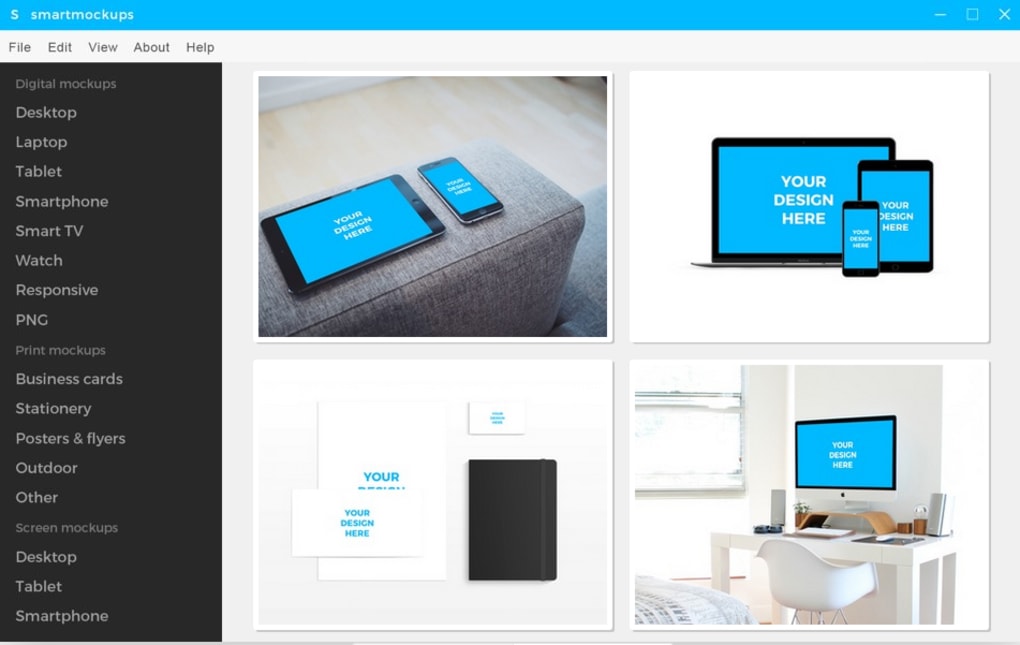
Beyond its ease of use, the Smartmockups app also offers basic editing tools. These tools allow users to make minor adjustments to their mockups, such as adding text, changing colors, or modifying the overall composition. While not as extensive as dedicated photo editing software, these features are sufficient for most basic mockup adjustments, further enhancing the app’s versatility.
A Diverse Range of Templates and Features
The Smartmockups app’s strength lies in its extensive library of high-quality templates. These templates are professionally designed and cover a vast array of scenarios, providing users with ample choices to suit their specific needs. The sheer variety ensures that the app remains relevant across diverse industries and design projects. This versatility makes it a valuable tool for marketers, designers, and anyone involved in presenting visual materials to clients or stakeholders.
The app’s focus on user-friendliness extends beyond its simple interface. The intuitive design ensures a smooth workflow, allowing users to navigate the app’s features effortlessly. The process of selecting a template, uploading an image, and making any necessary adjustments is streamlined and efficient, maximizing productivity and minimizing frustration. This intuitive approach allows users to focus on the creative aspects of their project without being bogged down by technical complexities.
Pros and Cons of the Smartmockups App
As with any software application, Smartmockups has its strengths and weaknesses. Understanding these aspects is crucial for making an informed decision about whether or not the app is the right tool for your needs.
Pros:
-
Speed and Efficiency: The app significantly accelerates the mockup creation process, reducing the time and effort required to generate professional-looking images. This efficiency is a significant advantage for individuals and businesses operating under tight deadlines.
-
Wide Variety of Templates: The extensive library of templates caters to a wide range of devices and media types, providing users with flexibility and ensuring the app’s applicability across diverse projects.
-
User-Friendly Interface: The intuitive design and streamlined workflow make the app accessible to users of all skill levels, eliminating the need for extensive training or prior experience with design software.
-
Basic Editing Capabilities: The integrated editing tools allow users to make minor adjustments to their mockups, further enhancing the app’s versatility.
-
Cost-Effectiveness: The app offers a trial version, allowing users to evaluate its capabilities before committing to a purchase.
Cons:
-
Limited Editing Capabilities: While the basic editing tools are sufficient for many users, the lack of advanced features may limit the app’s appeal to those requiring more sophisticated design control. Users seeking extensive photo editing functionality would need to utilize a dedicated image editing application in conjunction with Smartmockups.
-
Potential for Overuse of Stock Images: The app’s reliance on pre-designed templates may lead to a situation where the same mockups are used frequently, potentially diminishing the uniqueness of the final product. The risk of several individuals using the same stock images exists, making one’s project less unique.
-
Trial Limitations: While a trial version is available, its limitations might not fully showcase the app’s capabilities for users with extensive needs.
Smartmockups in the Context of Other Applications
The Smartmockups app occupies a unique niche within the broader landscape of design and marketing software. It doesn’t aim to replace comprehensive design suites like Adobe Photoshop or Illustrator, but rather complements them by providing a specialized solution for mockup creation. This targeted approach allows Smartmockups to focus on its core functionality, offering a high degree of efficiency and ease of use within its specific domain.
Compared to other mockup generation tools, Smartmockups distinguishes itself through its combination of user-friendliness and comprehensive template library. Some alternative solutions may offer more advanced editing capabilities, but they often come at the expense of increased complexity and a steeper learning curve. Smartmockups strikes a balance between power and accessibility, making it a suitable choice for users seeking a straightforward yet effective way to create professional-quality mockups.
Conclusion
The Smartmockups app effectively addresses the need for a fast, efficient, and user-friendly solution for creating marketing mockups. Its intuitive interface, extensive template library, and basic editing tools make it an invaluable asset for anyone involved in presenting visual materials, from professional marketers to casual users. While it may not possess the advanced features of dedicated design software, its streamlined approach and focus on ease of use make it a compelling choice for those seeking a quick and effective way to generate professional-looking mockups. The app’s versatility across various device types and media formats enhances its practical value in diverse contexts, ensuring its relevance across different industries and design projects. Considering both its pros and cons, Smartmockups remains a valuable tool in a designer’s arsenal, particularly for those prioritizing speed and efficiency in the mockup creation process.

File Information
- License: “Trial version”
- Version: “1.1.1”
- Latest update: “January 15, 2022”
- Platform: “Windows”
- OS: “Windows 8”
- Language: “English”
- Downloads: “1.4K”
- Size: “49.80 MB”


