
SmartPCFixer is a system utility designed to address various PC performance issues, including registry errors, file corruption, and malware-related problems. While marketed as a comprehensive solution, its effectiveness and value proposition remain a subject of ongoing discussion among users. This review delves into the software’s features, capabilities, user experiences, and overall suitability for different user profiles.
SmartPCFixer’s Core Functionality: Registry Cleaning and Beyond
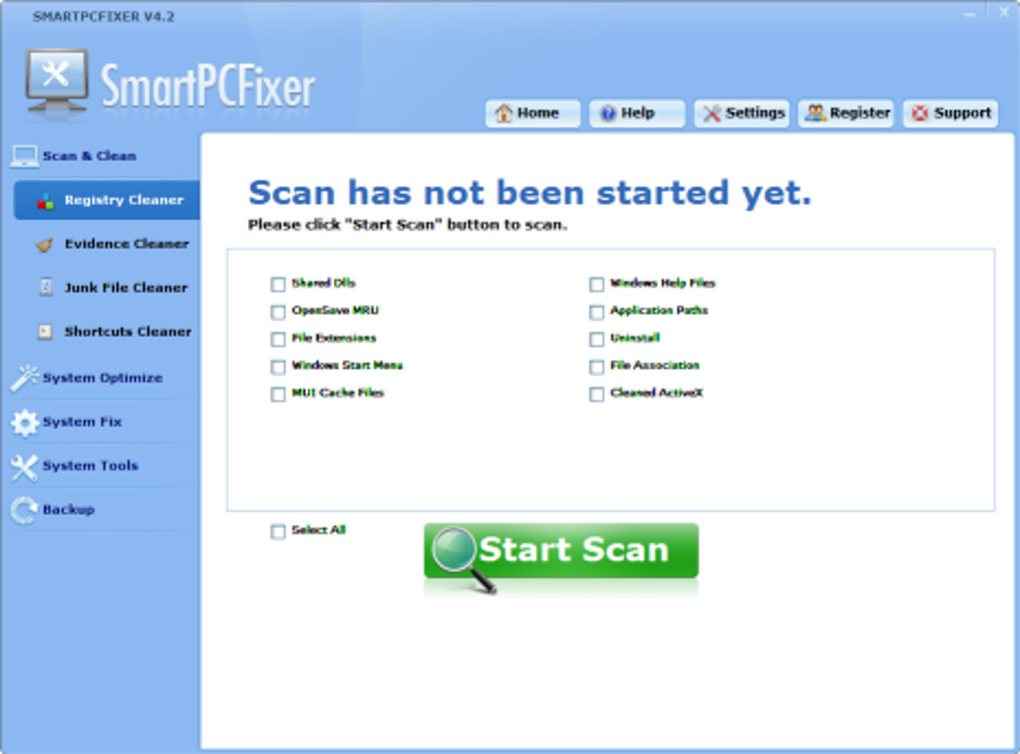
At its core, SmartPCFixer functions as a registry cleaner, targeting the Windows registry – a critical database containing system settings and application information. Over time, the registry can become cluttered with outdated or corrupted entries, potentially leading to slowdowns, application errors, and system instability. SmartPCFixer aims to identify and remove these problematic entries, thereby optimizing system performance. However, registry cleaning should always be approached cautiously, as improper modification can lead to severe system problems. SmartPCFixer’s scanning process analyzes the registry and identifies potential issues, providing users with a report detailing the found problems and potential solutions. The software also provides the option to repair these issues automatically, which can be particularly helpful for less tech-savvy users.
Beyond registry cleaning, SmartPCFixer incorporates additional tools designed to address a wider range of PC performance issues. These tools often include features to identify and remove unnecessary files, fix broken shortcuts, repair file associations, and manage startup programs. These functionalities are aimed at improving overall system responsiveness and stability. The comprehensive approach makes SmartPCFixer an appealing option for users experiencing multiple performance problems rather than needing a single, specific solution. Its multi-faceted approach is designed to address a broad spectrum of issues, rather than focusing on a single area of concern.
However, the extent of these additional functionalities varies between the trial and paid versions. The trial version typically offers a limited scope of tools and scans, aiming to demonstrate the software’s capabilities while encouraging users to upgrade to the full version. The full, paid version unlocks the complete range of tools and provides access to deeper scans and more extensive repair options.
User Experiences and Reviews: A Mixed Bag of Opinions
User reviews and experiences with SmartPCFixer present a mixed picture. While some users report significant improvements in system performance and stability after using the software, others express dissatisfaction, citing inefficacy, high cost, or concerns about potential security risks. The variability in user experiences likely stems from several factors:
-
The nature and severity of the underlying PC problems: SmartPCFixer may be highly effective for addressing certain types of problems, such as those related to registry clutter or temporary file buildup, but it may be less effective for more complex issues, such as malware infections or hardware failures.
-
Individual system configurations: The effectiveness of SmartPCFixer might vary depending on the user’s operating system, hardware specifications, and installed software. A system with a heavily fragmented hard drive, for example, might experience more noticeable performance improvements than a system with a solid-state drive (SSD).
-
The user’s technical skills: Some users might find the software’s interface intuitive and easy to use, while others might find it challenging to navigate or understand the technical details presented in the scan reports. This highlights a potential learning curve, which may deter some users.
-
Misconceptions about system optimization: Some users might hold unrealistic expectations regarding the software’s ability to magically solve all PC problems, leading to disappointment if the results fall short of their expectations. Furthermore, some users might misinterpret a lack of immediate, dramatic improvements as a sign of inefficacy. PC optimization is usually a cumulative process, and improvements may not be noticeable immediately.
Several online reviews highlight the high cost associated with the full version of SmartPCFixer. This cost can become a significant barrier to entry for users on a budget, especially considering the availability of other free or less expensive system optimization tools. The high price point has consequently led to criticism from some users, who consider the cost-benefit ratio to be unfavorable.
Moreover, some user reviews express concerns regarding the software’s vulnerability to security threats. This underscores the importance of downloading software only from trusted sources and regularly updating antivirus and anti-malware software. Any software that interacts deeply with the system’s core files and processes presents a potential attack vector; therefore, maintaining up-to-date security software is crucial.
SmartPCFixer’s Features and Technical Specifications
SmartPCFixer is available for Windows operating systems and offers a range of features, including:
- Registry cleaning: Identifies and removes outdated, corrupted, or unnecessary registry entries.
- File cleanup: Removes temporary files, unused files, and other unnecessary data.
- Shortcut repair: Fixes broken or invalid shortcuts.
- File association repair: Restores correct file associations.
- Startup program management: Allows users to disable or enable startup programs to reduce boot times.
- System information: Provides detailed information about the user’s computer system.
- Error detection and repair: Identifies and attempts to resolve various system errors.
The software is offered as a trial version with limited functionality and a paid version offering a full range of features. The trial version serves as a demonstration, allowing users to test the core functionality before committing to a purchase. The full version includes all features, along with extended support and access to additional tools.
The software’s technical specifications include a relatively small installation size, typically around 4.76 MB. It supports multiple languages, including English, German, Spanish, French, Italian, Japanese, and Chinese, demonstrating an effort to cater to a global audience. The availability of the software in multiple languages highlights the developers’ intentions to target a broad market.
Conclusion: Weighing the Pros and Cons of SmartPCFixer
SmartPCFixer offers a potentially useful suite of tools for addressing various PC performance issues. Its comprehensive approach combines registry cleaning with other optimization functionalities, potentially offering a one-stop solution for users facing a range of problems. The software’s user-friendly interface makes it accessible to users with varying levels of technical expertise.
However, the software’s high cost, mixed user reviews, and concerns regarding potential security vulnerabilities need to be carefully considered. The cost of the full version can be prohibitive for some users, while the variability in reported effectiveness raises questions about its overall reliability and efficacy. Users should exercise caution and take appropriate security measures when using any system optimization software.
Ultimately, the suitability of SmartPCFixer depends on individual needs and circumstances. Users with simple performance issues or a limited budget might find alternative free or less expensive options more suitable. However, users experiencing multiple complex issues and willing to invest in a potentially effective solution might find SmartPCFixer a valuable tool. Careful consideration of the software’s limitations, cost, and security implications is crucial before making a decision. Thorough research and consideration of alternative solutions are highly recommended. Exploring free alternatives and understanding the limitations and risks associated with PC optimization software are important steps in making an informed choice.
File Information
- License: “Trial version”
- Latest update: “July 15, 2022”
- Platform: “Windows”
- OS: “Windows 98”
- Language: “English”
- Downloads: “60.2K”
- Size: “4.76 MB”


