
SmoothDraw is a free digital painting and drawing application designed for personal computers. It provides a user-friendly interface and a robust set of tools, making it accessible to both beginners and experienced artists. While it may not possess the advanced features of professional-grade software like Adobe Photoshop, SmoothDraw effectively bridges the gap between simple paint applications and more complex digital art suites. Its intuitive design and layer support make it a valuable tool for a wide range of creative projects.
Intuitive Interface and Familiar Functionality
SmoothDraw boasts an intuitive and familiar user interface, making it easy to navigate even for those unfamiliar with digital painting software. Its layout closely resembles traditional paint programs, minimizing the learning curve for users transitioning from other applications. This familiar feel allows artists to focus on their creative process rather than struggling with complex controls. The software’s simple, uncluttered interface prevents overwhelming new users, while still offering a rich array of tools and options for more advanced users. The streamlined design ensures that the focus remains firmly on the artistic process.
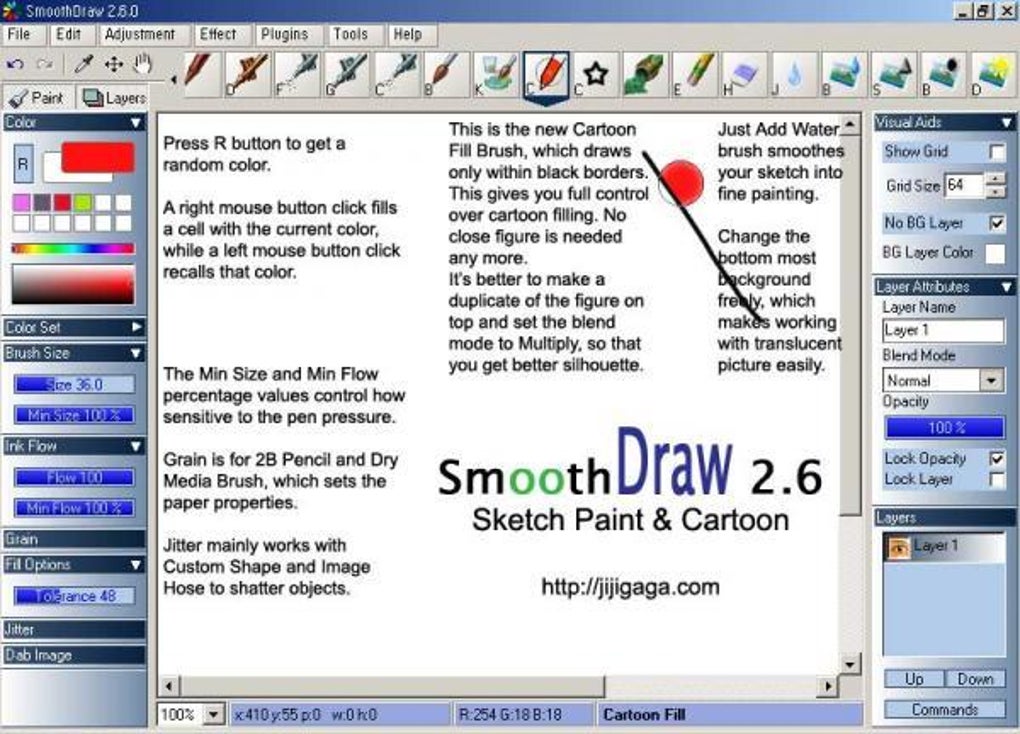
The software seamlessly integrates with pen tablets and styluses, enhancing the creative experience by allowing for pressure sensitivity. This responsiveness allows for nuanced brushstrokes and precise control over line weight, mimicking the tactile feel of traditional art mediums. The pressure sensitivity adds a level of realism and control, enhancing the overall creative process. This integration of hardware with software allows artists to leverage the strengths of both, creating a more natural and intuitive artistic workflow.
Robust Toolset and Feature Set
SmoothDraw offers a diverse range of brushes, each with customizable settings. Users can choose from pencils, pens, airbrushes, and a variety of other brush types, each providing unique textural qualities. This variety of tools caters to different artistic styles and preferences, providing flexibility for various projects. The customizability of each brush further allows artists to fine-tune the tools to their specific needs, creating a truly personalized artistic experience.
Beyond brushes, SmoothDraw includes essential features such as layer support, enabling artists to create complex compositions with ease. Layers allow for the isolation and manipulation of individual elements within a larger piece, providing greater control over the overall image. This ability to work non-destructively is crucial for complex projects, allowing for easy edits and adjustments without affecting other elements of the artwork. The inclusion of layers is a significant advantage, elevating SmoothDraw beyond the capabilities of basic paint applications.
Further enhancing its functionality are options for resizing canvases, adjusting paper textures, and applying various image adjustments such as contrast, saturation, and gamma. These features allow artists to fine-tune their work and explore different creative avenues. The ability to customize the canvas size and texture is especially beneficial for artists working in different formats or styles. The adjustment options provide a level of control that allows artists to achieve a desired aesthetic, mimicking traditional methods of image manipulation.
Supporting Features and Workflow Enhancements
The inclusion of built-in stencils is a welcome addition, providing artists with pre-made shapes and patterns to incorporate into their artwork. These stencils, ranging from simple shapes like stars to more complex patterns like grass, can be utilized for various creative projects. These pre-made elements can streamline the creative process and add a degree of visual interest to the artwork. The addition of stencils caters to both beginner and advanced users, providing quick access to useful elements without compromising artistic freedom.
While SmoothDraw’s strengths lie in its user-friendly interface and powerful tools, certain aspects could be improved. The absence of tooltips can be frustrating for new users, hindering the learning process and discovery of the software’s full potential. The inclusion of tooltips would greatly enhance the user experience, making it easier for users to understand the function of each tool and option. The limited availability of keyboard shortcuts also limits workflow efficiency for power users who prefer faster input methods. Expanding the range of keyboard shortcuts would significantly improve the overall user experience for experienced users, especially those familiar with hotkey-based workflows.
User Reviews and Community Feedback
User reviews highlight SmoothDraw’s intuitive nature and ease of use, praising its effectiveness as a digital painting tool. Many users appreciate its suitability for creating various artwork, from detailed portraits to educational presentations. Positive feedback frequently focuses on its user-friendly interface and the effectiveness of its brush tools. The software’s ability to produce high-quality images, even without extensive training, is frequently lauded by users.
However, some recurring criticisms point towards the lack of tooltips and limited hotkeys, echoing the points raised earlier. Other users have highlighted occasional bugs, such as the color reset issue when using the undo function and unintended pen size adjustments. While these issues are not widespread, they point to areas where improvements could enhance the user experience. Addressing these recurring bugs and adding tooltips and more keyboard shortcuts would greatly improve user satisfaction and overall functionality.
Comparison with Alternative Software
SmoothDraw occupies a unique niche in the digital art software market. While it doesn’t match the feature-rich complexity of professional-grade software like Adobe Photoshop or Corel Painter, it surpasses basic paint applications in terms of functionality and creative potential. Compared to other free alternatives, SmoothDraw stands out for its balance between ease of use and powerful tools. While other free options might specialize in specific niches like vector graphics or 3D modeling, SmoothDraw’s focus on raster-based digital painting sets it apart.
The software effectively caters to users seeking a middle ground, providing a robust set of tools without the steep learning curve often associated with professional-grade applications. Its intuitive interface and layer support make it an excellent choice for both casual users and those seeking a more powerful alternative to basic painting programs. The free accessibility of the software further contributes to its appeal, making it a viable option for users on a budget.
Conclusion: SmoothDraw’s Strengths and Limitations
SmoothDraw is a powerful and versatile free digital painting software. Its intuitive interface, robust toolset, and layer support make it suitable for a wide range of users, from beginners to experienced artists. While it lacks some of the advanced features found in professional-grade software, it compensates with its user-friendly design and ease of use.
However, the absence of tooltips and limited hotkeys are notable drawbacks that could be addressed in future updates. Addressing these issues would improve the overall user experience and potentially expand the software’s appeal to a wider audience. Despite these limitations, SmoothDraw remains a valuable and accessible tool for digital painting and drawing, offering a compelling blend of usability and creative potential. Its free availability further enhances its value proposition, making it an excellent option for both casual and serious digital artists.
File Information
- License: “Free”
- Latest update: “May 24, 2023”
- Platform: “Windows”
- OS: “Windows Vista”
- Language: “English”
- Downloads: “16.8K”
- Size: “2.30 MB”


