
Snappy Driver Installer is a free, versatile driver management tool developed by BadPointer. Designed for both home users and IT professionals, it simplifies the often-tedious process of finding, installing, and updating device drivers for Windows operating systems. Unlike many driver update utilities that bundle adware or push premium features, Snappy Driver Installer remains entirely free, offering a robust set of features without any hidden costs or limitations. This comprehensive guide will explore its functionalities, advantages, and disadvantages, helping you determine if it’s the right solution for your needs.
Streamlined Driver Installation and Updates
Snappy Driver Installer tackles the core issue of outdated or missing drivers. Its intuitive interface guides users through the process of identifying and installing the necessary drivers for their hardware components. The software utilizes an advanced driver ranking algorithm. This prioritizes driver compatibility over recency, significantly reducing the risk of installing a driver that might cause system instability or malfunctions. This intelligent approach minimizes the potential for conflicts and ensures a smoother, more reliable installation experience.
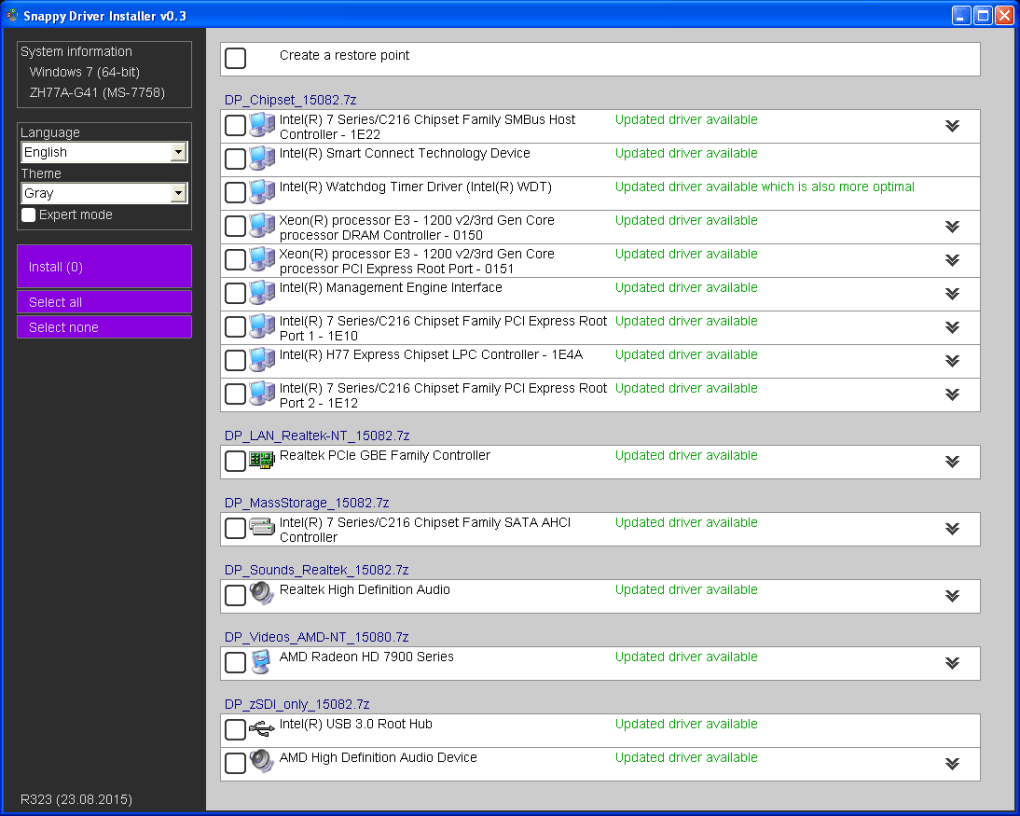
The software’s ease of use is a significant advantage. The default mode is straightforward, making it accessible to users with limited technical expertise. However, for advanced users, an expert mode unlocks a wider array of features and controls, providing granular control over the driver installation process.
Offline and Online Driver Access
One of Snappy Driver Installer’s key features is its dual approach to driver access: offline and online. Upon initial launch, the software prompts users to download either the complete driver packs (over 12GB) or only the indexes (approximately 10MB).
Downloading the full driver packs is recommended for users who want to create a portable version of the tool. This allows them to install drivers on multiple PCs without requiring an internet connection for each installation. The user can simply copy the entire package to a USB flash drive or external hard drive.
Downloading only the indexes is a space-saving alternative suitable for users who intend to use the software primarily on their own PC. The indexes act as a catalog, allowing the software to identify the required drivers and download them on demand using the integrated torrent client. This efficient method ensures that only necessary drivers are downloaded, conserving storage space and bandwidth.
Integrated Torrent Client and Efficient Downloads
Snappy Driver Installer incorporates a built-in torrent client, significantly speeding up the download process. This integration bypasses the potential bottlenecks associated with traditional HTTP downloads, allowing for faster acquisition of driver packs and individual drivers. The torrent client leverages peer-to-peer technology to distribute the download load among multiple sources, maximizing download speeds, especially beneficial when downloading large driver packs. This ensures a timely installation, particularly important for users with limited bandwidth or those needing to install numerous drivers.
Automatic Updates and Expert Mode Features
The software automatically checks for updates each time it’s launched. This ensures that users always have access to the latest driver versions and software improvements. When updates are available, the software notifies users and provides a convenient option to download and install them directly through the application’s interface.

The expert mode provides an in-depth level of control and information for experienced users and IT professionals. This mode offers the following advanced capabilities:
-
Detailed Driver Information: Floating tooltips display comprehensive information about each driver, including version, manufacturer, and compatibility details, aiding in informed decision-making.
-
Alternative Driver Selection: Expert mode allows users to choose alternative drivers, providing flexibility in situations where the recommended driver might not be optimal for specific configurations or hardware setups. This is particularly useful when troubleshooting compatibility issues.
-
Driver Backup and Restore: The ‘Extract to…’ button enables users to create backups of installed drivers, providing a safety net in case of accidental driver deletions or installations leading to system problems. This backup functionality can be vital for restoring a system to a stable state if a driver update causes issues.
- Remote Troubleshooting: Expert mode facilitates remote troubleshooting by allowing users to send snapshots of their driver configurations to technicians. These snapshots provide a detailed view of the system’s drivers, enabling remote diagnostics and problem-solving. This functionality is extremely useful for IT professionals supporting multiple users remotely.
Advantages of Using Snappy Driver Installer
-
Free and Open-Source: The software is completely free to use, without any hidden costs or premium features often found in competing applications. This makes it an attractive option for users on a budget or those seeking a cost-effective solution.
-
Comprehensive Driver Database: Snappy Driver Installer boasts a large and regularly updated database of drivers, ensuring compatibility with a wide range of hardware components.
-
Advanced Driver Ranking Algorithm: The algorithm prioritizes compatible drivers, reducing the likelihood of installing drivers that might cause conflicts or system instability.
-
User-Friendly Interface: The intuitive interface simplifies the driver installation process, making it accessible to both novice and advanced users. The expert mode provides added functionality for experienced users.
-
Built-in Torrent Client: The integrated torrent client significantly accelerates driver downloads, saving users valuable time and bandwidth.
-
Regular Updates: The software automatically checks for updates, ensuring access to the latest driver versions and software improvements.
Potential Disadvantages
-
Resource Intensive (Full Download): Downloading the full driver pack requires significant storage space (over 12GB). While the index download is minimal, the complete package is a large commitment.
-
Potential for Incompatibilities: Despite the advanced driver ranking algorithm, some driver updates may not be fully compatible with certain hardware or system configurations. Always back up your system before performing significant driver updates.
-
Expert Mode Complexity: The expert mode, while offering powerful features, might be overwhelming for users lacking technical expertise. It is recommended that beginners stick with the default mode until comfortable with the software’s functionality.
Conclusion
Snappy Driver Installer stands out as a powerful and versatile driver management tool. Its combination of ease of use, comprehensive features, and free access makes it a compelling option for both home users and IT professionals. The advanced algorithm, integrated torrent client, and automatic updates enhance efficiency and minimize the risk of driver-related issues. While the size of the full driver pack might be a consideration, the option to download only the indexes provides flexibility, making Snappy Driver Installer a valuable tool for managing and updating device drivers on Windows systems. Understanding its strengths and limitations will allow users to effectively utilize its capabilities and maximize its benefits for a smoother computing experience.
File Information
- License: “Free”
- Latest update: “March 24, 2025”
- Platform: “Windows”
- OS: “Windows Vista”
- Language: “English”
- Downloads: “122.9K”


