
In the vast and ever-evolving landscape of software, certain tools manage to carve out a niche and remain relevant despite the passage of time and the emergence of more feature-rich alternatives. Snippy, a free Windows application developed by Bhelpuri, is a quintessential example of such an enduring utility. Positioned firmly within the productivity software category, Snippy has, for over a decade, served a dedicated user base seeking simplicity, efficiency, and unwavering reliability in their daily digital interactions. This comprehensive article delves into what makes Snippy a notable piece of software, exploring its origins, core functionalities, user experiences, and its continued relevance in today’s demanding digital environments.
The Genesis and Core Identity of Snippy
First introduced to the public catalog in 2012, Snippy quickly established itself as a straightforward solution for a common computing need: screen capturing. At its heart, Snippy is designed to empower users to easily select and “snip” specific portions of their screen, effectively turning dynamic on-screen content into static, usable images. This fundamental capability, while seemingly basic, underpins a wide array of productivity enhancements across various professional and personal contexts.
Developed by Bhelpuri, Snippy arrived at a time when users were increasingly looking for lightweight, efficient tools that didn’t burden their systems with unnecessary features or excessive resource consumption. Its initial release as version 1.0, and subsequent updates (like the 1.03.6 version referenced in some contexts), underscored a commitment to stability rather than constant, sprawling feature additions. This philosophy of focused utility is a significant part of Snippy’s appeal.
The application’s free availability has undoubtedly been a major factor in its adoption. In an ecosystem often dominated by paid subscriptions or freemium models, Snippy offers its full functionality without cost, making it an accessible option for everyone from casual users to those with specific professional needs. This democratic approach to software distribution has allowed Snippy to garner a substantial number of installations, accumulating over 34,518 recorded installations since its inception on PhanMemFree.org, with a consistent trickle of new users continuing to discover its benefits.
Geographically, Snippy has found particular traction in countries such as the United States, Netherlands, Taiwan, and the Province of China. This localized popularity hints at specific workflow requirements or perhaps a cultural preference for simple, effective tools in these regions. The fact that it is exclusively available in English further shapes its primary user demographic, providing a focused experience for English-speaking users worldwide.
Its identity as a “pretty light software” is not just a descriptive phrase but a core design principle. With a remarkably small file size of approximately 90.11 KB, Snippy stands in stark contrast to many modern applications that demand hundreds of megabytes or even gigabytes of storage and processing power. This minimal footprint ensures that Snippy can run smoothly on a wide range of hardware, including older systems, without causing performance bottlenecks. This efficiency is particularly valuable in environments where system resources are at a premium, or for users who simply prefer a clutter-free computing experience.
Unlocking Productivity with Snippy’s Capabilities
While Snippy may not boast a sprawling list of advanced features found in modern, comprehensive screenshot tools, its focused capabilities are precisely what make it a powerful asset for productivity. Its design philosophy prioritizes direct functionality over feature bloat, leading to a tool that is intuitively understood and immediately useful.
Precision Screen Capturing
The primary function of Snippy is its ability to capture custom regions of the screen. Unlike tools that only allow full-screen or active-window captures, Snippy provides users with the flexibility to define an exact rectangular area. This precision is invaluable for a multitude of tasks:
- Documentation and Reporting: Quickly snip specific data points, chart sections, or interface elements for inclusion in reports, presentations, or technical documentation. This avoids the need to capture a larger image and then crop it in a separate editor, streamlining the workflow.
- Web Content Preservation: Capture specific paragraphs, images, or interactive elements from websites without grabbing the entire page or dealing with complex web archiving tools. This is particularly useful for research, collecting visual references, or sharing snippets of information.
- Tutorials and Instructions: When creating guides or tutorials, Snippy allows for the capture of precise steps or visual cues, making instructions clearer and easier to follow.
- Troubleshooting: Capture error messages, unusual interface behaviors, or specific settings to share with support teams or colleagues, aiding in quicker diagnosis and resolution.
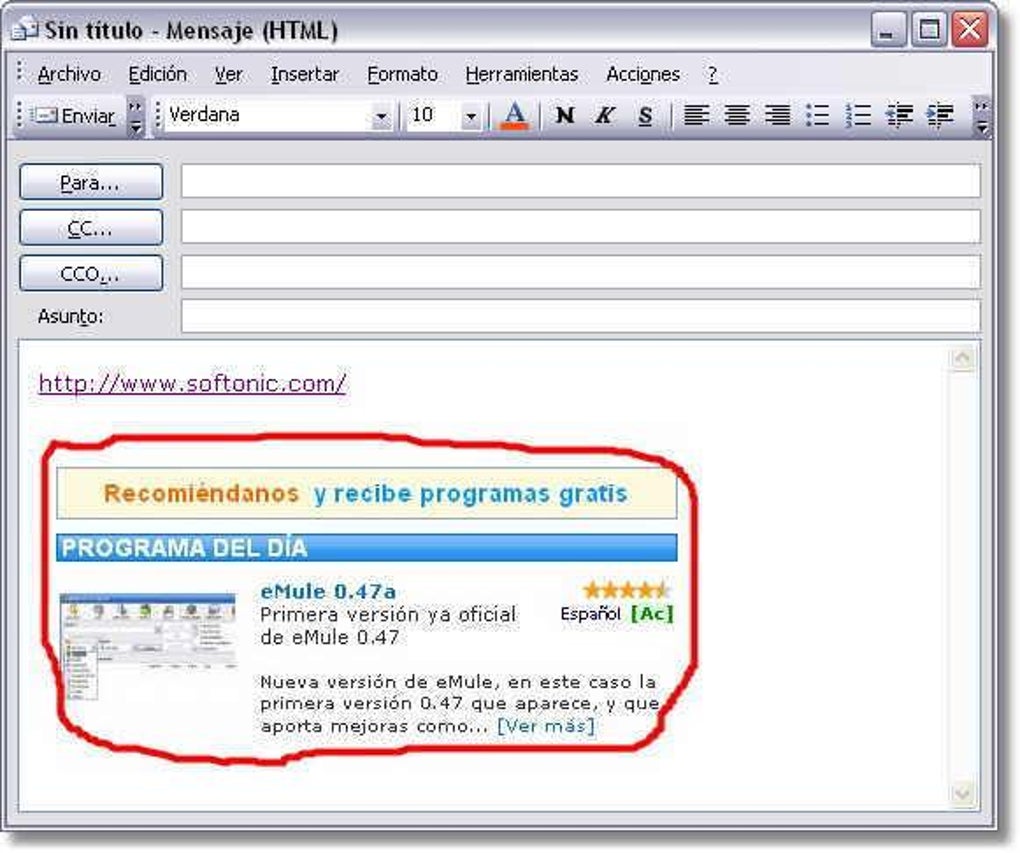
The act of “cropping out text and graphics from your PDF file and paste it to other Windows applications” as mentioned in the context of alternative apps, highlights a common use case that Snippy inherently facilitates for any on-screen content. By isolating critical visual information, Snippy enables users to focus on the essential details without distractions.
Lightweight Design and System Compatibility
One of Snippy’s most significant advantages is its remarkably small installation footprint and minimal system resource requirements. At just 90.11 KB, it consumes negligible disk space, making it an ideal choice for systems with limited storage or for users who prefer to keep their software installations lean. This lightweight nature extends to its operational performance; Snippy runs efficiently in the background, consuming minimal RAM and CPU cycles, ensuring that it doesn’t impede the performance of other demanding applications.
Its compatibility with “Windows XP and previous versions” is a testament to its age and stability. While modern Windows versions offer their own built-in snipping tools, Snippy provides a robust and reliable option for users running older operating systems. This makes it a valuable tool for maintaining productivity on legacy systems that may not support newer software or for environments where upgrading the OS is not feasible. Even on newer Windows versions, its simplicity can be a refreshing alternative to more complex, feature-laden tools.
Reliability and User Trust
A recurring theme in user feedback about Snippy is its consistent performance. As one anonymous user eloquently put it in a 2013 review, “I recommend Snippy, it’s always worked perfectly and trouble-free.. I have used Snippy for years. It has always worked exactly as promised.” This kind of long-term user satisfaction speaks volumes about the software’s stability and bug-free operation. In a world where software updates often introduce new issues, Snippy’s steadfast reliability is a cherished quality.
The sentiment “Every new PC or laptop I get, I immediately download Snippy!” underscores a deep level of trust and dependence on the application. This isn’t just a casual recommendation; it’s an acknowledgment of Snippy as an indispensable tool that forms a foundational part of a user’s computing setup, akin to essential drivers or core utility software. This level of loyalty is rare and earned through consistent, trouble-free performance over many years.
Real-World Applications and User Experiences
The true value of any productivity tool lies in its practical application. Snippy, despite its modest feature set, shines in how it integrates into various workflows, enabling users to accomplish tasks more efficiently. The anonymous user review from PhanMemFree.org provides a compelling glimpse into the diverse ways Snippy empowers its users.
Enhancing Historical Document Transcription
For individuals engaged in meticulous work such as transcribing old documents for projects like the World Archives Project, Snippy proves to be an invaluable aid. The process of transcribing historical texts often involves deciphering faded, handwritten, or otherwise challenging source material. The user highlights: “I can take one small area of an image, adjust contrast, etc., with the tools I have available, and that makes transcribing easier.”
While Snippy itself might not possess contrast adjustment features, its ability to capture “one small area of an image” is crucial. This allows the transcriber to isolate particularly difficult sections of text, magnify them, and then use other specialized image manipulation tools (which the user refers to as “the tools I have available”) to enhance visibility without affecting the entire document image. This focused approach reduces cognitive load and significantly speeds up the transcription process, turning a daunting task into a manageable series of precise efforts. Snippy acts as the vital first step, providing the exact “input” for further refinement.
Streamlining Genealogical and Mapping Hobbies
Another fascinating application described by the user pertains to hobbies involving maps and genealogical research: “My other hobby involves capturing areas of maps, as well as lists of requests, so I can plan out trips to find and photograph requested headstones for Findagrave.”
Here, Snippy facilitates:
- Precise Map Sectioning: When planning a trip to a cemetery or historical site, capturing specific sections of a map (e.g., a detailed street layout, a particular quadrant of a large cemetery map) allows for highly targeted navigation planning. This beats printing entire maps or struggling with dynamic digital maps on the go.
- Organizing Request Lists: For projects like Findagrave, where individuals request photos of specific headstones, Snippy can be used to capture sections of these request lists. This creates easily referable visual “to-do” lists that can be organized, annotated, or integrated into trip planning documents. The visual capture ensures accuracy and eliminates potential errors from manual copying.
In both these scenarios, Snippy’s ability to create discrete image files from specific on-screen content helps organize complex information, making planning and execution of these intricate hobbies significantly more efficient and less prone to error.
Broader Professional and Educational Applications
Beyond these specific examples, Snippy’s capabilities translate broadly into various professional and educational settings:
- Software Development and Testing: Developers can quickly capture UI elements, error messages, or specific code snippets for bug reports, peer reviews, or documentation. Testers can precisely illustrate issues encountered during software use.
- Customer Support: Support agents can use Snippy to capture user interface elements to guide customers through troubleshooting steps or to clarify technical instructions.
- Education and E-Learning: Students and educators can snip diagrams, equations, textual excerpts, or images from online resources for study notes, assignments, or teaching materials.
- Content Creation: Bloggers, journalists, and marketing professionals can capture relevant visuals from websites, applications, or documents to enrich their articles, presentations, or social media posts.
The enduring popularity and consistent usage in countries like the United States, Netherlands, Taiwan, and the Province of China suggest that these benefits resonate with a global audience, highlighting a universal need for efficient visual communication tools.
Installation, System Requirements, and Staying Secure
Acquiring and installing Snippy is a straightforward process, aligning with its overall philosophy of simplicity. As a free productivity program for Windows, it is readily available for download from trusted platforms like PhanMemFree.org.
How to Get Snippy
- Navigate to PhanMemFree.org: Access the official listing for Snippy on the PhanMemFree website.
- Locate the Download Link: Look for the “Free Download for Windows” button or a similar prompt.
- Initiate Download: Click the button to download the Snippy installer file (e.g.,
SnippySetup.exe). Given its small size (90.11 KB), the download should be almost instantaneous on most broadband connections. - Run the Installer: Once downloaded, locate the installer file in your downloads folder and double-click it to begin the installation process.
- Follow On-Screen Prompts: The installer is typically minimalist, guiding you through a few simple steps, such as accepting the license agreement and choosing an installation directory.
- Complete Installation: Once the installation is complete, Snippy will be ready for use, often accessible from your Start Menu or desktop.
Minimal System Requirements
One of Snippy’s standout features is its undemanding nature when it comes to system resources.
- Operating System: Officially supported on Windows XP and previous versions. However, users often report successful operation on later Windows versions (Vista, 7, 8, 10, and even 11) due to its core simplicity and adherence to fundamental Windows APIs.
- Disk Space: Approximately 90.11 KB. This is exceptionally small, meaning it will occupy virtually no space on your hard drive.
- RAM and Processor: Minimal requirements. Any computer capable of running Windows XP or later will have more than enough RAM and processing power to run Snippy smoothly.
Security and Best Practices
PhanMemFree.org, like other reputable download platforms, emphasizes security. The site states, “In PhanMemFree we scan all the files hosted on our platform to assess and avoid any potential harm for your device.” They perform checks on new file uploads and periodically review existing files. Snippy, as a long-standing application on the platform, generally carries a “Clean” status, indicating that it’s “extremely likely that this software program is clean” after being scanned by multiple antivirus services.
Despite this, it’s always good practice for users to:
- Download from Trusted Sources: Always obtain software from reputable sites like PhanMemFree.org to minimize risks.
- Maintain Antivirus Software: Keep your personal antivirus and anti-malware software updated and active.
- Be Mindful of Warnings: If any security software flags a downloaded file, investigate the warning. False positives can occur, but caution is always advised.
- Understand Software Policies: Be aware of the laws concerning software use in your region, as PhanMemFree.org explicitly states, “Laws concerning the use of this software vary from country to country. We do not encourage or condone the use of this program if it is in violation of these laws.” This pertains more to the content captured rather than Snippy itself, but it’s an important consideration for any screen capture utility.
The Enduring Appeal and Place in the Productivity Ecosystem
In an era of cloud-based applications, AI-powered tools, and highly integrated software suites, a simple, local utility like Snippy might seem anachronistic. Yet, its continued existence and dedicated user base underscore a timeless truth: sometimes, the best tool for the job is the one that does one thing exceptionally well, without fuss or complexity.
Why Choose Snippy in a Modern Context?
- Unparalleled Simplicity: For users who are overwhelmed by complex interfaces or who simply need a quick, no-frills way to capture part of their screen, Snippy is unparalleled. There’s no learning curve, no configuration headaches.
- Resource Efficiency: For older machines, virtual environments, or systems where every byte of RAM and CPU cycle counts, Snippy’s minimal footprint is a significant advantage. It doesn’t bloat the system or slow down other critical applications.
- Reliability: The consistent “it just works” feedback is a powerful testament. In mission-critical workflows, stability often trumps a myriad of extra features.
- Offline Capability: As a standalone desktop application, Snippy doesn’t require an internet connection to function, making it reliable in any environment.
- Complementary to Other Tools: As seen in the user’s transcription example, Snippy often serves as an excellent front-end for more specialized image editing or document processing software. It provides the precise input, and other tools handle the advanced manipulations.
- Free and Accessible: For individuals or small businesses on a tight budget, a free, effective tool like Snippy removes financial barriers to essential productivity functions.
Snippy vs. Built-in Alternatives (e.g., Windows Snipping Tool)
Modern versions of Windows include their own “Snipping Tool” or “Snip & Sketch” utilities, which offer similar basic functionality along with some additional features like basic annotation, delayed snips, and integration with the clipboard history. While these built-in tools are convenient, Snippy can still appeal to a specific demographic:
- Users of Older Windows Versions: For those on Windows XP or earlier, Snippy is a superior and more flexible option compared to potentially outdated or non-existent built-in tools.
- Preference for Third-Party Tools: Some users simply prefer a dedicated, external application that isn’t tied into the operating system’s update cycle or specific UI paradigms.
- Absolute Minimalism: Snippy is arguably even more lightweight and less visually obtrusive than the built-in Windows tools, offering a purer screen capture experience.
The Broader Productivity Software Landscape
Snippy operates within a diverse category that includes everything from word processors (like Microsoft Word) and spreadsheets (Microsoft Excel) to specialized PDF editors (PDF-XChange Editor, Adobe Reader DC) and project management tools. While it performs a much narrower function, its role in facilitating visual communication and information extraction is fundamental to many other productivity tasks. The related topics listed, such as “Productivity For Windows Free,” “Copy And Paste Free,” and “Text Copy,” underscore the core utility Snippy offers within this broader context. It’s a specialized tool that enhances the overall efficiency of an individual’s digital interaction.
Alternatives mentioned, like “PDF Copy Paste” or “Briss” (for eliminating blank space from PDFs), highlight that while they perform specific document-related tasks, Snippy provides a more general-purpose solution for capturing any visual information on the screen, which can then be used in conjunction with these other applications.
In essence, Snippy represents the enduring value of a well-designed, simple utility. It avoids the temptation of feature creep, focusing instead on perfecting its core function. This dedication to simplicity and reliability has allowed it to maintain a relevant presence for over a decade, serving as a quiet but indispensable workhorse for countless Windows users.
Conclusion
Snippy, from Bhelpuri, stands as a quiet testament to the power of focused design and unwavering reliability in the world of productivity software. Since its introduction in 2012, this free Windows utility has consistently provided a straightforward and efficient solution for capturing precise sections of the screen. Its lightweight nature, minimal system requirements, and celebrated stability have endeared it to a dedicated user base across various countries, making it a go-to tool for everything from meticulous historical transcription to intricate hobby planning.
In an increasingly complex digital ecosystem, Snippy’s enduring appeal lies in its fundamental simplicity. It doesn’t aim to be a comprehensive suite but rather excels at its singular purpose, seamlessly integrating into diverse workflows without demanding significant system resources or a steep learning curve. The heartfelt testimonials from users who have relied on Snippy for years, downloading it onto every new device, underscore its position as an indispensable utility that “always worked exactly as promised.”
While modern operating systems offer their own built-in screen capture functionalities, Snippy continues to offer a compelling alternative, particularly for users on older Windows versions, those who prioritize absolute minimalism, or anyone who values a standalone, trouble-free application. As long as there is a need to quickly and accurately capture visual information from a screen, Snippy will likely remain a respected and downloaded utility on platforms like PhanMemFree.org, embodying the principle that true productivity often comes from the tools that just work, without getting in the way.
File Information
- License: “Free”
- Version: “1.0”
- Latest update: “September 6, 2018”
- Platform: “Windows”
- OS: “Windows XP”
- Language: “English”
- Downloads: “15.8K”
- Size: “90.11 KB”


