
The internet is a vast and varied landscape, offering access to a wealth of information and services. However, geographical limitations, network restrictions, and privacy concerns often hinder our ability to fully explore this digital world. A SOCKS5 proxy server acts as an intermediary between your computer and the internet, allowing you to mask your IP address and potentially circumvent these restrictions. However, manually configuring a SOCKS5 proxy can be a technically challenging process. This is where the Socks5 Configurator for Google Chrome comes in, offering a simple and user-friendly solution for managing your SOCKS5 proxy settings within your browser.
Developed by TxThinking, Socks5 Configurator is a free Chrome extension designed to streamline the process of connecting to a SOCKS5 proxy. Its intuitive interface eliminates the need for complex technical knowledge, making it accessible to users of all skill levels. This comprehensive guide will explore the features, benefits, and practical applications of Socks5 Configurator.
Why Use a SOCKS5 Proxy?
Before delving into the specifics of Socks5 Configurator, let’s understand the advantages of using a SOCKS5 proxy. SOCKS5, an advanced version of the SOCKS protocol, offers several key benefits:
-
Enhanced Privacy: By routing your internet traffic through a SOCKS5 proxy server, your IP address is masked, making it more difficult for websites and online services to track your activity. This is particularly important for users who prioritize their online privacy and wish to protect their personal information from unwanted surveillance.
-
Bypass Geo-Restrictions: Many websites and services restrict access based on geographic location. Using a SOCKS5 proxy with an IP address from a different region can allow you to bypass these restrictions and access content that might otherwise be unavailable in your area. This is particularly useful for accessing streaming services, news sites, and other content that is geo-blocked.
-
Increased Security: While not a direct security measure in itself, a SOCKS5 proxy can indirectly improve your security by adding an extra layer of anonymity. It can help protect you against certain types of attacks and make it more difficult for malicious actors to track your online activities.
-
Improved Network Performance: In some cases, a SOCKS5 proxy can improve network performance by caching frequently accessed data. However, this is dependent on the specific proxy server being used.
-
Access Restricted Networks: In certain environments, such as workplaces or schools, network administrators might restrict access to specific websites or services. A SOCKS5 proxy, configured correctly, can help bypass these restrictions, provided they are not too stringent.
Socks5 Configurator: A User-Friendly Solution
The manual configuration of a SOCKS5 proxy involves navigating complex browser settings and potentially editing system files. This process can be daunting for users who lack technical expertise. Socks5 Configurator simplifies this entire process, offering a user-friendly interface that allows you to quickly and easily configure your SOCKS5 proxy settings within Google Chrome.
The extension’s intuitive design allows you to:
-
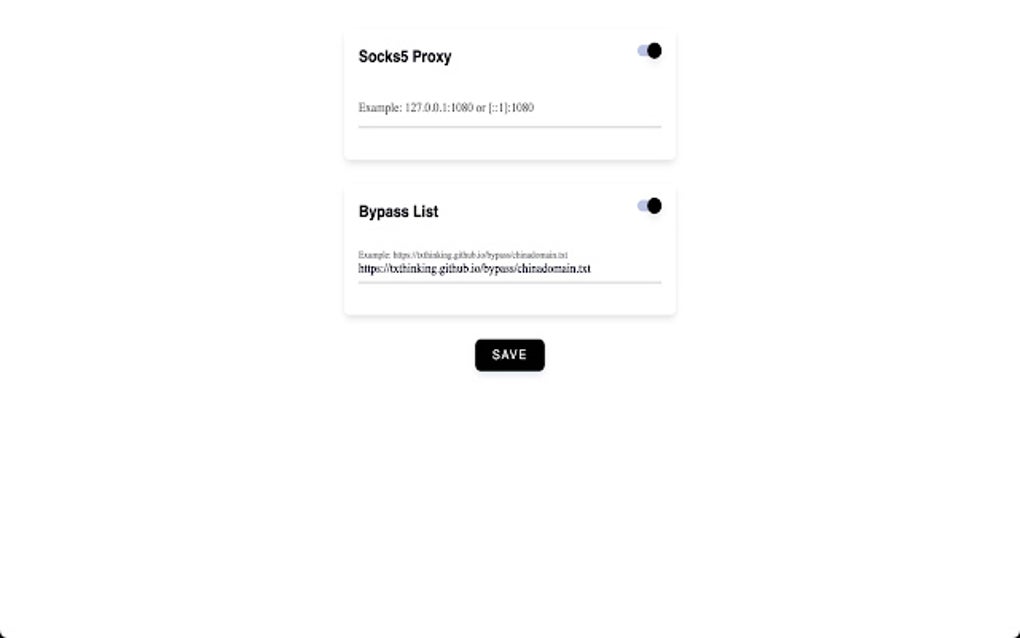
Quickly Input Proxy Details: Simply enter your SOCKS5 proxy server address and port number, and the extension handles the rest. No need for complex command-line instructions or intricate system modifications.
-
Easy Management of Multiple Proxies: If you use multiple SOCKS5 proxy servers for different purposes, Socks5 Configurator allows you to easily switch between them with a few clicks.
-
Seamless Integration with Chrome: The extension integrates seamlessly into your Chrome browser, ensuring a smooth and uninterrupted browsing experience.
Using Socks5 Configurator: A Step-by-Step Guide
Using Socks5 Configurator is incredibly straightforward. Here’s a step-by-step guide:
-
Download and Install: Download the Socks5 Configurator extension from the Chrome Web Store (or a trusted source). Once downloaded, install it like any other Chrome extension.
-
Access the Extension: Click the extension icon in your Chrome toolbar to open the Socks5 Configurator interface.
-
Enter Proxy Details: In the extension’s interface, enter the IP address of your SOCKS5 proxy server and the corresponding port number. Ensure that you have the correct credentials for accessing the proxy. Most proxy services provide this information to their subscribers.
-
Enable the Proxy: Toggle the “Enable Proxy” switch to activate the connection to your SOCKS5 proxy server.
-
Test the Connection: Once the proxy is enabled, try accessing websites or services that are typically restricted in your region. If you can access them successfully, then the proxy is working correctly.
-
Disable the Proxy (When Necessary): When you are finished using the proxy, simply toggle the “Enable Proxy” switch to disable it. This will restore your normal browsing configuration.
Applications of Socks5 Configurator
Socks5 Configurator caters to a broad range of users and scenarios. Its simplicity and effectiveness make it a valuable tool for:
-
Privacy-Conscious Individuals: For individuals who prioritize their online privacy, Socks5 Configurator provides a convenient way to mask their IP address and protect their browsing activity from unwanted surveillance.
-
Users Accessing Geo-Restricted Content: Those who want to access streaming services, news websites, or other content that is geographically restricted can use Socks5 Configurator to bypass these limitations. It provides a simple solution to access content that might otherwise be inaccessible due to location-based restrictions.
-
Developers and Testers: Software developers and testers might use SOCKS5 proxies to simulate different geographical locations and ensure their applications function correctly across diverse environments. Socks5 Configurator simplifies this setup process.
-
Users in Restricted Networks: In environments with restricted internet access, Socks5 Configurator can potentially help access websites and services that are otherwise blocked. This is particularly relevant in workplaces, schools, or other environments with firewalls and network restrictions.
Security Considerations
While SOCKS5 proxies offer enhanced privacy and access capabilities, it’s crucial to exercise caution when using them. Choosing a reputable and trustworthy proxy provider is essential to avoid risks such as:
-
Data Breaches: Using a compromised or unreliable proxy server can expose your data to malicious actors.
-
Malware Infection: Some malicious proxy services might inject malware into your system.
-
Slow Performance: Low-quality or overloaded proxy servers can significantly impact your browsing speed and performance.
Always ensure you use a trustworthy SOCKS5 proxy provider and keep your software up-to-date to minimize security risks.
Conclusion
Socks5 Configurator provides a simple, effective, and user-friendly solution for managing SOCKS5 proxy settings within Google Chrome. Its intuitive interface and seamless integration with Chrome make it an invaluable tool for users seeking to enhance their privacy, bypass geo-restrictions, or access content in restricted networks. However, remember to always choose a reputable proxy service provider and prioritize online security best practices. By combining the power of a SOCKS5 proxy with the ease of use offered by Socks5 Configurator, you can navigate the internet with greater privacy, security, and access to a broader range of online content.
File Information
- License: “Free”
- Version: “2023.06.12”
- Latest update: “September 11, 2023”
- Platform: “chrome”
- Downloads: “1.1K”


