
SocksDroid is a free, open-source VPN application for Android devices developed by Boundary Effect. Unlike many VPN services that provide their own servers, SocksDroid acts as a client, leveraging Android’s built-in VPN capabilities to allow users to connect to their own pre-configured VPN servers. This approach offers a high degree of customization and control, but also requires a more technical understanding than typical VPN applications. This detailed review explores SocksDroid’s features, benefits, drawbacks, and its place within the broader VPN landscape.
Understanding SocksDroid’s Functionality
At its core, SocksDroid is a proxy-based VPN. It doesn’t offer a server network of its own; instead, it relies on user-provided server information. This means you’ll need to have already secured a VPN server connection (e.g., through a separate VPN provider or a self-hosted solution) to use SocksDroid effectively. The app acts as an intermediary, connecting your Android device to your chosen server using the Socks5 protocol, a more secure variant of traditional proxies.
.webp)
The Socks5 protocol provides several advantages over traditional HTTP proxies: it’s inherently more secure, offering strong authentication and encryption, and it supports various authentication methods. This enhanced security makes SocksDroid a powerful tool for users who prioritize control and privacy, allowing them to connect to servers they trust implicitly. However, the responsibility for finding and managing a reliable and secure VPN server rests entirely with the user.
Key Features and Configuration Options
SocksDroid’s strength lies in its configurability. The app provides a range of settings tailored for advanced users who require precise control over their VPN connection:
-
Custom Server Configuration: The most fundamental feature allows users to specify the server IP address and port number of their chosen VPN server. This flexibility is crucial, enabling users to connect to virtually any VPN server that adheres to the Socks5 protocol.
-
IPv6 Forwarding: For networks supporting IPv6, SocksDroid allows enabling IPv6 forwarding. This can significantly improve connection speeds and efficiency, especially for users with IPv6-capable networks and servers.
-
UDP Forwarding: Similar to IPv6 forwarding, enabling UDP forwarding can optimize data transmission speeds, particularly beneficial for applications that rely heavily on real-time data transfer, like online gaming or video streaming.
-
Authentication: Robust security is ensured through the option to enable username and password authentication. This step prevents unauthorized access to the VPN server, safeguarding the user’s privacy and connection security. The app supports a variety of authentication methods, including standard username/password combinations.
-
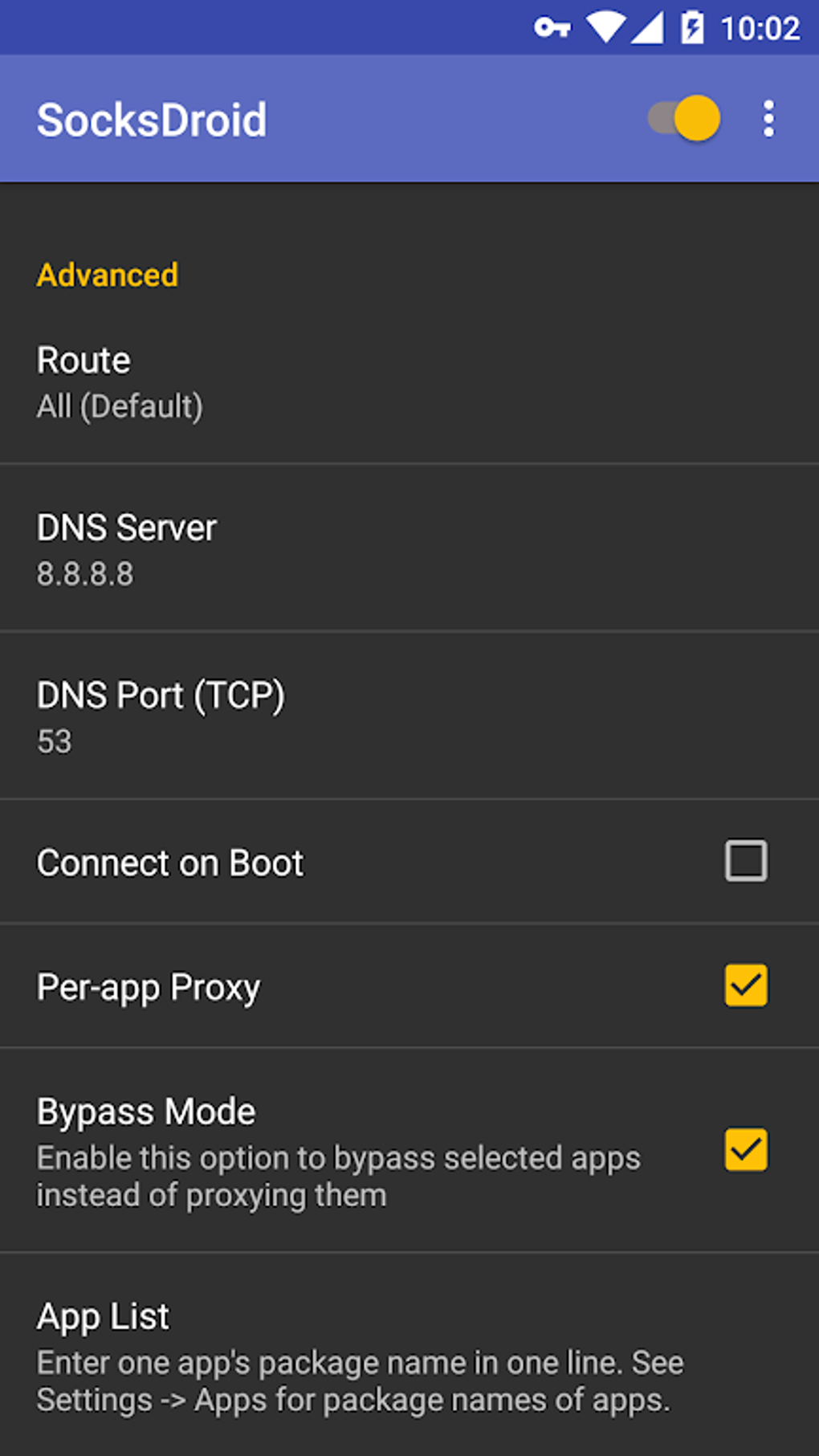
Custom DNS Server: Users can configure a custom DNS server, allowing them to override their default DNS settings and potentially improve browsing speed or privacy by using a more secure or faster DNS provider.
-
Per-App Proxy Settings: A standout feature is the ability to specify which applications on the device use the VPN connection. This selective application of the VPN offers granular control, allowing users to route only specific apps through the proxy while leaving others using the device’s standard network connection. This is particularly useful for situations where using a VPN for all apps isn’t necessary or desirable.
Advantages and Disadvantages of Using SocksDroid
SocksDroid presents a compelling alternative to traditional VPN applications, but it’s essential to weigh its advantages and disadvantages before deciding if it suits your needs.
Advantages:
- Flexibility and Control: The greatest advantage is the unmatched level of control and customization offered to users. This surpasses the limitations of most conventional VPN apps that provide only pre-configured servers. You’re in the driver’s seat regarding server selection, protocol choices, and application-specific routing.
-
Cost-Effectiveness: The app itself is free, meaning the only cost is the cost of your underlying VPN server. This can be significantly cheaper than paid VPN services, especially for users who already own or have access to a suitable server.
-
Lightweight and Efficient: SocksDroid’s lean design ensures it doesn’t consume excessive system resources, making it suitable for low-powered devices. Its efficient codebase contributes to its performance, ensuring smooth operation even on older devices.
-
Open-Source Nature: While this isn’t a direct advantage for all users, the open-source nature of SocksDroid allows for community scrutiny of the code, contributing to increased trust and transparency. This openness helps ensure there’s no hidden functionality or backdoors.
Disadvantages:
-
Technical Expertise Required: The app’s extensive configuration options and reliance on external servers necessitate a degree of technical proficiency. Beginners may find the setup process daunting, and troubleshooting issues could be challenging without a solid understanding of networking concepts.
-
No Built-in Servers: The lack of built-in servers is a significant drawback. Users are solely responsible for finding and configuring a compatible VPN server. This requires additional research and potentially the need to pay for a third-party VPN service, negating the cost advantage in some cases.
-
Security Responsibility: The onus of ensuring server security rests entirely on the user. Selecting a compromised or unreliable server could expose the user to security risks. Careful consideration must be given to server selection to maintain privacy and security.
- Limited Support: As a free and open-source application, SocksDroid might offer limited or non-existent official support. Users will likely have to rely on community forums or online resources for assistance.
Comparison to Other VPN Applications
Compared to other VPN applications on the market, SocksDroid occupies a unique niche. Popular services like ExpressVPN or NordVPN provide a user-friendly interface and a vast network of servers managed by the provider. This simplicity comes at a cost—both financially and in terms of control. Users have limited configuration options and rely on the provider’s security practices.
SocksDroid, on the other hand, prioritizes control and customization over ease of use. The trade-off is the technical knowledge required for setup and management. If you value extensive configuration options and are comfortable with the technical aspects of VPNs, SocksDroid is a viable alternative. If simplicity and a hassle-free experience are paramount, a more user-friendly paid VPN service would be a better choice.
Conclusion: Who is SocksDroid For?
.webp)
SocksDroid isn’t a one-size-fits-all solution. It caters specifically to tech-savvy users who value fine-grained control over their VPN connection and possess the technical understanding to configure and manage their own VPN servers. If you’re comfortable managing your own server configurations and prioritizing customization over simplicity, SocksDroid’s powerful features and flexibility make it a compelling choice. For those who prioritize ease of use and a plug-and-play experience, more user-friendly VPN services are readily available. In essence, SocksDroid empowers the technically proficient user, providing a powerful and customizable tool for securing their online activities, but it’s not suitable for the average user seeking a simple VPN solution.
File Information
- License: “Free”
- Version: “1.0.3”
- Latest update: “February 13, 2023”
- Platform: “Android”
- OS: “Android 6.0”
- Language: “English”
- Downloads: “288.8K”
- Size: “789.48 KB”
- Download Options: “APK, Google Play”
- Filename: “SocksDroid_1.0.3.apk”


