
Soda Player is a free media player for Windows designed for ease of use and broad compatibility. This review delves into its features, performance, and overall user experience, comparing it to other players in the market and exploring its strengths and weaknesses.
Feature Set: A Robust Multimedia Experience
Soda Player distinguishes itself through its comprehensive support for a wide range of multimedia formats. It seamlessly handles popular video formats such as MP4, MOV, 3GP, 3GPP, 3GPP2, and OGG, as well as audio formats including MP3, WAV, WMA, OGG, AAC, FLAC, APE, and M4A. This broad compatibility eliminates the frustration of encountering unsupported files, a common issue with many media players.
Beyond basic playback, Soda Player offers several notable features that enhance the user experience. Its built-in support for subtitles allows for customizable viewing experiences, accommodating different languages and preferences. This feature is crucial for users who consume media with subtitles, either for language accessibility or to enhance understanding of the content.
Further enhancing its versatility, Soda Player integrates a video converter and an audio converter. These built-in tools allow users to convert between various video and audio formats without needing to rely on separate applications. This streamlined approach simplifies the workflow for users who frequently need to convert files for compatibility with different devices or platforms. The specific codecs supported by the converters aren’t explicitly detailed, but the general claim suggests a wide range of common formats are included.
The player also boasts a built-in CD/DVD/Blu-ray player, providing a complete multimedia solution for users who still utilize physical media. This functionality is a valuable asset for those who prefer or require the use of discs, eliminating the need for a separate disc player application.
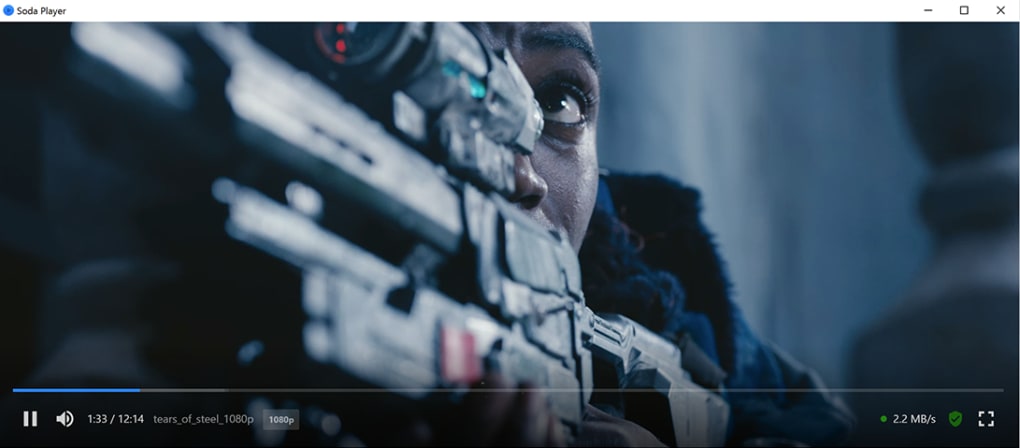
Finally, Soda Player prioritizes user convenience by supporting keyboard and mouse controls. This feature allows for navigating the player’s functions and adjusting settings efficiently without relying solely on the mouse. This can significantly improve the viewing experience for users who prefer keyboard shortcuts or for those who find navigating with a mouse less intuitive.
Performance and User Interface: Simplicity and Efficiency
Soda Player’s interface is designed for simplicity and ease of navigation. The clean and uncluttered layout ensures users can quickly access the features they need without being overwhelmed by a complicated interface. This streamlined approach makes the player highly accessible to users of all technical skill levels. While a detailed visual description of the interface isn’t provided, the emphasis on simplicity suggests a user-friendly design prioritizing functionality over aesthetic complexity.
Performance is another key aspect of Soda Player. While the provided information doesn’t offer specific benchmarks or performance metrics, the claim of smooth playback across various formats suggests adequate performance for typical usage scenarios. However, the absence of detailed performance data limits the ability to objectively assess how it compares to other players in terms of resource usage, processing speed, or handling of very large or high-resolution files.
Comparison with Alternative Media Players
Soda Player’s versatile feature set and straightforward user interface position it favorably against other media players in the market. However, comparing it to established players like VLC media player requires considering the strengths and weaknesses of each.
VLC media player, a renowned open-source option, is known for its exceptional compatibility and robust feature set. While offering extensive customization options and advanced features, VLC’s interface can sometimes appear overwhelming to novice users. Soda Player aims for a simpler, more accessible approach, potentially sacrificing some advanced features for ease of use.
Other players, such as Rox Player and RMVB Player, focus on specific functionalities or target niches. Rox Player, for example, might cater to more casual users, while RMVB Player specializes in handling a particular file type. Soda Player’s strength lies in its broad appeal, aiming to serve a wider range of users with its comprehensive format support and straightforward design.
The absence of user reviews in the provided text prevents a detailed comparison based on real-world experiences. User feedback would provide valuable insights into the player’s practical performance and usability in comparison to other popular options. A future update could incorporate such information.
Security and Privacy: User Trust and Data Handling
The provided text mentions a security status check, indicating the developers’ efforts to ensure the software’s integrity. However, lacking specific details regarding the security measures implemented, we cannot provide a complete evaluation of Soda Player’s security practices. This is a crucial aspect for users concerned about malware or data breaches. Further information regarding data collection, usage, and security protocols would strengthen user confidence and transparency.
The privacy policy of the developer, Fwdom Island Privacy Inc., would provide crucial context. Understanding how user data is handled is essential for building trust and ensuring responsible data management.
Conclusion: A Solid Contender in the Media Player Market
Soda Player presents itself as a viable and user-friendly option for users seeking a versatile media player with a straightforward interface. Its broad format support, integrated converters, and built-in disc player make it a compelling alternative to other players. However, the lack of detailed performance benchmarks, user reviews, and in-depth information about security and privacy practices limits the scope of this review.
Further investigation into these areas, including user feedback and transparent disclosure of security and privacy policies, would enhance the overall assessment of Soda Player and its position within the competitive media player landscape. The current information suggests a competent player, but additional detail is necessary for a comprehensive and informed evaluation.
File Information
- License: “Free”
- Version: “1.0”
- Latest update: “February 5, 2024”
- Platform: “Windows”
- OS: “Windows 10”
- Language: “English”
- Downloads: “23.7K”


