
SoftKey Revealer is a free Windows program designed to help users recover serial numbers for their installed software. Categorized as security software, specifically under the password revealers subcategory, it offers a straightforward solution for retrieving lost or forgotten product keys. While its functionality is relatively simple, its impact on users needing to regain access to their software is significant. This article will explore SoftKey Revealer’s features, functionality, and place within the broader landscape of password management tools.
Understanding SoftKey Revealer’s Functionality
SoftKey Revealer’s primary function is the retrieval of serial numbers from a user’s Windows system. Unlike some more comprehensive password management suites, it does not aim to manage or store passwords; rather, its sole purpose is to uncover existing product keys already present on the computer. This means it operates by scanning system files and registries to locate these keys, which are often necessary for activating or re-installing software. The program’s effectiveness depends on the way in which the software’s serial numbers were initially stored by the installing program. Some applications may store their keys in a more easily accessible manner than others, thus influencing the likelihood of success when using SoftKey Revealer.
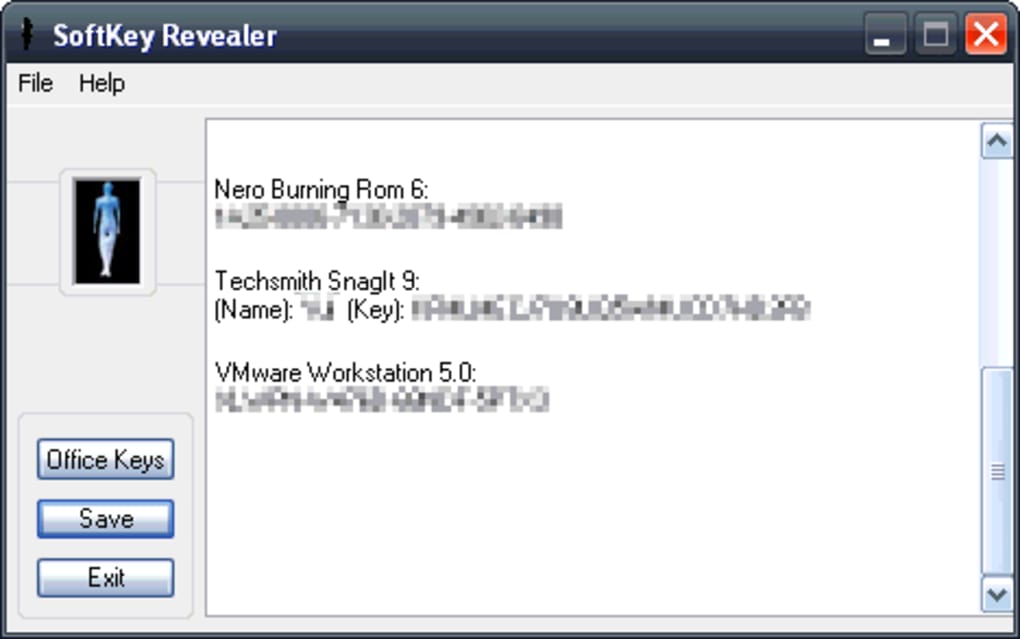
The process is typically straightforward: users simply run the program, and it begins scanning the system. Upon completion, the program displays a list of found serial numbers associated with the installed applications. The results are presented in a clear and concise manner, allowing users to quickly locate the keys they require. The program’s simplicity makes it an accessible tool, even for users with limited technical expertise.
System Requirements and Compatibility
SoftKey Revealer boasts compatibility with a wide range of older Windows operating systems, including Windows 98 and subsequent versions. This broad compatibility makes it a valuable tool for users still operating on older machines. However, its compatibility with more recent Windows versions needs clarification, as the latest update was in 2013, suggesting possible limitations when used on newer systems with significantly changed registry structures. Users intending to utilize SoftKey Revealer on modern Windows iterations should proceed with caution and be prepared for the possibility of limited or no success. While the software may technically run on newer systems, its effectiveness is not guaranteed due to potential incompatibilities with updated operating system architecture.
The program is known for its relatively small size, making it a lightweight application that doesn’t consume significant system resources. This characteristic is beneficial for users with older machines or systems with limited storage space. The low footprint minimizes the impact on overall system performance, allowing users to run it alongside other applications without noticeable slowdowns. This efficiency is a key advantage, especially when compared to heavier, resource-intensive password management suites.
SoftKey Revealer’s Interface and User Experience
SoftKey Revealer’s user interface is designed for simplicity and ease of use. The program features a minimal, straightforward design, prioritizing functionality over complex aesthetics. Users are presented with a clear set of options, typically focusing on the initiation and termination of the scanning process. There are no intricate settings or complex configurations to navigate, making it accessible for novice users who might be intimidated by more sophisticated security software.
The lack of advanced features translates into a fast and efficient experience. The scanning process itself is usually relatively quick, meaning users do not need to wait an extensive time for results. The presentation of the recovered serial numbers is also straightforward, with the keys presented in a clear and organized format. This minimal design, while lacking advanced features found in other password managers, significantly enhances usability and facilitates a quick solution for users seeking to recover their product keys.
Security Considerations and Potential Risks
While SoftKey Revealer serves a useful purpose, it is important to acknowledge potential security considerations. Any software that accesses and interacts with system files and registries carries inherent risks. Malicious actors could potentially create similar programs disguised as legitimate tools to gain access to user data. Therefore, users should only download SoftKey Revealer from trusted sources such as the official website or reputable software download platforms to mitigate the risk of malware.
Furthermore, the use of such tools should comply with applicable software licensing agreements. It is crucial to remember that the unauthorized copying or distribution of software is illegal. SoftKey Revealer should only be used to recover serial numbers for software that the user legitimately owns and has the right to re-install. Unauthorized usage could lead to legal repercussions. Users should always operate within the confines of the law and respect the intellectual property rights of software developers.
SoftKey Revealer in the Broader Context of Password Management
SoftKey Revealer occupies a niche within the broader world of password management. Unlike comprehensive password managers which offer features like secure password storage, generation, and multi-platform synchronization, SoftKey Revealer’s focus is singular: recovering existing serial keys. This makes it a specialized tool rather than a general-purpose solution. Users requiring broader password management capabilities would need to look towards more feature-rich software.
While other password management solutions offer robust features like password vaults, secure password sharing, and automatic password updates, SoftKey Revealer’s streamlined approach caters to a specific need: recovering lost serial numbers. The lack of advanced features, while limiting its overall functionality, contributes significantly to its simplicity and ease of use, making it an appealing option for those with limited technical expertise and a defined need.
SoftKey Revealer is not a replacement for a comprehensive password management suite. Instead, it complements existing strategies by providing a specialized solution for recovering lost serial keys. Users might employ it in conjunction with a dedicated password manager to maintain a robust security posture across their digital landscape.
The choice between using SoftKey Revealer and other password management tools depends largely on individual needs and technical proficiency. For users who need to specifically retrieve lost software keys and prioritize simplicity, SoftKey Revealer may be an adequate solution. For those requiring a more comprehensive approach to password management, other options with broader features and functionalities should be explored.
Alternatives and Comparisons
Several alternative programs offer similar functionality to SoftKey Revealer, each with its strengths and weaknesses. Some programs may provide more extensive key recovery capabilities, spanning a wider range of software applications. Others may integrate additional security features, such as advanced encryption and multi-factor authentication. The best alternative for a user will depend heavily on their specific requirements and technical expertise.
The exploration of alternative solutions should involve careful consideration of factors such as ease of use, compatibility, the range of supported software, and security features. Users should read reviews and compare specifications before making a decision. The choice of a password management tool, whether a general-purpose suite or a specialized tool like SoftKey Revealer, is a personal one and should be tailored to individual needs and preferences. It is crucial to prioritize user experience, effectiveness, and security when making this decision.
Conclusion
SoftKey Revealer offers a simple yet effective solution for users facing the frustration of lost or forgotten software serial numbers. Its streamlined design and compatibility with various Windows operating systems make it a readily accessible tool for those needing a quick and straightforward solution. However, users should be mindful of security considerations and ensure they download the software from trustworthy sources. Furthermore, its limited functionality compared to broader password management solutions needs to be weighed against the specific need for serial key recovery. Ultimately, the suitability of SoftKey Revealer depends on individual user needs and preferences within the broader context of password management practices.
File Information
- License: “Free”
- Latest update: “May 24, 2023”
- Platform: “Windows”
- OS: “Windows 8”
- Language: “English”
- Downloads: “16.9K”
- Size: “130.64 KB”


