
Software Informer is a free utility designed to streamline the process of keeping your installed software up-to-date and informed. It functions as a central hub, providing users with real-time information on the programs they utilize, automating updates, and offering a convenient method for accessing the latest versions of their applications. The program operates by regularly checking for updates to the software installed on your computer, comparing installed versions against a constantly updated database of the latest releases. This allows users to maintain a system with optimized performance and enhanced security, minimizing vulnerabilities associated with outdated software.
Streamlined Software Updates: Convenience and Potential Pitfalls
One of Software Informer’s key selling points is its automated update functionality. The program runs discreetly in the background, periodically checking for new versions of your installed software. This automated approach significantly simplifies the update process, eliminating the need for manual checks and installations. Users benefit from having their software consistently updated, ensuring access to the latest features, bug fixes, and security patches. This feature is particularly beneficial for individuals who may not have the time or technical expertise to manage updates manually.
However, this automated approach is not without its drawbacks. Automatic updates, while convenient, can occasionally lead to unforeseen issues. Software updates sometimes contain bugs or may not be compatible with all systems. In such cases, the automatic installation could disrupt system functionality. Therefore, users should be aware of this potential pitfall and consider whether complete automation suits their needs. Some users might prefer to review update details and manually approve installations to maintain greater control over their system’s updates.
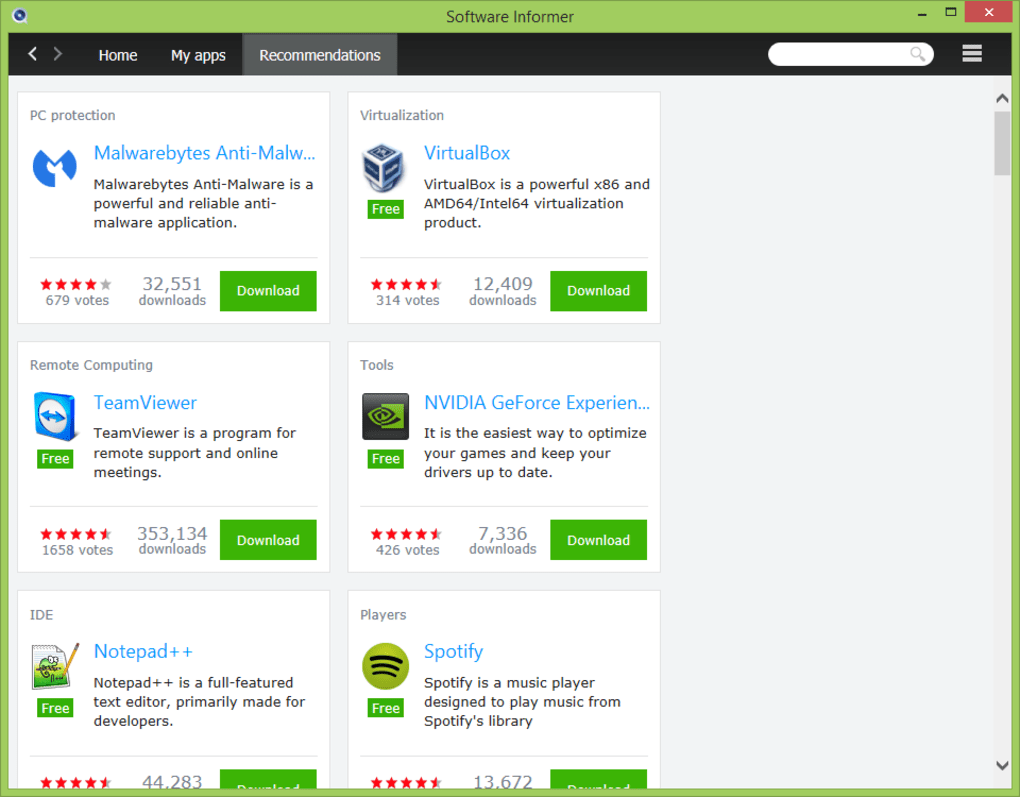
Beyond Updates: Accessing Comprehensive Software Information
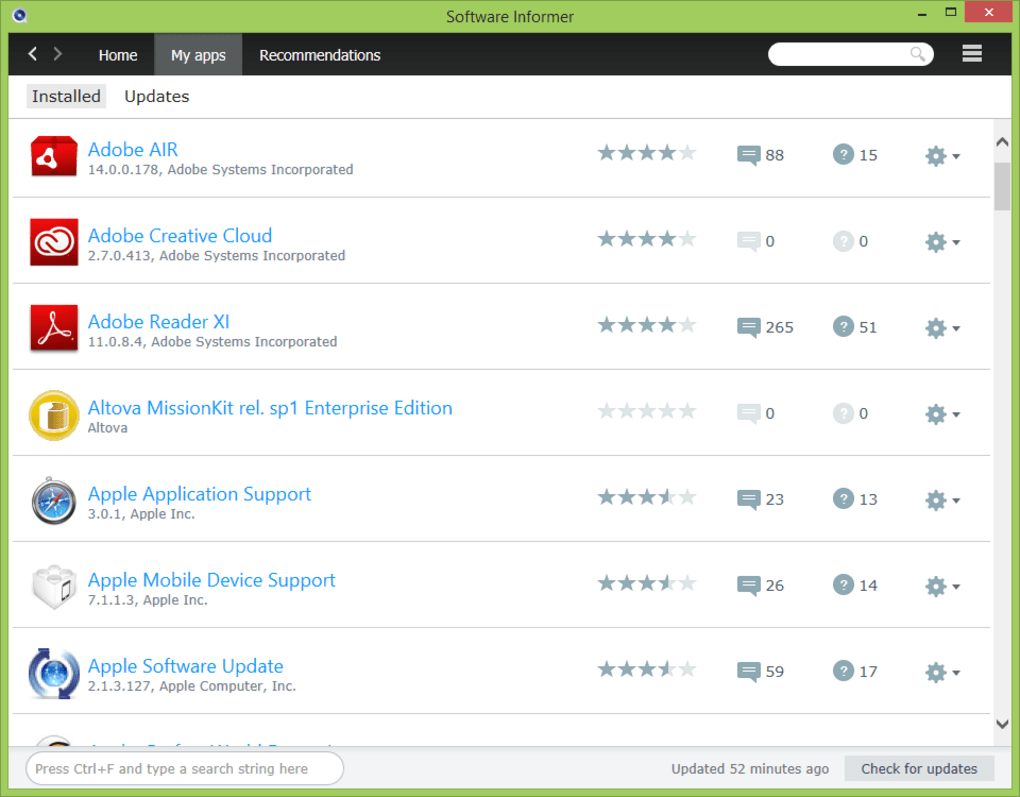
Software Informer goes beyond mere automated updates. It functions as a comprehensive source of information related to your installed applications. The program maintains a detailed inventory of your software, displaying crucial information such as version numbers, release dates, and developer details. This information can be invaluable for troubleshooting and for identifying potential conflicts between software applications. The program also offers convenient links to the official websites and support pages of each application, allowing users to easily access help resources if needed.
This feature proves particularly useful when encountering software problems. By knowing the exact version of a program, users can efficiently search for specific fixes or solutions online. They can also cross-reference their version with the latest available version, immediately identifying the need for an update. Such detailed information empowers users to manage their software effectively, promoting a stable and productive computing environment.
Security and Safety: A Multi-Layered Approach
Security is a critical aspect of any software update process. Software Informer addresses this concern by employing a multi-layered security strategy. Before any update is made available, the download package undergoes thorough scanning by several leading antivirus engines, including NOD32, Dr.Web, Avast, Kaspersky, ClamAV, and McAfee. This multiple-vendor approach helps to identify and eliminate any malicious code or unwanted bundled software.
This robust security system ensures that users receive only legitimate updates, significantly reducing the risk of malware infections. The results of the antivirus scans are clearly displayed, allowing users to review the security status of each update before installation. This transparency fosters confidence in the software’s integrity, assuring users that their systems are safe from malicious interference. Such a comprehensive approach distinguishes Software Informer in the market, emphasizing its dedication to user security.
User Experience and Interface: Simplicity and Ease of Use

Software Informer prioritizes user-friendliness. Its intuitive interface is designed for accessibility, regardless of the user’s technical expertise. The program’s clean design avoids unnecessary complexity, allowing even novice users to navigate and utilize its features effortlessly. Key information is clearly presented, and all actions are straightforward. The minimal design approach avoids overwhelming the user, focusing instead on providing essential information and functionality.
The easy navigation and clear presentation of information contribute to the program’s overall positive user experience. This focus on simplicity distinguishes it from more complex software update utilities, appealing to a broad range of users. This approach makes Software Informer an accessible and efficient tool for managing software updates, appealing to both casual and power users alike.
Limitations and Potential Improvements
While Software Informer offers a valuable service, it also has some limitations. One limitation is its relatively limited scope. While it checks for updates to a wide variety of programs, it may not include every application available. This means that users may need to manage updates for some software outside of the program. Further, as with any software, occasional bugs or glitches are possible. These, while usually minor, can cause minor inconveniences.
While the automatic update function is a significant advantage, its potential to install unwanted updates is a significant consideration. The program’s developers could enhance user control over the update process by adding features to customize which updates are automatically installed and which require manual confirmation. Greater transparency into the update process would further enhance user confidence and trust. These improvements would make Software Informer an even more powerful and reliable tool for managing software updates and information.
Alternative Solutions and Comparisons
Several alternative software update utilities exist in the market, each with unique strengths and weaknesses. Some offer more comprehensive coverage of applications, while others focus on specific features such as advanced security scanning or granular control over update installations. Some alternatives might have a more visually appealing interface or a more feature-rich set of tools. When choosing an update utility, users should consider their specific needs and preferences.
Comparing Software Informer with its competitors highlights its focus on ease of use and security. Its straightforward interface and multi-layered security checks differentiate it from solutions emphasizing advanced features or a more intricate user experience. Users seeking a simple, secure, and easy-to-use solution might find Software Informer a preferable choice over more complex and potentially cumbersome alternatives.
Conclusion: A Valuable Tool for Streamlining Software Management
Software Informer provides a valuable service for users who want to maintain up-to-date software without the hassle of manual updates. Its combination of automated updates, comprehensive software information, robust security checks, and user-friendly interface makes it a compelling solution for managing software on Windows systems. While it has limitations like potential unwanted updates and occasional bugs, its simplicity and dedication to user security make it a significant tool in managing and maintaining a healthy and secure computing environment. Its continued development and improvement could address existing limitations, ultimately enhancing its capabilities and solidifying its position in the software update utility market.
File Information
- License: “Free”
- Latest update: “July 11, 2023”
- Platform: “Windows”
- OS: “Windows 7”
- Language: “English”
- Downloads: “103.6K”
- Size: “3.87 MB”


