
SolveigMM HyperCam is a free screen recording software for Windows, offering a straightforward approach to capturing desktop activity. While it might not boast the extensive feature set of more popular options like Bandicam or OBS Studio, HyperCam provides a solid foundation for basic screen recording needs, making it an attractive choice for users seeking a simple and effective solution without the complexity of more advanced programs. This review will delve into its strengths and weaknesses, exploring its usability, performance, and overall suitability for various purposes.
HyperCam’s Core Functionality: Simplicity and Ease of Use
HyperCam’s primary strength lies in its user-friendly interface. The program is exceptionally intuitive, requiring minimal technical expertise to operate. The main window presents a clear and uncluttered layout, allowing users to quickly access essential functions without navigating through complex menus or sub-menus. The recording process is straightforward: select the area of the screen to capture (full screen or a custom region), initiate recording, and stop when finished. This simplicity makes it ideal for casual users or those who need a quick and easy way to capture screen activity without investing time in learning intricate software.
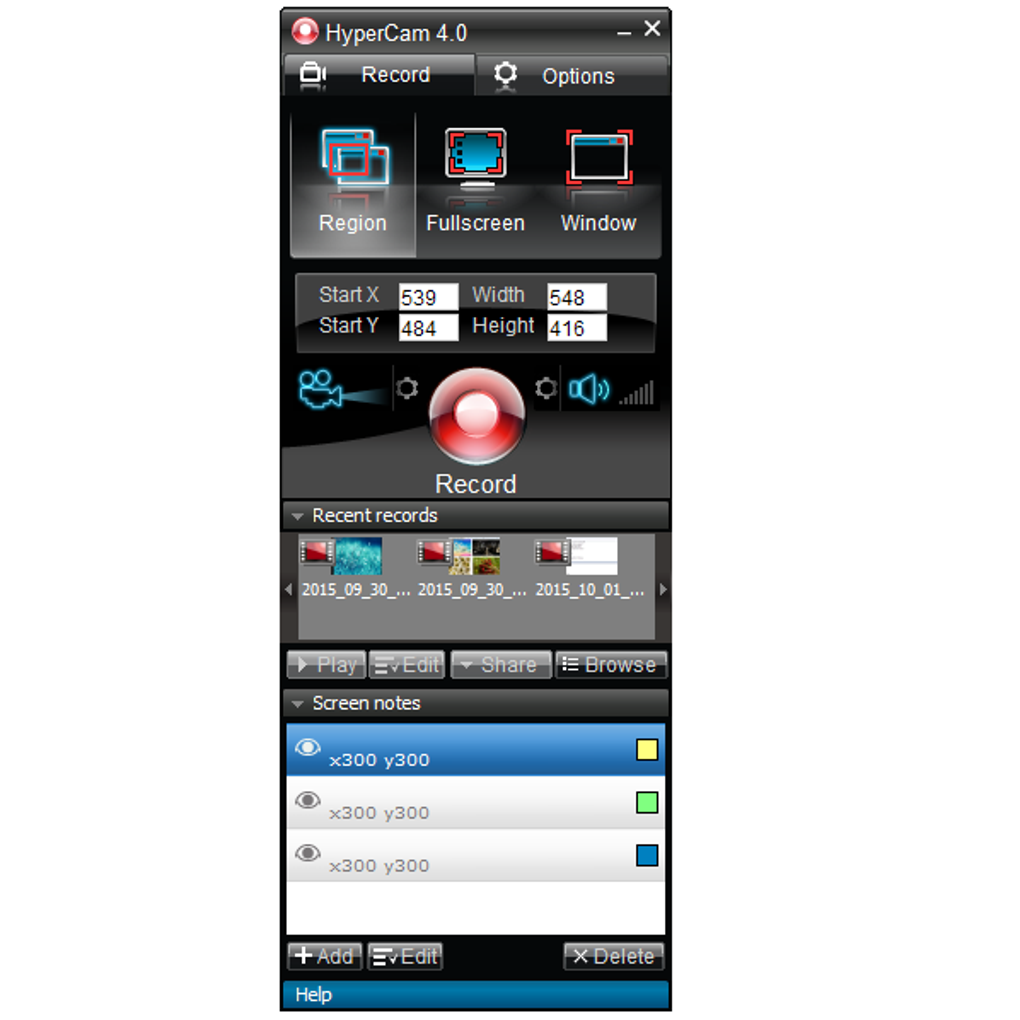
The software’s ability to record specific regions of the screen, rather than the entire desktop, is a significant advantage. This feature conserves system resources and reduces file sizes, making it particularly useful for recording specific applications or windows without unnecessary background clutter. The output quality is generally good, delivering clear and sharp recordings suitable for various purposes, from creating tutorials to documenting software issues.
Limitations and Areas for Improvement
Despite its simplicity and ease of use, HyperCam does have some limitations. The most significant drawback is the restricted range of supported output file types. This limitation can be problematic for users who require specific formats for compatibility with certain editing software or platforms. While the program handles common formats adequately, the lack of flexibility in this area restricts its adaptability for some workflows.
Another minor drawback is the relatively small screen size of the program’s main interface. While this doesn’t significantly impact functionality, it might feel somewhat cramped to users accustomed to larger interfaces. A larger interface could improve the overall user experience and provide better visual clarity, especially for users working with multiple windows or applications.
HyperCam’s Strengths: A Closer Look at its Advantages
HyperCam’s freeware status is undoubtedly a major draw. This removes the financial barrier to entry, allowing anyone to access and utilize its screen recording capabilities. This accessibility makes it a powerful tool for educational purposes, casual users, and individuals with budget constraints. The combination of free access and user-friendly design sets it apart from many other screen recording solutions.
The software’s overall performance is noteworthy. It runs smoothly on a range of Windows systems, consuming relatively few system resources. This efficiency ensures that recording sessions do not significantly impact the overall performance of the computer, preventing lag or slowdown during recording, a critical element for seamless operation. The program’s ability to effectively capture screen activity without impacting the user’s workflow is a crucial benefit.
The intuitive design ensures a fast learning curve. Users can quickly grasp the software’s functionality without lengthy tutorials or extensive technical know-how. This ease of use allows for efficient screen recording, minimizing the time needed to master the software and maximize the time spent creating recordings.
HyperCam Compared to Competitors: Identifying its Niche
While HyperCam cannot compete with feature-rich professional-grade screen recorders like Camtasia or OBS Studio, it occupies a distinct niche. These advanced programs offer a much wider array of functionalities, including advanced editing tools, streaming capabilities, and support for a broader range of output formats. However, their complexity makes them less suitable for casual users or those who simply need a basic screen recording solution.
HyperCam’s strength lies in its simplicity and accessibility. It provides a streamlined and user-friendly experience, making it ideal for users who prioritize ease of use over extensive customization options. It is perfect for capturing quick screen recordings for tutorials, demonstrations, or documentation purposes without needing to navigate a complex interface.
Conclusion: Who is HyperCam For?
SolveigMM HyperCam is a valuable tool for a specific segment of users. It excels as a lightweight, easy-to-use screen recorder for those who require straightforward functionality without the complexities of more advanced software. Its free availability and efficient performance make it a compelling choice for users who value simplicity and accessibility.
While the limitations regarding output file types and interface size should be acknowledged, they do not significantly diminish its overall usability for its intended audience. For users who need a simple, free, and efficient way to record their screen activities, HyperCam offers a solid and reliable solution. It is particularly well-suited for educational purposes, casual users, or anyone who needs to quickly and easily capture screen recordings without needing extensive features or technical expertise. Its niche lies in bridging the gap between extremely basic screen capture capabilities and the more complex, feature-rich options available. Ultimately, the decision of whether to use HyperCam depends on the user’s specific needs and priorities. If simplicity and ease of use are paramount, HyperCam delivers a compelling and effective solution.
File Information
- License: “Free”
- Latest update: “June 12, 2025”
- Platform: “Windows”
- OS: “Windows 11”
- Language: “English”
- Downloads: “92K”


