
In the vast ecosystem of personal computing, audio output plays an often-underestimated yet critical role in shaping the user experience. From the immersive soundscapes of modern video games and the crystal-clear dialogue of video conferences to the nuanced melodies of a favorite song, the quality and controllability of a system’s sound directly impact engagement and productivity. While operating systems provide rudimentary audio management tools, these default solutions often fall short for users seeking more granular control, greater flexibility, and a truly personalized sound environment. It is precisely within this niche that specialized freeware applications, such as Sound Control, have historically carved out a significant space, offering a robust alternative to the standard Windows Sound Mixer.
Sound Control emerged as a direct response to the limitations inherent in OEM audio applications, providing a level of hands-on interaction and customization that was, for its time, revolutionary. Designed primarily for Windows systems, this application positioned itself as a comprehensive replacement for the default mixer, packing in a suite of features aimed at empowering users to dictate their audio output with unprecedented precision. More than just a volume slider, Sound Control offered a deeper dive into audio management, enabling users to fine-tune their listening experience, integrate with third-party devices, and even personalize the application’s interface itself. However, as with many long-standing software solutions, its journey has been marked by both significant advantages and certain limitations, particularly in the face of rapidly evolving operating systems and hardware.
This article delves into the intricacies of Sound Control, exploring its foundational principles, comprehensive feature set, and the unique advantages it offered to its user base. We will also critically examine its drawbacks, especially concerning its compatibility with contemporary Windows versions, and place it within the broader context of audio management utilities. Ultimately, we aim to provide a thorough understanding of why Sound Control remains a noteworthy piece of software history and for whom it might still hold relevance in today’s technological landscape, always mindful of its original mission to give users unparalleled dominion over their digital sound.
The Quest for Enhanced Audio Control: Why Default Isn’t Always Enough
The standard audio mixer provided by Windows, while functional for basic tasks, often operates under a “one-size-fits-all” philosophy. For many casual users, simply adjusting the master volume or muting an application suffices. However, the modern digital landscape demands more sophisticated audio management. Gamers require precise control over game audio versus communication software. Content creators need to balance playback levels for multiple sources during editing or streaming. Even everyday users might find themselves frustrated by the lack of quick access to specific application volumes or the inability to fine-tune output increments.
These inherent limitations in OEM applications spurred the development of specialized tools like Sound Control. Users often found themselves navigating through multiple menus, clicking endlessly to find specific settings, or wishing for a more intuitive way to manage their soundscape. The desire for a “hands-on level of interaction” that transcended the basic capabilities of the system’s default mixer became a driving force. This quest wasn’t merely about convenience; it was about optimizing the auditory experience for various use cases, ensuring clarity, preventing auditory fatigue, and ultimately enhancing overall productivity and enjoyment.
Furthermore, the integration of diverse audio sources and output devices—from external sound cards and USB headsets to home theater systems—often presented challenges for standard mixers. The need for an application that could automatically detect and synchronize with these third-party devices without requiring tedious manual adjustments became paramount. Users wanted a seamless experience, where their audio preferences translated effortlessly across different hardware configurations, eliminating the constant need to reconfigure settings. This underlying demand for greater flexibility, customization, and intuitive control laid the groundwork for the enthusiastic adoption of applications like Sound Control, which promised to bridge the gap between basic functionality and advanced user requirements.
Unpacking Sound Control’s Core Features
Sound Control distinguished itself through a thoughtfully designed feature set aimed at providing users with unparalleled mastery over their PC’s audio output. Its comprehensive functionalities transcended the rudimentary capabilities of the default Windows mixer, offering a streamlined yet powerful platform for personalized sound management.
A Direct Replacement for the Default Mixer: Streamlined Functionality
At its heart, Sound Control was conceived as a free, yet potent, alternative to the cumbersome Windows Sound Mixer. This wasn’t merely about offering a different interface; it was about reimagining the user’s interaction with their audio settings. The application provided the same foundational level of functionality as the standard Windows mixer but presented it within a “streamlined interface,” making it more accessible and intuitive.
Key among its primary functions was the inherent ability to “adjust the sound of a system.” This encompassed not just master volume control but also granular adjustments for individual applications, ensuring that users could precisely balance audio levels according to their specific needs. Whether it was lowering the volume of a background music player while boosting a video call, Sound Control provided the levers for such detailed orchestration. Beyond basic adjustments, it offered the “possibility to integrate this application with an existing mixer,” suggesting a flexible design that could work in conjunction with other audio tools or simply enhance the capabilities of the system’s native offering. This adaptability meant users weren’t forced to abandon their existing setups but could augment them with Sound Control’s advanced features. For those seeking comprehensive control without the bloat of complex digital audio workstations, Sound Control struck an ideal balance between simplicity and power.
Hotkey Customization and Device Synchronization: Efficiency at Your Fingertips
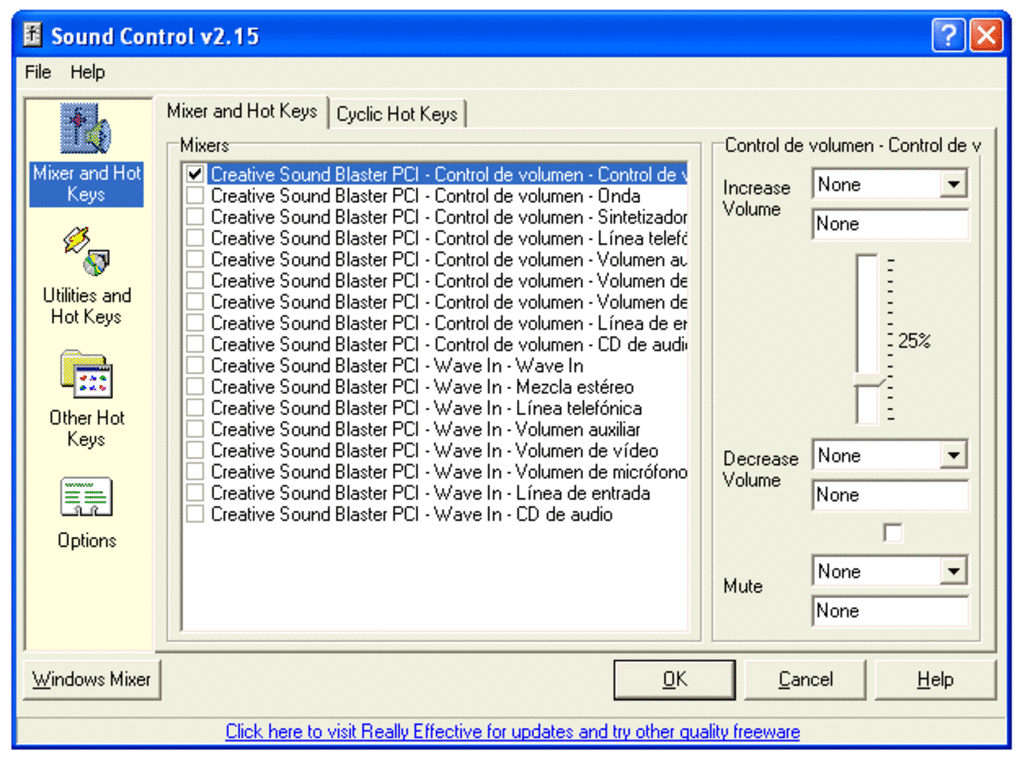
One of Sound Control’s most celebrated features was its embrace of “hot keys as quick access points during normal operations.” This functionality allowed users to assign custom keyboard shortcuts to various audio actions, transforming the way they interacted with their system’s sound. Imagine the convenience of instantly muting your microphone, adjusting the volume of a specific application, or toggling between audio profiles with a single keystroke, without having to minimize your current task or navigate through menus. This level of efficiency was a significant boon for power users, gamers, and anyone whose workflow benefited from rapid, non-intrusive audio adjustments. The ability to “add hotkeys to adjust any combination of your sound mixer volumes” provided an unprecedented degree of personalization, allowing users to craft an audio control scheme that perfectly matched their habits and preferences.
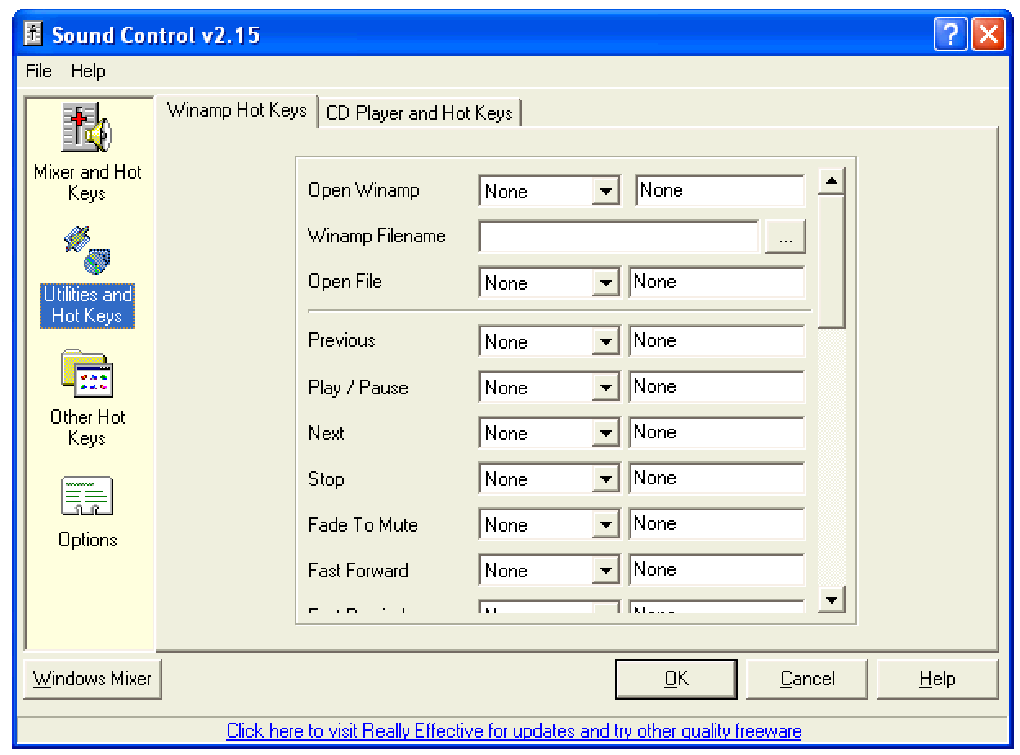
Beyond system-wide control, Sound Control also featured “support to control Winamp with a series of hotkeys.” For users of the popular Winamp media player, this integration meant seamless playback control—playing, pausing, skipping tracks, and adjusting Winamp’s specific volume—all from custom hotkeys, further cementing its utility for media consumption.
Equally impressive was Sound Control’s intelligent handling of “third-party devices.” The program boasted the capability to “automatically detect and synchronize its settings without requiring the user to perform any manual adjustments.” This eliminated a common point of frustration for users who frequently switched between headphones, speakers, or external audio interfaces. Upon connecting a new device, Sound Control would intelligently adapt its settings, ensuring a consistent and optimized audio experience across different hardware. This automatic synchronization simplified setup, saved valuable time, and allowed users to focus on their tasks rather than grappling with audio configurations. This seamless integration was a testament to the application’s user-centric design philosophy.
Personalization at Your Fingertips: A Customizable System
Beyond its functional prowess, Sound Control truly excelled in its commitment to user experience through extensive customization options. “One feature which is unique to Sound Control is that it is highly customizable.” This wasn’t just about tweaking a few settings; it allowed users to mold the application’s appearance and behavior to align with their individual tastes and operational requirements.
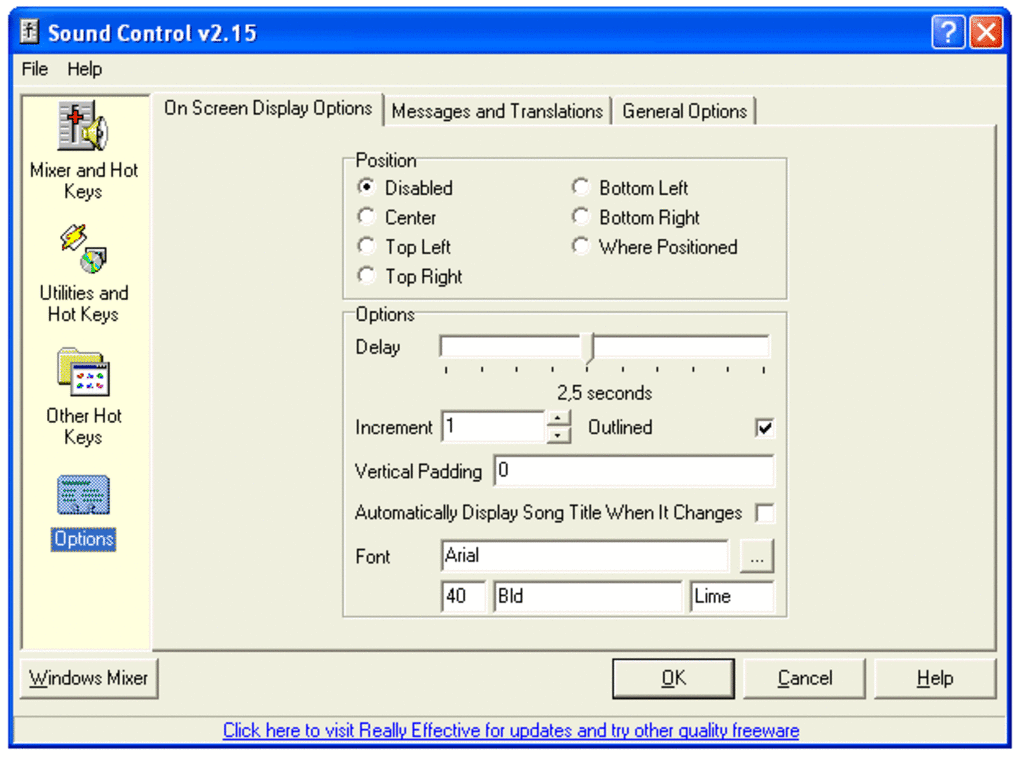
Users were granted the freedom to “adjust the size of the window, the font and the color.” This level of aesthetic personalization might seem minor, but it contributed significantly to making Sound Control feel like an integral, rather than intrusive, part of the desktop environment. Users could choose skins, fonts, and colors that blended seamlessly with their operating system theme or stood out with their own unique style, transforming a utilitarian tool into a personalized companion.
More critically, the application made it “possible to designate audio output increments.” This granular control over how much the volume changed with each adjustment—whether via hotkeys or the main interface—was a standout feature. Compared to generic options that might only offer large, predefined steps, Sound Control empowered users to make minute, precise alterations to their sound levels. This meant achieving the “perfect” volume was no longer a game of approximation but a precise science. Such direct control over audio increments provided a level of nuance that was simply unavailable in most default system interfaces, appealing directly to audiophiles and users who demanded absolute precision from their sound management tools. This deep personalization, both aesthetic and functional, solidified Sound Control’s position as a premium freeware utility.
On-Screen Display and Lightweight Design: Efficiency and Usability
Further enhancing the user experience, Sound Control included an “on-screen display (OSD).” This visual feedback mechanism allowed users to see real-time indicators of their volume adjustments, hotkey actions, or other changes directly on their screen, without needing to open the main application window. The OSD provided an unobtrusive yet immediate confirmation of actions, which was particularly useful when making quick adjustments during full-screen applications, gaming, or media playback. It eliminated guesswork and contributed to a smoother, more confident user interaction.
Another significant advantage, especially for users conscious of system resources, was its lightweight design: “No run-time files needed.” This meant that Sound Control was a self-contained application, requiring minimal dependencies or additional installations that could bloat a system or introduce compatibility issues. Its lean architecture ensured efficient performance, quick launch times, and a minimal footprint on system resources, making it an ideal choice for older machines or users who prioritized system responsiveness. This efficiency, combined with “context-sensitive help” for easy guidance, underscored Sound Control’s commitment to both powerful functionality and user-friendly operation.
Advantages and Limitations: A Balanced Perspective
While Sound Control offered a compelling suite of features that significantly enhanced the Windows audio experience, a comprehensive evaluation requires a look at both its strengths and its undeniable weaknesses. Understanding these aspects is crucial for anyone considering its use, especially in the rapidly evolving landscape of operating systems and software.
The Pros: Why Users Chose Sound Control
The primary appeal of Sound Control stemmed from its core promise: superior audio management compared to default Windows offerings. For a freeware application, it delivered an impressive array of benefits that resonated deeply with its user base:
- Direct and Granular Audio Control: This was perhaps its most significant advantage. Users could bypass the often-limited increments and options of the system mixer, gaining “more direct audio control than system interfaces.” This meant finer adjustments, quicker reactions to changing audio environments, and a sense of true command over their sound.
- Personalized Experience: The extensive customization options allowed users to truly make the software their own. The ability to “adjust skins, fonts, and colors to enjoy a personalized experience” transformed a utility into an aesthetic component of their desktop. This personalization extended to defining audio output increments, empowering users with precision not found elsewhere.
- Hotkey Efficiency: The robust hotkey support was a game-changer for productivity and convenience. Assigning custom shortcuts for various audio functions, including Winamp control, streamlined operations and minimized interruptions, allowing users to manage audio without diverting focus from their primary tasks.
- Automatic Device Synchronization: The program’s ability to “automatically detect and synchronize its settings without requiring the user to perform any manual adjustments” simplified audio management, especially for users who frequently switched between different audio output devices.
- Lightweight and Efficient: Being a standalone application with “no run-time files needed” meant Sound Control was lean on system resources. It launched quickly, ran efficiently, and didn’t contribute to system bloat, making it suitable even for older or less powerful machines.
- Freeware Accessibility: As a free application, Sound Control made advanced audio control accessible to everyone, without the barrier of cost.
The Cons: Understanding Its Constraints
Despite its strengths, Sound Control suffered from critical limitations that significantly impact its relevance and usability in today’s computing environment:
- Outdated Compatibility: The most glaring drawback is its compatibility. “This software is not compatible with any system newer than Windows 7.” This renders Sound Control largely obsolete for the vast majority of current Windows users running Windows 8, 10, or 11. Its utility is thus confined to legacy systems, virtual machines, or very specific niche scenarios.
- Lack of Updates: The fact that “no updates have taken place since 2010” is a major red flag. Lack of updates means no new features, no bug fixes, and critically, no security patches to address potential vulnerabilities that may have emerged over the past decade and more. Running unmaintained software carries inherent risks.
- User-Reported Issues and Potential Risks: User reviews, as seen on PhanMemFree, highlight several concerning issues:
- “Not working it was working before Microsoft was installed on my computer” (August 4, 2018): This suggests potential conflicts with system updates, reinforcing the compatibility issue.
- “WARNING. Watch out these guys also download some kind of registry cleaner and anti-virus whether you want them or not” (August 25, 2014): This is a significant concern regarding unwanted bundled software, a common tactic with freeware of that era. Users should be extremely cautious and vigilant during installation if they choose to proceed. PhanMemFree’s own clean status scan is a general check, but bundled installers can be tricky.
- “Absence audio connection. poor sound absence of trunk-call signs show absence any audio connection with other side on skype” (May 16, 2013): This points to direct functional problems, possibly related to specific applications or overall audio routing.
- Security Concerns: Operating an unpatched, 13-year-old piece of software in an interconnected world poses significant security risks. While Sound Control itself might be “clean” as per PhanMemFree’s scans, its age means it hasn’t been hardened against modern threats.
In conclusion, while Sound Control provided a pioneering and highly valued service for Windows users of its era, its current utility is severely hampered by its age and lack of maintenance. It stands as a testament to effective freeware development but also as a cautionary tale of software obsolescence.
Sound Control in Context: Alternatives and Modern Solutions
Sound Control carved out its niche by offering a superior alternative to the default Windows Sound Mixer during a specific era of computing. However, the technological landscape has evolved dramatically since its last update in 2010. To understand Sound Control’s enduring legacy and limited contemporary relevance, it’s vital to place it within the broader context of audio management utilities and to consider modern alternatives.
For its time, Sound Control was a standout. It addressed genuine pain points for users struggling with the often-clunky and limited native audio controls of Windows XP, Vista, and 7. Its freeware status made advanced audio control accessible, fostering a community of users who appreciated its customization, hotkey integration, and intuitive design. It appealed to a wide range of individuals, from those seeking better control over their media consumption to early streamers and multitaskers who juggled multiple audio sources. Its “no run-time files needed” ethos was particularly attractive in an age where software bloat was a growing concern, offering a lightweight yet powerful solution.
However, the rapid advancements in operating systems have largely bypassed Sound Control. Windows 8, 10, and 11 have introduced more sophisticated native audio mixers, often incorporating features that were once the exclusive domain of third-party applications. These newer Windows versions offer improved per-application volume control, better integration with diverse audio hardware, and more refined audio routing capabilities directly within the system settings. While still not as customizable or hotkey-centric as Sound Control was, the gap has significantly narrowed.
For users on modern Windows platforms seeking similar or enhanced functionalities, a plethora of contemporary alternatives exists:
- Volume 2: Often cited as a spiritual successor to tools like Sound Control, Volume 2 is a robust, free, and actively maintained advanced volume controller for Windows systems. It offers extensive hotkey support, an on-screen display, customizable interfaces, and a wide range of control options for various audio devices and applications. It is perhaps the closest modern equivalent in terms of philosophy and feature set.
- Power Mixer: This is an advanced Windows audio mixer that provides enhanced control over volume, including per-application adjustments, scheduling options, and a customizable interface. While often a trial version, it exemplifies the capabilities expected from a modern, comprehensive audio utility.
- Letasoft Sound Booster: For users whose primary concern is amplifying their PC’s volume beyond its software maximum, Sound Booster offers a specialized solution. While not a full mixer replacement, it addresses a specific audio enhancement need.
- Dolby Audio: Integrated into many modern laptops and available as standalone software, Dolby Audio provides advanced audio processing capabilities, including equalization, surround sound virtualization, and dynamic volume control, aiming to enhance overall sound quality.
- Sound Lock: A simple, free tool that allows users to set maximum volume levels for their PC, preventing sudden bursts of loud audio. It serves a specific, protective function rather than offering comprehensive mixing.
- Sound Volume-7: Another free tool focused on creating hotkeys for sound volume control, indicating the enduring popularity of this specific feature.
These alternatives, alongside enhanced native Windows features, illustrate that while the core need for better audio control remains, the means of achieving it have evolved. Modern solutions prioritize compatibility with the latest operating systems, active development, security, and often a more polished user experience.
Therefore, Sound Control’s place in the modern computing landscape is primarily historical or extremely niche. It might still be relevant for enthusiasts who run older Windows 7 or earlier systems, perhaps in virtualized environments or on legacy hardware. For these specific users, its lightweight nature and deep customization might still offer value. However, for anyone running a contemporary Windows operating system, the lack of updates, potential compatibility issues, and security concerns associated with such an old application make it an unadvisable choice. Users are strongly encouraged to explore the actively developed and more secure modern alternatives that cater to the same needs for enhanced audio management.
Conclusion
Sound Control, in its prime, represented a significant leap forward in empowering Windows users with unparalleled control over their PC’s audio output. As a free alternative to the often-limited default Windows Sound Mixer, it provided a rich tapestry of features: a streamlined interface for intuitive sound adjustment, robust hotkey support for efficient operation, seamless automatic synchronization with third-party devices, and extensive customization options for both aesthetics and precise volume increments. It was a testament to how freeware could address a common user frustration with elegance and effectiveness, fostering a truly personalized and optimized auditory experience for its users.
Its lightweight design and independence from runtime files further solidified its appeal, particularly for those on older systems or concerned with system bloat. Sound Control gave users a genuine sense of command, transforming the mundane task of volume adjustment into a dynamic aspect of their computing interaction. From media consumption and communication to gaming and content creation, its feature set aimed to enhance every facet of digital sound.
However, the passage of time, coupled with the rapid evolution of operating systems, has undeniably cast a long shadow over its once-bright relevance. The critical limitations, most notably its incompatibility with Windows versions newer than Windows 7 and the absence of any updates since 2010, mean that Sound Control, while historically significant, is no longer a viable or recommended solution for the majority of contemporary users. The lack of ongoing development introduces not only functional obsolescence but also potential security vulnerabilities, making it a risky proposition in today’s interconnected digital environment. Moreover, user reports regarding installation issues and potential bundled software further underscore the need for extreme caution.
For those operating legacy systems or nostalgic for a bygone era of software, Sound Control might still hold a specific, niche appeal. It stands as a fascinating artifact of freeware development, showcasing innovative solutions to common problems before they were addressed by native OS functionalities or more modern applications. For everyone else, the market now offers a wealth of actively developed, secure, and feature-rich alternatives like Volume 2, Power Mixer, and others, which provide the advanced audio control desired, without compromising on compatibility or safety.
In essence, Sound Control’s story is one of innovation and eventual obsolescence—a pioneering tool that redefined user expectations for audio management, yet ultimately succumbed to the relentless march of technological progress. Its legacy lives on in the principles it championed: granular control, customization, and user empowerment, all of which continue to be key drivers in the development of today’s advanced audio utilities.
File Information
- License: “Free”
- Latest update: “July 8, 2025”
- Platform: “Windows”
- OS: “Windows 2000”
- Language: “English”
- Downloads: “541.2K”
- Size: “611.67 KB”


